
Use Secret Santa Generator
Create a directed gift exchange with no self-matches and optional exclusions.
Secret Santa assignments
Add at least three names, then generate a draw.
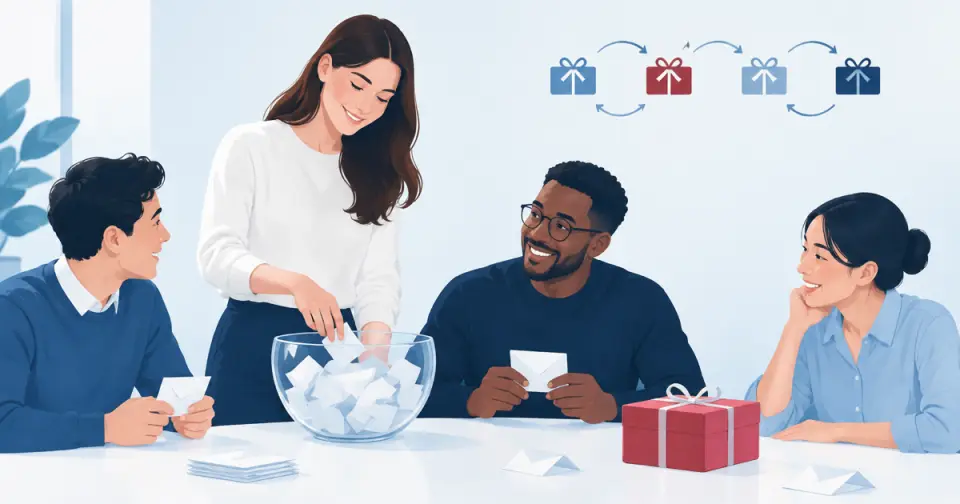
Paste your participant list, prevent unwanted matches, and create a one-to-one Secret Santa assignment without email or login.
Every person receives someone else and every recipient is assigned once.
Keep couples, family members, or teammates from drawing each other.
Give each participant a link that reveals only their own recipient.
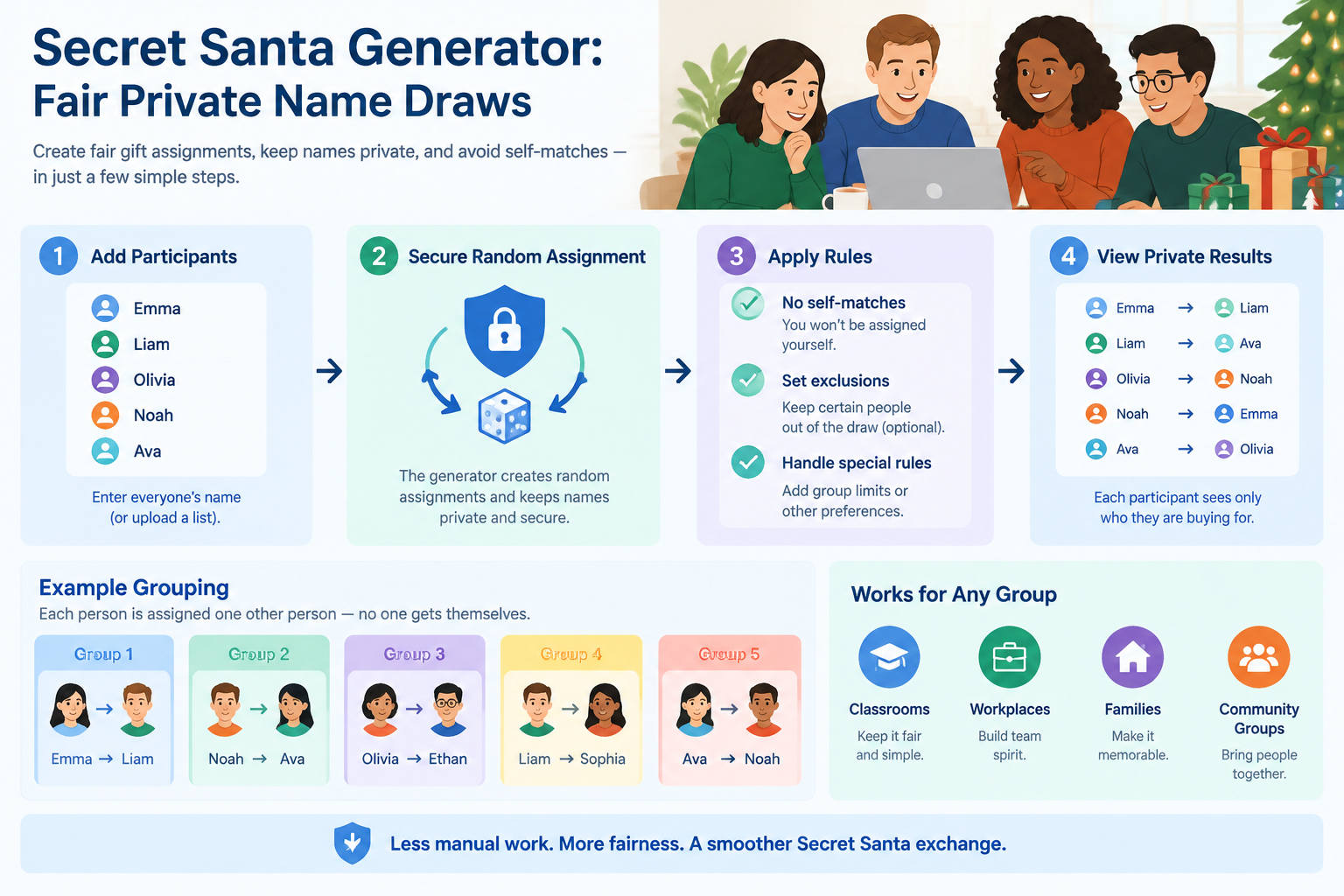
How this Secret Santa generator works
Add the people taking part, optionally exclude specific matches, and generate a one-to-one draw. The matching algorithm prevents self-matches and does not silently ignore an exclusion rule.
The draw runs in your browser first. You can copy individual messages or create expiring private reveal links when you are ready to distribute the results.
Secret Santa exchanges are fun until organizers have to manage names, privacy, special rules, and last-minute changes. A secret santa generator helps teachers, team leaders, HR coordinators, and event organizers create fair gift assignments without manually drawing names or accidentally matching someone with themselves.
This guide explains how to use a secret santa generator for private name draws, how no-self-match rules work, when exclusions are useful, and how to run a smooth exchange for classrooms, workplaces, families, and community groups.
A traditional Secret Santa draw usually starts with slips of paper in a bowl. This method works for small groups, but it becomes harder when there are many participants or when organizers need special rules. A person may accidentally draw their own name, two people may be assigned to each other when that is not desired, or a late change may require starting over.
A secret santa generator solves these common problems by creating assignments automatically. The organizer can enter participants, apply rules, and generate a balanced set of matches. The main goal is not to make the exchange complicated; it is to remove the repetitive checking that takes time away from planning the actual event.
For example, an HR coordinator organizing a 40-person holiday exchange may need to prevent managers from being assigned to direct reports. A teacher organizing a classroom activity may want students to avoid selecting close friends or themselves. A generator provides a structured way to handle these situations.
Compared with a manual draw, an online secret santa generator is especially useful when:
A manual process can still be a good choice for a small group that wants the tradition of a physical drawing. However, a digital tool is usually easier when fairness, privacy, and flexibility matter.
A reliable secret santa assignment generator follows a simple idea: each participant should be assigned exactly one recipient while each recipient should receive exactly one giver. The organizer provides the participant list, and the system creates a matching that follows the exchange rules.
The most important rule is the no-self-match requirement. A secret santa generator no self match setup ensures that participants cannot be assigned their own names. This prevents one of the most common mistakes in manual draws.
The basic workflow looks like this:
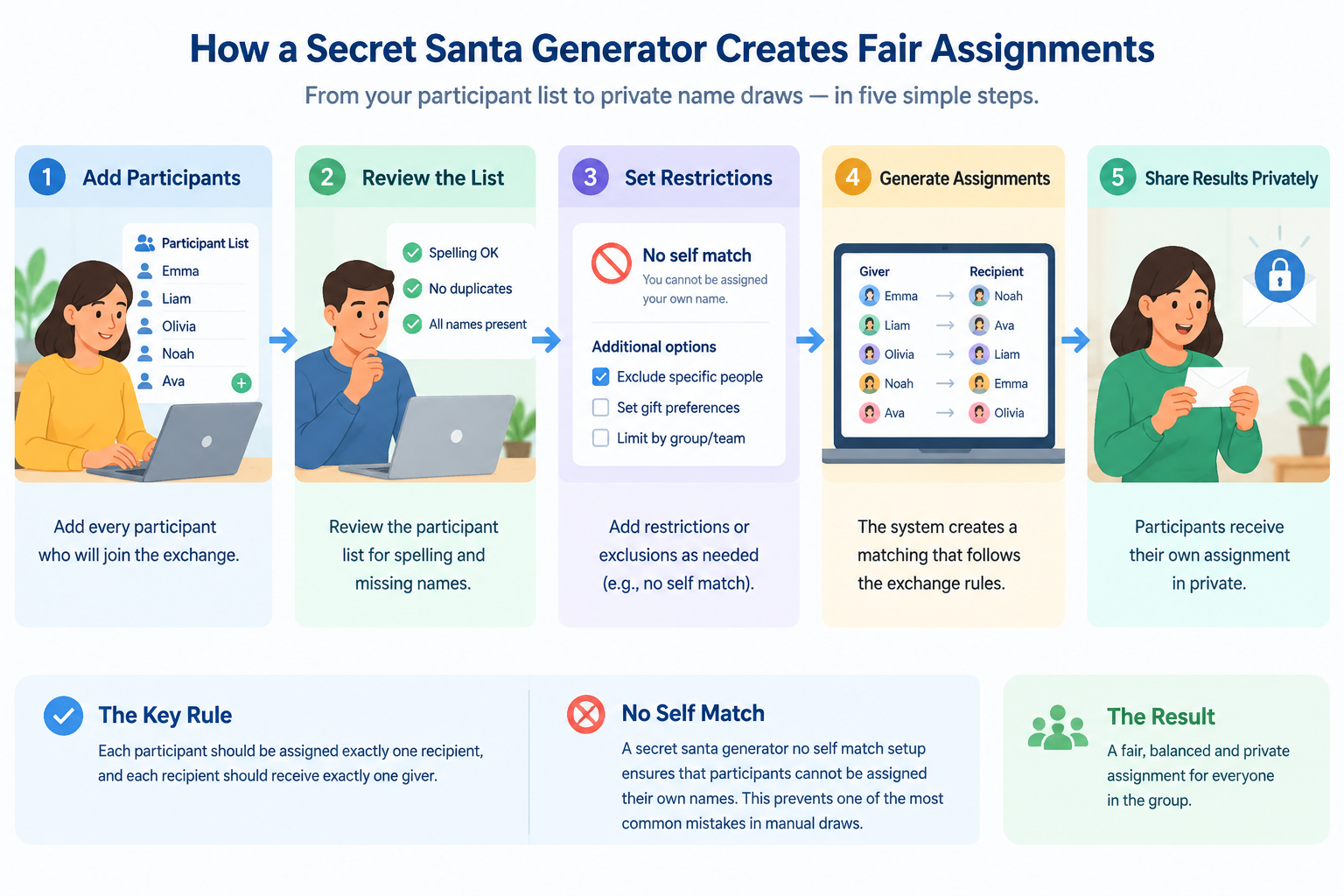
For example, imagine a team of six coworkers: Alex, Jordan, Mia, Sam, Taylor, and Chris. The organizer enters all six names. The generator creates a private match where Alex receives one person, gives to one person, and no one receives their own name. Each participant can learn only their own assignment rather than seeing the full list.
Fairness also depends on the rules chosen by the organizer. If a group adds too many restrictions, there may be fewer possible combinations. A practical tool should balance the requested rules with the need to create a complete exchange.
Using a secret santa generator is usually a quick process, but careful setup helps avoid problems later. Follow these steps to create a smoother experience.
Start with a complete list of everyone joining the exchange. Include only people who have agreed to participate. For workplace or classroom activities, confirm the final list before generating assignments because adding participants afterward may require creating new matches.
Example: A department planning a holiday exchange has 18 employees. The organizer collects the final names on Monday, checks participation, and creates assignments on Tuesday so everyone has enough time to buy a gift.
Some groups need special rules. A secret santa generator with exclusions can help organizers avoid unwanted matches. Common exclusions include:
Exclusions should be used thoughtfully. Too many restrictions can make it harder to create a complete set of assignments, especially for small groups.
After checking the settings, create the assignments. The important part is keeping results private. Participants usually only need to know who they are buying for, not everyone else's matches.
For remote teams, this approach works well because members can participate from different locations without needing an in-person meeting. It also reduces the chance of someone accidentally revealing another person's surprise.
A successful exchange needs more than a random match. Tell participants the gift budget, deadline, delivery method, and any important rules. Clear instructions prevent confusion after assignments are created.
For example, a virtual team might send each participant their recipient name, a $20 budget limit, and a shipping deadline. The generator handles the matching, while the organizer handles communication.
A secret santa generator can support many types of exchanges because the core problem is the same: create fair assignments while protecting privacy.
Companies often use Secret Santa activities to encourage connection across teams. A workplace exchange may involve dozens of employees, remote workers, or people from different departments.
A useful setup includes participant names, optional exclusions, a clear budget, and a communication plan. For larger groups, digital assignment tools reduce the administrative work for HR teams and event organizers.
Teachers may use Secret Santa activities as seasonal classroom projects or community-building exercises. Younger students may need additional guidance about gift limits, kindness, and participation rules.
A teacher can prepare a list of students, generate assignments, and privately provide each student with their recipient. For activities involving student groups, other tools like a Random Student Picker can help with fair classroom selections.
Families often have repeating patterns where the same people exchange gifts every year. Exclusions can help create variety by preventing spouses, siblings, or close relatives from being matched repeatedly.
Community organizers can also use a generator when participants are spread across locations. A private online process avoids the need for everyone to attend the same drawing event.
Different randomization tools solve different problems. A Secret Santa generator is designed for one-to-one gift exchanges, while other tools are better for teams, pairs, or classroom activities.
If you need to divide people into teams for a workshop or activity, a Random Group Generator is more suitable. If you need to create partner activities, a Random Pair Generator can help create fair pairs. If you need creative team labels after creating groups, a Group Name Generator can provide ideas.
The right tool depends on the outcome you need:
| Goal | Best option |
|---|---|
| Private gift exchange | Secret Santa generator |
| Classroom teams | Random Group Generator |
| Partner activities | Random Pair Generator |
| Team labels | Group Name Generator |
Using the correct tool keeps the process simple and avoids adding unnecessary steps.
A secret santa generator can handle the matching process, but organizers still need to make good decisions. The tool cannot know personal relationships, gift preferences, or communication issues unless those details are provided through rules.
Before generating assignments, consider these tips:
For example, a small office with eight people may only need a no-self-match rule. A large company exchange may need additional exclusions because of reporting relationships or team structures.
A generator is also not a replacement for communication. It creates assignments fairly, but a successful event still depends on clear instructions and respectful participation.
A secret santa generator is an online tool that creates private gift exchange assignments. It matches participants while applying rules such as preventing self-matches and supporting optional exclusions.
A no-self-match feature prevents a participant from being assigned their own name. The generator creates a matching where each person gives a gift to someone else in the group.
Yes. A secret santa generator with exclusions can help groups avoid specific pairings, such as partners exchanging gifts with each other or managers being matched with direct reports. Keep exclusions limited so the system can still create valid assignments.
Yes. An online secret santa generator is useful for remote teams because participants do not need to meet in person for the draw. Organizers can create assignments and share private results digitally.
The best group size depends on the tool and the number of rules applied. Larger groups generally have more possible matches, while small groups with many exclusions may require more careful setup.
Ready to organize a fair gift exchange? Use the Secret Santa Generator to create private assignments, prevent self-matches, and simplify your next holiday activity.
Use Secret Santa Generator when the result is a private gift assignment.
Create a directed gift exchange with no self-matches and optional exclusions.
Use ordinary random pairs when two people simply need to work together.
Use the home tool when people need to be split into teams rather than gift assignments.
Go from a roster to private assignments in four steps.
Paste one name per line or import a CSV or text file. Names must be unique.
Prevent partners, relatives, or coworkers from drawing each other when needed.
The tool finds a complete one-to-one draw or explains why the rules have no valid solution.
Copy a private message, export the assignment list, or create an expiring reveal link for each person.
The result is a directed assignment, not an ordinary pair list.
Nobody is assigned to buy a gift for themselves.
Each participant gives once and receives once.
Exclusions are checked before a result is shown.
Keep the event lightweight and distribute only what each person needs to know.
Each link reveals one recipient instead of the full assignment table.
Copy a ready-to-send message for any participant.
Download CSV, text, or Markdown for your organizer notes.
A simple draw for groups that want the surprise without the spreadsheet work.
Exclude managers, partners, or close teammates and share one private result per coworker.
Keep a larger gift exchange manageable without revealing everyone else's assignment.
Send reveal links in chat or direct messages without requiring everyone to create an account.
Use the exclusion rules when organizers need to keep particular matches apart.
A clear exchange workflow is better than pretending to manage the whole event.
The tool does not send email, manage wish lists, collect gift budgets, or identify whether a participant opened a message. Private links are bearer links: anyone who receives a link can open that result until it expires or is revoked.
If your exclusions leave a participant with no possible recipient, the tool stops and asks you to adjust the rules. It never returns a partial draw.
Keep names local until you explicitly create private reveal links.
“A clear draw and a private link are all most small exchanges need.”
Preview how the draw pairs look before you run your own gift exchange.


Related tools
Split a list into random groups or teams in seconds.
Create random pairs and partners fast for class discussion, speaking practice, and workshop icebreakers.
Spin the wheel once to split your whole roster into balanced groups, teams, or pairs.
Spin a classroom name picker wheel for fair participation, fullscreen display, and no-repeat rounds.
Spin the wheel to fill groups one pick at a time or draw single names live.
Shuffle any list into a numbered random order in seconds — presentations, turn order, lineups, and raffle draws, right in your browser.
Turn a class roster into a random seating chart with rows, seats, and printable results in seconds.
Build a fair stations rotation schedule in seconds — set your groups, stations, and minutes per rotation, and get a chart every group can follow.
Randomize your white elephant gift exchange turn order in seconds, with steal-rule cheat sheets for the whole party.
Paste 4–64 teams and get a random-seeded single elimination bracket with automatic byes — every round mapped from the first matchup to the final.
Estimate a fair event budget in seconds — enter attendees, a budget per person, and an extras buffer to get a total with a planning range.
Explore related ways to organize people for activities and events.
Learn practical classroom random grouping strategies to create fair teams, improve participation, and save time with simple teacher-friendly methods.
Read the guideDiscover why educators choose a random group generator for teachers to save time, promote fairness, and increase student engagement in every classroom.
Read the guideDiscover creative classroom group names ideas for teams, projects, and activities. Learn how teachers can choose memorable names and use a free group name generator.
Read the guideAnswers for common draw, privacy, and exclusion questions.
No. Self-matches are blocked by the matching algorithm before the result is returned.
Yes. Add an exclusion rule for two people and the rule applies in both directions by default.
No. You can copy individual messages or create private reveal links and send them through your existing chat or messaging channel.
The draw is created in the browser. If you create reveal links, each link shows only one person's assignment and expires automatically.
The tool stops with an error and asks you to remove or change an exclusion. It does not silently relax your rules.
Yes. After generating a draw, you can download CSV, plain text, or Markdown.
Yes. Add the team roster, exclude any unwanted matches, generate the draw, and distribute each private result to the right coworker.
Paste your list, add any exclusions, and keep the surprise private.