
Use Group Name Generator
Choose this page for class projects, workshop teams, volunteer crews, and short-term internal groups.

Generate names instantly in private local mode, or switch to AI mode for ideas shaped by your scenario, tone, and keywords. It is built for class projects, workshop teams, event squads, and internal work groups.
Good for project teams, student groups, and event squads that need a practical name quickly.
Topic, tone, goal, and audience keywords help you narrow the direction faster.
Generate options, shortlist them, and vote instead of brainstorming from a blank page.
Quick answer
Group Name Generator is for lightweight naming jobs such as class projects, workshop teams, event squads, and internal work groups.
If the brief is closer to company naming or full brand identity work, this tool is intentionally too narrow.
Whether you’re a teacher organizing reading circles, a corporate trainer setting up breakout rooms, or an event host forming teams for a game, coming up with engaging group names can eat into precious activity time. Brainstorming often leads to endless debate or overly generic labels like “Group 1” and “Team A.” The group name generator from Random Group Generator solves this problem instantly, giving you creative, themed names that bring energy and identity to any group setting. This group name generator tutorial will show you exactly how the tool works, how to use it in everyday scenarios, and how to get the most out of every generated name.
Assigning a name to a small team does more than just label it. A well-chosen name builds cohesion, sparks inside jokes, and makes participation feel less like a chore — especially for students and workshop participants who might be shy. Yet facilitators often spend 10–15 minutes debating names, and even then they end up with something forgettable. The group name generator removes that friction. In a single click you get a fresh list of names you can adopt as-is or use as a springboard for further customization.
This is particularly helpful during fast-paced activities like icebreakers, morning meetings, and timed challenges, where every minute counts. Instead of awkward silence while groups think up a name, you can instantly provide options. Teachers who rotate group activities multiple times a week can give each set of groups a new theme every day, keeping the experience novel and motivating. The tool also ensures variety — you won’t accidentally repeat the same name twice because the generator always offers multiple alternatives.
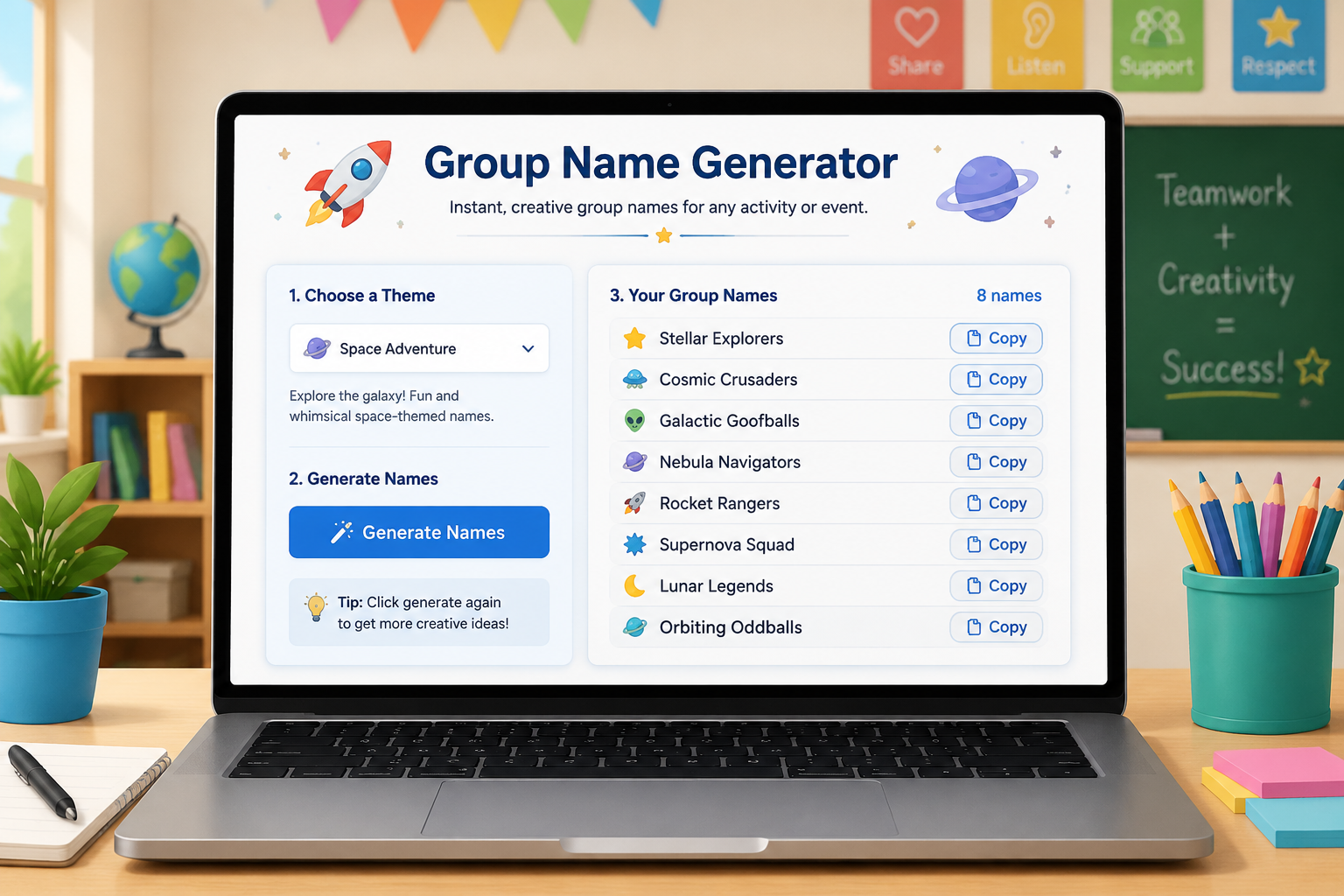
The Group Name Generator is a simple web app that produces random group names organized by theme. When you open the page, you’ll see a series of name slots pre-filled with names from a default category (such as Animals or Space). At the top of the generator, a theme selector lets you switch between categories like Food, Colors, Sports, Fantasy Creatures, and many more. Each theme draws from a curated list of words and phrases designed to be classroom-appropriate but also flexible enough for office and social events.
Below the name list, a prominent “Generate” button refreshes all the names at once. If you like a particular name but want to see more options, you can click the button repeatedly until a name clicks. The tool also includes a copy feature — a simple copy button that saves the entire list to your clipboard so you can paste it into a slide deck, a shared document, or a group chat. Because it runs entirely in your browser, there’s no account required and no name history is stored, which keeps the process lightweight and private.
Let’s walk through a real-world scenario: a middle school science teacher wants to name five groups for a hands-on lab activity about the solar system. The teacher wants names that tie into the lesson but doesn’t want the same stale options every year.
The teacher navigates to the Group Name Generator and sees the default category. They use the theme dropdown to select “Space.” Instantly the name slots update with options like “Orion’s Belt,” “Galaxy Guardians,” and “Solar Surfers.” This matches the lesson theme perfectly and sparks curiosity before the activity even begins.
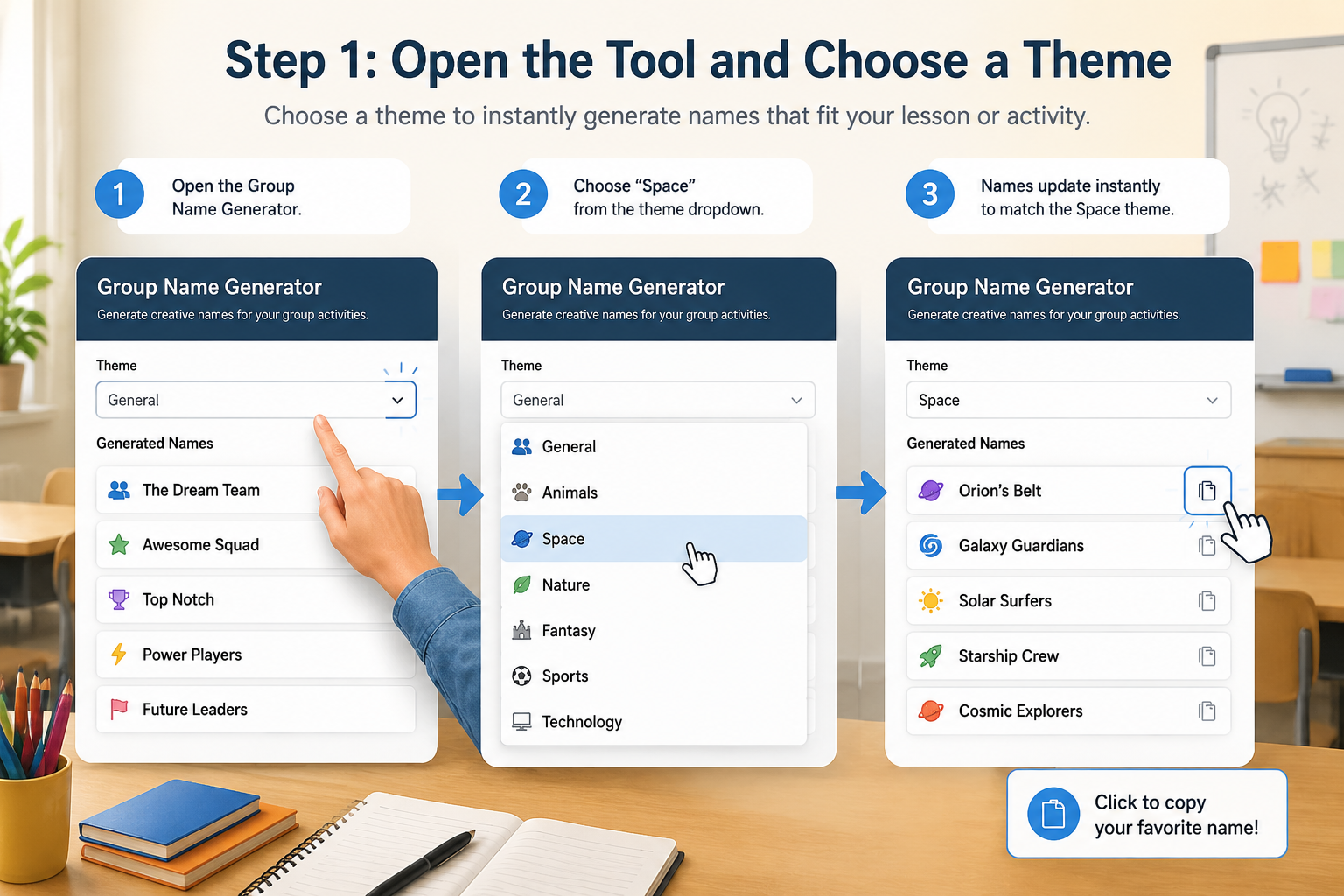
If only three out of five names feel right, the teacher clicks “Generate” again to see new space-themed combinations. After a couple of tries, they land on a set that feels balanced: “Nova Squad,” “Rocket Raccoons,” “Moonwalkers,” “Star Sailors,” and “Cosmic Crew.”
They hit the copy button, then paste the list into the lab instruction slide on the classroom display. Students immediately see their group assignments tied to a fun name, which makes it easy to call groups to supply stations or to announce which group presents first.
If the teacher hasn’t pre-assigned members, they can use the Random Group Generator to split the class list into the right number of groups, then paste the generated names beside each team. This links naming directly to the grouping workflow, saving even more setup time.
A group name isn’t just a label — it can become part of an activity’s identity. Below are several practical ways educators and facilitators incorporate the group name generator into their routines.
Because the names are always fresh, you can reuse the tool for every session without the fear of repeating yourself. When time allows, you can even run a quick poll to let participants choose their favorite name from the generated list, giving them a sense of agency.
While the group name generator does the heavy lifting, a few simple strategies will help you get names that fit your group perfectly.
1. Match the theme to your activity or class content. If you’re covering a history unit on ancient civilizations, choose a theme like “History” or “Mythology” if available. For a general workshop, lighter themes like “Desserts” or “Weather” often break the ice effectively.
2. Use the generator as an idea starter. If you find a name that’s almost right but want to tweak it, copy the list and edit the names in your document. Change “Furious Foxes” to “Focused Foxes” to align with a growth mindset message, or combine parts of two generated names to create a hybrid.
3. Generate multiple sets for larger events. If you have a big event with 20 tables, generate five sets of four names and mix them together to avoid duplicates. Because the tool can be refreshed instantly, you can quickly produce a long list.
4. Keep it appropriate. All themes are designed to be school‑friendly, but if you’re using the names in a professional or sensitive context, double-check that none of the whimsical names could be misinterpreted. A quick review of the list before displaying it avoids any awkward moments.
The Group Name Generator works best when paired with the platform’s other free tools. If you’re starting from a roster, use the Random Group Generator to divide participants into balanced groups with one click. Then, name each group using the group name generator. For partner activities, the Random Pair Generator can create pairs, and you can still give each pair a playful name to make the exercise feel less formal.
If you’re a teacher who regularly picks students to answer questions or lead discussions, integrate names from the group name generator into your Random Student Picker process. For example, you might say, “Today’s space crew captains are the ‘Rocket Raccoons,’ and the captain will be chosen by the student picker.” This layered approach turns routine classroom management into an engaging narrative.
Try it while you read: if you want real teams to name, split your class list into teams first, then run each team through the generator below.
Split Into Teams, Then Name Them
Divide your class list into balanced teams, then come back and pick a name for each one.
Random Group Generator
Split a list into random groups or teams in seconds.
Result
Split a list into random groups or teams in seconds.Add participants and click generate to see your balanced groups appear here.
You cannot directly edit the names inside the generator, but you can easily copy the list and modify any name in a document, presentation, or whiteboard. The generator provides a starting point; treat it like a creative launchpad. If a particular name doesn’t fit your context, simply tweak a word while keeping the overall structure.
The generator shows a fixed number of name slots (typically five to ten depending on your screen size and theme). You can click “Generate” as many times as you want to see new sets. There is no daily or session limit. If you need more names than what fits on the screen, copy several sets and combine them in a text editor.
While the exact list may evolve, the group name generator includes categories like Animals, Space, Food, Colors, Fantasy Creatures, Weather, and more. The themes are chosen to be broadly appealing and suitable for both children and adults. The tool’s developers regularly add new themes, so check back if you don’t see one that matches your activity.
Yes, the Group Name Generator is completely free. There is no registration, subscription, or in‑app purchase. You can use it as often as you like without any tracking of your generated names.
The names are constructed from common words and themes and do not contain trademarked or copyrighted material. For most purposes, such as naming teams in a paid workshop or labeling breakout rooms at a corporate event, you can use them without concern. However, if you plan to use a generated name as a formal brand name for a product or company, you should conduct your own trademark search to ensure it is available.
Stop scrambling for names and start your activity with energy and clarity. Whether you’re kicking off a new classroom unit, a training session, or a party game, the Group Name Generator delivers instant, creative group names that set the right tone. Open the Group Name Generator now and see how a simple name change can transform your group experience.
Stay here when the job is finding a usable group name quickly.
Choose this page for class projects, workshop teams, volunteer crews, and short-term internal groups.
If the brief is brand naming or a long-term public identity, a lightweight group-name flow is usually too narrow.
Once the name is set, move back to Random Group Generator if you still need to allocate members into teams.
A quick shortlist usually beats open-ended brainstorming.
Use words about the topic, tone, audience, or purpose of the group.
Generate a manageable batch so the team can review and compare quickly.
Keep names that are easy to say, easy to remember, and easy to reuse.
Once the name is set, use it in chat, slides, or return to the home tool for actual member allocation.
The goal is to create practical options, not to replace a full naming process.
Start from a shortlist instead of waiting for one perfect idea to appear.
Keyword prompts help keep the result aligned with class, work, or event context.
Generate, filter, and vote while the team is already together.
It fits teams that need a usable name quickly without a large creative process.
Helpful for student teams, assignments, showcases, and club activities.
Good for project crews, internal workshops, and short-term collaboration groups.
Useful for camps, volunteer crews, contest teams, and event pods.
Name the group first, then go back and assign members formally if needed.
A shortlist helps the team choose a name before the allocation step begins.
Return to Random Group Generator when you are ready to place people into teams.
The page can expand into industry, tone, or style filters without affecting the home tool.
Open it when you need a shortlist of names instead of a broad naming strategy.
Generate names for student teams, showcase groups, and assignment pods.
Create practical names for project squads, workshop groups, and internal teams.
Use it for camps, volunteer groups, and event squads that need a quick identity.
If the brief is closer to team branding or company naming, start with a broader naming workflow.
Naming six workshop tables before a 15-minute icebreaker
A facilitator has six breakout tables and no brand budget. They enter the theme keyword “orbit,” generate a short list of local or optional AI name ideas, and let each table vote on one option in 60 seconds. Names become table signs for the rest of the day.
When two tables pick the same favorite, the facilitator assigns the runner-up automatically. The point is shared identity for the session, not trademark-ready naming. Total time from keyword to signs is under five minutes.
How name ideas are produced
Local mode combines your keyword with curated patterns and word lists suitable for classrooms and light workplace use. Optional AI mode expands variety when enabled and available; treat AI lines as drafts, not cleared trademarks.
The tool optimizes for speed and group fun, not linguistic perfection. You should still filter for cultural sensitivity, pronunciation, and unintended meanings in your language community.
What a group name generator will not do
This is not a trademark search, domain registrar, or brand-strategy firm. Generated names can collide with existing products, include awkward slang, or translate poorly. Always check conflicts before printing merch or creating accounts.
AI mode may be unavailable, slower, or less appropriate for children’s contexts depending on policy. Local mode is safer for offline or privacy-sensitive rooms but less diverse.
Built for people who need usable options quickly, not a full brand workshop.
“Generating options first made our naming discussion much shorter and much more focused.”
A few sample naming directions based on different contexts and keyword sets.










Related tools
Split a list into random groups or teams in seconds.
Create random pairs and partners fast for class discussion, speaking practice, and workshop icebreakers.
Spin the wheel once to split your whole roster into balanced groups, teams, or pairs.
Spin a classroom name picker wheel for fair participation, fullscreen display, and no-repeat rounds.
Spin the wheel to fill groups one pick at a time or draw single names live.
Shuffle any list into a numbered random order in seconds — presentations, turn order, lineups, and raffle draws, right in your browser.
Turn a class roster into a random seating chart with rows, seats, and printable results in seconds.
Build a fair stations rotation schedule in seconds — set your groups, stations, and minutes per rotation, and get a chart every group can follow.
Randomize your white elephant gift exchange turn order in seconds, with steal-rule cheat sheets for the whole party.
Paste 4–64 teams and get a random-seeded single elimination bracket with automatic byes — every round mapped from the first matchup to the final.
Estimate a fair event budget in seconds — enter attendees, a budget per person, and an extras buffer to get a total with a planning range.
These articles help you filter weak names, find better directions, and know when the naming brief is too broad for this tool.
Struggling to pick the perfect group name? Learn a step-by-step process, avoid common pitfalls, and use the free Group Name Generator to brainstorm creative ideas. Ideal for classrooms, teams, and events.
Read articleNeed a catchy name for a class project? Explore 50+ creative group name ideas for school projects and learn how to pick the perfect one.
Read articleShort answers to the main questions people ask before generating group names.
Use words about the topic, industry, tone, audience, or goal of the group.
Local mode creates names instantly in your browser without sending your keywords to an AI service. AI mode sends the submitted context to the configured AI provider for more varied, context-aware ideas.
The Cloudflare security check helps prevent automated abuse of the AI service. It is only used for AI generation and is not required in local mode.
Your input stays in the form so you can retry AI generation or switch back to local mode. The tool never labels a local fallback as an AI result.
No. It is designed for lightweight group, project, and event naming instead of long brand strategy work.
Yes. You can use them directly or treat them as a shortlist to refine with the team.
Group Name Generator focuses on smaller, more practical naming jobs. Broader team naming often has a wider brief.
If you still need to allocate people into teams, go back to Random Group Generator and complete the group setup there.
Short, concrete names beat clever puns: combine your department, project codename, or a shared value (think 'Data Dragons' or 'Rocket Ops'). Generate a batch, then keep the three that people would actually say out loud in a meeting.
Yes. Enter keywords from your game, season, or event — 'raid night', 'summer camp', 'festival crew' — and the generator returns squad-style names you can refine for esports rosters, camps, and seasonal events.
After naming the group, you can return to the home tool for formal grouping.