
group name ideas for class projects
Creative Group Name Ideas for Class Projects (That Students Love)
Need a catchy name for a class project? Explore 50+ creative group name ideas for school projects and learn how to pick the perfect one.

If you’re searching for a great group name for a class project, you’ve landed in the right spot. Whether you’re a teacher assigning the first group science fair project or a high-school student who wants a memorable team name, finding the right name sets the tone. A well‑chosen group name boosts morale, creates a sense of identity, and can even make presentation day a little less nerve‑wracking. This guide gives you 50+ ready‑to‑use group name ideas and shows you how to pick one that fits your project perfectly. And when you need instant inspiration, you can always turn to the Group Name Generator to generate hundreds of options in seconds.

Why Group Names Matter for Class Projects
A group name isn’t just a label—it’s the first piece of your team’s identity. When students get to choose a creative name, they feel a stronger sense of ownership. This small act of autonomy can increase engagement, especially in longer projects where motivation sometimes dips. In many classrooms, the teacher may allow groups to present their name as part of the project introduction, which immediately adds a personal touch.
On a practical level, a clear group name makes it easier to keep materials organized. Papers, shared folders, and online documents can all carry the team name, reducing mix‑ups when multiple groups work on similar topics. It also helps substitute teachers, parent volunteers, and school tech coaches quickly identify which students belong to which team. A fun, descriptive name like “The Circuit Breakers” for a physics project or “The Eco Explorers” for an environmental study adds context that a simple “Group 3” never will.
Of course, the name shouldn’t distract from learning. The goal is to find a balance between creativity and relevance. That’s why the ideas below are sorted by theme—you can pick a name that ties directly to your subject or opt for something light‑hearted that still feels appropriate for a school setting.
Types of Group Names to Consider
Before diving into the list, it helps to decide what kind of name you want. Different projects call for different tones, and having a few categories in mind makes the choice faster. Here are the most common approaches teachers and students use:
- Subject‑Based Names: These reference the project topic. For a history presentation, names like “The Time Travelers” or “Revolutionary Reporters” reinforce the content. For STEM, names such as “The Data Wizards” or “Atomic Architects” signal what the group is doing.
- Funny & Punny Names: A little humor goes a long way, especially in middle and high school. Puns on science terms, math formulas, or literature characters can make the name memorable without being disrespectful.
- Team Spirit Names: Some groups prefer a name that sounds like a real sports team or a startup: “The Trailblazers,” “Visionary Vipers,” or “Creative Sparks.”
- Alliterative & Rhyming Names: Easy to remember and fun to say, alliterative names like “Brilliant Builders” or rhyming names such as “Mighty Fighters” (for a debate project) stick in the mind.
- Animal & Nature Names: Animal names are universally popular because they suggest certain traits: “The Wise Owls,” “The Busy Bees,” or “The Rapid Rhinos.”
Pick a category, then browse the list below. You can mix and match—many of the best group names combine two categories (for example, a subject‑based pun).
50+ Creative Group Name Ideas for School Projects
Use these suggestions as they are, or treat them as springboards for your own creation. They are grouped loosely by subject, but many are adaptable.
STEM & Science
- The Lab Rats
- Atomic Architects
- The Data Crunchers
- The Quantum Thinkers
- The Bio‑Busters
- Code Breakers
- The pH Phenoms
- Galaxy Gliders
- The Hypothesis Heroes
- The Variable Voyagers
History & Social Studies
- The Time Trailblazers
- The Constitution Crew
- History Hunters
- Civilization Specialists
- The Revolutionaries
- Cultural Caravan
- Ancient Scroll Society
- The Geography Gurus
- Democracy Defenders
- The Timeline Titans
English & Literature
- The Plot Twisters
- The Sonnet Writers
- The Metaphor Masters
- Chapter Champions
- The Bookworms
- Verse Voyagers
- Grammar Guardians
- The Narrative Knights
- The Poetry Posse
- The Story Spinners
Art, Music & Creative Arts
- The Color Palette Crew
- The Melody Makers
- The Sketchy Characters (pun intended!)
- Canvas Clique
- The Rhythm Rebels
- The Improv Artists
- Creative Chords
- The Art Sparks
General / Team Spirit
- The Brainy Bunch
- The Dream Team
- The Idea Igniters
- The Think Tankers
- The Star Squad
- The Champion Clan
- The Goal Getters
- The Persistent Projectors
- The Sync Squad
- The Puzzle Pros
- The Bright Sparks
- The A‑Team (for any project that needs to shine!)
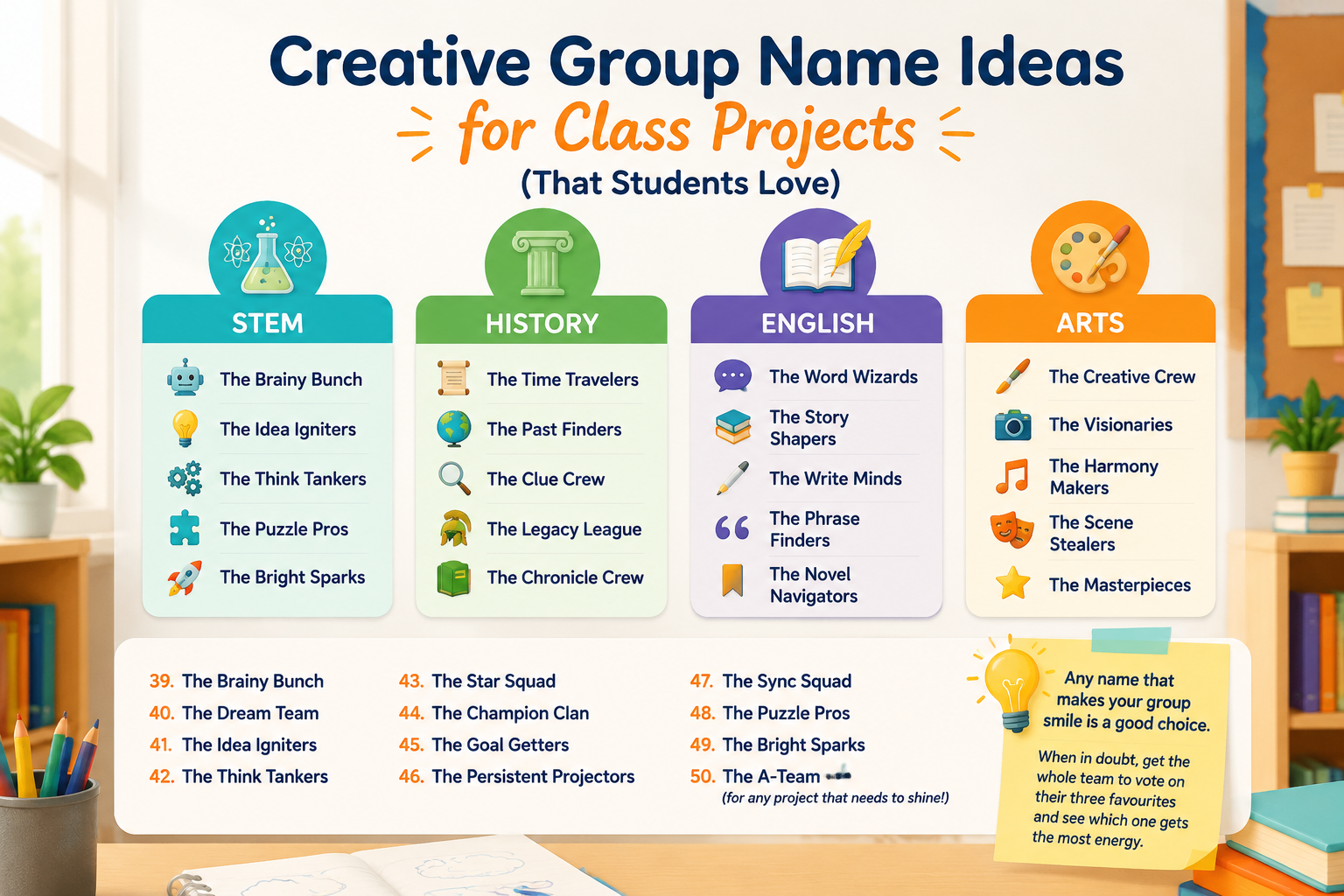
Any name that makes your group smile is a good choice. When in doubt, get the whole team to vote on their three favourites and see which one gets the most energy.
How to Choose the Perfect Group Name: A Step‑by‑Step Process
Aimless brainstorming can eat up 20 minutes of class time. Follow this simple process to land on a name efficiently:
- Set the tone first. Ask the group: should the name be serious, funny, or somewhere in between? This prevents endless back‑and‑forth.
- Brainstorm 5‑7 words related to the project topic. If the project is about renewable energy, words like “green,” “power,” “sun,” “wind,” or “future” are obvious candidates.
- Combine words and add a team noun. Attach a noun like “squad,” “team,” “crew,” “gang,” or “collective” to one of your words. For example: “Green Genius Squad” or “Solar Flare Crew.”
- Check for puns or alliteration. A simple pun (“Watt’s Up?”) or alliterative phrase (“Wind Warriors”) makes the name stickier.
- Test the name out loud. Say it three times fast. Does anyone stumble? Is it easy to pronounce over a classroom presentation mic?
- Get the teacher’s quick nod. Make sure the name is appropriate and not confusing. A 10‑second approval avoids later embarrassment.
The whole process can take less than 5 minutes when you’re focused. If you’re teaching a class that’s consistently slow at naming, introducing the Group Name Generator as a backup tool saves time.
Using a Group Name Generator to Save Time
When you need dozens of ideas right now, a group name generator is a lifesaver. The Group Name Generator on our site gives you instant, random suggestions with one click. You can specify a theme, choose a style (funny, professional, cool), and generate as many names as you want until one clicks. It’s especially helpful for:
- Teachers who run multiple projects at once and need unique names for each team without repeating themselves.
- Students who feel stuck and need a spark to get the creative juices flowing.
- After‑school clubs that want a fresh identity for a new season or event.
Because the generator works in nine languages, it’s also ideal for bilingual classrooms or international projects. Just pick your language from the menu, type in a keyword, and let the tool do the work.
Integrating Group Names with Classroom Team Activities
Group names become even more powerful when they’re part of a larger team‑building workflow. If you use the Random Group Generator to create balanced, unpredictable teams in seconds, you can then have each freshly formed group pick a name from the list above. This turns a random assignment into a bonding moment: “Okay, Team #4, you are now the ‘Quantum Thinkers.’ Decide on a team cheer and introduce yourselves!”
For pair‑based activities—peer reviews, lab partners, debate teams—the Random Pair Generator can quickly assign duos, and each pair can adopt a compound name (e.g., “Newton & Edison” for a science pair). When you need to call on a specific student, the Random Student Picker can select someone by name, and you can reference their group name as a gentle prompt: “Let’s hear from someone on the ‘Idea Igniters’ team.”
These small touches build a collaborative classroom culture where every group feels seen and valued, not just a number on a seating chart.
FAQ
What is the best group name for a school project?
The best group name fits your project topic, the group’s personality, and the classroom environment. Subject‑based names like “The Data Crunchers” work well for STEM, while funnier names like “The Sketchy Characters” suit an art project. When everyone agrees and the name makes the team happy, it’s the right one.
How do you come up with a creative group name quickly?
Start with the project keyword, add a descriptive word (e.g., “bright,” “swift,” “curious”), and attach a team noun like “crew” or “squad.” If you’re short on time, a Group Name Generator can produce hundreds of names in seconds, and you can pick the one that sparks the most enthusiasm.
Can I use the same group name for multiple projects?
Yes, especially if the same group of students works together across units. However, changing the name slightly for each project reinforces the topic and keeps things fresh. For a science unit, you might be “The Atomic Architects”; for a history unit, switch to “The Time Trailblazers.”
Is it okay if my group name is in another language?
Absolutely! A French phrase like “Équipe Soleil” (Sun Team) or even a nom de groupe projet scolaire in French can add an international flair, provided everyone in the group understands and can pronounce it. The Group Name Generator supports nine languages, giving you authentic options in each one.
What if my teacher doesn’t allow group names?
Some teachers prefer straightforward labels like “Group 1” to keep things simple. Respect that. But you can still use an informal name among yourselves for spirit—just don’t submit it on official work. You can even suggest to your teacher that a brief naming exercise takes only a minute and boosts teamwork.
Ready to Find Your Perfect Group Name?
A great group name turns a collection of students into a team with its own identity. Whether you want something clever, academic, or just plain fun, the ideas above give you plenty to work with. When you need instant inspiration, hit the Group Name Generator and watch the suggestions flow. Pair it with our Random Group Generator to create teams and name them in one smooth classroom routine.
Give your next project the name it deserves—and have fun doing it.
SponsoredExplore more resources