
Use Random Student Picker
Choose it for class calling, answer checks, presentation order, and live audience prompts.

Paste or import a roster, spin the wheel, and show the result full screen. Remember picked keeps selected names out of the next spin until you reset the round.
The wheel makes each pick easy to show and explain on a classroom display.
Remember picked removes selected names from the next spin so more students get a turn.
Use presenter mode for classrooms, online lessons, meetings, and workshops.
Quick answer
Random Student Picker Wheel is a fullscreen-ready classroom name picker for choosing one or several students fairly.
Import a CSV or TXT roster, spin the visible wheel, turn on Remember picked to avoid repeats until reset, and copy the selected names or picked history after class.
Are you tired of always calling on the same students, or feeling guilty about unconscious bias? Whether you teach in a K‑12 classroom, lead corporate training sessions, or run workshops, selecting participants fairly matters. In this random student picker tutorial, you’ll learn how to use a free, no‑login online tool that brings instant fairness to student selection—without any complicated setup or physical materials.
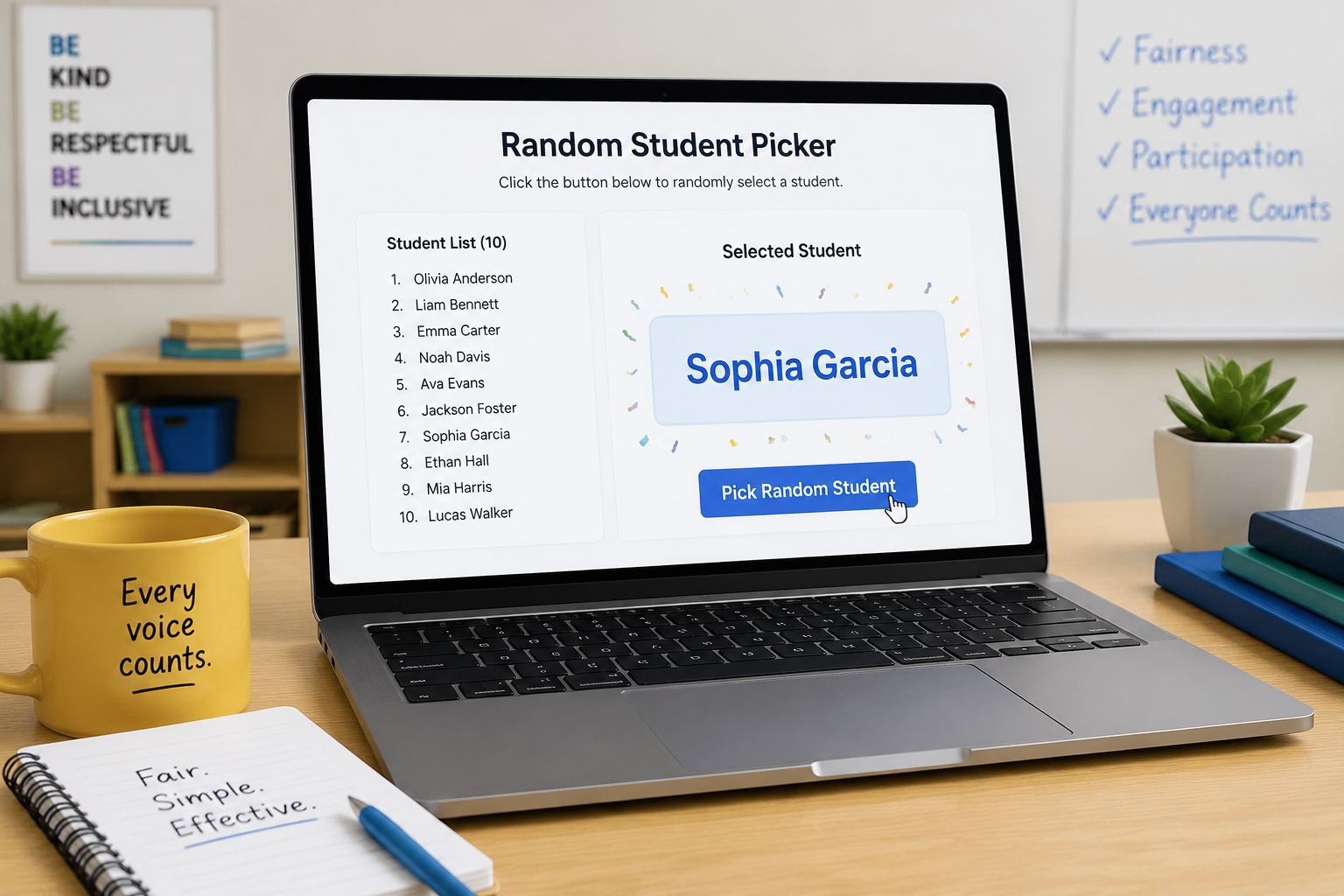
The Random Student Picker is a simple web‑based tool that selects one name at random from a list you provide. Think of it as a digital replacement for popsicle sticks, name jars, or numbered ping‑pong balls—but with zero preparation, infinite reuse, and complete transparency when shown on a screen. It’s part of the larger Random Group Generator suite, which includes tools for creating balanced groups and random pairs as well as a random group name generator.
Educators use the student picker to:
Beyond the classroom, corporate trainers and event organizers rely on the picker for icebreakers, Q&A sessions, and door‑prize drawings. Because the selection is truly unpredictable (for practical purposes) and results are displayed publicly, it removes any perception of favoritism and helps all participants feel included.
One of the biggest advantages is speed. You can load a list of 30 students in less than a minute, pick a name with one click, remove that name to avoid repeats, and reset the entire list whenever you need a fresh start. There’s no app to install, no account to create—it just works in any modern browser on a computer, tablet, or phone.
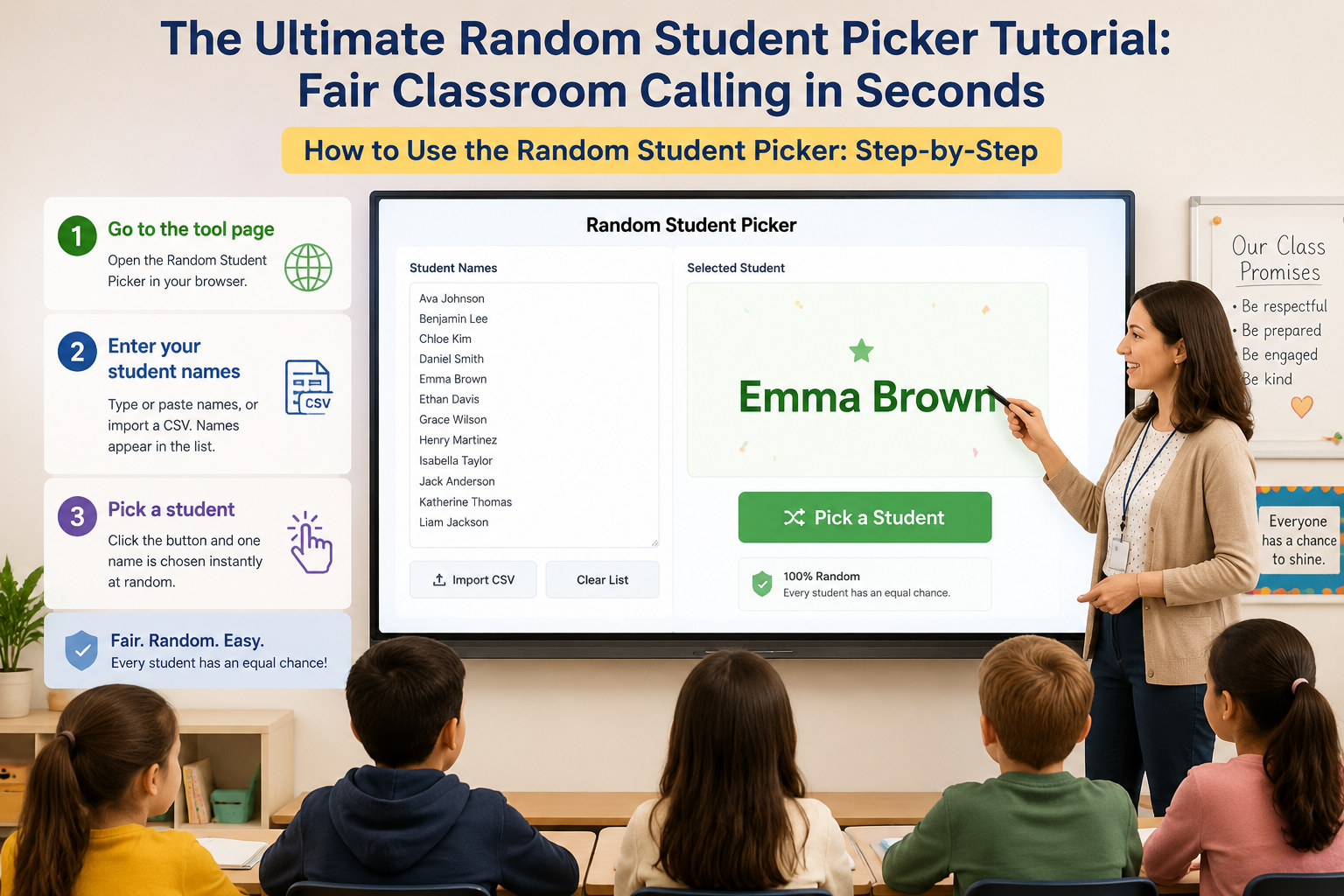
Open a browser and navigate to the Random Student Picker. The page loads instantly with an empty name box and a clean interface.
In the text box, type one name per line. For larger classes, you can paste a list copied from a spreadsheet or a roster document. The tool also supports CSV upload if you already have a class list in that format—just click the “Import CSV” option and select your file. Names appear in the list automatically.
Click the large “Pick a Student” button. The tool uses JavaScript’s built‑in pseudorandom algorithm to select one name instantly. The chosen name appears in a large, clear font that’s easy to read on a projector or shared screen.
By default, the picker does not remove names, so the same student can be chosen again. If you want to avoid repeats, click the “Remove” link or checkbox next to the drawn name (the exact toggle depends on the tool version). This ensures everyone gets a turn before the list refreshes.
Once all names have been used, or whenever you want to start over, hit the “Reset” button. All names reappear, and the picking cycle begins again.
Pro tip: If a selected student is absent, simply click “Pick Again” or remove their name temporarily—the tool never forces a teacher to lose control. You’re always the facilitator; the picker just adds a layer of unbiased randomness.
Ms. Johnson teaches 8th‑grade English and often struggles with getting reluctant readers to volunteer. She pastes her class list into the Random Student Picker at the start of the period and projects the browser tab on the smartboard. When it’s time to read aloud, she clicks “Pick a Student,” and the whole class can see the name appear. After the student reads, she removes the name. By the end of the week, every student has read at least once, and nobody can claim they were ignored or singled out.
During a quarterly all‑hands meeting, Ravi, the training coordinator, wants to encourage questions without the same extroverts dominating the conversation. He loads the attendee list from the registration CSV into the picker and shares his screen in Zoom. When he says, “Let’s hear from someone new,” he clicks the button, and a random name appears. The selected employee unmutes and asks a question. The random draw feels like a game, reducing anxiety and increasing participation.
Lena organizes a free community gardening workshop with 60 pre‑registered participants. She uses the Random Student Picker (renamed in her mind as “Attendee Picker”) to draw names for three giveaways. She pastes the sign‑in list, clicks “Pick a Student” three times without removal to allow the same person to win multiple prizes (which adds excitement). The audience can watch on a projected screen, and the process feels completely transparent.
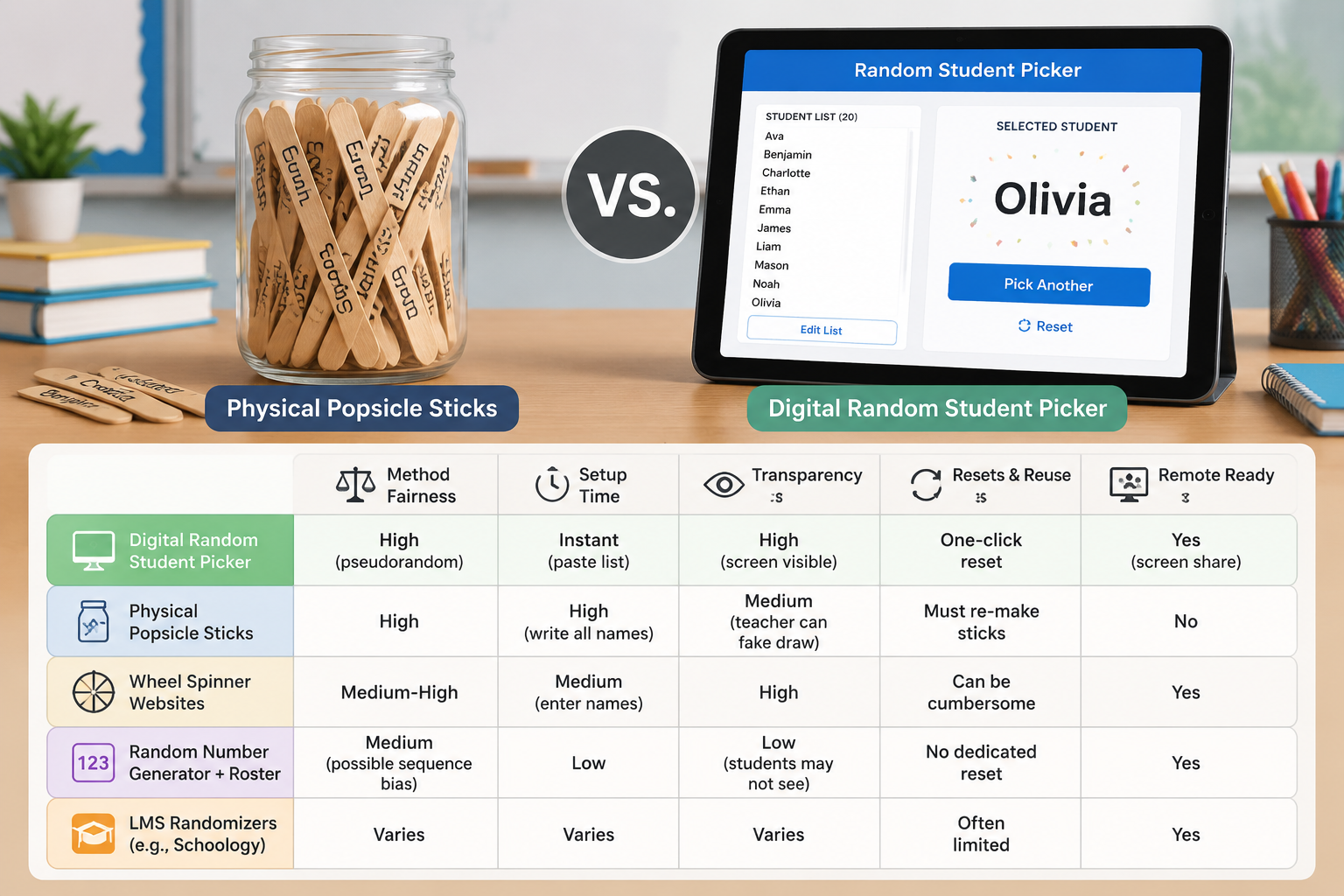
| Method | Fairness | Setup Time | Transparency | Resets & Reuse | Remote Ready |
|---|---|---|---|---|---|
| Digital Random Student Picker | High (pseudorandom) | Instant (paste list) | High (screen visible) | One‑click reset | Yes (screen share) |
| Physical Popsicle Sticks | High | High (write all names) | Medium (teacher can fake draw) | Must re‑make sticks | No |
| Wheel Spinner Websites | Medium‑High | Medium (enter names) | High | Can be cumbersome | Yes |
| Random Number Generator + Roster | Medium (possible sequence bias) | Low | Low (students may not see) | No dedicated reset | Yes |
| LMS Randomizers (e.g., Schoology) | Varies | Varies | Varies | Often limited | Yes |
A physical jar of popsicle sticks is the classic “fair” method, but it’s time‑consuming to create, easy to lose individual sticks, and can’t be used in remote settings. Online wheel spinners look engaging, but they often involve flashy animations that distract and load slowly. A random number generator paired with a printed roster is quick, but it doesn’t provide the same visibility, and students can’t see that the selection was truly random.
The Random Student Picker occupies the sweet spot: it’s faster than physical methods, more transparent than a standalone number generator, and cleaner than gamified spinners. If you find you need to divide your class into groups rather than calling on individuals, the Random Group Generator lets you create teams of any size with the same one‑click fairness.
The picker is a standalone web page, which means it plays nicely with almost any digital toolset. Here are a few ways teachers are weaving it into their daily routines:
While the tool doesn’t have a built‑in API or direct integration with learning management systems, its simplicity is its greatest strength: there’s no need for credentials, no data storage concerns, and no heavy interface to learn. The entire workflow is copy‑paste‑project‑pick.
The tool currently does not have a cloud‑save feature, but there are easy workarounds. The simplest is to keep your list in a plain text document or spreadsheet and paste it into the picker each time. If you use the same device and browser, the names may persist through the session and even across tabs, but for guaranteed safety, always keep a local copy.
The picker uses a standard pseudorandom number generator built into your browser’s JavaScript engine. For classroom and workshop use, this is more than sufficient: it avoids any pattern that a human would detect and treats every name equally. While it’s not certified cryptographic randomness, it is absolutely fair for educational selection.
The student picker is designed to select one individual at a time. If you need to form random groups for a project or activity, the Random Group Generator is the right tool—you can set group size, balance the teams, and even export the results. To create pairs, the Random Pair Generator is just as quick.
The page needs an internet connection to load initially. Once the page is open, the name list and picking logic run entirely in your browser, so you can continue using it even if the connection drops briefly. It is not a fully offline app, but it is resilient enough for most classroom network conditions.
Yes. Like all tools on random-group-generator.com, the student picker is free to use with no registration required. The site is supported by ads, so you may see a small ad on the page, but it does not interfere with the core functionality.
The Random Student Picker takes the guesswork and bias out of student selection, giving every participant an equal shot while saving you precious minutes. Try it today—you can start picking names in less than a minute.
Open the Random Student Picker and make your next class, training, or event fairer, smoother, and a little more fun.
This page is the right fit when the job is deciding who answers or who goes next.
Choose it for class calling, answer checks, presentation order, and live audience prompts.
Return to the home tool if you need to divide the whole roster into project or discussion groups.
If everyone needs one partner instead of a speaker selection, the pair tool is the better fit.
A visible wheel works best when the roster and repeat rule are clear.
Add names with commas or line breaks, or import a CSV/TXT class list locally in the browser.
Pick one student or several names for answers, examples, presentations, or meeting turns.
Keep Remember picked on when you want selected names removed until you reset the round.
Spin the wheel from the page or use fullscreen presenter mode for classrooms and calls.
Use a wheel-based random step that students and participants can see.
The wheel turns the roster into a visible random draw for calling, answers, and speaker order.
Hide the input form and show only the wheel, result, remaining count, and reset controls.
Import CSV or TXT lists with FileReader so names stay in the browser during setup.
Use the round controls to keep participation spread across more names.
Selected names are removed from the next spin until you reset the round.
Choose a single student or reveal multiple selected names from the same engine result.
Copy the current result or the picked history for class notes, meeting records, or follow-up.
Speaker selection and full-team formation are different jobs and deserve different pages.
This page stays focused on calling and participation instead of broad group-building.
The picker can run through a roster without repeating names until the teacher resets the round.
Move back to Random Group Generator when the next step becomes full team formation.
Use it whenever the real question is “who should answer next?”
Use it for fair calling, reading turns, answer checks, presentation order, and drawing seat numbers when you reshuffle the seating chart.
Use it in remote lessons and live classes when the same few voices keep dominating the chat.
Use it to build a more transparent participation routine and reduce perceived bias.
If the next task is full-team formation, open the Random Team Generator use case instead.
Reducing hand-raise monopolies in a 30-minute discussion
A high-school teacher notices the same six students answer every cold-call. During a discussion block, the teacher pastes the class list into Random Student Picker, enables a simple no-repeat pass for the period, and projects the wheel or name highlight so the selection is public.
After three draws, quieter students have spoken once without being singled out as “the shy kid the teacher is targeting.” The teacher still skips a student who is clearly unprepared and documents that skip as a teacher override, not as a silent re-roll that looks rigged.
Fair call-outs without fake randomness
The picker samples from the active roster after cleaning empty entries. When a no-repeat or “already called” mode is available, drawn names leave the pool until the pool is exhausted, then the cycle can reset. That approximates short-term fairness better than pure memory.
Visual modes (wheel or highlight) are presentation aids; they do not change the underlying random selection. The fairness claim is “each eligible name has equal chance on this draw,” not “every student speaks the same amount this semester.”
When random picking is the wrong intervention
Random cold-calling can increase anxiety for some learners. It is a poor fit for trauma-sensitive classrooms without opt-out norms, for students with speech accommodations, or for questions that truly need volunteered expertise.
A single random draw does not fix uneven preparation or seating power dynamics. It also cannot prevent a teacher from re-rolling until a preferred name appears—that behavior is visible to students and undermines the tool.
Better than relying on memory, habit, or the same few raised hands every session.
“Giving everyone a short prep window before the random pick made students much more comfortable with the process.”
A few example flows for classroom and remote participation.










Related tools
Split a list into random groups or teams in seconds.
Create random pairs and partners fast for class discussion, speaking practice, and workshop icebreakers.
Spin the wheel once to split your whole roster into balanced groups, teams, or pairs.
Spin the wheel to fill groups one pick at a time or draw single names live.
Shuffle any list into a numbered random order in seconds — presentations, turn order, lineups, and raffle draws, right in your browser.
Turn a class roster into a random seating chart with rows, seats, and printable results in seconds.
Build a fair stations rotation schedule in seconds — set your groups, stations, and minutes per rotation, and get a chart every group can follow.
Randomize your white elephant gift exchange turn order in seconds, with steal-rule cheat sheets for the whole party.
Paste 4–64 teams and get a random-seeded single elimination bracket with automatic byes — every round mapped from the first matchup to the final.
Estimate a fair event budget in seconds — enter attendees, a budget per person, and an extras buffer to get a total with a planning range.
These posts explain how to use random calling as a real participation routine, not just a novelty click.
Learn how to use a random student picker to boost classroom engagement, ensure fair participation, and save time. Step-by-step guide with practical examples for K-12 and higher ed.
Read articleDiscover how a random student picker can eliminate bias in classroom cold-calling, increase participation, and ensure every student gets an equal chance. Step-by-step guide and real-world examples.
Read articleDiscover how a random student picker can transform online classes. Learn practical ways to implement random selection, ensure equitable participation, and create an engaging virtual classroom environment.
Read articleThe main questions teachers and facilitators ask before using a random picker wheel.
Yes. The page turns your roster into a visible wheel and uses the existing random picker engine to decide the final result.
Yes. Set the pick count based on whether you need one speaker or several names; multiple results reveal from the same engine result.
Yes. Keep Remember picked enabled and selected names will stay out of the wheel until you reset the round.
Yes. Fullscreen presenter mode keeps the wheel, spin button, result, remaining count, reset, and exit controls visible while hiding the setup form.
No. Pasted names and CSV/TXT imports are processed locally in the browser for the picker session.
This page answers “who should answer next?” The home tool answers “how should the full roster be split into teams?”
No. It simply gives you a clear, visible default rule for participation when fairness matters.
Yes. Draw names one at a time and assign each name to the next seat in your room. For a ready-made grid with rows, seat numbers, and printable output, use the random seating chart generator.
If the next step is team formation, switch back to the main grouping tool.