
remote teams
Random Group Generator for Remote Teams: Fair, Fast, and Scalable Team Splitting
A comprehensive guide to using a random group generator for remote teams. Learn benefits, workflows, best practices, real use cases, and how to improve collaboration through fair team assignment systems.

Remote work has fundamentally changed how teams collaborate, brainstorm, and execute projects. One persistent challenge in distributed environments is how to form fair, balanced, and efficient groups without bias or logistical friction. A random group generator for remote teams solves this by automating group assignment, ensuring neutrality, speed, and flexibility in team formation.
In this guide, we’ll explore how random group generators work, why they matter in remote-first environments, and how to implement them effectively in daily workflows.
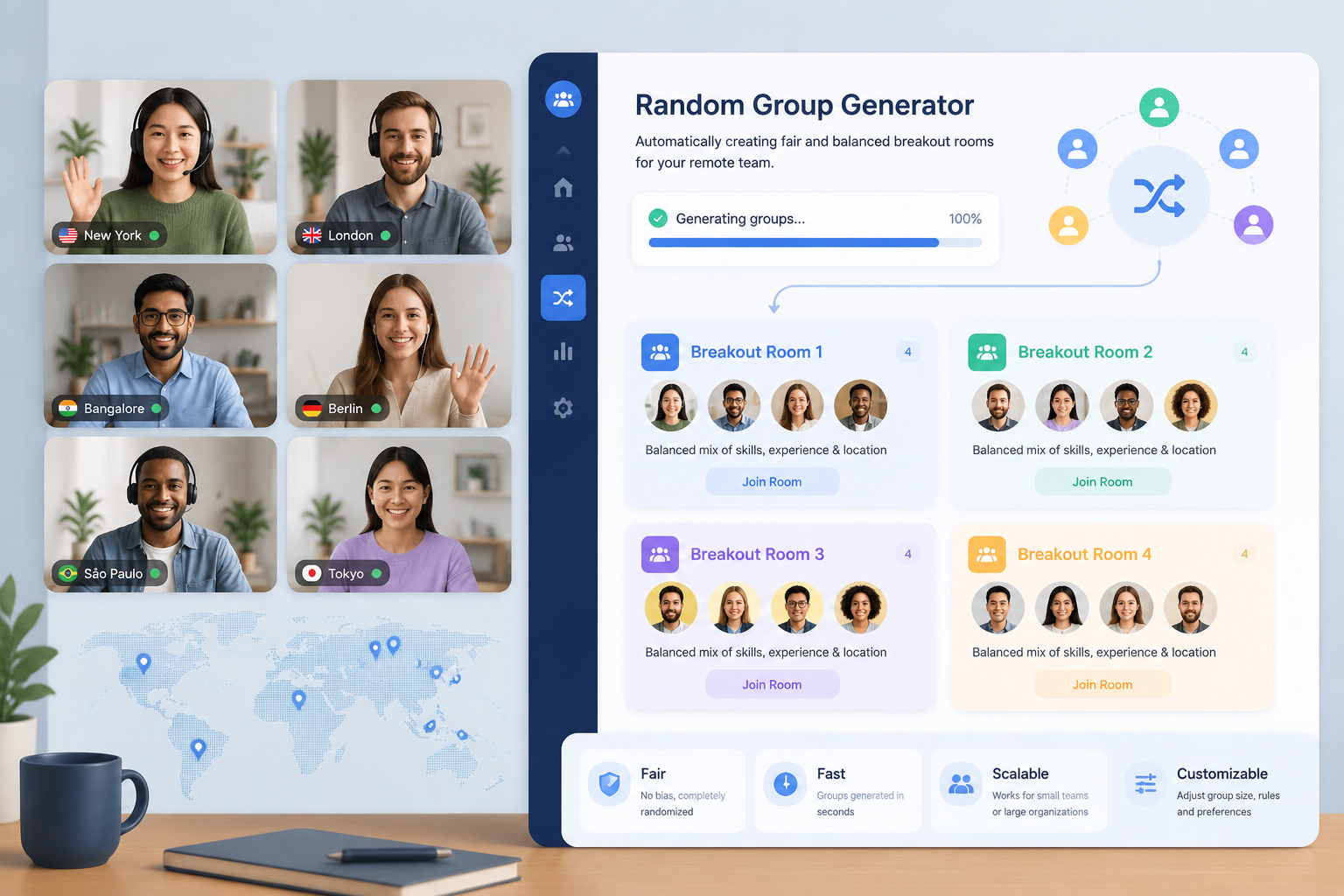
Why Remote Teams Need Random Group Generators
Remote teams often rely on structured communication systems like Slack, Zoom, Microsoft Teams, or asynchronous tools. However, forming subgroups manually introduces inefficiencies and potential bias. Managers may unconsciously group people by familiarity, seniority, or timezone convenience.
A random group generator removes these barriers by introducing algorithmic fairness into team formation.
Key Challenges in Remote Group Formation
- Uneven participation across time zones
- Social clustering (people sticking with familiar colleagues)
- Cognitive overload for managers organizing large groups
- Bias in assigning tasks or breakout sessions
According to workplace research from sources such as Harvard Business Review, structured randomness in team formation can improve idea diversity and reduce groupthink tendencies in collaborative environments.
What Is a Random Group Generator?
A random group generator is a digital tool that automatically divides a list of participants into smaller groups using randomized or semi-randomized logic. In remote teams, it is commonly used for:
- Virtual breakout sessions
- Agile sprint planning groups
- Workshop discussions
- Icebreaker activities
- Peer review assignments
Unlike manual grouping, a generator ensures that each participant has an equal probability of being assigned to any group, reducing unconscious bias.
How a Random Group Generator Works
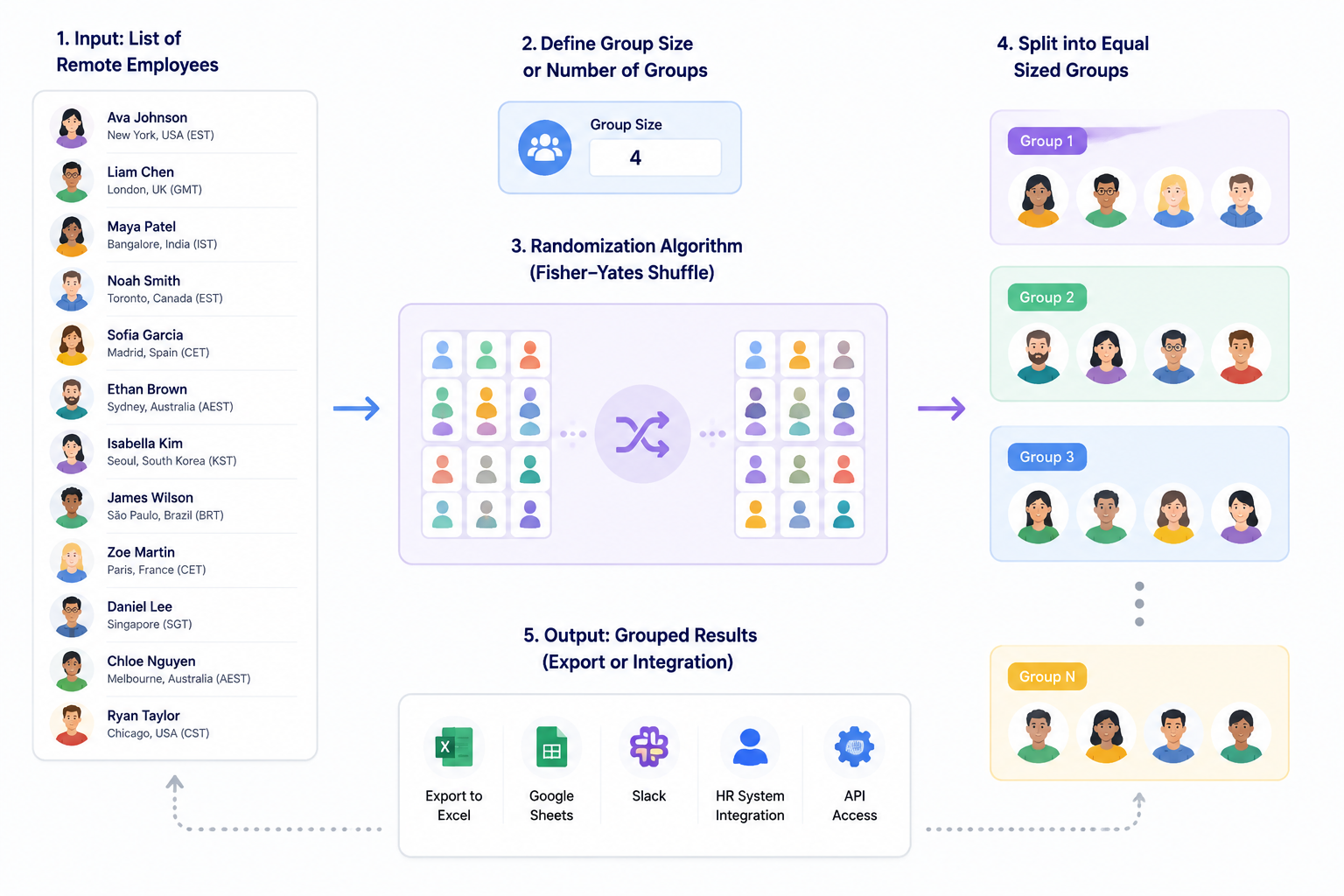
At a technical level, most group generators follow a simple workflow:
- Input a list of participants
- Define group size or number of groups
- Apply a randomization algorithm (often Fisher-Yates shuffle or similar logic)
- Split the randomized list into groups
- Output grouped results for export or integration
More advanced systems may include constraints such as:
- Ensuring timezone diversity in each group
- Preventing repeated grouping across sessions
- Balancing skill levels or roles
- Integrating with HR systems or collaboration tools
Step-by-Step Guide to Using a Random Group Generator in Remote Teams
Here is a practical workflow for implementation:
Step 1: Define Your Objective
Before generating groups, clarify the purpose. Are you running a brainstorming session, training workshop, or sprint planning meeting? The objective determines group size and structure.
Step 2: Prepare Your Participant List
Collect names, roles, or identifiers of team members. Ensure the list is up to date and includes all remote participants across time zones.
Step 3: Choose Group Parameters
Decide on:
- Number of groups (e.g., 4 groups of 5 people)
- Maximum or minimum group size
- Optional constraints (if supported by your tool)
Step 4: Generate Groups
Use a random group generator tool such as the one available at https://random-group-generator.com/ to automatically assign participants.
Step 5: Share Results
Distribute the output via your communication platform (Slack, email, or Zoom chat). For recurring sessions, consider saving templates or exporting results.
Benefits of Using a Random Group Generator for Remote Teams
1. Fairness and Transparency
Randomization eliminates favoritism and ensures all team members have equal opportunity to collaborate with different colleagues.
2. Increased Collaboration Diversity
Teams interact with a wider range of colleagues, leading to fresh perspectives and improved creativity.
3. Time Efficiency
Manual grouping can take several minutes to hours in large organizations. Automation reduces this to seconds.
4. Reduced Managerial Load
Team leaders can focus on facilitation instead of administrative logistics.
5. Better Engagement in Virtual Settings
Random group assignments encourage participation in otherwise siloed remote environments.
Practical Use Cases in Remote Work
Agile and Product Development
Scrum teams often use random grouping for sprint retrospectives or brainstorming sessions to ensure diverse input.
Virtual Workshops
Facilitators can break large webinars into smaller discussion groups instantly, improving engagement.
Training and Onboarding
New employees can be randomly grouped with different mentors or peers to accelerate learning.
Icebreaker Activities
Random pairing is commonly used for informal networking sessions, especially in fully remote organizations.
Best Practices for Remote Group Generation
Balance Randomness with Structure
Pure randomness is not always ideal. Consider hybrid models where constraints ensure diversity (e.g., mixing departments or time zones).
Avoid Repetition
If running repeated sessions, ensure the same individuals are not repeatedly grouped together.
Communicate the Process
Transparency builds trust. Explain to teams why randomization is being used.
Respect Time Zones
Ensure no group is unintentionally overloaded with inconvenient meeting times.
Common Pitfalls to Avoid
- Creating overly large groups that reduce participation
- Ignoring cultural or time zone constraints
- Overusing randomization for critical strategic decisions
- Failing to test group distribution before large-scale rollout
Example Scenario: Global Marketing Team
A global marketing team with 40 members across 6 time zones uses a random group generator before weekly brainstorming sessions.
Instead of manually assigning breakout rooms, the manager inputs all participants into the system. The tool automatically creates 8 balanced groups of 5 people each, ensuring each group includes at least two time zones.
This leads to more diverse discussions and reduces the time spent organizing meetings by approximately 15–20 minutes per session.
Integration with Remote Work Tools
Many organizations integrate group generators into broader workflows:
- Slack bots for instant group creation
- Zoom breakout room automation
- Google Sheets add-ons for roster management
- API-based integrations with HR systems
These integrations allow seamless scaling across large remote organizations.
FAQ
What is a random group generator used for in remote teams?
A random group generator is used to automatically divide participants into fair groups for meetings, workshops, and collaborative sessions in remote work environments.
Is random grouping actually effective for team performance?
Yes, when used appropriately. Research in organizational behavior suggests that diverse group formation can improve idea generation and reduce bias, especially in brainstorming contexts.
Can I control group size in a random group generator?
Most tools allow you to specify either the number of groups or the number of participants per group, depending on your needs.
How do I prevent random groups from being unbalanced?
You can use hybrid generators that include constraints such as timezone balancing, role distribution, or skill-level mixing.
Is random grouping suitable for all types of meetings?
No. It is best suited for collaborative, exploratory, or learning-focused sessions rather than high-stakes strategic decision-making.
Conclusion
A random group generator is more than a convenience tool—it is a scalable solution for improving fairness, engagement, and efficiency in remote teams. As distributed work continues to evolve, structured randomness will play an increasingly important role in how teams collaborate, learn, and innovate together.
Related guides
- 10 Classroom Random Grouping Strategies for Balanced Teams — Learn practical classroom random grouping strategies to create fair teams, improve participation, and save …
- How to Create Gender-Balanced Random Groups — Struggling to form fair, mixed-gender teams?
- How to Use a Team Generator Based on Skill to Create Balanced Groups — Struggling to form fair, productive teams?
- What Is a Random Group Generator? Definition, Uses & Best Practices — A random group generator is a digital tool that automatically divides a list of names or items into random …
Related Tools
Pick the right generator for the job — every tool runs free in your browser.