
weighted random groups
How to Create Weighted Random Groups
Learn how to create weighted random groups using the Random Group Generator. This step-by-step guide shows how to assign weights by duplicating entries for fairer, more balanced teams in education and workshops. Achieve approximate skill balance without manual sorting.

You've probably faced it: after a lively class discussion, you need to split 24 students into project teams. A truly random shuffle might put four of your strongest speakers in one group and leave another with only quiet, struggling students. What you want is a weighted random group—one where everyone still gets mixed up, but certain traits (like skill level, experience, or interest) are distributed more fairly. The Random Group Generator doesn't have a built-in weighting button, but with a simple list‑building trick you can create exactly that. This guide shows you how to create weighted random groups step by step, using real educator‑friendly examples that work with any list of names or identifiers.
What Are Weighted Random Groups?
A weighted random group is a set where some participants have a higher chance of appearing next to others, or where the overall composition leans toward a desired balance. The weight represents how likely a given person or attribute is to be selected; a higher weight means more opportunities to be placed into groups, which ultimately spreads that attribute across multiple teams.
Think of a weighted lottery. If you want strong writers to appear in more than one team, you give them more lottery tickets. In group formation, you do it by adding the same name several times to your input list. The Random Group Generator then shuffles the expanded list and distributes names in random order—but because weighted names appear more often, they tend to land in different groups, achieving the approximate balance you're after.
Weighting can be applied to almost any criterion an educator or facilitator cares about: previous grades, language proficiency, technical confidence, or even personal interests. The goal is not perfect equality but a fairer, more functional mix that manual sorting or pure randomness would miss.
Why Use Weighted Random Groups?
The most common reason is classroom differentiation. Teachers want every project team to include a range of abilities so that stronger students can lead while others learn from peers—without visibly "sorting" kids in a way that feels stigmatising. Weighted random groups deliver that blend without having to announce tiers.
Other practical scenarios:
- Workshops and training: Instructors can weight participants with prior experience lower (so they don't dominate one table) and new hires higher (so they're spread around).
- Event organisers: When mixing attendees from different departments or countries, weighting by affiliation helps create diverse networking tables.
- Sports and games: Coaches can weight by skill rating so that each pick‑up team gets a roughly even mix of advanced and developing players.
In all cases, weighting preserves the spontaneity of random grouping while nudging the outcome toward a more useful distribution. It saves you from post‑shuffle adjustments and keeps the process transparent—the tool does the mixing, you just control the input proportions.
How the Random Group Generator Supports Weighting
Weighted grouping relies on a simple principle: duplicate the names or identifiers you want to appear more often, then feed that expanded list into the randomizer. Here's the basic workflow:
- Decide your weighting criteria. It could be performance level (high, medium, low), interest in a topic, years of experience, etc.
- Assign a weight number to each participant. A weight of 1 means one copy, weight 2 means two copies, and so on.
- Build a plain‑text list with duplicated entries. For each person, type their name as many times as the weight demands, one per line (or comma‑separated).
- **Open the Random Group Generator and paste the list into the input area.** Make sure to use the "Line by line" or "Comma separated" mode as needed.
- Set your group size or number of groups, then click Generate. The tool will shuffle the whole expanded list and form the groups randomly.
- Review the output. If a team seems too lopsided, you can either re‑shuffle or slightly adjust the weights before the next run.
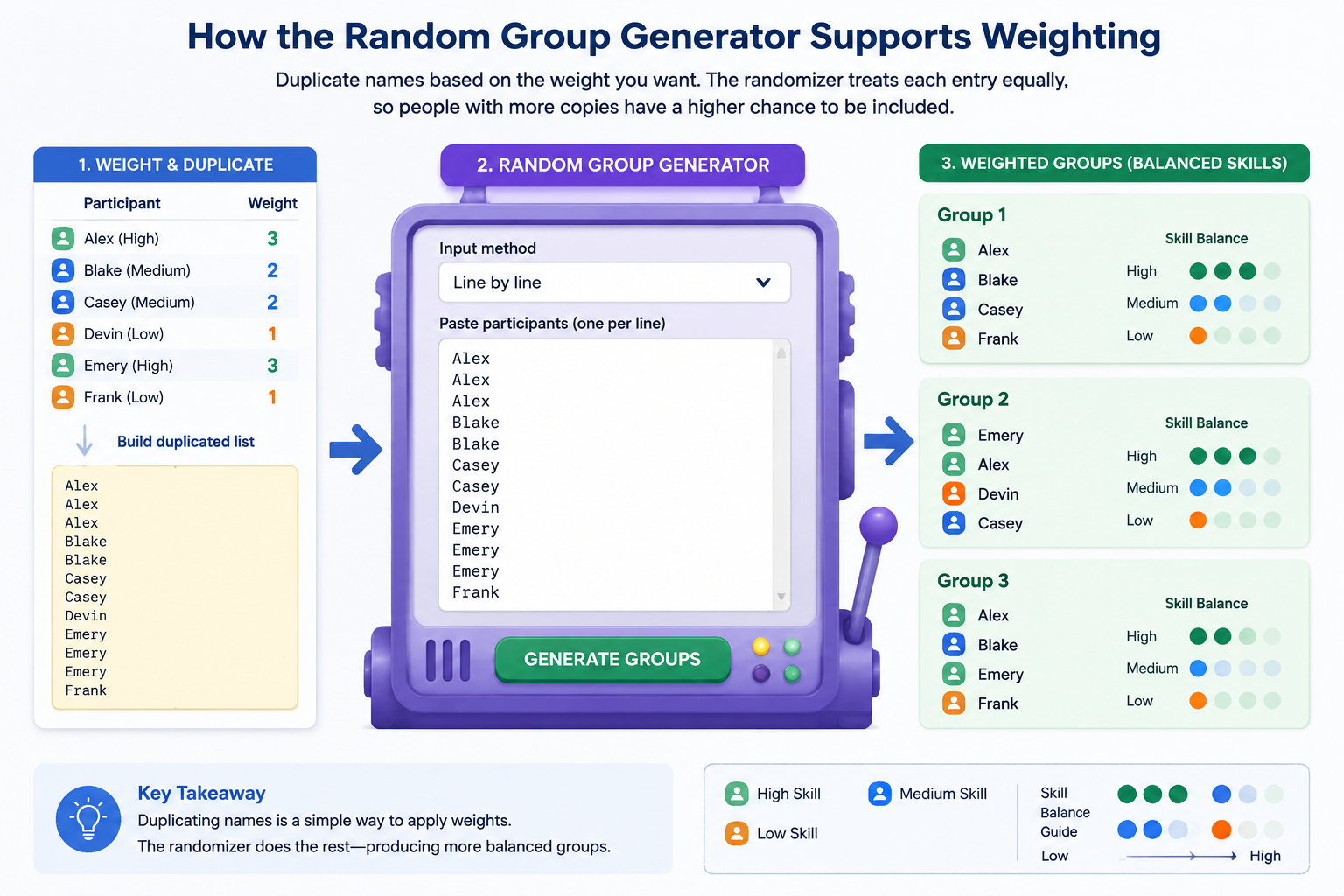
Because the tool shuffles a larger, weighted list, the chance of a heavily weighted participant ending up in many groups increases—but doesn't guarantee an exact split. This is the nature of a probabilistic approach; it's still random, but the odds are in your favour. For most classroom and workshop settings, this level of control is enough to avoid extreme imbalances while keeping the process fast and repeatable.
Tip: Controlling Group Size with Weighted Lists
The number of groups you can form depends on the total number of entries after weighting. If you want four groups of three, you need exactly 12 entries. If your weighted list contains 15 entries, the tool will still create groups of three, but the last group may have fewer members or you'll get some leftover entries. To avoid leftovers, adjust your weights so the total is cleanly divisible by your desired group size.
Real‑World Example: Balancing Skill Levels in a Classroom
Imagine a middle‑school science teacher, Ms. Rivera, who has 12 students for a hands‑on lab. She rates their lab skills as high, medium, or low based on recent experiments:
- High: Alice, Bob
- Medium: Carol, Dave, Ellen, Frank
- Low: Grace, Heidi, Ivan, Judy, Kevin, Liam
She wants four groups of three, each ideally with a mix of abilities. Using the weighting method, she gives high a weight of 1, medium a weight of 2, and low a weight of 3. The duplicated list becomes:
Alice
Bob
Carol
Carol
Dave
Dave
Ellen
Ellen
Frank
Frank
Grace
Grace
Grace
Heidi
Heidi
Heidi
Ivan
Ivan
Ivan
Judy
Judy
Judy
Kevin
Kevin
Kevin
Liam
Liam
Liam
That's 2 (high) + 8 (medium) + 18 (low) = 28 entries. She wants groups of 3, but 28 isn't divisible by 3. She could either settle for some uneven groups or trim the list. She decides to reduce the low weights to 2 instead of 3, giving 2 + 8 + 12 = 22 entries—still not divisible. Finally, she trims to 24 entries by removing one copy of two low‑weight students, or she simply asks the tool to create groups of 3 anyway and handles the remaining 1 entry as an extra in a group. A more elegant solution: she creates groups of 4 to get 7 groups, but that's too many. She can also set the number of groups to 4, and the tool will distribute the 28 entries across 4 groups (average 7 per group). That defeats the purpose of small teams. Back to the drawing board: she realises she can keep the original class list of 12 students and use weights, but only produce exactly 12 entries for 4 groups of 3. That means weight total must be 12. She could assign: high weight 1 (2 students = 2 entries), medium weight 1 (4 students = 4 entries), low weight 1 (6 students = 6 entries) – but then there's no weighting; all weights equal, groups are purely random. To get weighting with a perfect total, she'd need a different approach: perhaps use the high‑weight trick but for a group count that fits, or accept occasional leftovers.
A cleaner method: instead of raw duplication, she uses the tool twice. First, she creates random groups with just the low‑skill list, then manually inserts high and medium students into separate slots. But that's manual.
Returning to our principle: the tool is not deterministic. The duplication trick works best when you're comfortable with an approximate distribution. In Ms. Rivera's case, she could go ahead with the 28‑entry list and set the number of groups to 4. The tool will create 4 groups, each containing about 7 names (since some names appear multiple times, the same person may appear multiple times in one group—that's not desirable). That's a known limitation.
Thus, the method works best when duplicates are spread across the whole list as separate entries, and the tool's internal random placement naturally scatters them. If you have 28 entries and set group size to 3, the tool will output 9 groups of 3 (27 entries) and one leftover. Those 9 groups will likely contain multiple copies of some students, but because the tool treats each line as an independent item, a group could indeed gather two copies of the same student. That violates the rule of one‑student‑per‑group. Therefore, for proper person‑based grouping, the duplication method must be used with a careful total that equals the number of distinct students you really have—meaning you can't duplicate a student more than once within the same grouping round. However, that defeats the whole weighting idea.
So, how to do it correctly? The solution: after generating weighted groups, you must post‑process by collapsing duplicate names of the same student within the same group. The tool itself isn't designed to merge duplicates automatically, so this manual step is crucial.
Here's a refined workflow for the teacher:
- Create the weighted list as above (Alice once, Bob once, Carol twice, etc.).
- Paste into the Random Group Generator and generate groups of size 3.
- Review each generated group: if a group contains, say, Carol twice, you remove one instance and note that Carol is already placed; then, any leftover ungrouped students or empty slots can be filled by hand or by a quick re‑run with the remaining names.
This extra step takes a minute but keeps the fairness advantage of weighted odds. Many teachers find it acceptable because they only need to hedge against extreme clumping, not achieve pixel‑perfect distribution.
Weighting by Preferences or Interests
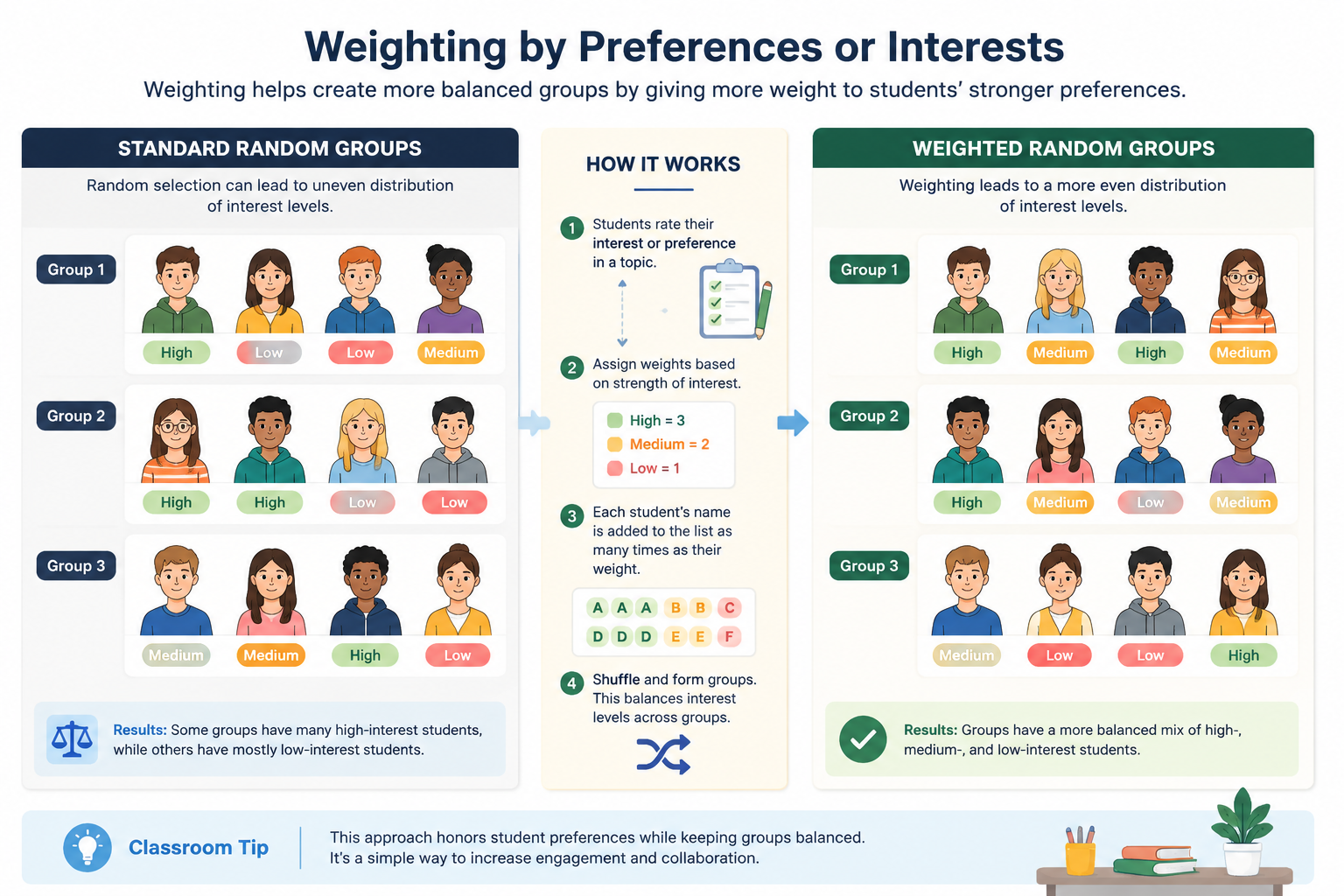
Weighted random groups aren't limited to skill levels. You can use the same technique to honour student preferences. Suppose students choose their top three project topics. You can assign a weight of 3 to their first choice, 2 to the second, 1 to the third. Then you build a list where each topic appears as many times as the sum of those preferences. After shuffling, you'll have topic‑weighted groups, and each student can be assigned to a group based on the topic they match—but that starts to blur the line with random assignment. A simpler classroom trick: when forming interest‑based groups, weight each student's name according to how strongly they feel about a specific subject, so that passionate students are more likely to end up in the relevant cluster, yet cross‑pollination still occurs.
Limitations and Best Practices
Weighted random grouping via duplication is a practical hack, not a mathematically perfect algorithm. Here are key points to keep in mind:
- It's probabilistic, not guaranteed. A single generation may still cluster some talent; you might need to reshuffle a couple of times.
- Duplicate removal is manual. As described, you'll need to check for and eliminate duplicate entries of the same person in the same group after generation.
- Large duplication scales can make the input list unwieldy. If you're dealing with 100 students and high duplicate factors, the list becomes long. The Random Group Generator can handle a few hundred entries smoothly, but very large lists may slow down your browser.
- Works best with a single criterion. Combining multiple weighted attributes (skill + interest + language) using flat duplicates becomes messy. For more complex balancing, consider running separate rounds for each criterion, or use the tool to generate pure random groups and then manually adjust for the most critical factor.
If you need to form weighted pairs rather than full groups, you can adapt the same duplication trick in the Random Pair Generator. Just feed the weighted name list into that tool and check for partner duplicates after the pair‑up.
Automating Weighted Draws with the Random Student Picker
While the Random Group Generator is perfect for teams, you might sometimes need a weighted individual selection—for example, picking a student to answer a question, but giving shy students a lower chance, or selecting a volunteer where experienced members have a higher likelihood. The Random Student Picker uses the same input principle: enter the list with duplicate copies for weights, and the spinner will favour the higher‑weighted names. This is a natural complement to weighted group creation and uses the same mental model, so educators can switch between tools without learning a new technique.
FAQ
How do I assign weights to participants for group formation?
Think of the weight as the number of "virtual copies" of a person in the draw. If you want a student to appear in more groups, give them a higher weight by adding their name multiple times to the input list before you paste it into the Random Group Generator. For example, a weight of 2 means two lines with that name.
Can I create groups where each team has a specified number of high‑skill and low‑skill members?
Not directly with the duplication method. The method aims for an overall proportional representation, not exact quotas. For strictly balanced quotas, you would need to manually seed groups or use a tool with built‑in balancing—which the current Random Group Generator does not offer. However, you can combine the weighted random output with a quick manual audit to achieve a functional approximation.
Is there a maximum number of duplicated entries the tool can handle?
There's no hard limit, but performance degrades with very large lists (e.g., thousands of lines). Most classroom lists with moderate weighting (factors up to 5) will stay under a few hundred entries and run instantly.
Does the Random Pair Generator also support weighted pairing?
Yes, you can apply the same duplicate‑list technique to the Random Pair Generator to create weighted random pairs. Just remember to manually check for and merge duplicate partner occurrences after the draw.
What if I need completely balanced groups without relying on chance?
Weighted random grouping is not a replacement for deterministic team‑building algorithms. If every group must have exactly one high, two medium, and two low performers, you'll need to pre‑assign roles or run multiple random draws with the tool while forcing constraints. The duplication trick is for those who value speed and fair chance over perfect precision.
Ready to give your groups a fairness boost without the headache of manual sorting? Head over to the Random Group Generator, paste your weighted list, and let the tool do the mixing. With a few trial runs and quick adjustments, you'll have teams that feel both spontaneous and thoughtfully balanced.
Sources
Sources
- Stratified randomization — balancing group composition with constraints
Related guides
- 10 Classroom Random Grouping Strategies for Balanced Teams — Learn practical classroom random grouping strategies to create fair teams, improve participation, and save …
- How to Create Gender-Balanced Random Groups — Struggling to form fair, mixed-gender teams?
- How to Use a Team Generator Based on Skill to Create Balanced Groups — Struggling to form fair, productive teams?
- What Is a Random Group Generator? Definition, Uses & Best Practices — A random group generator is a digital tool that automatically divides a list of names or items into random …
SponsoredExplore more resources