
secret santa
How to Organize Secret Santa at Work Without Spreadsheet Chaos
Learn how to organize Secret Santa at work with a simple, private process for collecting names, setting rules, assigning coworkers, and sharing results.

If you are responsible for organizing a workplace Secret Santa, the hardest part is often not choosing gifts. It is keeping track of participants, avoiding accidental self-assignments, respecting spending limits, and keeping each person's recipient private. This guide explains how to organize Secret Santa at work with a simple process that replaces a fragile spreadsheet with a clear assignment workflow.
Secret Santa works best when the organizer decides the basic rules before making any assignments. Confirm who is participating, set a sensible budget, collect optional gift preferences, make one assignment per participant, and communicate the result privately. For a faster setup, a Secret Santa Generator for Work can handle the assignment step without requiring you to build formulas yourself.
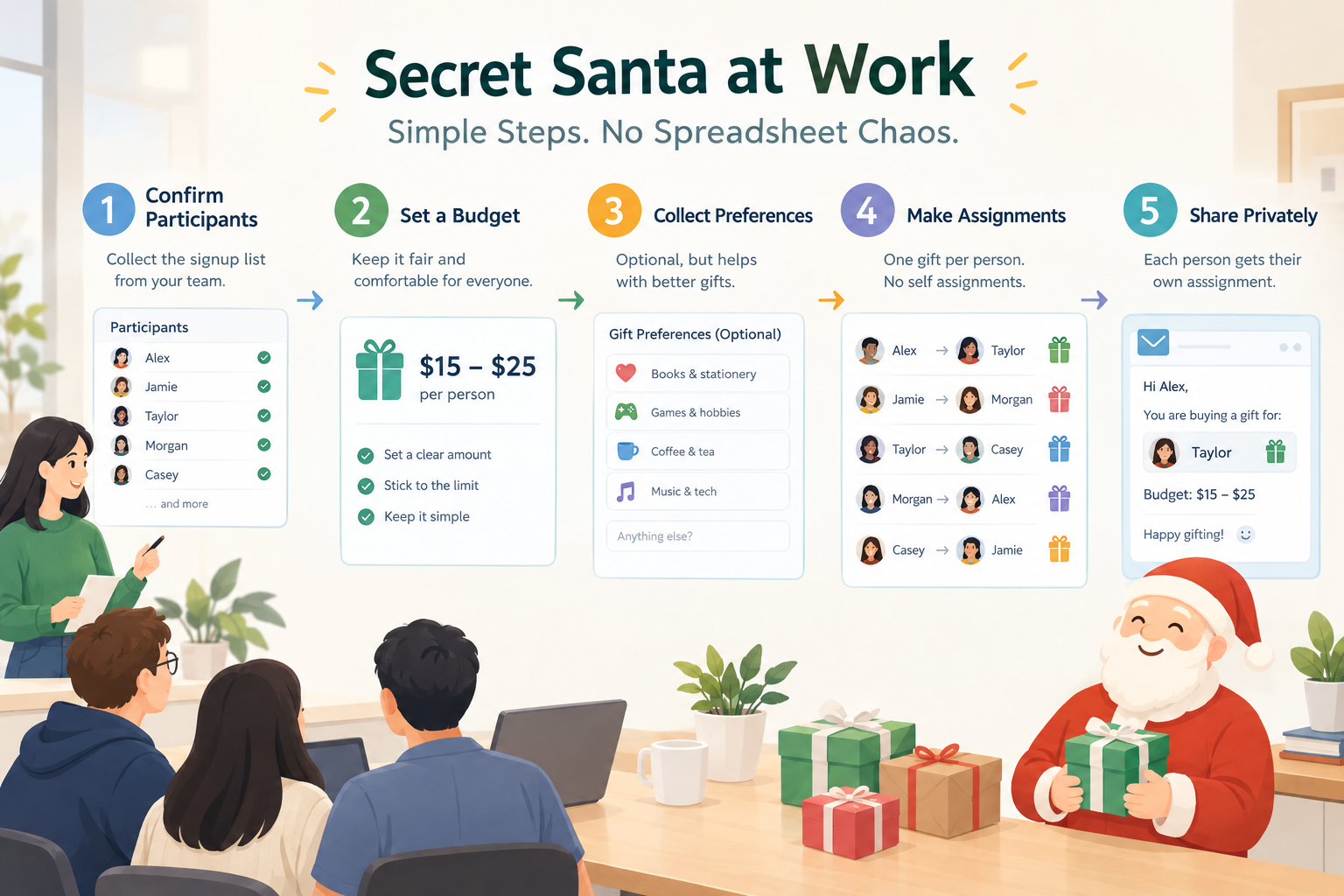
Start with clear Secret Santa rules
Before you generate any assignments, decide what participation means. A workplace Secret Santa can be casual, but unclear rules create most of the avoidable questions. Tell coworkers whether participation is optional, how much they should spend, when gifts should be exchanged, and whether handmade or secondhand gifts are acceptable. If the group includes remote employees, decide whether gifts will be mailed or whether the exchange will happen online.
Keep the rules short enough that someone can understand them in a minute. A typical office exchange might use a spending limit of $20 to $25, require participants to bring or ship one gift, and set a specific exchange date. A spending range is often more practical than an exact amount because it gives people some flexibility while keeping gifts reasonably comparable. Also explain what happens if someone joins late or needs to withdraw.
For example, imagine a team of 18 coworkers that wants a low-pressure holiday activity. The organizer could set a $20 maximum, make participation optional, collect a favorite snack or hobby from each volunteer, and schedule the exchange for the team's final meeting of the year. Those decisions can be written in one short message before the assignment process begins.
A useful rule is to collect only information that helps people choose appropriate gifts. Names and contact details may be necessary, while highly personal information usually is not. If coworkers submit preferences, remind them not to include sensitive information.
Build a participant list without overcomplicating it
Once the rules are set, make a final participant list. This is where spreadsheets can become unnecessarily difficult. You may start with a column for names, another for email addresses, another for preferences, and then add formulas to produce assignments. As people join, leave, or change their minds, the risk of editing the wrong cell increases.
Instead, create a clean list and establish a cutoff time for participation. Ask each person to confirm before the cutoff. Remove anyone who has declined, and check for duplicate names or entries. If your workplace has several teams, make sure everyone understands whether the exchange covers the whole organization, one department, or one specific team.
Here is a practical preparation sequence:
- Announce the activity and explain that participation is optional.
- Set the participation deadline.
- Set the spending limit and exchange date.
- Collect participant names and optional gift preferences.
- Remove withdrawals and duplicate entries.
- Confirm the final number of participants.
- Generate the Secret Santa assignments only after the list is final.
For example, if 24 employees initially sign up but two withdraw before the deadline, do not generate assignments for all 24 and then try to repair the results. Finalize the list at 22 participants first. This makes the assignment process easier to audit and communicate.
Use a Secret Santa generator for work to make assignments simpler
The assignment is the part that usually causes spreadsheet chaos. Every participant needs one recipient, nobody should be assigned themselves, and the organizer needs to communicate the results without exposing the entire matching list. For a small group, you can create a manual shuffled list, but a dedicated Secret Santa generator for coworkers is more convenient when you want a repeatable workflow.
A generator is especially useful when the group changes during setup. Instead of maintaining formulas and checking several columns, you can start with the finalized participant list and create the pairings in one workflow. The important point is that randomization solves the matching problem; it does not replace the organizer's responsibility for setting the rules and checking that the final exchange fits the workplace.
To run the assignment, use this process:
- Open the Secret Santa Generator.
- Enter the finalized participant names.
- Review the participant list before generating assignments.
- Generate the Secret Santa pairings.
- Check that every participant has a recipient and that no one has been assigned themselves.
- Share each person's recipient privately rather than publishing the complete assignment list.
Suppose your 12-person marketing team has finalized its list. You enter all 12 names, generate the assignments, and verify the results. Instead of posting all 12 pairings in a team channel, send each coworker only the information they need: their recipient, the budget, the deadline, and any approved preference information.
The key workflow assumption is simple: the tool helps create the random assignment, while the organizer controls participation, communication, and workplace rules. That distinction matters because a generator cannot know whether someone has a conflict with a particular recipient, whether a gift would be inappropriate, or whether your company's policies require special handling.
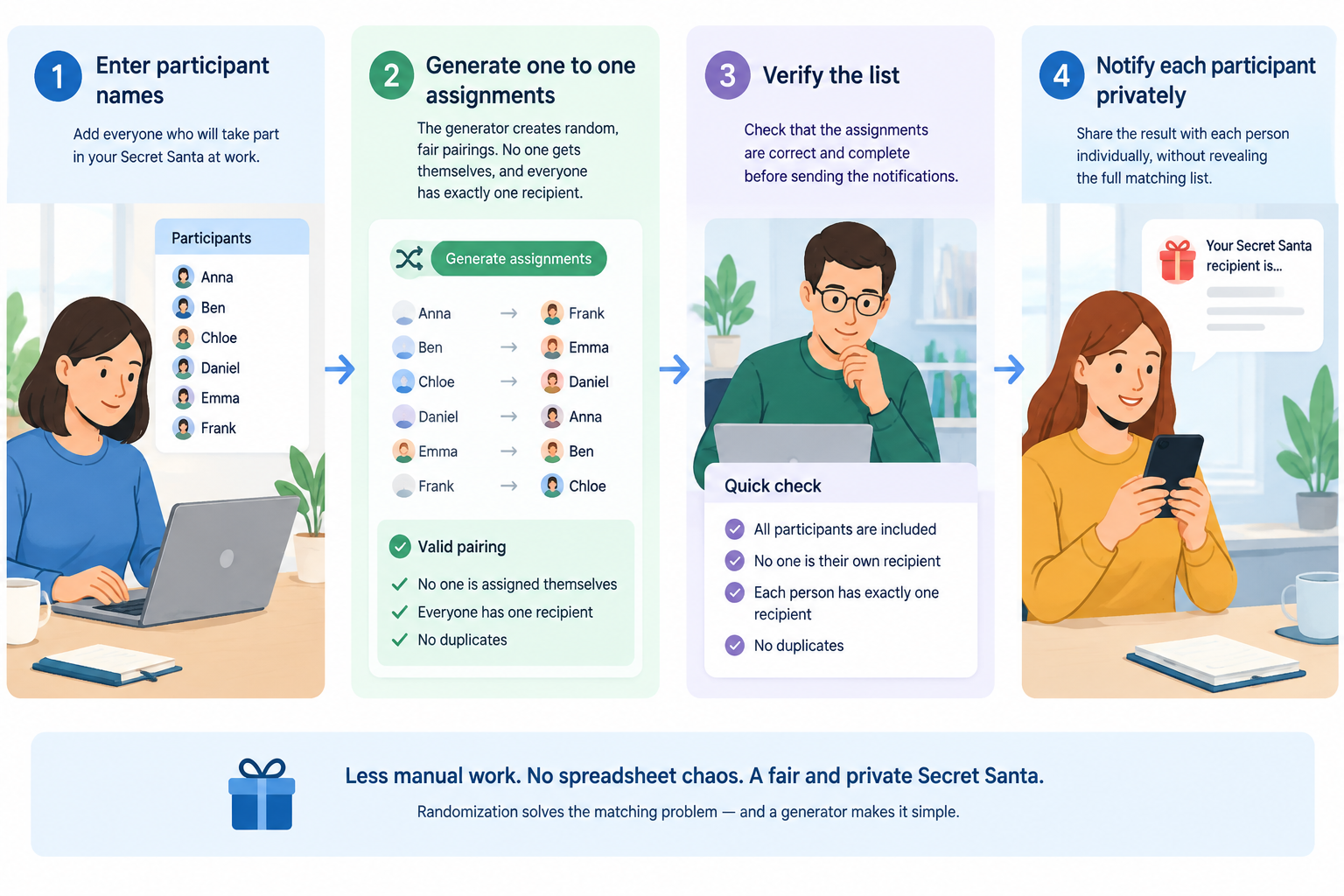
Keep Secret Santa assignments private
Privacy is part of the fun of Secret Santa, so avoid treating the assignment list like an ordinary team document. The complete list tells everyone who is buying for whom, which removes the surprise. More importantly, an openly shared list can expose information that participants did not need to see.
A simple approach is to separate organizer information from participant information. The organizer can retain the complete assignment record temporarily, while each participant receives only their own recipient. If you use email or workplace messaging, double-check the recipient before sending. For a larger event, sending individualized messages may take longer, but it reduces accidental disclosures.
For example, if Alex is assigned to buy for Jordan, Alex needs to know Jordan's name and any gift preferences that Jordan chose to share. Alex does not need to know who is buying Alex's gift, who is buying for the rest of the team, or the entire assignment table.
It is also sensible to establish a retention rule. Once the exchange is complete, there may be little reason to keep a detailed assignment file. If your organization has a policy for handling employee information, follow that policy rather than creating your own storage practice.
Make gift preferences useful, not restrictive
Gift preferences can make Secret Santa easier, especially for coworkers who do not know each other well. Ask for a few optional clues rather than a detailed shopping list. Useful prompts include favorite snacks, hobbies, colors, books, general interests, or items the person would rather avoid.
Avoid turning the exchange into a requirement that every gift match a specific wishlist. The point is to give the buyer enough context to make a thoughtful choice while leaving room for creativity. You should also give participants a way to mention practical restrictions that affect gifts, such as food allergies, without requiring them to disclose unrelated personal information.
Consider a 10-person remote team where coworkers live in different cities. Instead of asking everyone for a long wishlist, the organizer could collect three categories: favorite treat, hobby or interest, and one type of gift to avoid. The assigned coworker then has useful guidance without needing access to a detailed personal profile.
If the exchange involves food, drinks, fragrances, or other items that can create sensitivities, encourage participants to share relevant restrictions voluntarily and respectfully. When in doubt, choose a neutral gift or ask the organizer for guidance.
Plan for common workplace problems
Even a well-organized Secret Santa can encounter last-minute changes. Someone may forget the deadline, withdraw after assignments are generated, or accidentally reveal their recipient. Decide how you will handle these situations before they occur. A backup plan is more useful than trying to improvise after the exchange has started.
If someone withdraws before gifts are purchased, the organizer may need to regenerate the assignments. If someone withdraws after gifts have already been purchased, a simple reassignment can create a second problem. In that case, consider whether the organizer can step in with a replacement gift or another solution that fits the original rules.
For example, if Priya leaves the exchange two days before the event, do not immediately send a new public list to the entire team. First identify who was assigned to Priya and who was assigned by the affected participant. Then make the smallest practical adjustment while keeping the remaining assignments private.
A generator is not always the right fit. A very small group may prefer drawing names from a bowl, while a highly regulated workplace may require a specific internal process for employee information. A generator also cannot resolve sensitive conflicts between participants unless the organizer knows about those constraints and accounts for them separately.
Run the exchange with a simple communication plan
Good communication keeps the activity fun and prevents the organizer from becoming the help desk. Send one announcement before sign-up closes, one confirmation when assignments are ready, and one reminder before the exchange. Keep each message focused on what participants need to do next.
The assignment message should include the recipient, spending limit, exchange date, and any relevant gift preference information. It should also remind participants not to reveal their recipient. If the event is remote, include the delivery instructions or the meeting details in the reminder rather than burying them in the original announcement.
For example, a team could announce participation on Monday, close sign-ups Friday afternoon, generate assignments Friday evening, and send private notifications that night. A reminder the day before the exchange can ask participants to bring or ship their gifts without repeating the full participant list.
If you regularly organize workplace activities, you can also reuse the same process for other fair random selections. The Random Group Generator is designed for balanced group creation, while the Random Pair Generator is useful when you need participants matched into pairs for an activity.
A practical Secret Santa workflow from start to finish
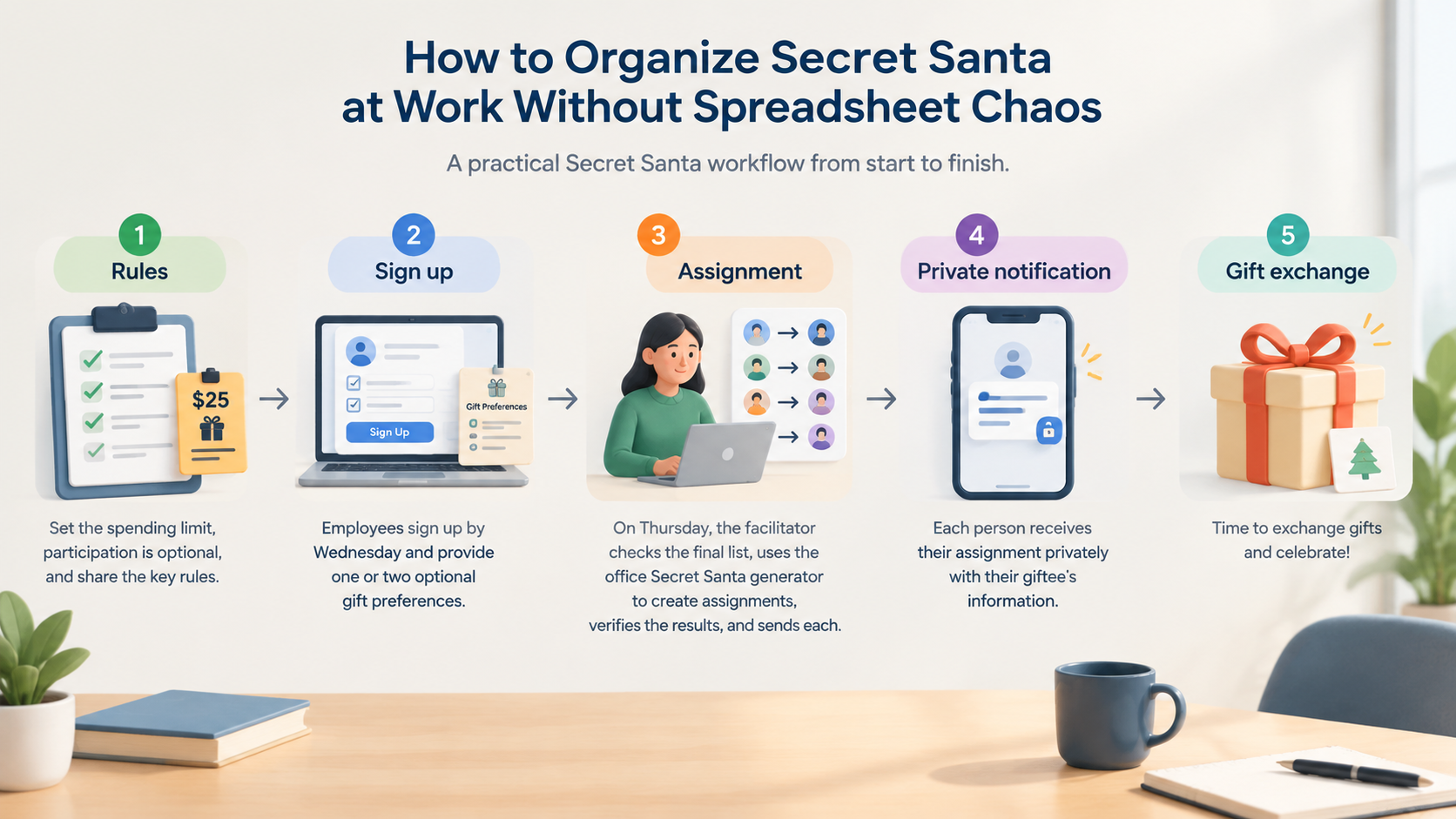
The simplest way to organize a workplace exchange is to treat it as a short project with five stages: rules, sign-up, assignment, private communication, and exchange. Keeping these stages separate makes it easier to identify problems before they affect everyone.
Here is a complete example. A corporate training team of 16 people wants to hold a Secret Santa during its December meeting. The facilitator announces a $25 spending limit and makes participation optional. Employees sign up by Wednesday and provide one or two optional gift preferences. On Thursday, the facilitator checks the final list, uses the office Secret Santa generator to create assignments, verifies the results, and sends each participant only their own recipient. The facilitator sends a reminder before the meeting and handles any late issue privately.
This approach avoids the most common spreadsheet problems because the organizer does not need to maintain a chain of formulas as people join or leave. More importantly, it gives participants a predictable experience: they know the rules, they know when they will receive their assignment, and they know what information they need to keep confidential.
FAQ
What is the easiest way to organize Secret Santa at work?
Set the budget, participation deadline, exchange date, and any gift rules first. Then collect a final participant list, use a Secret Santa generator to create assignments, verify the results, and send each person their recipient privately. This is usually simpler than maintaining a spreadsheet with manual formulas and repeated edits.
How many people do you need for a workplace Secret Santa?
There is no fixed minimum for a Secret Santa exchange, but the activity generally becomes more useful as the group grows because random assignment is harder to coordinate manually. For a very small group, drawing names manually may be perfectly adequate. For larger or changing groups, a generator can reduce administrative work.
Should the Secret Santa assignment list be shared with everyone?
Usually, no. If the goal is to keep the exchange secret, participants should receive only the recipient they need. The organizer can retain a temporary complete record to resolve problems, subject to the organization's information-handling rules, but publishing every pairing defeats the purpose of the activity.
What should I do if someone drops out after assignments are made?
Handle the change privately and make the smallest adjustment that keeps the exchange workable. If the withdrawal happens before gifts are purchased, regenerating or carefully repairing the affected assignments may be straightforward. If gifts have already been purchased, the organizer may need to arrange a replacement or another solution rather than disrupting the entire exchange.
Can a Secret Santa generator handle workplace gift restrictions?
A generator can create the random assignments, but workplace restrictions still require organizer judgment. If participants have conflicts, special policies, or sensitive gift restrictions, review those requirements before finalizing assignments. A random assignment should support the event rules, not replace them.
Ready to organize your workplace Secret Santa?
You do not need a complicated spreadsheet to run a smooth exchange. Set clear rules, finalize your participant list, create the assignments, keep them private, and give everyone a simple deadline and budget. When you are ready to make the pairings, try the Secret Santa Generator for Work and use the resulting assignments as one part of a clear, organized workplace workflow.
Sources
Sources
- Secret Santa — background on the gift-exchange tradition and its common rules
Related guides
- How to Do Secret Santa Without Email: A Simple Private-Link Method — Learn how to run Secret Santa without email using private reveal links, a clear participant list, and a sim…
- How to Exclude Couples From Secret Santa — Learn how to exclude couples from Secret Santa fairly with clear rules, practical steps, and a Secret Santa…
- How to Organize a Remote Secret Santa: A Simple Guide for Teams — Learn how to organize a remote Secret Santa for distributed teams with clear steps, privacy tips, and tools…
- Secret Santa Generator: Fair Private Name Draws — Learn how a secret santa generator creates fair private gift exchanges with no self matches, exclusions, an…
Related Tools
Pick the right generator for the job — every tool runs free in your browser.