
team picker wheel
Team Picker Wheel: Randomly Split Any List into Fair Teams
Learn how a team picker wheel works, how to randomly divide names into teams, and how teachers and facilitators can create fair, balanced group activities.

Dividing people into teams sounds simple until you have a classroom full of students, a workshop with different attendance numbers, or a company event where everyone wants to know which group they belong to. A team picker wheel offers a visual way to select names and organize people into teams without spending several minutes assigning everyone manually. Instead of repeatedly choosing people yourself, you can use a random selection process to make group formation more straightforward, transparent, and engaging.
A team picker wheel is useful for teachers, corporate trainers, workshop leaders, event organizers, and anyone who regularly creates temporary groups. The key is understanding what the wheel can do, how to prepare your participant list, and how to turn individual selections into complete teams. This guide explains the process, provides practical examples, and helps you decide when a wheel is more appropriate than a traditional group generator.
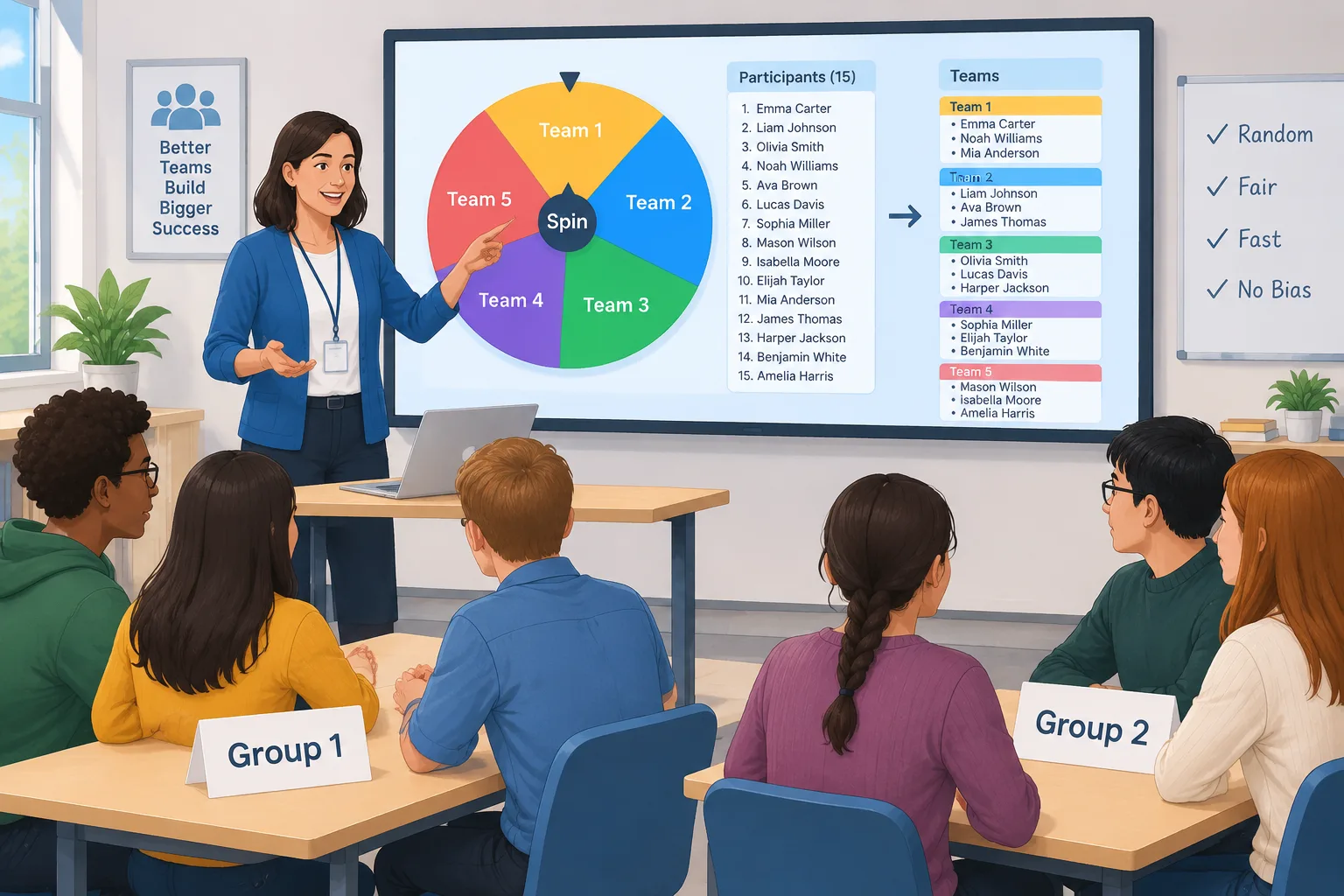
What Is a Team Picker Wheel?
A team picker wheel is a digital selection tool that helps users choose names randomly from a prepared list. Participants are entered as individual names or entries, and the wheel provides a visual way to make selections. Depending on the tool and its settings, selected entries can be removed or managed so that the same person is not accidentally selected again during a selection round.
The visual format makes the process easy to follow. Rather than watching someone assign names privately, participants can see the selection process happen. This can be particularly helpful in classrooms, training sessions, and group activities where transparency matters. A teacher might use the wheel to select students for project teams, while a facilitator could use it to assign volunteers to workshop activities.
A team picker wheel should not automatically be confused with a complete team generator. A selection wheel chooses entries, while a team generator organizes a complete participant list into groups according to a requested group size or number of teams. Some workflows use both approaches: a wheel creates the excitement of selection, while a generator handles the full distribution.
For example, imagine a teacher has 24 students and wants six teams. The teacher can use a wheel to make visible selections, but manually building all six teams may take longer than using a dedicated grouping tool. Choosing the right approach depends on whether the main goal is a visible selection or a complete set of groups.
Why Use a Team Picker Wheel Instead of Choosing Names Manually?
Manual team assignments can become repetitive, particularly when the same person is responsible for organizing several activities each week. Even when the organizer tries to distribute people fairly, personal preferences and unconscious assumptions can influence the decisions. Random selection introduces a consistent process that does not depend on the organizer choosing individual participants.
A team picker wheel also makes participation more engaging. Students often pay closer attention when they can see a name being selected. In corporate training, the visual process can add a little energy to an otherwise routine activity. This does not mean that a wheel automatically produces better learning outcomes or more effective teams. It simply changes how selection is presented and reduces some of the work involved in choosing names.
Consider a professional development workshop with 18 participants. The facilitator needs three groups for a discussion exercise. Instead of calling out names and deciding who should join each table, the facilitator can prepare a list and use a selection process to allocate participants. The process is easier to explain because everyone starts with the same selection rules.
There are practical limits, however. Random selection does not account for specialist skills, language requirements, accessibility needs, interpersonal conflicts, or different experience levels unless the organizer handles those factors separately. A wheel is therefore a useful starting point, not a replacement for thoughtful facilitation.
How to Use a Team Picker Wheel Step by Step
Using a team picker wheel effectively starts before the first spin. A clean participant list, a clear grouping plan, and a simple explanation help prevent confusion. The following process works for classroom activities, workplace workshops, and informal team-building events.
- Prepare your participant list. Collect the names of everyone who should participate. Check spelling, remove duplicates, and confirm attendance. If someone is absent, remove that entry before starting.
- Choose your team structure. Decide how many groups you need or how many people should be in each group. For example, 20 participants could be organized into four teams of five.
- Enter the names. Add the participant names to your selected wheel or grouping tool. Use one entry per person so that everyone has an appropriate opportunity to be selected.
- Start the selection process. Use the wheel to make a selection. Explain the rules before starting so participants understand whether selected names remain eligible or are removed from subsequent selections.
- Record each assignment. Keep track of selected names and the team to which each person belongs. This is particularly important when creating several teams over multiple rounds.
- Review the final groups. Check that every participant has been assigned once and that group sizes match your plan. Make any necessary adjustments for practical requirements.
- Share the results. Display the completed team list, announce the assignments, or share the results through your usual classroom or workplace communication channel.
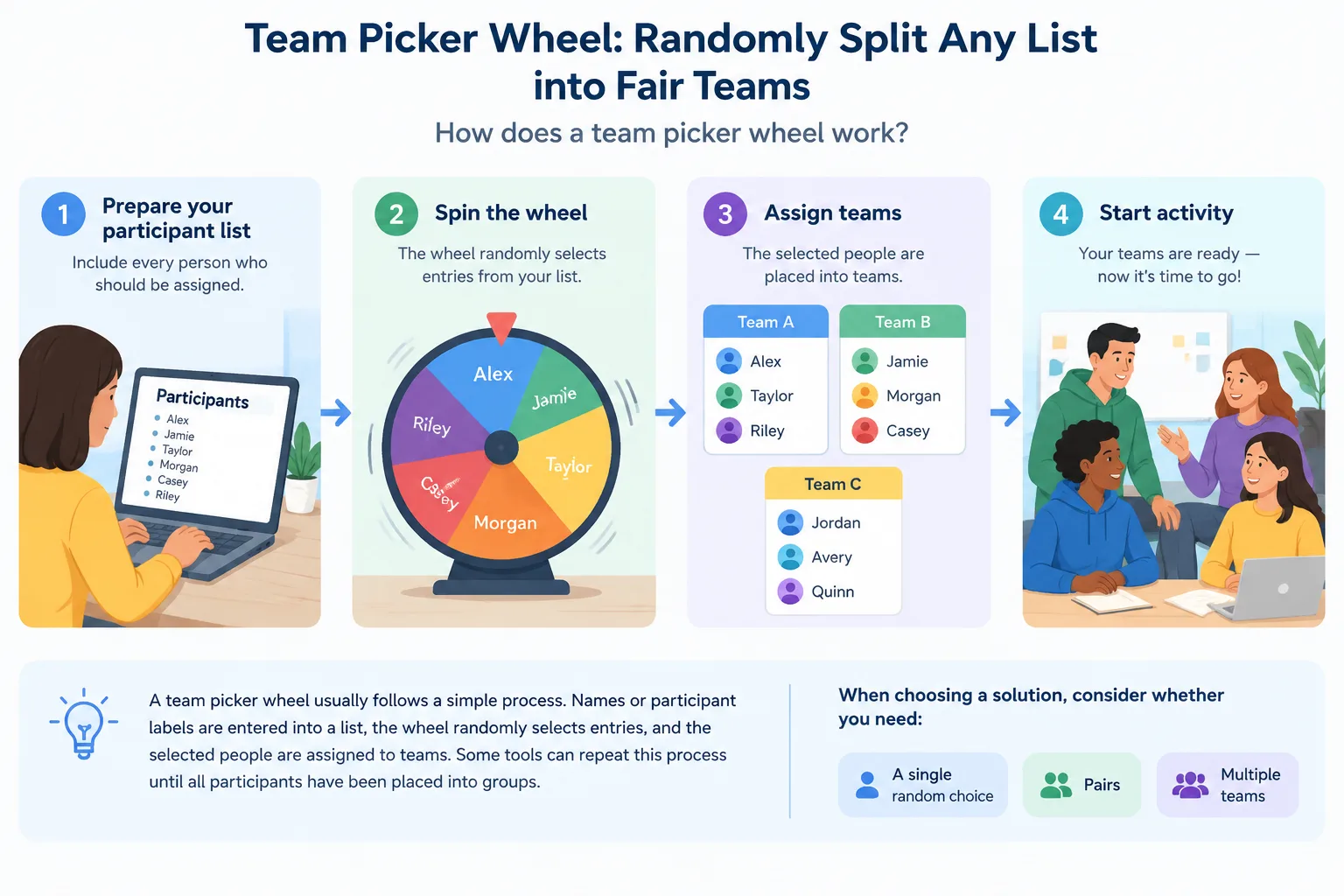
A useful example is a classroom debate with 16 students. The teacher wants four teams of four. After checking attendance, the teacher enters all 16 names and uses a selection process to distribute them across the four teams. Each selected name is recorded before the next selection. Once all assignments are complete, the teacher checks that there are no missing or repeated names.
For a recurring activity, save a clean copy of the original participant list. This makes it easier to prepare another round without accidentally carrying over old assignments. If the class needs different groups each week, start with the complete current roster rather than editing an old team list without checking it.
How to Create Fair and Balanced Teams
Randomness and balance are related, but they are not identical. A random process can give everyone an equal opportunity to be selected while still producing groups with different sizes or combinations of experience. Understanding this distinction helps teachers and facilitators choose an appropriate method.
Suppose a training session has 23 participants and needs four teams. Dividing 23 by four produces five people per team with three participants left over. A practical distribution is three teams of six and one team of five. This keeps the difference between the largest and smallest teams to one person.
A simple way to plan this distribution is:
- Count the total number of participants.
- Decide whether you want a fixed number of teams or a fixed team size.
- Divide the participant count by the number of teams.
- Give each team the whole-number result.
- Distribute the remaining participants one at a time across different teams.
- Review the results and make sure the group sizes are workable for the activity.
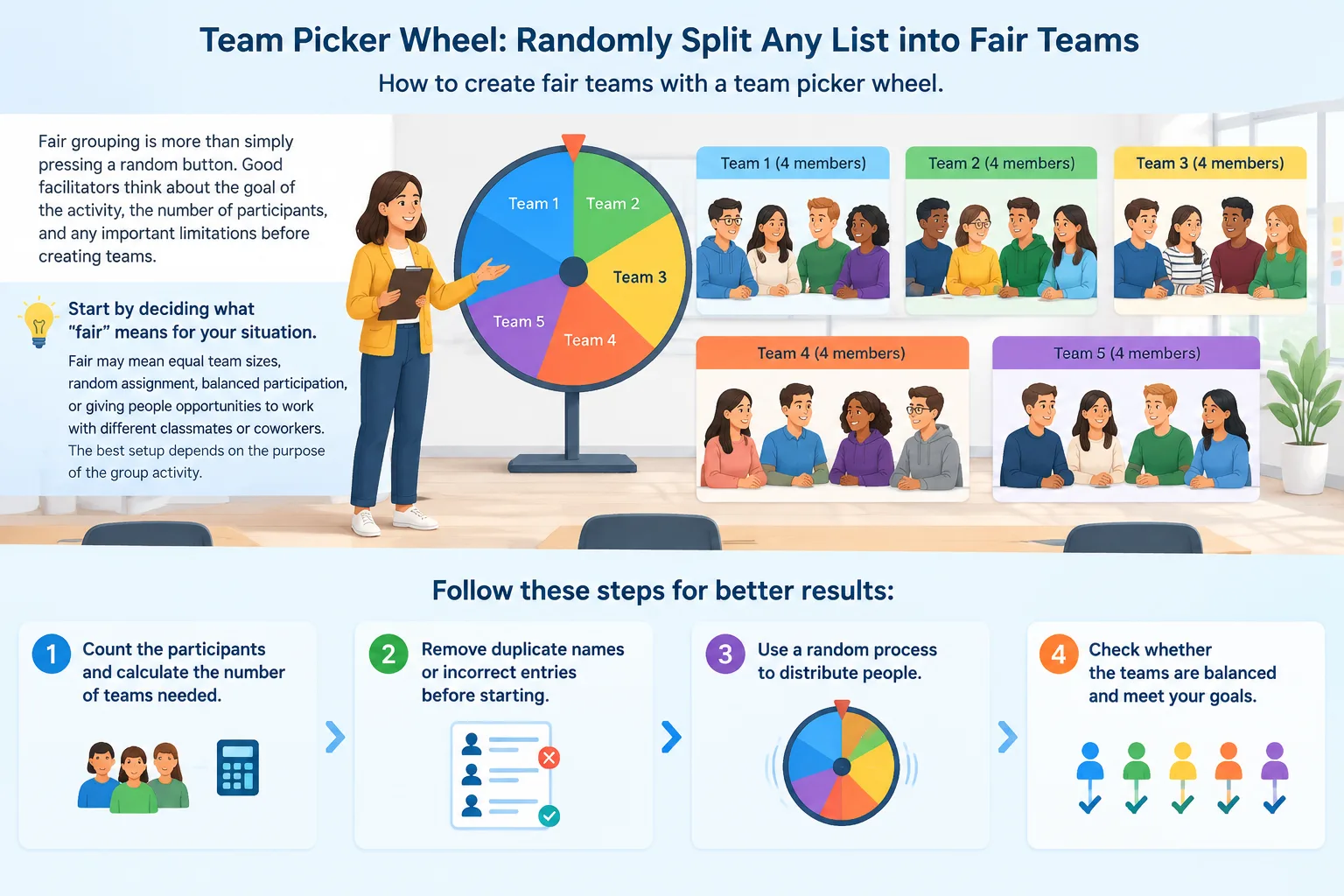
For example, a teacher organizing 27 students into five teams could create two teams of six and three teams of five. Everyone is included, and the largest team differs from the smallest by only one participant. This is often a reasonable arrangement for discussions, collaborative worksheets, and short presentations.
If the activity requires specific abilities or experience levels, use a different approach. A science project might benefit from mixing students with different levels of subject knowledge. A corporate workshop might require each group to include someone familiar with a particular business process. In these situations, the organizer can first create suitable participant categories and then use random selection within those categories.
The important principle is to separate fair selection from suitability for a particular task. Random grouping can help reduce arbitrary choices, but it cannot independently guarantee equal skill, equal participation, or successful collaboration.
Team Picker Wheel vs. Random Group Generator
A team picker wheel and a random group generator solve related problems, but they serve different purposes. A wheel is especially useful when the visible selection process is part of the activity. A random group generator is more convenient when the main objective is to divide an entire list into several groups quickly.
For instance, a teacher running a classroom quiz might use a wheel to select a student to answer a question. However, if that teacher needs six complete teams for a longer project, a dedicated grouping tool can reduce the amount of manual work. The organizer enters the roster, chooses the desired grouping structure, and reviews the resulting teams.
Here is a practical comparison:
| Requirement | Team picker wheel | Random group generator |
|---|---|---|
| Visible name selection | Well suited | Depends on the interface |
| Creating complete teams | May require recording assignments | Main purpose |
| Managing uneven group sizes | May require manual planning | Can support planned distribution depending on settings |
| Selecting one participant | Well suited | Usually unnecessary |
| Repeating classroom grouping | Possible with preparation | Convenient for repeated group creation |
| Adding excitement to selection | Strong visual element | Depends on presentation |
If you need complete groups, the Random Group Generator is designed for that workflow. For activities involving two-person collaboration, the Random Pair Generator offers a more focused way to create pairs.
For a lesson where the teacher needs to choose one student to demonstrate a solution, the Random Student Picker is more directly aligned with the task. These tools address different organizational needs, so selecting one should depend on the outcome you want rather than the visual format alone.
Practical Team Picker Wheel Examples for Schools and Workplaces
In K-12 classrooms, a team picker wheel can support quick decisions during warm-up exercises, classroom discussions, reading groups, and short collaborative tasks. A teacher with 20 students might prepare a participant list before class and use the selection process to distribute students into four groups. The teacher can then display the assignments on a board and explain the objective of each activity.
In higher education, instructors can use random selection to organize discussion groups for case studies or peer feedback. For example, a seminar with 30 students might need six groups of five. The instructor can prepare the roster, select the grouping method, and check the final distribution before asking students to discuss a reading or solve a problem together. If a particular project requires specialist knowledge, the instructor should review the assignments rather than assume random distribution will meet every requirement.
Corporate trainers face similar challenges. A workshop may include employees from different departments who do not normally collaborate. Randomly assigning participants can introduce people to colleagues outside their usual working groups. A facilitator can use the group name generator after creating the teams to give each group an easy-to-remember identity.
Event organizers can also use selection tools for breakout discussions, networking activities, volunteer assignments, and small-group games. Imagine a conference with 40 attendees and eight discussion tables. The organizer can prepare a list before the session and assign five participants to each table. If attendance changes, the organizer should update the roster before distributing the final assignments.
These examples share one practical lesson: preparation matters more than the number of spins. A correct participant list and a clearly defined team structure make the selection process easier to manage.
Tips for Running Team Selection in Online and Hybrid Sessions
Online workshops add another challenge because participants may be joining from different locations or devices. A facilitator needs to make the selection process visible and communicate the results clearly. A wheel can be shared during a live meeting when its interface is accessible through the presentation or screen-sharing workflow.
Before the session, prepare the participant list and decide how assignments will be communicated. Do not assume that every attendee will see a shared screen clearly or be able to read small text. Keep the final team assignments available in a written format, such as a meeting message or shared document.
For a hybrid training session with 12 people in the room and eight joining remotely, the facilitator has 20 participants. Four groups of five might be appropriate, but each group should have a practical way to communicate. The facilitator can distribute participants across the groups and then check whether each team has suitable access to the required discussion space.
A good workflow is to:
- Confirm who is attending in person and online.
- Prepare one complete participant list.
- Decide the number and size of breakout groups.
- Make the selection process visible where appropriate.
- Record the final assignments in writing.
- Confirm that everyone can access their assigned discussion space.
If your organization uses Zoom, Microsoft Teams, Google Classroom, or Slack, consider how the final assignments will be transferred into the platform. Do not assume that a selection wheel automatically creates meeting rooms or sends assignments to those services. Check the available workflow and handle any required room creation or message sharing separately.
Common Mistakes to Avoid When Using a Team Picker Wheel
One common mistake is starting the selection process before checking the participant list. Duplicate names can result in repeated assignments, while missing names can leave someone without a team. Always compare the final roster with the attendance list before the activity begins.
Another mistake is choosing a team size without considering the task. Groups of eight may work for a broad brainstorming session, but they can make it harder for everyone to contribute during a short discussion. Smaller groups may be more manageable for activities where each person needs time to speak. The appropriate size depends on the objective, available time, and type of interaction.
A third mistake is treating every random result as automatically fair. Random selection can distribute opportunities without favoring a particular person, but it may still create teams with uneven experience or accessibility needs. If the activity has important participation requirements, review the assignments and explain any necessary adjustments.
Finally, avoid changing the rules halfway through the activity. If participants expect selected names to be removed from the remaining pool, follow that process consistently. If a selection can be repeated, explain the reason and apply the same rule to everyone. Clear expectations help participants understand the result and reduce disagreements.
Frequently Asked Questions
What is a team picker wheel used for?
A team picker wheel is used to select names randomly from a prepared participant list. Teachers, trainers, and event organizers can use it to support classroom activities, workshop assignments, and team-building exercises. It is particularly useful when the selection process should be visible to participants.
How do I use a team picker wheel to make multiple teams?
Prepare a complete list of names and decide how many teams you need. Select participants using a consistent process, recording each assignment as you go. Check the completed teams for missing names, duplicates, and workable group sizes before beginning the activity.
Can a team picker wheel create equal-sized teams?
A wheel does not necessarily create equal-sized teams automatically. You need to plan the distribution and track the assignments. If the participant total does not divide evenly, distribute the remaining people across different teams so that the group sizes differ as little as possible.
Is a team picker wheel better than a random group generator?
The two tools serve different purposes. A team picker wheel is useful for visible individual selections, while a random group generator is more suitable when you need to divide a complete list into several teams. Choose based on whether your main goal is selection or complete group organization.
Can teachers use a team picker wheel for classroom activities?
Yes. Teachers can use a team picker wheel to select students for presentations, discussions, games, and collaborative exercises. Before using it, check attendance and consider whether the activity requires specific skills, accommodations, or experience levels that random selection cannot account for.
How can I make random team assignments more balanced?
Start by choosing a practical team size and distributing any remaining participants across different teams. If you need a mix of experience, abilities, or roles, organize participants into suitable categories before making random selections. Review the final groups to ensure that they meet the requirements of the activity.
Try a Random Team Selection Workflow
A team picker wheel can make choosing participants more engaging, but successful group activities depend on more than the selection itself. Prepare an accurate list, decide how many teams you need, explain the selection rules, and review the results before starting. When you need complete teams rather than individual selections, use a dedicated grouping workflow to reduce manual assignments and keep the process organized.
Ready to organize your next classroom activity, workshop, or team exercise? Start with the Random Group Generator to divide your participant list into teams and make your next group activity easier to manage.
Related Tools
Pick the right generator for the job — every tool runs free in your browser.