
team names
Random Team Name Generator: How to Name Groups Quickly and Fairly
Learn how to use a random team name generator to instantly create fun, fair group names for classrooms, workshops, and team building. Step-by-step guide.

You've just used a random group generator to split your class or workshop into teams. But without names, those groups feel like 'Group 1' and 'Group 2'—forgettable and impersonal. A random team name generator solves that in seconds. It instantly creates fun, neutral, and memorable names so every group starts with a shared identity. This guide explains how it works, how to use it, and how to make team naming a smooth part of your facilitation routine.
Why Team Names Matter (And Why Random Works)
When groups have names, members feel a stronger sense of belonging. Research on group dynamics shows that even a simple label can increase cooperation and effort. In a classroom, a named group is more likely to take ownership of a project. In a corporate workshop, a team name breaks the ice and gives people a quick way to refer to each other.
But coming up with names on the spot is harder than it sounds. You might default to 'Team A' and 'Team B,' which are functional but forgettable. You could let each group choose its own name, but that takes time and sometimes leads to one group dominating the creative process. A random team name generator provides a fair, fast alternative: everyone gets a name from the same pool, with no favoritism.
Random naming also avoids the awkwardness of picking names that accidentally favor one group. If you generate names from a neutral word list, every team starts on equal footing. That's especially useful when you're facilitating multiple sessions and want to keep things fresh.
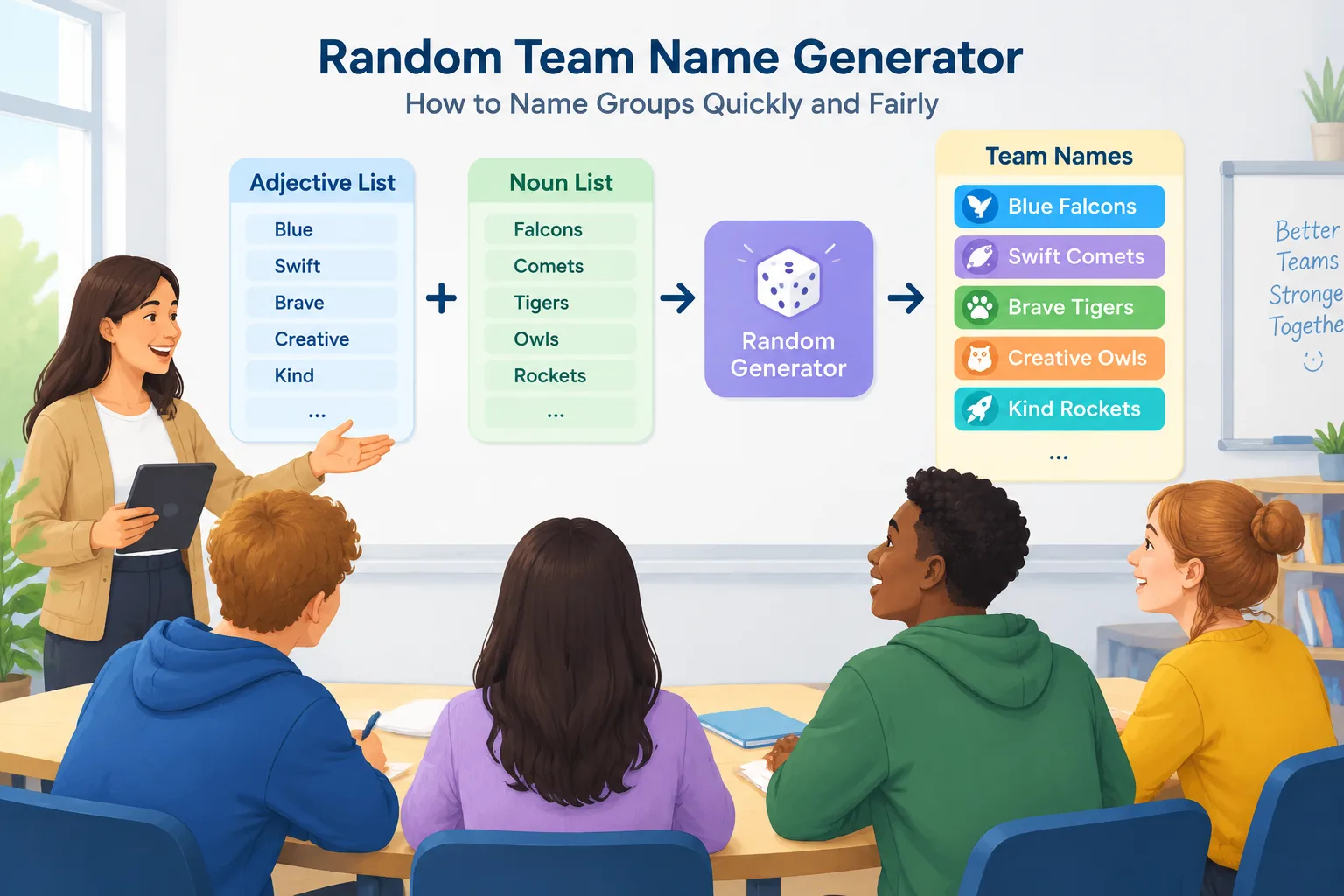
What Is a Random Team Name Generator?
A random team name generator is a simple tool that combines words—usually an adjective and a noun—to create unique team names. For example, it might pair 'Mighty' with 'Tigers' to get 'Mighty Tigers.' Because the combination is random, you get names that are creative but not repetitive. The tool can generate dozens of names at once, so you can assign one to each group instantly.
On Random Group Generator, the Group Name Generator is designed for exactly this purpose. You can choose how many names you need, and the tool will produce a list you can copy, edit, or assign to groups. The names are generated locally in your browser, so no data is sent to a server—a nice bonus for privacy-conscious educators.
It's different from a random group generator, which splits people into teams. The name generator comes after that step. You can also use it alongside a random pair generator when you want quick names for partner activities. The tool supports multiple languages, so you can generate team names in English, Spanish, French, and several other languages if you're working with a multilingual group.
How to Use the Group Name Generator: Step-by-Step
Using the generator is straightforward, but a few small decisions make the results better. Here's a step-by-step workflow you can follow.
- Form your groups first. Use the Random Group Generator to split your participants into the number of teams you need. Decide whether you want balanced groups by skill, random assignment, or another method. Once you have your groups, you're ready to name them.
- Open the Group Name Generator. Go to the Group Name Generator page. You'll see a simple interface where you can specify how many names you want.
- Set the number of names. Enter the same number as your groups. For example, if you have five groups, ask for five names. The tool will generate a list of unique combinations.
- Review and adjust. Look through the generated names. If one feels off—too silly, too similar to another, or potentially offensive—you can regenerate or simply pick a different one from the list. Most tools let you generate more names than you need so you have backups.
- Assign names to groups. You can read them aloud, write them on the board, or have groups pick randomly from a hat. If you're meeting online, paste the names into the chat or into your slide deck. For a more interactive approach, let each group choose from the generated list—that gives them a small sense of agency.
- Use the names throughout the session. Refer to groups by their names during activities. This reinforces identity and makes transitions smoother. At the end, you can even give a small prize to the group that best lived up to its name.
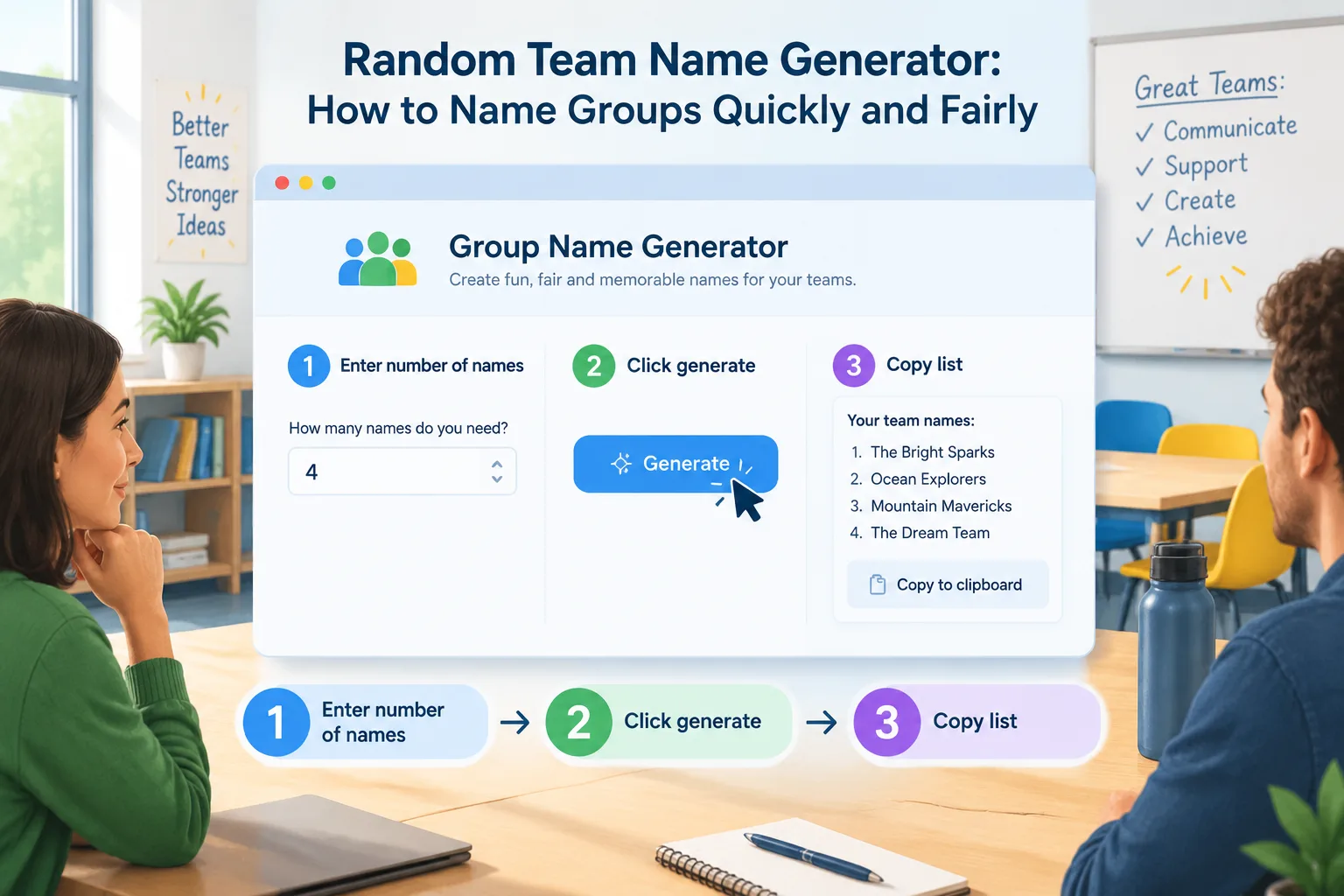
This entire process takes less than two minutes. In a classroom, that's time saved for actual learning. In a workshop, it keeps energy high and avoids the lull of manual naming.
Real Examples: Team Names in Classrooms and Workshops
Let's look at how this works in three real-world scenarios.
Example 1: 5th-grade science class. A teacher splits 28 students into six groups using the random group generator. She then opens the Group Name Generator and asks for six names. The tool produces 'Curious Comets,' 'Bright Sparks,' 'Wild Waves,' 'Clever Coyotes,' 'Solar Flares,' and 'Deep Divers.' She writes each name on a sticky note and places one on each table. Students immediately start referring to themselves as 'the Comets' or 'the Coyotes.' The names give each group a quick identity and make it easier to call on teams during experiments.
Example 2: Corporate training workshop. A facilitator is running a half-day session on agile teamwork with 30 participants. She creates five groups using the random group generator, then uses the name generator to get five names: 'Blue Falcons,' 'Red Rockets,' 'Green Giants,' 'Silver Sharks,' and 'Golden Eagles.' She projects the names on the screen and asks each group to claim one. The names add a playful touch to a serious topic and help people remember which team they're in. During breaks, participants joke about their team mascots, which builds camaraderie.
Example 3: University seminar. A professor teaching a small seminar of 15 students wants to form three discussion groups for a debate. She uses the random group generator to create three groups, then the name generator to get 'Socratic Circle,' 'Aristotle's Allies,' and 'Plato's Punks.' The names are themed enough to fit the philosophy course but still random. Students later say the names made the debate feel more like a friendly competition.
In each case, the random team name generator saved time and produced names that were memorable and fair. No group felt left out, and the facilitator didn't have to invent names on the spot.
Tips for Better Team Names (and Common Pitfalls)
Random generation is fast, but a little curation goes a long way. Here are some practical tips.
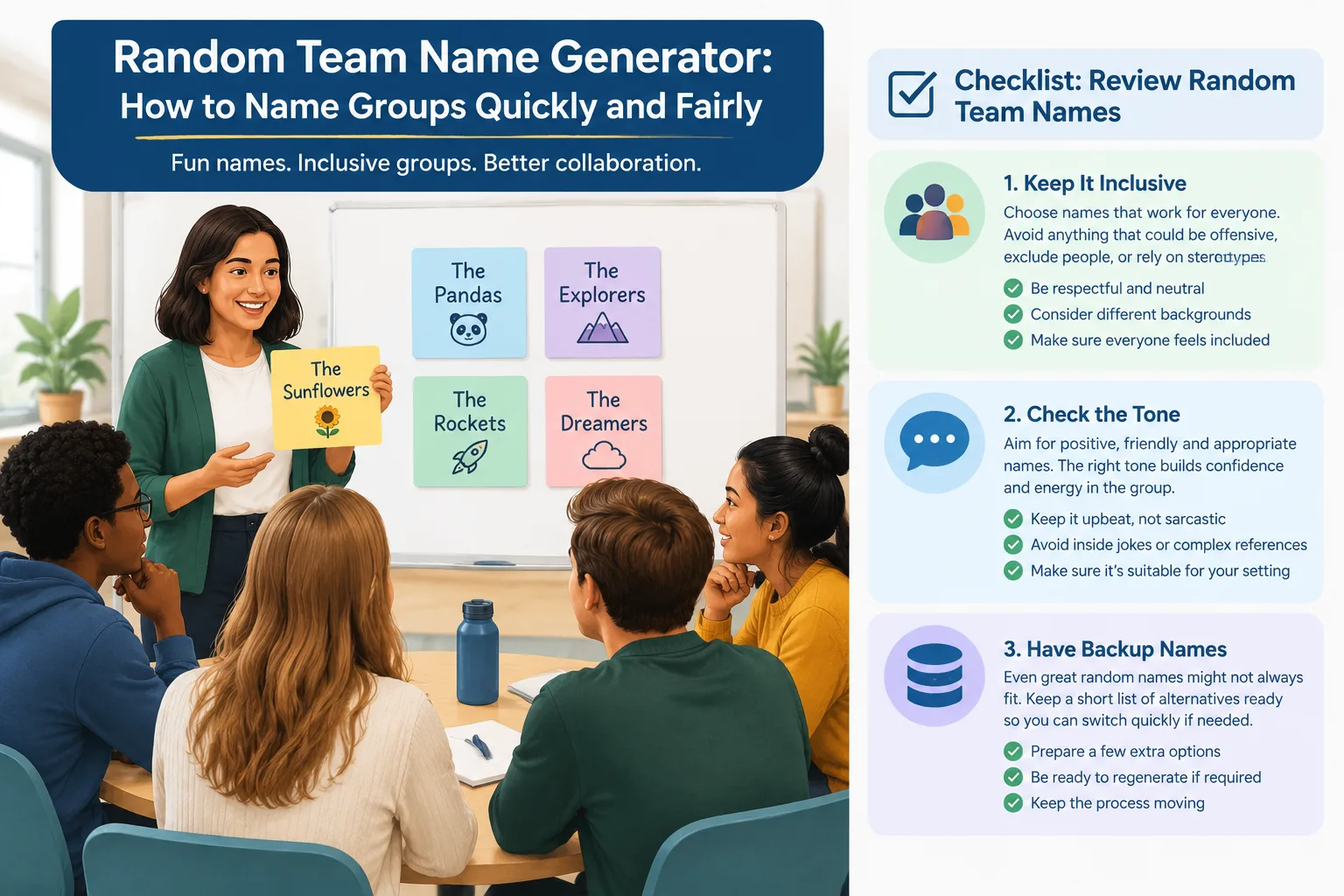
- Generate more names than you need. If you have five groups, generate 10–15 names. This gives you options if one name doesn't fit the context or if two names sound too similar.
- Check for unintended meanings. A random combination can sometimes create a name that sounds odd or has a negative connotation in your language or culture. A quick scan prevents awkwardness.
- Keep it inclusive. Avoid names that reference stereotypes, abilities, or backgrounds. The generator uses neutral word lists, but it's always good to review.
- Match the tone to your audience. For young children, silly names like 'Wiggly Worms' work well. For a professional workshop, names like 'Strategic Minds' might be more appropriate. Some generators let you choose a theme—if yours does, use it.
- Let groups personalize if time allows. After assigning a random name, you can invite groups to add a slogan or a hand gesture. This increases ownership without adding much time.
- Don't overthink it. The goal is a quick label, not a branding exercise. If a name is good enough, move on.
Common pitfalls include spending too long deliberating over names, using the same names every session (which gets stale), and accidentally assigning a name that one group dislikes. Random generation plus a quick review solves most of these.
Comparing Random Team Names to Manual Naming
You might wonder whether it's worth using a generator at all. Let's compare the two approaches.
| Aspect | Random Team Name Generator | Manual Naming |
|---|---|---|
| Speed | Generates dozens in seconds | Takes minutes of brainstorming |
| Fairness | Equal pool for all groups | May favor certain groups |
| Creativity | Surprising combinations | Limited by your imagination |
| Control | You can review and edit | Full control from the start |
| Best for | Time-pressed facilitators | Groups with strong preferences |
Manual naming can be great if you have a specific theme or if you want groups to name themselves. But when you're short on time or running multiple sessions, a random generator is more efficient. It also removes the pressure of coming up with names on the spot, which can be surprisingly stressful when a room full of people is waiting.
Another advantage: the random approach protects against unconscious bias. If you always name groups after colors, you might inadvertently create hierarchies (e.g., 'Red Team' sounds more aggressive). A generator draws from a broad word list, so you get more variety with less effort.
Of course, a generator isn't perfect. It won't understand inside jokes or curriculum-specific references. That's why the review step matters. But as a starting point, it's hard to beat.
FAQ
Can I use the random team name generator for large groups?
Yes. The tool can generate as many names as you need, whether you have three groups or thirty. For very large events, you might generate a long list and then assign names systematically (e.g., first name to Group 1, second to Group 2, and so on). Just be sure to generate extra names so you have backups.
Does the generator work in languages other than English?
The platform supports nine languages, including Spanish, French, German, and Japanese. If you're facilitating a multilingual group, you can switch the interface language and generate names in that language. The word lists are adapted for each language, so the combinations sound natural.
What if I need names for random pairs instead of groups?
You can use the Random Pair Generator to create pairs, and then use the Group Name Generator to name each pair. Or, if you're working with a small number of pairs, you can simply generate a few names and assign them. For partner activities, two-word names like 'Dynamic Duo' work well.
Can I edit the names after they're generated?
Absolutely. The generator produces a list, and you can copy it into a document and edit any name that doesn't fit. You can also regenerate the list if you want a completely different set. The tool is meant to be a starting point, not a final verdict.
Are team names really that important for group work?
Research on group dynamics suggests that even small labels can increase cohesion and effort. A name gives a group a shared identity and a quick way to refer to itself. While a name alone won't guarantee success, it's a low-cost way to signal that each group matters. Many educators and facilitators find that named groups participate more and feel more accountable.
Ready to Name Your Groups?
Naming groups doesn't have to be a chore. With a random team name generator, you can create fair, fun, and memorable names in seconds. Whether you're teaching a class, running a workshop, or organizing a team-building event, the right name helps groups bond and stay engaged.
Try the Group Name Generator now, and pair it with the Random Group Generator to streamline your entire grouping workflow. If you're working with individual students, the Random Student Picker is another handy tool. Give your groups an identity—and watch them rise to the occasion.
SponsoredExplore more resources