
spin wheel group
Spin Wheel Group: Build Fair Random Groups in Seconds
Learn how to use a spin wheel group to build fair, balanced groups fast. Step-by-step setup, real classroom and workshop examples, and mistakes to avoid.

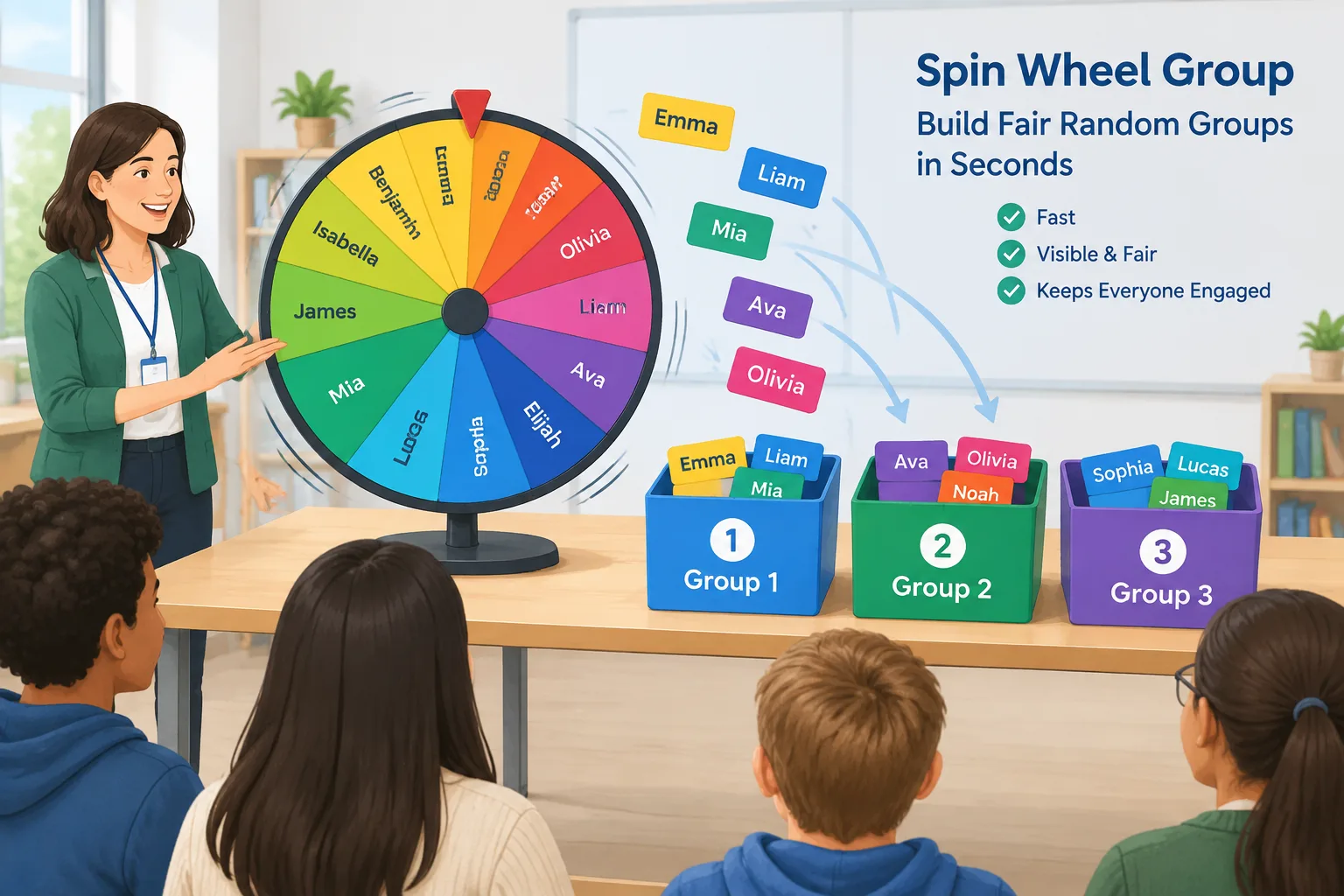
If you have ever stood in front of a room and said, "Okay, find a partner," you know the pattern. The confident students pair up in seconds, the quiet ones wait, and the resulting groups are uneven in skill and in mood. A spin wheel group fixes that in about ten seconds: names go on a wheel, the wheel spins, and the grouping is decided in public where everyone can watch it happen.
This guide is for teachers, trainers, HR facilitators, and event organizers who want fast, visibly fair groupings. It covers how a spin wheel group works, how to set one up step by step, how to keep groups balanced without losing the randomness, and when a wheel is the wrong tool for the job.
Why a Spin Wheel Group Beats "Just Pick Your Own"
The strongest argument for a wheel is not randomness. It is visibility. When you assign groups from a spreadsheet, students quietly assume you engineered the outcome. When names physically spin and land in Group 3, there is nothing to argue with. That transparency is worth more than most facilitators expect, because the resentment that comes with "she always puts me with him" damages group work before the first task begins.
The second argument is speed. Writing names on sticks, shuffling cards, or counting off "1-2-3-4" all work, but each has friction. Counting off creates fixed clusters when students sit in the same seats every day. Sticks need storage and re-sorting between classes. A wheel handles a full roster in seconds and can be re-spun for the next activity with no prep at all.
The third argument is attention. A wheel is a small piece of theatre, and that is a feature. Announcing "first name up is…" pulls the room back to you, which is useful when you need a clean transition between activities.
Grouping research generally supports deliberate grouping over self-selection for mixed-ability tasks; cooperative learning frameworks popularized by researchers such as David and Roger Johnson emphasize teacher-structured, mixed groups for complex work. Treat that as a design principle rather than a guarantee: a wheel creates fair chance, not a perfect pedagogical match.
Before You Spin: Five Decisions to Make First
Decide these before any names go on the wheel, because changing your mind mid-spin looks arbitrary to the room.
- Group size or group count. Pick one and let the other float. With 26 students and groups of four, you get six groups and one pair. Decide in advance whether that pair joins a group or takes a support role.
- Number of rounds. One spin per activity, or a fresh spin every block? Weekly rotations reduce clique formation.
- What you balance. Pure random, or random within a category so that strong writers are spread across groups.
- Roles. Assign facilitator, recorder, timekeeper, and presenter either by spin position or by choice.
- Visibility. Projected wheel, shared screen, or one device passed around the room.
Write these decisions on the board if you are working with students. A short "today's rules" note prevents the "that's not fair" conversation entirely.
How to Build a Spin Wheel Group, Step by Step
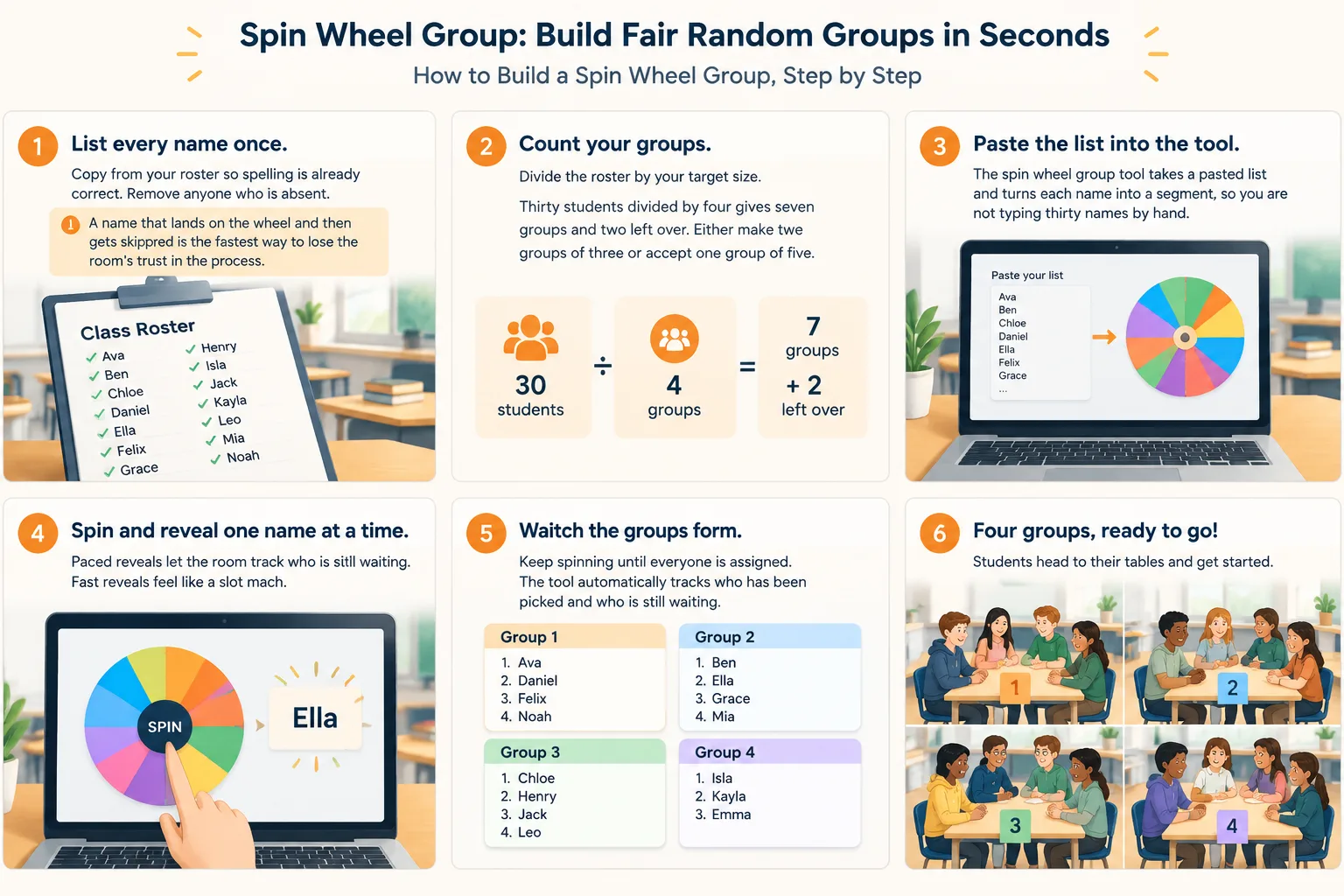
- List every name once. Copy from your roster so spelling is already correct. Remove anyone who is absent. A name that lands on the wheel and then gets skipped is the fastest way to lose the room's trust in the process.
- Count your groups. Divide the roster by your target size. Thirty students divided by four gives seven groups and two left over. Either make two groups of three or accept one group of five.
- Paste the list into the tool. The spin wheel group tool takes a pasted list and turns each name into a segment, so you are not typing thirty names by hand.
- Spin and reveal one name at a time. Paced reveals let the room track who is still waiting. Fast reveals feel like a slot machine; a steady reveal feels like a fair draw.
- Lock the group and move it. Send each group to a table, a corner, or a breakout room immediately. Groups that stay seated in the wrong place will quietly merge back together.
- Save or screenshot the result. You will want it for attendance, grading records, or explaining the composition to a co-teacher or observer.
If your class is working in pairs rather than groups, the same flow applies with a random pair generator. For whole-class question rounds you would switch to a random student picker instead.
Keeping Groups Balanced Without Killing the Randomness
Pure random is fair but not always useful. If three of your strongest readers land in the same group, the rest of the class struggles. The standard fix is stratified random grouping: sort the roster into two or three tiers, spin within each tier separately, then combine one name from each tier per group.
For example, with 30 students you might build Tier A from the 10 strongest independent workers, Tier B from the middle 10, and Tier C from the 10 who need the most scaffolding. Spin Tier A into 10 slots, then B into the same slots, then C. You now have 10 groups of three, each containing one name from every tier. The result is random within tiers and balanced across them.
Two habits make this work in practice:
- One re-spin rule. Allow a single re-spin per session, and only before names are revealed. Unlimited re-spins turn a random process into a negotiation.
- Rotate across weeks. Record group membership so the same trio does not form three weeks in a row. Randomness over one session is fine; randomness over a term is what actually breaks cliques.
Once groups are set, a quick naming round helps them bond. A group name generator gives each team a label in seconds, which makes calling on groups much faster for the rest of the session.
Real Examples from Classroom, Workshop, and Event Settings
Grade 9 biology lab, 28 students, 55-minute period. The teacher projects the wheel, spins groups of four, and assigns lab roles by spin position: the first name revealed is the materials manager, the second is the recorder, and so on. Setup takes about 90 seconds, leaving the full period for the investigation. Because the wheel is visible, no one asks for a swap.
Corporate workshop, 24 participants, 90-minute sprint. The facilitator wants cross-department mixing. Instead of one wheel, she runs four, one per department, and pulls one name from each into every table of four. Results are read aloud and posted in the chat so remote attendees on a video call stay aligned with the room.
Community event, 60 attendees, 10 tables. Organizers pre-print table numbers, spin 60 names into 10 groups of six, and hand out a table card at check-in. The spin happens once at the start, and guests watch their table number appear on screen.
Spin Wheel vs. Other Random Grouping Methods
| Method | Strength | Weak spot |
|---|---|---|
| Spin wheel | Public, fast, re-spinnable | Needs a screen or device |
| Counting off 1-2-3-4 | Zero prep | Clusters follow the seating plan |
| Name sticks or cards | Tactile and low tech | Slow for large groups |
| Spreadsheet randomizer | Fast and repeatable | Invisible to the room |
| Self-selection | Fastest of all | The same pairs every time |
A wheel and a spreadsheet do the same mathematical job; the difference is social. If your main problem is suspicion of favoritism, the visible wheel is the better tool. If you need documented, repeatable lists across a whole semester, a spreadsheet plus a saved spin log is easier to archive.
Practical Limits and Common Mistakes
A wheel does not know who should not be paired together, who needs a translator, or who has an accommodation requiring a specific partner. Keep a short exclusion list and handle those cases by hand before you spin, then mention that the list exists so it does not look like favouritism later.
The tool also cannot judge group dynamics. Random groups occasionally produce a combination that simply does not work. Have a quiet plan for regrouping after the first activity rather than forcing it for an entire unit. And for high-stakes science labs, clinical placements, or any pairing with a safety requirement, random selection is the wrong starting point. Assign by qualification first, then use randomness inside the qualified pool.
A few practical limits are worth knowing. Very long lists of a hundred names or more are hard to read on a projected wheel, so split the roster or display the drawn names as text. Rooms without a projector do better passing one device. Younger students respond better when you announce names aloud rather than asking them to read a small screen.
Frequently Asked Questions
What is a spin wheel group?
It is a random grouping method where each participant's name sits on a segment of an on-screen wheel. You spin, and the wheel selects names into teams. It works the same way as any random group generator, but the selection is visible to everyone in the room, which makes the result feel fair rather than assigned.
How many names can I put on a spin wheel?
A wheel stays readable up to roughly 30 to 50 names. Past that, segments become too thin to see and the reveal slows down. For larger events, split the list into several wheels or display the drawn names as a list instead of relying on the wheel graphic alone.
Is a spin wheel actually random and fair?
Yes, if you set the rules before the first spin and stick to them. Fairness comes from two things: every name appearing exactly once, and a stated limit on re-spins. Without that second rule, a wheel can be negotiated into a predetermined outcome by a determined group of students.
Can I use a spin wheel group for online classes and hybrid meetings?
Yes. Share your screen, run the wheel, and paste the results into the chat so remote participants see the same outcome as the room. Then send each group to its own breakout room immediately. Delays between the spin and the breakout invite people to drift away from their assigned group.
How do I stop the same students from being grouped together every week?
Track group membership in a simple log and re-spin fully each week rather than only swapping one or two names. Full re-spins break repeating trios; partial edits tend to preserve them. Rotating roles at the same time also changes who is leading and who is recording.
Try It With Your Next Class or Session
The next time you need groups, set the rules out loud first, then run the wheel where everyone can see it. Start with the free spin wheel group tool to spin names into teams, and use the main random group generator when you want larger groups built from a pasted roster in one pass. Both are free to use, and the interface is available in nine languages for multilingual classrooms and international teams.
FAQ
What is a spin wheel group?
It is a random grouping method where each participant's name sits on a segment of an on-screen wheel. You spin, and the wheel selects names into teams. It works the same way as any random group generator, but the selection is visible to everyone in the room, which makes the result feel fair rather than assigned.
How many names can I put on a spin wheel?
A wheel stays readable up to roughly 30 to 50 names. Past that, segments become too thin to see and the reveal slows down. For larger events, split the list into several wheels or display the drawn names as a list instead of relying on the wheel graphic alone.
Is a spin wheel actually random and fair?
Yes, if you set the rules before the first spin and stick to them. Fairness comes from two things: every name appearing exactly once, and a stated limit on re-spins. Without that second rule, a wheel can be negotiated into a predetermined outcome by a determined group of students.
Can I use a spin wheel group for online classes and hybrid meetings?
Yes. Share your screen, run the wheel, and paste the results into the chat so remote participants see the same outcome as the room. Then send each group to its own breakout room immediately. Delays between the spin and the breakout invite people to drift away from their assigned group.
How do I stop the same students from being grouped together every week?
Track group membership in a simple log and re-spin fully each week rather than only swapping one or two names. Full re-spins break repeating trios; partial edits tend to preserve them. Rotating roles at the same time also changes who is leading and who is recording.
Related Tools
Pick the right generator for the job — every tool runs free in your browser.