
random group spinner
Random Group Spinner: Spin the Wheel to Make Groups
Use a random group spinner to split a class or team into fair groups in seconds. Step-by-step tips, tool comparisons, and fixes for awkward class sizes.
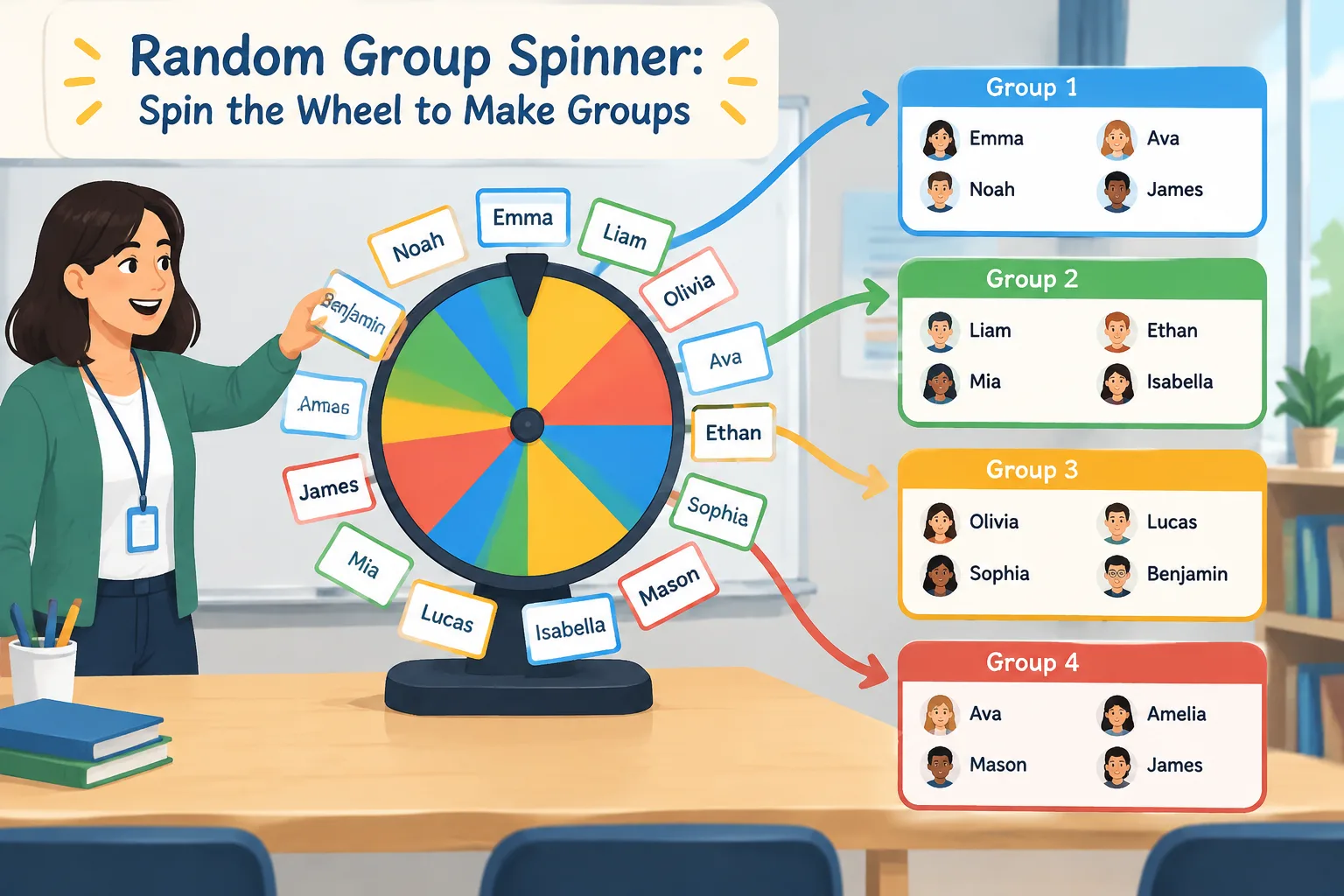
Splitting a class or a workshop into groups should take seconds, not ten minutes of negotiation. A random group spinner lets you spin a wheel, watch names land in teams, and get on with the lesson. This guide is for K-12 teachers, university instructors, corporate trainers, and anyone running a meeting who needs groups fast. You'll learn how the spinner works, when it beats a full group generator, and the small habits that keep groups balanced after the wheel stops.
Why Hand-Picking Groups Creates Friction
Every facilitator has seen the same scene. You say "get into groups of four," and three predictable things happen: friends lock eyes and pair up instantly, a handful of students wait to be chosen, and someone asks whether they can pick their own group. What follows is a negotiation, not a lesson.
The problem isn't the students — it's the method. When people choose their own groups, friendship, confidence, and social status decide the outcome. Repeat that pattern across a semester and the same students end up on the edges. Assign groups by hand instead, and the opposite complaint appears: "You always put me with him."
Random assignment removes the decision from everyone in the room, including you. The rule becomes simple and visible: the wheel decides. Because the whole class watches the same spin, there is far less room for suspicion about favoritism. That visible fairness matters as much as the actual randomness — it's a big part of why students accept the result without arguing.
There's a practical benefit too. Hand-picking 30 students into six groups takes several minutes and usually invites last-minute editing ("those two can't work together"). A spinner settles it in seconds, and if you genuinely need to honor one or two hard constraints, you can pre-arrange those before you ever load the list.
What a Group Wheel Spinner Actually Does
A group wheel spinner does one job: it draws items from a list at random and shows you the result. Before the first spin, the names you typed in are shuffled, so each person has roughly the same chance of appearing next or landing in any slot. That's the same basic idea behind the Fisher–Yates shuffle used in many randomization tools — a list is rearranged so that every possible order is equally likely.
In practice, you'll use it in one of two ways:
- Spin one name at a time. Each spin assigns the next person to the next group. This builds a little suspense in a classroom and is easy for students to follow.
- Spin for a task or a label. Keep your groups fixed, then spin to decide which team presents first, which topic they get, or who leads the warm-up.
What it doesn't do is balance skills, separate specific students, or account for absences for you. Those are judgment calls. It's also not ideal for very complex rosters: if you need to keep six students apart, merge two classes, or group by reading level, you'll spend more time correcting the output than you saved.
If you want finished groups in one click rather than one spin at a time, a random group generator is usually the better fit. Use the group wheel spinner when the process itself is part of the fun, or when you want the room to see every draw.
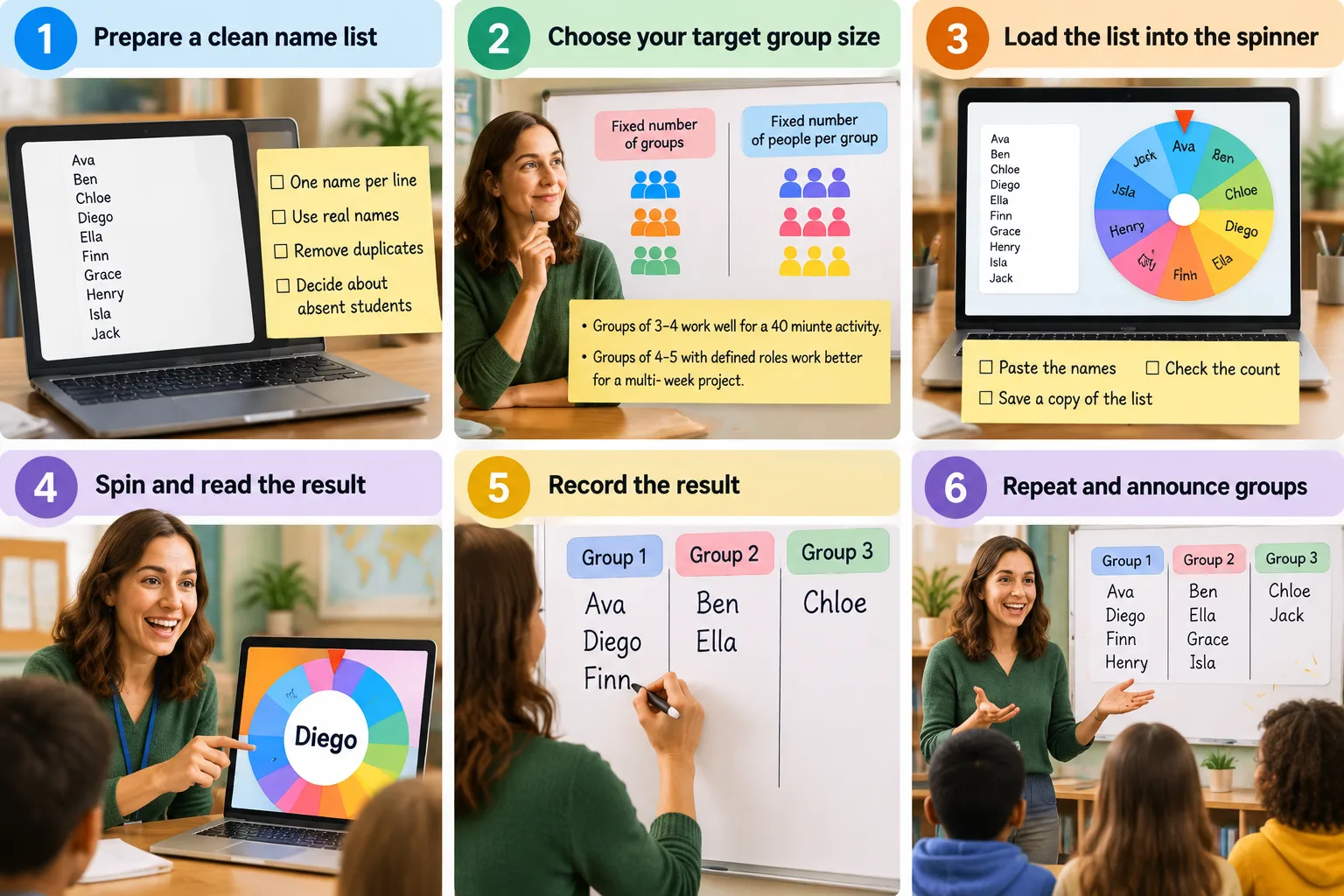
How to Spin Groups in Six Steps
- Prepare a clean name list. Type or paste one name per line. Use the names students actually answer to, remove duplicates, and decide in advance whether absent students belong on the wheel.
- Choose your target. Do you want a fixed number of groups, or a fixed number of people per group? For a 40-minute activity, groups of three or four are easy to manage. For a multi-week project, four to five with defined roles works better.
- Load the list into the spinner. Paste the names, check that the count matches your roster, and save a copy of the list somewhere you can find it again.
- Spin and read the result out loud. Call the name clearly, then write it in the matching group on the board or in your notes. A visible running record prevents "that's not what it said" five minutes later.
- Repeat until the groups are full. If your class doesn't divide evenly, stop when the second-to-last group is complete, then place the remaining students deliberately rather than leaving an awkward group of one.
- Announce and move on. Name the groups, hand out materials, start the timer. The whole sequence should take under two minutes.
One practical note on constraints: if two students must be separated, leave one of them off the wheel, spin everyone else, then place that student into a group that already has enough members. Be transparent about it. Students accept a manual fix when they understand the reason, and they notice when something is hidden.
A Real Example: 28 Students, Seven Groups of Four
A ninth-grade biology teacher needed lab groups for a practical session. The roster had 28 names, and she wanted mixed groups rather than the usual friendship clusters. She pasted the list, set the target to seven groups of four, and spun one name at a time while students copied the results onto the board. The whole process took about ninety seconds, including reading the names.
The spin produced two groups that were almost entirely quiet students. Instead of re-spinning — which would have undermined the fairness she had just demonstrated — she swapped one confident student from a strong group into each of those groups and explained why. The random draw decided membership; her judgment decided the final tweak.
She then let each group name itself using a group name generator, which took another minute and gave the groups an identity for the rest of the unit. Nobody complained about the composition, because everyone had watched the same wheel.
Spinner, Group Generator, or Pair Generator?
These tools overlap, but they solve slightly different problems. Choosing the right one saves you time and avoids awkward fixes.
| Situation | Best tool |
|---|---|
| You want suspense and a draw everyone can see | Group wheel spinner |
| You need finished groups in one click | Random group generator |
| You only need partners for a quick discussion | Random pair generator |
| You need one student to answer or present | Random student picker |
A useful rule of thumb: use the spinner when the ritual matters, and use the generator when speed matters more. Pair work sits in the middle — a pair generator handles think-pair-share or peer-review partners without creating the full group structure you don't need.
When the Spin Isn't the Right Tool
Random grouping is a strong default, not a universal rule. There are real cases where you should override it.
- Differentiation and support plans. If a student has an individual education plan, a language support need, or a documented pairing to avoid, those constraints come first. Randomize everything else, then place that student deliberately.
- Ability or role balance. Random draws can produce a group with four natural leaders and one with none. If the task requires specific skills, balance it yourself and use the spinner only for the parts that don't matter.
- Very small classes. With five students, random grouping is mostly theater. You'll get the same combinations on repeat.
- Very large rosters. A wheel with hundreds of names is hard to read on a projector. A group generator handles big lists more cleanly.
- Accessibility and devices. If a spinning animation distracts or disorients some students, or your projector fails, read results from a plain shuffled list instead. The outcome is the same.
One more limit worth stating plainly: random means repeats. The wheel can produce the same pairing twice in a row. That's not a bug, and treating it as one tells students the system is rigged. If repeated pairings genuinely matter, manage that constraint before the spin.
Using the Spinner in Meetings and Workshops
Classrooms aren't the only place this works. Trainers running breakout rooms, facilitators running offsites, and team leads running retrospectives all face the same problem: groups form by proximity and habit. The people sitting next to each other end up together, and the same voices dominate.
Spinning for breakout rooms fixes that in a way everyone can see. It's especially useful for icebreakers, rotating peer feedback, and mixed-team problem solving where you want people to work with someone new. For one-off social activities, the same principle applies to a secret santa generator for gift exchanges or a seating chart when you want new teams to sit together rather than reform old cliques.
After the Spin: Small Moves That Make Groups Work
Random groups get you started; structure keeps them productive. Three habits make the biggest difference.
First, assign roles immediately. A facilitator, a recorder, a timekeeper, and a presenter give every group a reason for each member to speak. Second, keep the membership stable for several sessions. Re-spinning every week prevents trust from building, and students start treating the activity as disposable. Third, rotate roles rather than groups, so quiet students get turns at the front without losing the group they've learned to work with.
Frequently Asked Questions
Is a random group spinner actually random?
It is, as far as the draw is concerned. The list is shuffled before spinning, so each name has an equal chance of coming up next. What it can't be is immune to small-sample patterns — with a class of 20, some clusters will look suspiciously tidy. That's normal randomness, not favoritism. If you want to verify a tool's behavior, run the same list several times and look at the distribution.
Can I stop the same students from being paired twice?
Not automatically. Most spinners treat each session as a fresh draw, with no memory of last week. If repeat pairings matter, remove a name after it's drawn, or keep a written record and re-spin only the specific conflict. Removing names mid-session is the simplest fix, because it guarantees a student can't be called twice.
How many names can I spin at once?
For typical class sizes — 15 to 40 names — a spinner works fine. As the list grows past 60 or 70, the wheel becomes hard to read on a screen and one-at-a-time spinning gets slow. At that point, switch to a group generator that produces all groups at once.
What should I do when the class doesn't divide evenly?
Plan for the remainder before you start. Options that work well: create one group one person larger, spread the extras across groups as fifth members, or assign leftover students as floating helpers, observers, or timekeepers. What you shouldn't do is leave a group of one, which singles out that student in front of everyone.
Does this work for adult training and team meetings?
Yes, and often better than in classrooms, because adults tend to self-select even more strongly. Visible random draws reduce the awkwardness of "who wants to work with whom" and make it easy to justify mixed breakout rooms. The same rule applies: state the method, show the draw, and don't re-spin because you dislike the result.
Ready to try it? Open the group wheel spinner, paste your list, and have your groups set up before the coffee finishes brewing.
FAQ
Is a random group spinner actually random?
It is, as far as the draw is concerned. The list is shuffled before spinning, so each name has an equal chance of coming up next. What it can't be is immune to small-sample patterns — with a class of 20, some clusters will look suspiciously tidy. That's normal randomness, not favoritism. If you want to verify a tool's behavior, run the same list several times and look at the distribution.
Can I stop the same students from being paired twice?
Not automatically. Most spinners treat each session as a fresh draw, with no memory of last week. If repeat pairings matter, remove a name after it's drawn, or keep a written record and re-spin only the specific conflict. Removing names mid-session is the simplest fix, because it guarantees a student can't be called twice.
How many names can I spin at once?
For typical class sizes — 15 to 40 names — a spinner works fine. As the list grows past 60 or 70, the wheel becomes hard to read on a screen and one-at-a-time spinning gets slow. At that point, switch to a group generator that produces all groups at once.
What should I do when the class doesn't divide evenly?
Plan for the remainder before you start. Options that work well: create one group one person larger, spread the extras across groups as fifth members, or assign leftover students as floating helpers, observers, or timekeepers. What you shouldn't do is leave a group of one, which singles out that student in front of everyone.
Does this work for adult training and team meetings?
Yes, and often better than in classrooms, because adults tend to self-select even more strongly. Visible random draws reduce the awkwardness of "who wants to work with whom" and make it easy to justify mixed breakout rooms. The same rule applies: state the method, show the draw, and don't re-spin because you dislike the result. Ready to try it? Open the [group wheel spinner](https://random-group-generator.com/tools/group-wheel-spinner), paste your list, and have your groups set up before the coffee finishes brewing.
Related Tools
Pick the right generator for the job — every tool runs free in your browser.