
random group spinner
Random Group Spinner: How to Spin Fair Groups Fast
A random group spinner splits a class or team into fair groups in seconds. Step-by-step guide, classroom and workshop examples, and balancing tips.

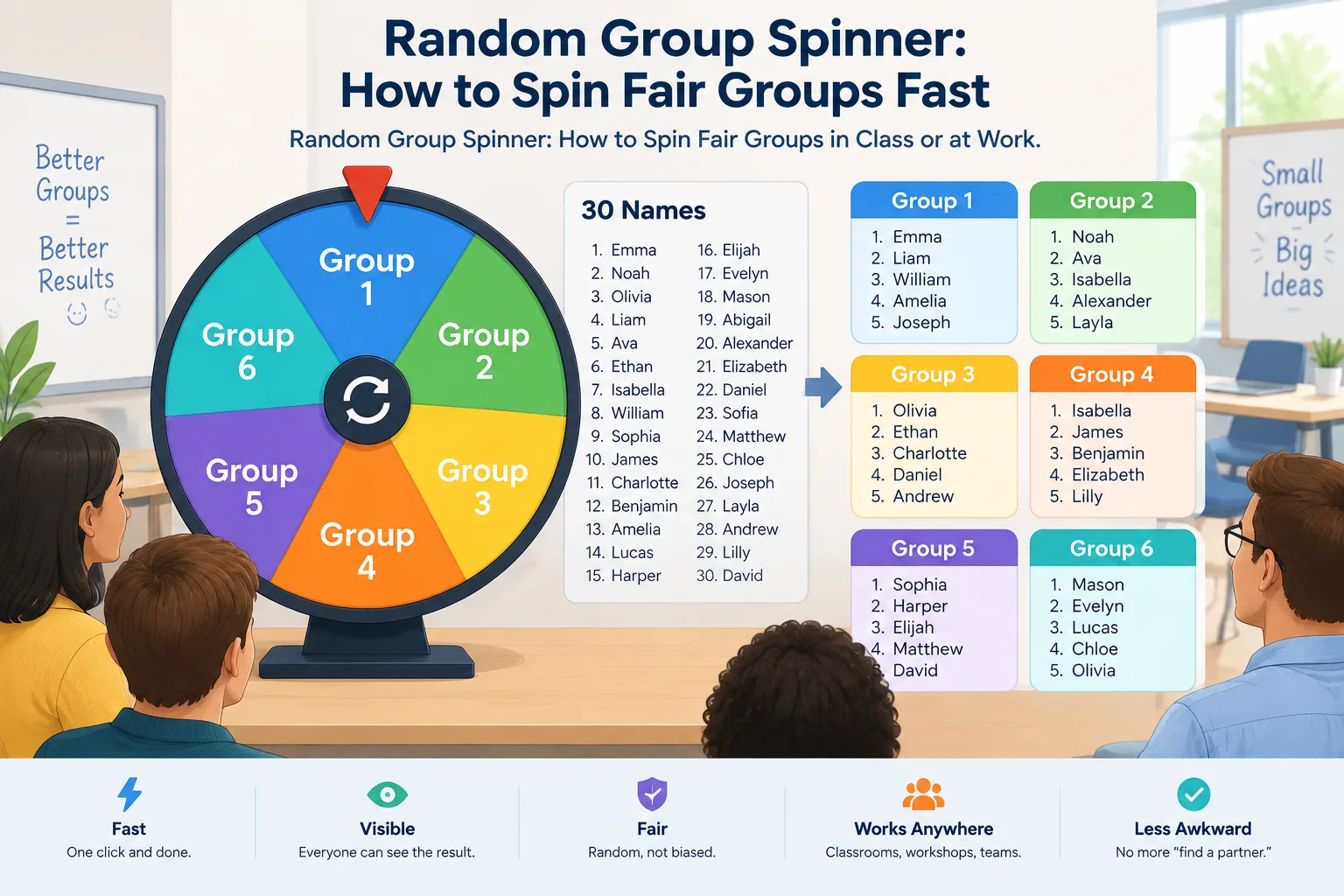
You have 24 students, 45 minutes, and a lesson that only works in teams of four. Or you are facilitating a workshop and need to split 30 adults into six discussion tables without the same four friends landing together again. A random group spinner handles that in a single click: it shuffles your list and deals each person into a group at random, so the split is fast, visible, and hard to argue with.
This guide is for teachers, trainers, and team leads who split people into groups regularly and are tired of the awkward “find a partner” moment that follows. It explains how the spin actually works, how to run it in five steps, real examples from a classroom and a workshop, and the common mistakes that make random groups feel unfair even when the math is fine. (Some readers arrive searching for spin kelompok — spinning a group — and land on exactly the same need.)
Why Spinning Beats Hand-Picking Groups
When you build groups by hand, you are not being neutral — you are being human. Teachers unconsciously group by ability, by who sits nearby, or by who quietly works well together. Facilitators repeat the same table assignments because they worked last time. The result is predictable: the same students are always together, the quieter ones end up in the group nobody notices, and the split starts to look like a verdict rather than a decision.
Hand-picked groups are not automatically bad. There are real reasons to separate two students who argue or to keep one strong reader in every group. The problem is the cost: hand-picking 28 students into seven groups takes three to five minutes of class time, and you spend another minute defending your choices to anyone who complains. Those minutes add up across a week.
A spinner flips the dynamic. Instead of explaining your reasoning, you show the result. Fairness becomes procedural rather than personal: everyone saw the wheel spin, everyone watched the names land, and the outcome belongs to the process rather than to you. That small shift saves you a surprising amount of classroom politics.
What the Spinner Actually Does (and What It Doesn't)
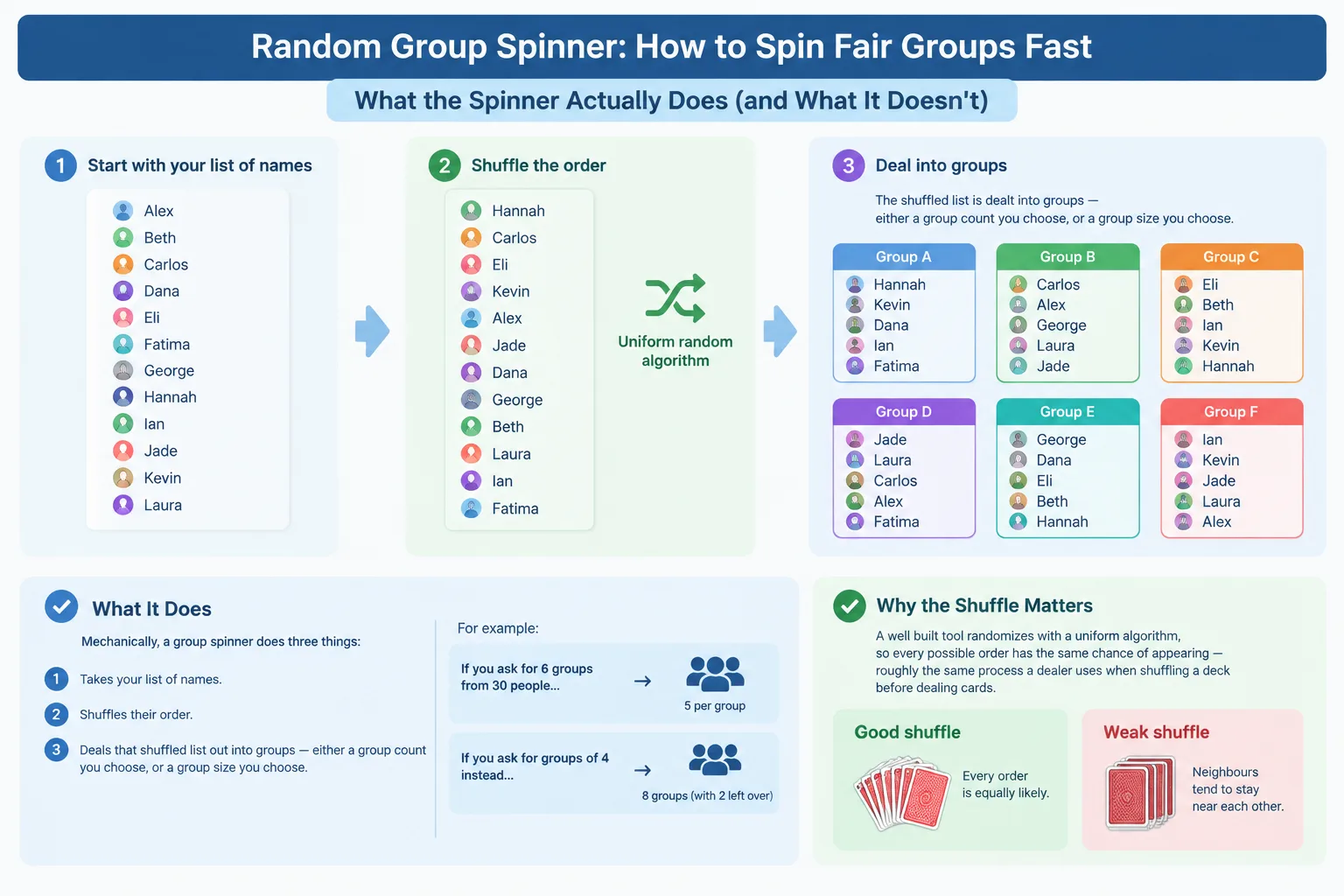
Mechanically, a group spinner does three things. It takes your list of names, shuffles their order, and then deals that shuffled list out into groups — either a group count you choose, or a group size you choose. If you ask for six groups from 30 people, the tool assigns five people per group. Ask for groups of four instead, and it calculates the number of groups itself and handles the remainder.
The shuffle is the important part. A well-built tool randomizes with a uniform algorithm, so every possible order has the same chance of appearing — roughly the same process a dealer uses when shuffling a deck before dealing cards. That matters because a weak shuffle tends to leave neighbours near each other far more often than chance would allow, which is exactly how you end up with two friends in the same group three weeks running.
What a spinner cannot do is know your context. It does not know reading levels, allergies, seating needs, language support, or the two students who had a falling-out last Tuesday. It also does not know that your group of 30 is not divisible by four. Treat the spin as a strong first draft, not a final answer. Constraints are your job; the shuffle is the tool's job.
How to Spin Groups in 5 Steps
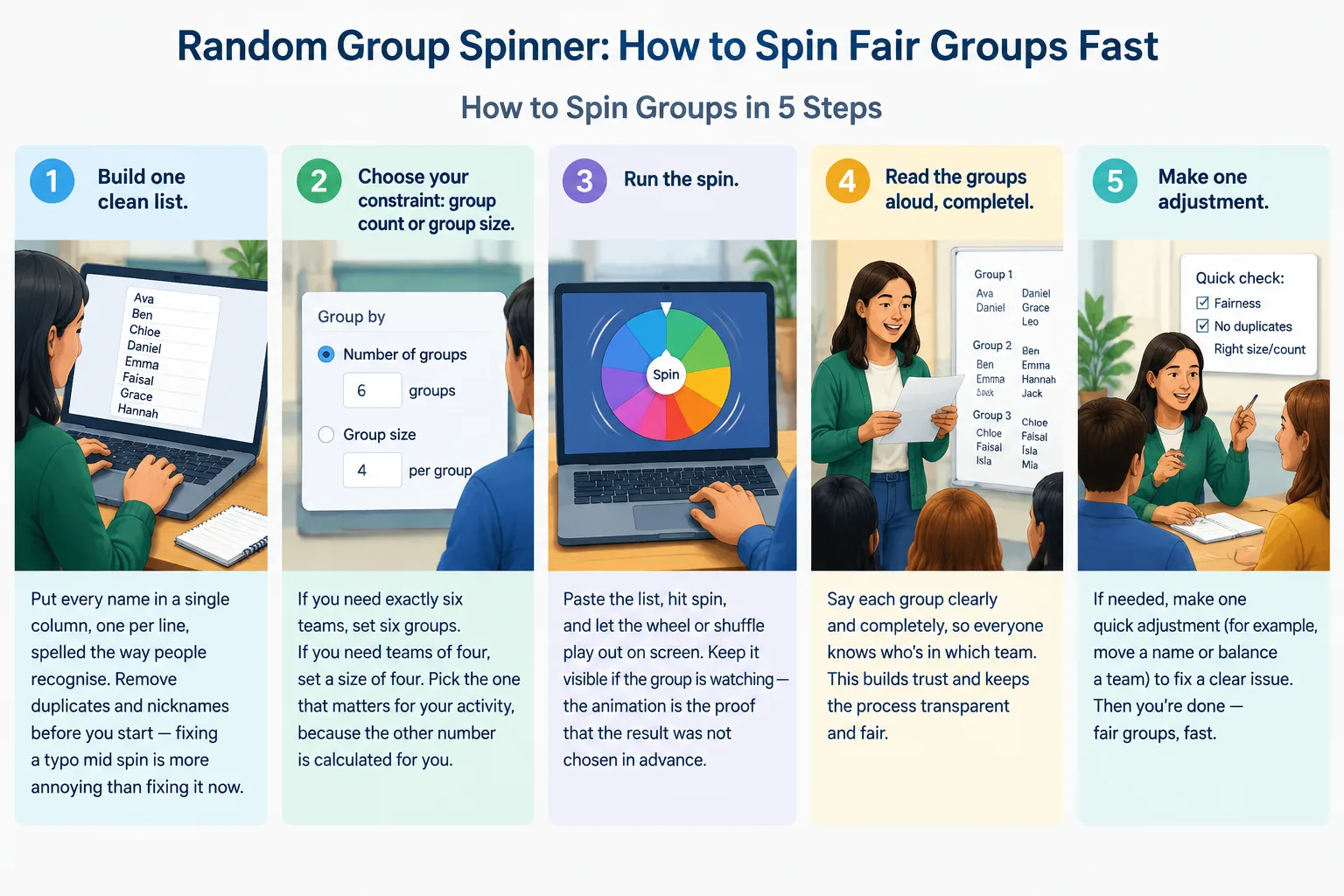
- Build one clean list. Put every name in a single column, one per line, spelled the way people recognise. Remove duplicates and nicknames before you start — fixing a typo mid-spin is more annoying than fixing it now.
- Choose your constraint: group count or group size. If you need exactly six teams, set six groups. If you need teams of four, set a size of four. Pick the one that matters for your activity, because the other number is calculated for you.
- Run the spin. Paste the list, hit spin, and let the wheel or shuffle play out on screen. Keep it visible if the group is watching — the animation is the proof that the result was not chosen in advance.
- Read the groups aloud, completely. Announce every group before you react to any of them. Stopping halfway to say “hmm” signals that you are already editing, which undermines the whole point.
- Make at most one adjustment — and say why. If you must move someone, name the reason out loud (“Priya needs to be near the front for the projector”). One transparent change is fine. Silent rearranging tells everyone the spin did not count.
Total time from blank screen to announced groups is about 90 seconds, including the spin. Compare that with the five minutes of negotiating and re-negotiating that hand-picking usually costs.
Real Examples: Spinning in Three Settings
A middle-school science lab, 28 students, seven groups of four
A teacher sets group size to four, spins once, and reads the seven groups aloud. Two groups have all three of the loudest students together, which will be chaos for a lab practical. Rather than re-spinning the whole list — which teaches students that results change when an adult does not like them — the teacher swaps two students between those groups and explains why: “I'm balancing voices, not choosing favourites.”
A corporate workshop, 36 attendees, six tables
The facilitator spins six groups of six at the start of a two-hour session and leaves people at those tables for the entire workshop. Because the groups are stable, attendees actually get past small talk. If the facilitator re-spun for every activity, people would spend the day re-introducing themselves instead of working.
A weekly team meeting, 12 people, three project pods
Here the goal is breaking a clique pattern rather than creating one-off teams. The manager spins once a month rather than every week, so pods have time to finish real work, and posts the spun result in the team channel before the meeting so nobody feels ambushed. The tool is the same; the cadence is what changed.
Spinner vs. Random Group Generator vs. Pair Generator
The group wheel spinner's advantage is the visible reveal. The animation builds a small moment of anticipation, which is useful with skeptical students or a room of strangers. The plain random group generator on the homepage is faster and quieter: you paste, you get groups, you move on. If you are re-mixing groups every single morning, the quieter tool usually wins, because the novelty of a spin wears off by Wednesday.
For two-person activities, the random pair generator is the right fit — it builds exactly pairs and handles odd numbers by creating one group of three instead of leaving someone out. Once your groups exist, the group name generator gives each team a label, which sounds trivial but changes how quickly a group starts referring to itself as a unit.
Pick the tool by the job, not by habit:
| Situation | Best tool |
|---|---|
| One-off split, audience is watching | Random group spinner |
| Daily or weekly re-mixing | Random group generator |
| Two-person work, think-pair-share | Random pair generator |
| Groups need identities or team names | Group name generator |
Tips for Balanced Groups When Random Isn't Enough
Pure randomness is fair, but fair is not always the same as useful. If the task requires mixed ability, mixed experience, or a specific skill spread, layer your constraints on top of the spin instead of abandoning it.
- Pre-assign a few anchors, then spin the rest. Place one experienced person into a group you will hold fixed, remove them from the list, and spin the remaining names around them. You keep most of the fairness and get the balance you need.
- Announce your re-spin policy before you spin. “I will re-spin once if two people who work poorly together land together.” When the rule exists in advance, a re-spin reads as consistent rather than as favouritism.
- Keep groups stable for a defined period. A group that lasts three sessions accomplishes more than a group that lasts ten minutes. Change groups on a schedule, not on a whim.
- Rotate roles inside groups each time you spin. Record keeper, timekeeper, spokesperson. Rotation stops one student from becoming the permanent note-taker in every random group.
- Watch for the same leftovers. If the same two or three students keep landing in the group that runs out of time, that is a signal about pacing, not about the spinner.
Common Mistakes to Avoid
The most common mistake is spinning dramatically and then overruling the result without explanation. Everyone notices, and next time the spin means nothing.
A close second is re-spinning until you get a grouping you like. Two or three re-spins is still random; ten re-spins is just hand-picking with extra steps and a worse cover story.
Third, do not ignore accessibility and physical reality. If a group lands far from a student with mobility needs, or two students who need the same support tool end up together, move them and name the reason. Randomness should never override a documented accommodation.
Finally, do not leave the last name on the list as an afterthought. If your group count does not divide evenly, decide in advance what happens to the remainder — a slightly larger group, or a group of three — and announce it before the spin, not after.
Frequently Asked Questions
Is a random group spinner really random?
A properly built spinner uses a uniform shuffle, meaning every ordering of your list is equally likely. The randomness comes from the tool's algorithm, not from the animation. What is not random is anything you do afterwards — manual swaps, re-spins, and exclusions are your choices and should be explained as such.
Can I use it with an odd number of people?
Yes. Odd numbers create uneven groups, which is normal. Decide your rule in advance: with 29 people and a target size of four, you get seven complete groups and one person left over, so plan for one group of five or one group of three, and say so before you spin.
Should I re-spin if the groups look uneven in skill?
One re-spin, announced before you start, is defensible. Repeated re-spinning destroys the fairness you were trying to create. If skill balance matters regularly, pre-assign anchors as described above instead of relying on luck.
How often should I re-spin the same class or team?
Match the cadence to the work. One-off activities can be spun every time. Multi-session projects usually work better with groups that stay together for two to four weeks, re-spun after that. Weekly team pods often benefit from a monthly re-spin rather than a weekly one.
Does the spinner work for remote teams?
Yes — the grouping logic is identical whether people are in a classroom or on a video call. Paste your participant list, spin, then paste the results into your meeting chat or breakout-room setup. In Zoom or Teams, create the breakout rooms in the order the spinner gave you so the rooms match what everyone just watched.
Spin Your Next Set of Groups in Under a Minute
The next time you need groups, do not spend five minutes negotiating them. Open the random group spinner, paste your list, and let the wheel decide — then keep the explanation short and the adjustments transparent. If you want a faster, quieter split, use the random group generator on the homepage. For two-person activities, try the random pair generator, and once your groups exist, hand them names with the group name generator.
FAQ
Is a random group spinner really random?
A properly built spinner uses a uniform shuffle, meaning every ordering of your list is equally likely. The randomness comes from the tool's algorithm, not from the animation. What is not random is anything you do afterwards — manual swaps, re-spins, and exclusions are your choices and should be explained as such.
Can I use it with an odd number of people?
Yes. Odd numbers create uneven groups, which is normal. Decide your rule in advance: with 29 people and a target size of four, you get seven complete groups and one person left over, so plan for one group of five or one group of three, and say so before you spin.
Should I re-spin if the groups look uneven in skill?
One re-spin, announced before you start, is defensible. Repeated re-spinning destroys the fairness you were trying to create. If skill balance matters regularly, pre-assign anchors as described above instead of relying on luck.
How often should I re-spin the same class or team?
Match the cadence to the work. One-off activities can be spun every time. Multi-session projects usually work better with groups that stay together for two to four weeks, re-spun after that. Weekly team pods often benefit from a monthly re-spin rather than a weekly one.
Does the spinner work for remote teams?
Yes — the grouping logic is identical whether people are in a classroom or on a video call. Paste your participant list, spin, then paste the results into your meeting chat or breakout-room setup. In Zoom or Teams, create the breakout rooms in the order the spinner gave you so the rooms match what everyone just watched.
SponsoredExplore more resources