
secret santa generator
Secret Santa Generator for Large Groups: A Simple Guide
Use a secret santa generator for large groups to organize fair assignments, manage exclusions, create printable lists, and prepare assignments for CSV workflows.

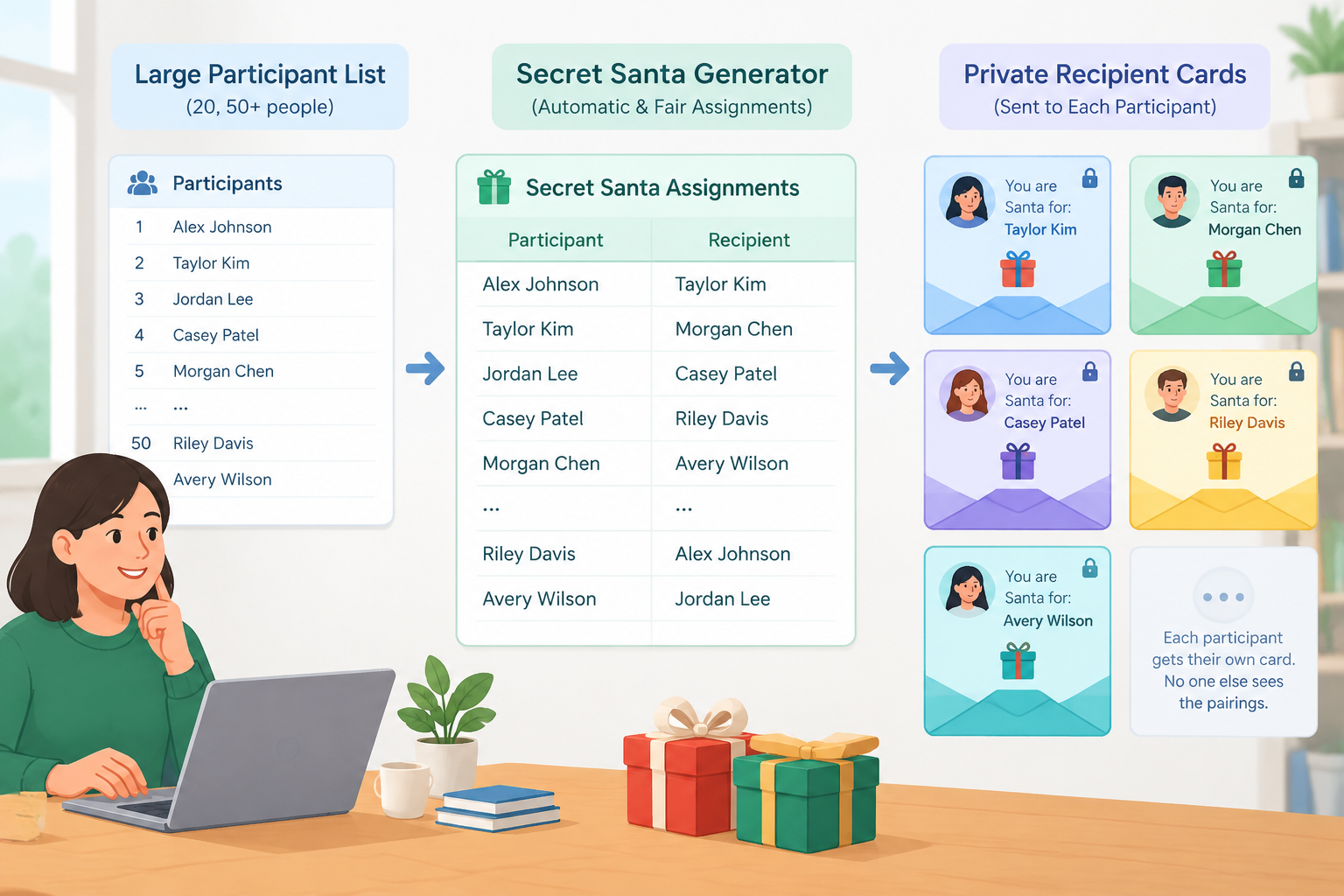
Organizing a Secret Santa exchange for a large group can quickly turn a fun tradition into an administrative task. With 20, 50, or more participants, you need to create assignments, avoid obvious mistakes, keep gifts secret, and communicate each result to the right person. A secret santa generator for large groups can make the draw easier by giving the organizer a consistent way to create assignments instead of matching names manually.
This guide is for teachers, workplace facilitators, HR teams, event organizers, and anyone coordinating a larger Secret Santa exchange. It focuses on the practical planning problem: how to prepare a fair draw, handle constraints, organize the results, and share assignments without accidentally revealing the whole list.
Why large Secret Santa draws are harder than they look
A small Secret Santa exchange can sometimes be organized with slips of paper and a bowl. As the group grows, however, manual drawing becomes harder to check. You may need to redraw several names because someone picked themselves, two people in the same household should not be matched, or coworkers who recently exchanged gifts should be kept apart. The larger the participant list, the more time it takes to verify every assignment.
There is also a communication problem. The organizer may need a complete record of who gives to whom, while each participant should normally see only their own assignment. This is particularly important in workplaces and classrooms where the organizer is managing the exchange for people who are not all in the same room.
For example, imagine a company with 48 employees across three departments. The organizer wants everyone to participate, but managers should not be assigned to their direct reports, and two people who share a household should not be paired. Creating the draw by hand means checking each match against several rules. A generator provides a more structured starting point for the assignment process.
How to plan a Secret Santa draw for a large group
Before generating assignments, decide what the exchange actually requires. A generator can help create the draw, but it cannot replace clear rules about participation, spending limits, deadlines, or communication.
Start by making a clean participant list. Use the names people will recognize, and remove duplicates or accidental entries. If participation is optional, confirm the final list before generating the draw. For a large group, changing the participant list after assignments have been communicated can create unnecessary confusion.
Then define any restrictions. Common examples include avoiding self-assignments, keeping partners or household members apart, preventing repeat matches from last year, or separating certain participants because of the way the event is organized. Only include restrictions that are actually needed. Too many rules can make a draw harder to complete.
A practical preparation sequence is:
- Confirm the final participant list.
- Decide the gift budget and exchange date.
- Record any required exclusions or pairing restrictions.
- Generate the Secret Santa assignments.
- Review the results for obvious errors.
- Prepare a private record for the organizer.
- Send each participant only the information they need.
For a classroom example, a teacher might organize a holiday exchange for 30 students. The teacher can first confirm participation, explain the maximum gift value, collect any necessary restrictions, and then generate the assignments. The teacher should keep the complete assignment record private rather than displaying it on a classroom screen.
Use a Secret Santa generator for large groups instead of drawing names by hand
A dedicated tool is most useful when the participant list is large enough that manual checking becomes tedious. The goal is not to make the exchange complicated; it is to remove repetitive matching work so the organizer can concentrate on the rules and communication.
You can use the site's Secret Santa Generator as the starting point for the draw. Prepare your names before opening the tool so that you are working from a final list rather than making changes while communicating assignments.
A simple workflow looks like this:
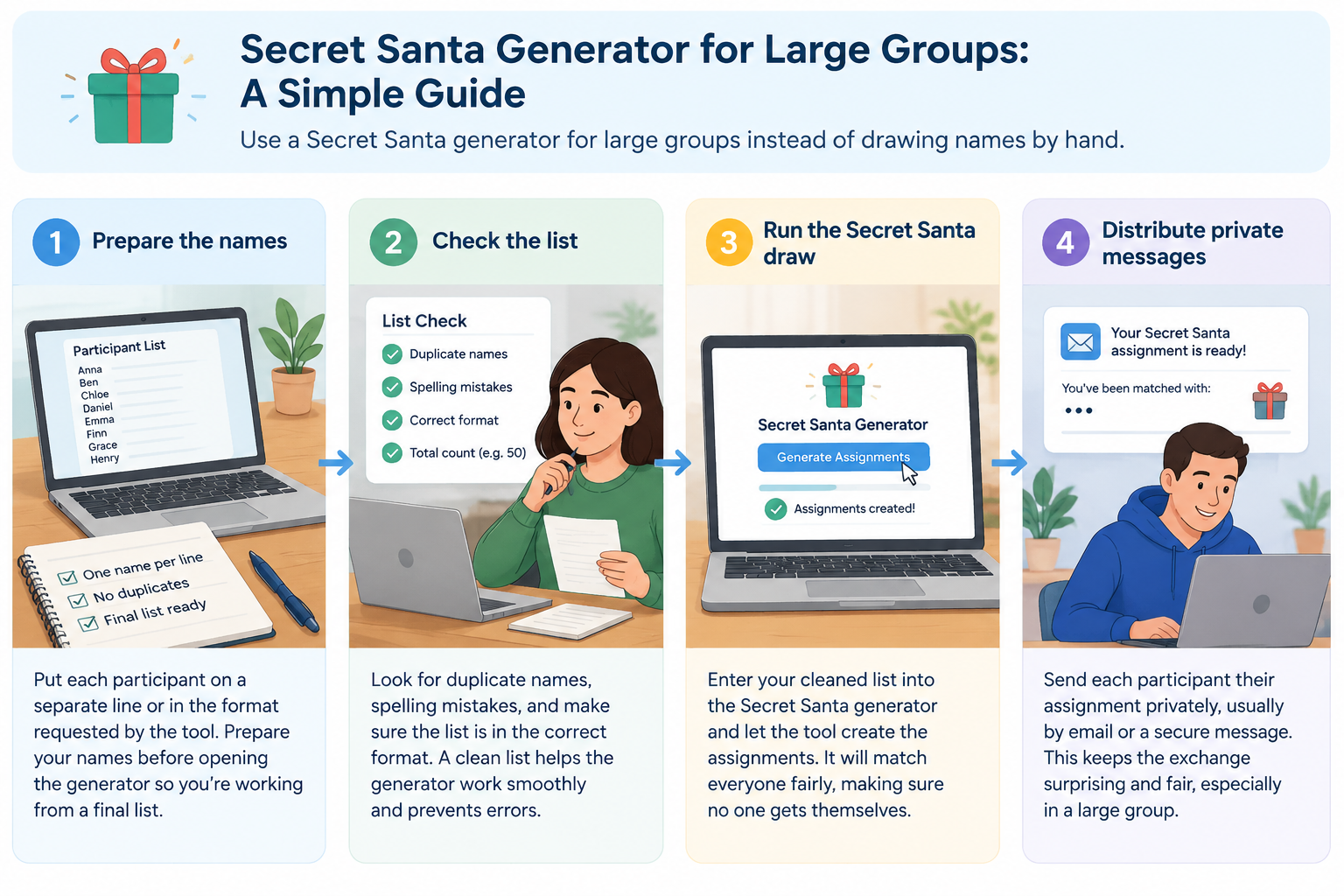
- Prepare the names. Put each participant on a separate line or in the format requested by the tool.
- Check the list. Look for duplicate names, spelling mistakes, and people who should not participate.
- Set the exchange rules. Decide which restrictions are necessary for your group and apply the available options in the generator.
- Run the draw. Generate the assignments once the participant list and rules are ready.
- Review the output. Check that every participant has an assignment and that the results follow your stated rules.
- Save the organizer record. Keep a private copy so you can answer questions or resolve a missing message later.
- Distribute privately. Give each participant their own recipient rather than publishing the complete assignment table.
For instance, a facilitator running a 60-person department exchange can prepare the participant list before a planning meeting, run the draw, verify the output, and then use the resulting assignment information to prepare individual messages. This is much easier to manage than asking 60 people to draw slips and then trying to reconstruct the final record.
How to make a Secret Santa draw printable list
A Secret Santa draw printable list can be useful when the organizer needs a physical record for event administration. It can also help when participants are gathered in one location and the organizer wants a controlled way to distribute assignments. The important distinction is between an organizer list and a participant-facing list: a complete list contains confidential information and should not be left where everyone can read it.
After generating the assignments, format the information in a simple table or document if you need a paper record. Useful columns might include the participant's name, assigned recipient, notification status, and any organizer-only notes. Keep the document somewhere private, especially if the exchange is intended to remain secret.
For a school example, a teacher might print a checklist containing all 25 participants and their recipients, then use it only to confirm that every student receives an assignment. Individual recipient slips can be prepared separately. The full organizer list should not be posted on a classroom wall because students could see matches that are meant to remain secret.
A printable workflow can be as simple as:
- Generate the assignments.
- Copy the organizer results into a private document if a paper record is needed.
- Add a checkbox for each participant.
- Print only the pages needed for administration.
- Distribute individual assignments separately.
- Store or securely dispose of the full list after the exchange.
The exact formatting is less important than keeping the complete assignment record separate from participant-facing information.
Preparing Secret Santa assignments for CSV workflows
Large organizations often already keep participant information in spreadsheets. In that situation, Secret Santa assignments CSV can be a useful format for moving assignment data into another workflow. A CSV is simply a plain-text table that spreadsheet applications and many other systems can read.
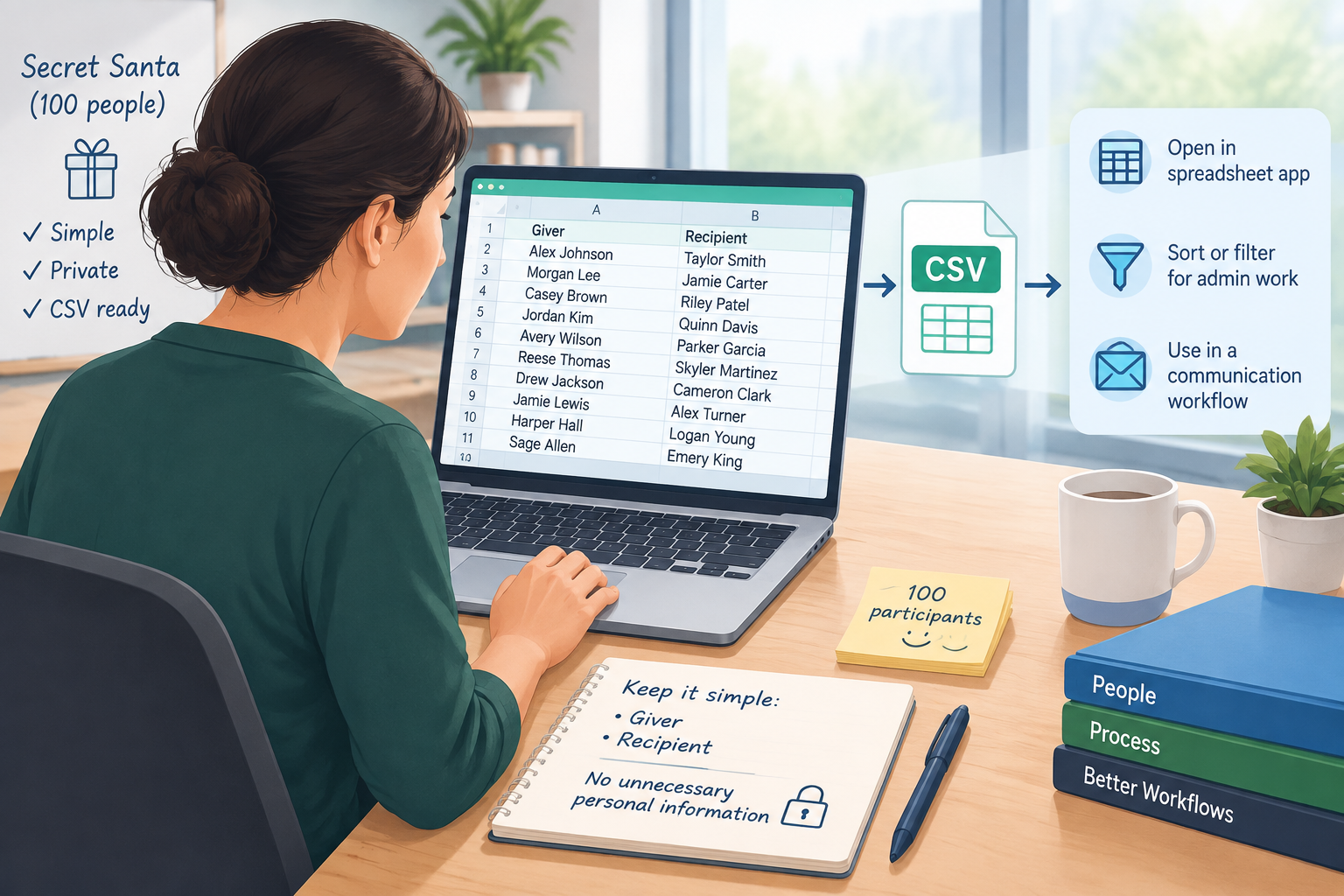
If your process requires CSV data, keep the structure simple. A basic organizer file might use columns such as giver and recipient. You can then open the file in a spreadsheet program, sort or filter it for administrative work, or use it as an input to a separate communication workflow. Do not include unnecessary personal information in the file.
For example, an HR coordinator organizing a 100-person exchange might maintain a participant spreadsheet, create the assignments, and then prepare a two-column assignment file for internal administration. The coordinator could use that file to track which employees have been notified while keeping the recipient information out of a public team document.
When working with CSV data, check three things before sending anything:
- Every participant appears exactly where expected.
- Recipient names are spelled consistently.
- The file does not contain columns or notes that could expose private information unnecessarily.
If the generator or your surrounding workflow does not provide the exact CSV export you need, you can still use the generated assignment results as the basis for a CSV file. Treat the CSV as an administrative format, not as something that should automatically be shared with the whole group.
Keep large-group Secret Santa assignments private
Privacy is one of the easiest parts of a Secret Santa exchange to overlook. The organizer needs enough information to manage the event, but participants usually need only their own recipient. Posting the complete assignment list in a group chat, shared document, classroom display, or public channel can reveal the surprise immediately.
For remote or hybrid groups, plan the communication method before generating the draw. If the exchange is being coordinated through workplace or classroom software, send individual messages where practical. The site's broader workflow context includes tools that can support different teaching and facilitation environments, but the safest process is still to share only the minimum information each participant needs.
Consider a remote team of 35 people using several communication channels. If the organizer posts a complete assignment spreadsheet in a shared channel, every participant can potentially see every match. A better process is to keep the master record private and distribute individual assignments through an appropriate private channel.
Before distributing results, ask:
- Does each participant receive only their own assignment?
- Is the organizer's master list stored privately?
- Could a shared link expose the complete list?
- Are names clear enough to avoid mistaken identities?
- Does the communication method fit the group's privacy expectations?
When a Secret Santa generator is not the right fit
A generator is helpful for organizing a draw, but it does not solve every Secret Santa planning problem. If your group has unusual matching rules, a very small number of participants, or a requirement for a highly customized allocation algorithm, you may need additional planning or a manual review. The organizer remains responsible for checking that the final arrangement makes sense for the event.
There are also cases where Secret Santa itself may not be appropriate. In a classroom, participation should fit the school's policies and the teacher's judgment, and gift exchanges should not create pressure for students or families. In a workplace, organizers should consider whether participation is genuinely voluntary and whether the spending limit is reasonable.
For a simple two-person activity rather than a gift exchange, a Random Pair Generator may be a better fit. For classroom teams, the Random Group Generator is designed for creating groups rather than Secret Santa assignments. These tools address different problems, so choosing the tool based on the activity helps keep the workflow straightforward.
Real-world large-group Secret Santa example
Consider a training department with 72 employees participating in an annual exchange. The organizer first confirms the final participant list and establishes a $20 spending limit. Several employees work in the same household, so those pairings need to be excluded. The organizer also wants a private record of the final assignments.
The organizer prepares the names, enters the necessary restrictions into the Secret Santa workflow, and generates the draw. After reviewing the results, the organizer prepares a private assignment record. Instead of posting that record in the department's shared workspace, the organizer sends each employee their own recipient. A simple tracking column can be used to mark whether each person has received their assignment.
This approach separates three jobs that are often mixed together: creating the draw, checking the draw, and communicating the draw. That separation is especially useful for large groups because a mistake in one stage is easier to catch before it affects everyone.
FAQ about Secret Santa generators for large groups
Can a Secret Santa generator handle a large participant list?
A generator is particularly useful when manual matching becomes difficult to manage. The practical limit depends on the specific tool and the number and complexity of restrictions you need. For a large exchange, prepare and verify the participant list before generating the assignments, then review the final results before distribution.
How do I create a Secret Santa draw printable list?
Generate the assignments first, then copy or format the results into a private document or spreadsheet if you need a printable organizer record. Keep the complete list confidential. For participant handouts, prepare individual assignments rather than printing the full giver-to-recipient table.
Can I use Secret Santa assignments in CSV format?
CSV is a convenient format for assignment data because it can be opened by common spreadsheet applications and used in many administrative workflows. If your generator provides a CSV option, follow its export process. Otherwise, you can format the assignment results into a simple CSV with fields such as giver and recipient, while avoiding unnecessary personal information.
How can I keep Secret Santa assignments secret in a large group?
Keep the complete assignment record private and send each participant only their own recipient. Avoid putting the master list in a shared document, group chat, public classroom display, or other location where participants can see other assignments.
What if my group has special pairing restrictions?
List the restrictions before generating the draw and use the generator's available controls when possible. Always review the final assignments afterward. If the rules are unusually complex, the organizer may need an additional manual check or a different allocation method.
Make your large-group Secret Santa draw easier
A large Secret Santa exchange does not need a complicated administrative process. Start with a clean participant list, decide the rules before the draw, generate the assignments, review the results, and communicate each assignment privately. For larger groups, keeping a clear organizer record also makes it easier to resolve questions without revealing everyone else's matches.
When you're ready to create the draw, use the Secret Santa Generator to organize your participant assignments and make the exchange easier to manage.
Sources
- Secret Santa — background on the gift-exchange tradition and its common rules
Related Tools
Pick the right generator for the job — every tool runs free in your browser.