
seat shuffle maker
Seat Shuffle Maker: Randomly Assign Classroom Seats Fairly
Use a seat shuffle maker to assign classroom seats randomly and fairly. Step-by-step setup, constraint tips, rotation rhythms, and answers to common questions.

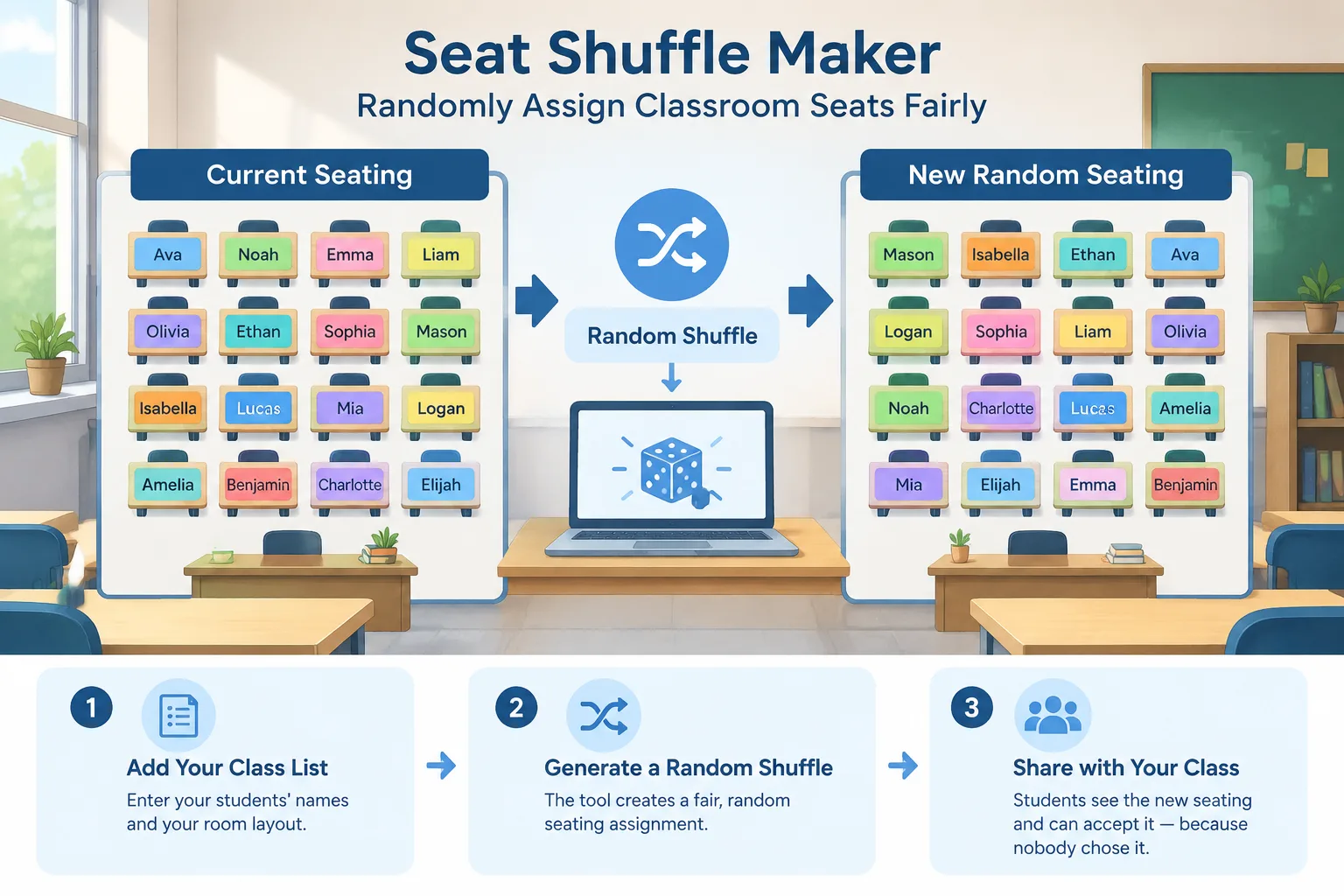
Every teacher knows the moment: it is time to change seats, and the room goes quiet in a particular way. Someone will end up at the back, someone will lose a seat next to a friend, and someone will insist the last shuffle "was not fair." A seat shuffle maker removes that argument. It takes your class list and your room layout and produces a random seating assignment that students can see and accept, because nobody — including you — chose it.
Why Random Seat Shuffles Solve Real Classroom Problems
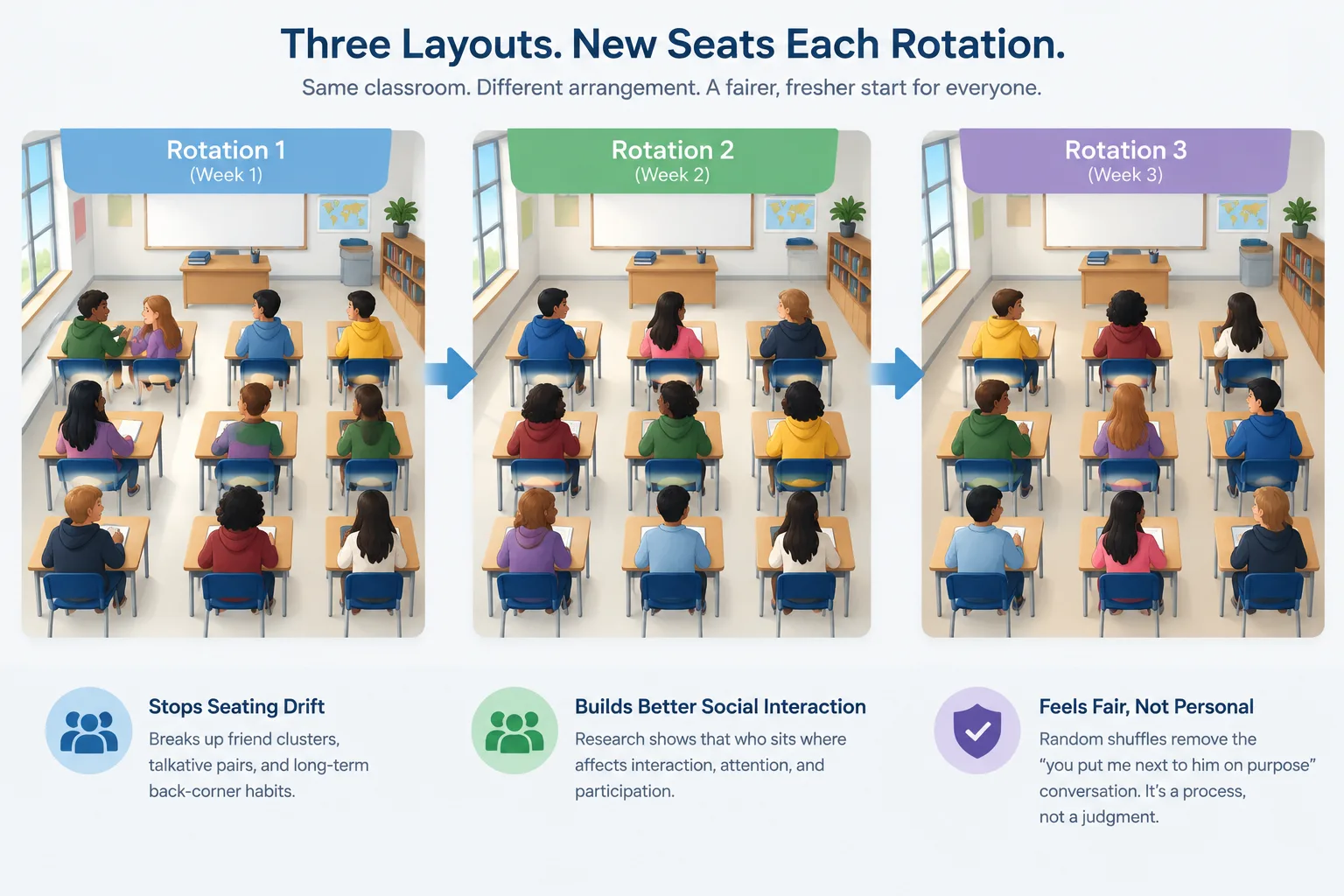
Seating is one of the few classroom decisions students care about deeply and that teachers often make on autopilot. Left alone, seating drifts. Friends cluster, talkative pairs form, and the same quiet students end up in the same back corners for months. A scheduled shuffle interrupts that drift on purpose.
The second benefit is social. Research on classroom seating arrangements consistently finds that who sits where affects interaction, attention, and how much students participate. When you shuffle randomly, you are not making a judgment about any individual student. You are running a process. That distinction matters, because it removes the "you put me next to him on purpose" conversation entirely.
Third, randomness protects you. If a parent or administrator asks why a student is now at the front or the back, the honest answer is simple: the shuffle was random, and here is the result everyone watched appear. A visible process is a defensible process.
Most teachers settle into a rhythm that works: shuffle every two to four weeks, or at the start of each new unit. Frequent enough to keep things fresh, rare enough that students still have a stable home base.
What a Seat Shuffle Maker Actually Does
A seat shuffle maker is a small, focused tool. You give it two things — the list of names and the seats available — and it returns a random one-to-one assignment of students to seats. No student appears twice, no seat is left empty unless you want it to be, and the result is generated at random rather than chosen by hand.
It is worth being clear about how this differs from a seating chart tool. A seating chart tool is for designing a layout you control: you place students at specific desks, keep certain pairs together or apart, and save a plan you intend to reuse. A seat shuffle maker is for the moment when you have decided the plan should change and you want the computer to make the calls.
In practice, most teachers use both. You design the room once, then run a shuffle when it is time to rotate. If your goal is group work rather than individual desks, a random group generator is the better fit — it produces balanced teams instead of single seats.
How to Run a Seat Shuffle in Six Steps
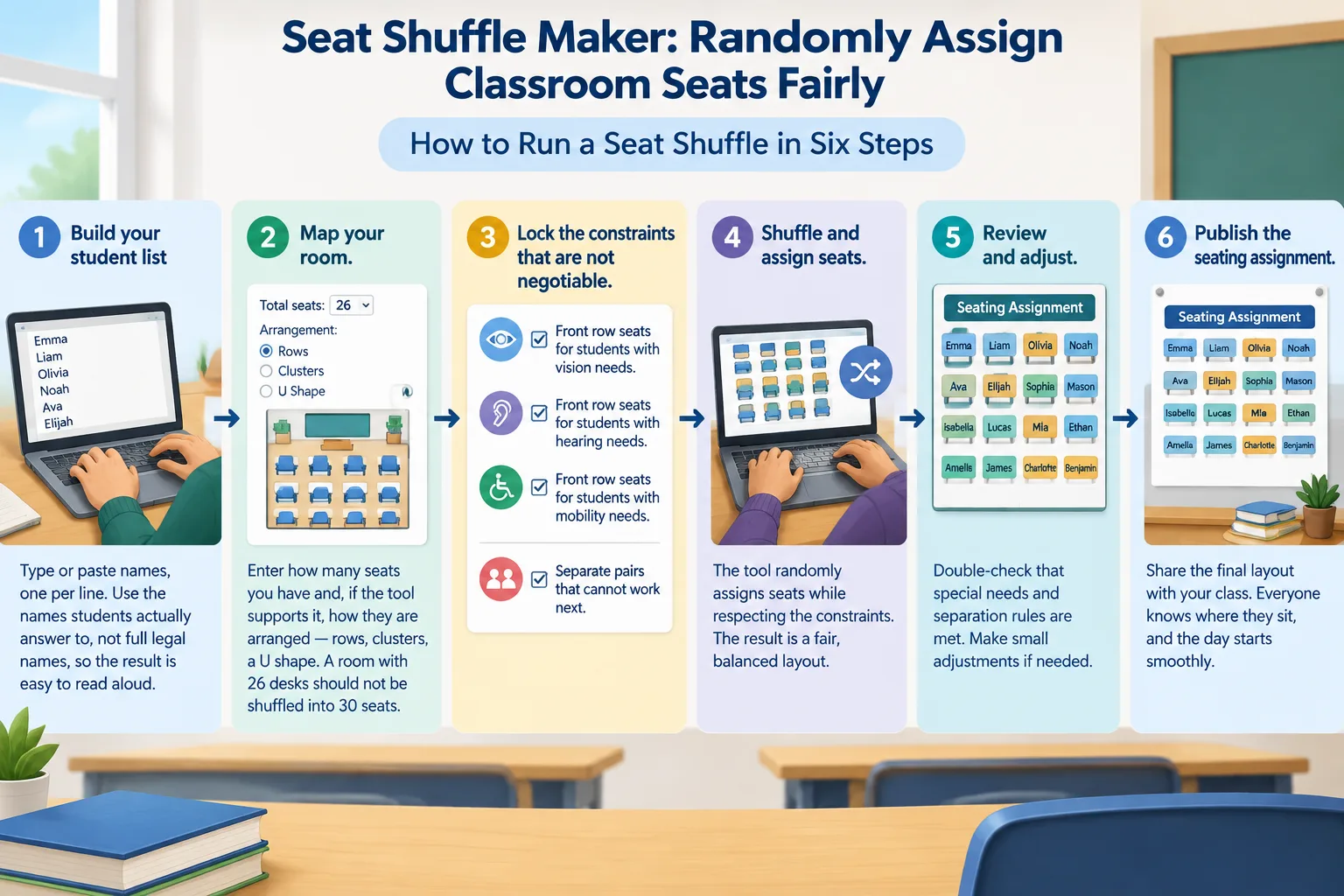
The process is short, but the order matters. Do these in sequence and you will avoid the two most common complaints: "I cannot see the board" and "you forgot that I need a front seat."
- Build your student list. Type or paste names, one per line. Use the names students actually answer to, not full legal names, so the result is easy to read aloud.
- Map your room. Enter how many seats you have and, if the tool supports it, how they are arranged — rows, clusters, a U-shape. A room with 26 desks should not be shuffled into 30 seats.
- Lock the constraints that are not negotiable. Front-row seats for students with vision, hearing, or mobility needs. Separation for pairs that cannot work next to each other. These are requirements, not preferences.
- Run the shuffle. Generate the assignment. If the tool offers a re-roll, use it sparingly — rerolling until you like the result quietly turns a random process back into a hand-picked one.
- Review the result against your constraints. This is a check, not a redesign. Confirm every locked requirement is satisfied and that no student is assigned to two seats.
- Publish it. Post the result where students can see it, or read it aloud while they move. Transparency is what makes the shuffle stick.
A Real Classroom Example: The Monday Morning Shuffle
Consider a ninth-grade English class with 28 students in a room of 28 desks arranged in four rows of seven. The teacher shuffles every three weeks, on a Monday, during the first five minutes of class.
She pastes her roster, confirms the room has 28 seats, and locks two constraints: one student with a documented vision need stays in row one, and two students who distract each other are flagged to be separated. She runs the shuffle once, checks that both constraints held, and projects the result on the board.
The whole thing takes under two minutes. Students move, the lesson starts on time, and no one argues, because the assignment came from a tool and everyone watched it happen. Three weeks later, the same routine runs again.
That last detail is the important one. The value of a seat shuffle maker is not the first shuffle — it is the tenth. A repeatable routine is what keeps a classroom fresh without creating weekly conflict.
Seat Shuffle Maker vs. Other Grouping Tools
Randomization tools look similar but solve different problems. Choosing the wrong one wastes class time and creates confusion about what is actually being decided.
| Tool | What it produces | Best for |
|---|---|---|
| Seat shuffle / seating chart tool | One student per seat | Rotating desks, managing the room |
| Random group generator | Balanced teams of a set size | Group projects, lab work, discussions |
| Random pair generator | Two students per pair | Think-pair-share, peer review |
| Random student picker | One name at a time | Cold calling, turn-taking |
If your question is "where does everyone sit," you want a seat shuffle. If your question is "who works with whom," you want a group or pair generator. Trying to serve both intents with one tool usually means doing both jobs badly.
Making Shuffles Fair: Constraints, Rotations, and Accessibility
Random does not mean careless. A good shuffle respects constraints while randomizing everything else.
Accessibility comes first. Students with vision, hearing, or mobility needs should have their positions fixed before the shuffle runs, not adjusted afterward. The same applies to students who need to be near the door, near a power outlet for a device, or away from a distracting hallway.
Behavioral separation is the second category. Two or three specific pairs can be flagged as "do not seat together." Be careful not to let this list grow — once half the class is flagged, the shuffle stops being random and becomes a puzzle you are solving by hand.
The third category is rotation fairness. Over a semester, every student should spend roughly equal time in the front, the middle, and the back. Shuffling frequently is the simplest way to achieve that. A student who sat in the back row for the last two rotations has a fair claim to a front seat next, and a truly random process will usually deliver that within a few rounds.
Tips by Grade Level and Room Layout
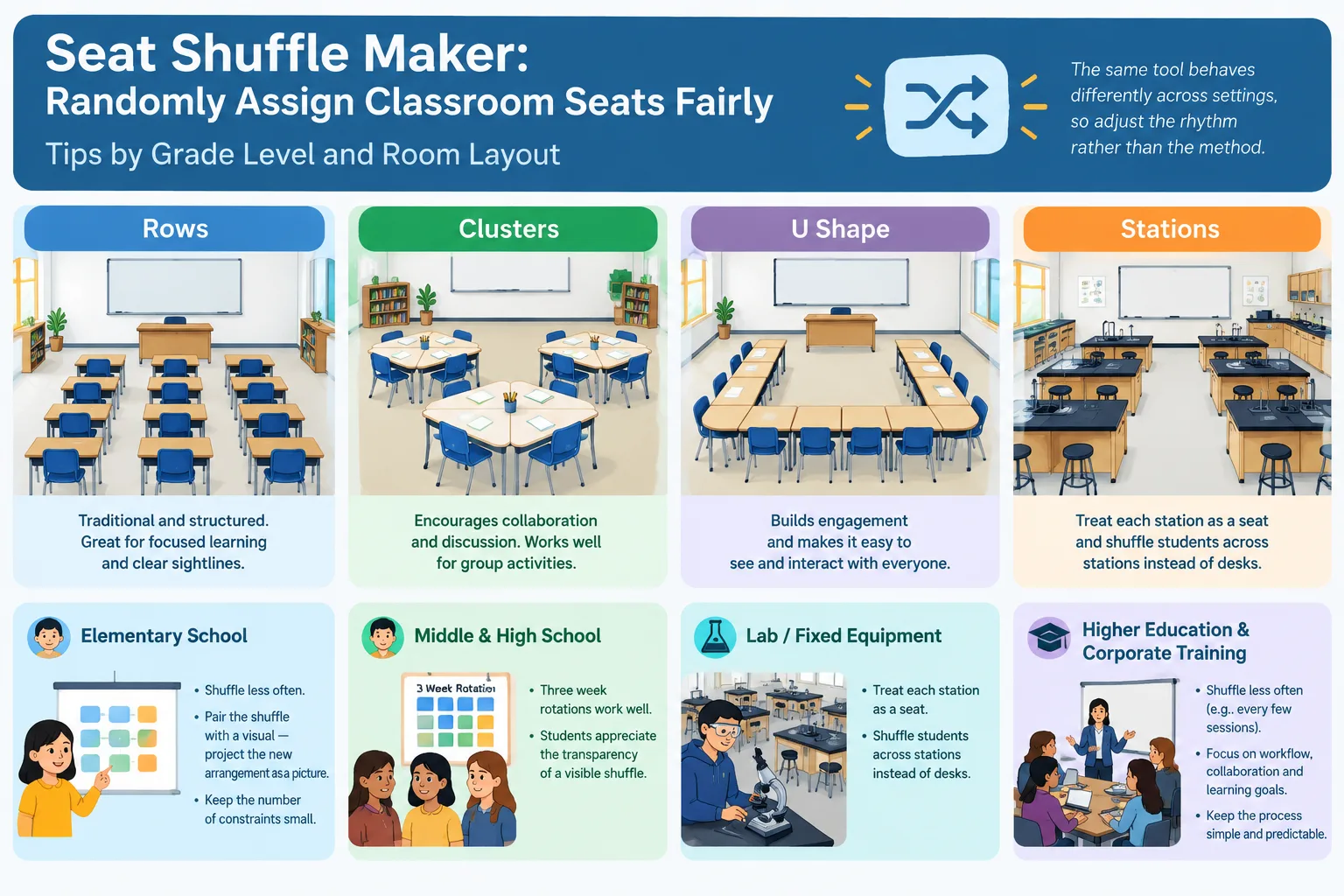
The same tool behaves differently across settings, so adjust the rhythm rather than the method.
In elementary classrooms, shuffle less often and pair the shuffle with a visual — projecting the new arrangement as a picture helps younger students find their seats without a stampede. Keep the number of constraints small, because young students notice when the rules seem inconsistent.
In middle and high school, three-week rotations work well, and students generally appreciate the transparency of a visible shuffle. If you teach in a lab or a room with fixed equipment, treat each station as a seat and shuffle students across stations instead of desks.
In higher education and corporate training, shuffling matters less for discipline and more for mixing. A deliberate shuffle at the start of a workshop breaks the habit of sitting with colleagues, and a mid-session reshuffle can restart flagging energy. A group name generator is a light way to add identity to teams formed this way.
Common Mistakes to Avoid
The first mistake is rerolling until the result looks pleasant. That defeats the purpose and, if students notice, costs you exactly the credibility the tool was supposed to give you.
The second is forgetting constraints until after you publish. Check locked seats before students move, not after they have settled in and started negotiating.
The third is shuffling too often. Weekly changes in a room with limited front-row seats mean some students rarely get a good position. Give randomness time to average out across the term.
Finally, do not use a shuffle to solve a behavior problem. If two students cannot be trusted together, that is a constraint to lock in advance, not a result to hope for afterward.
FAQ
Is a seat shuffle maker really fair if the results are random?
Random does not mean equal in a single round — it means equal over time. One shuffle might put a student in the back. Five shuffles will spread everyone across the room. If you need guaranteed fairness right now, lock the seats that must not change and let the rest be random.
How often should I shuffle seats?
Most teachers shuffle every two to four weeks, or at the start of a new unit or term. Early in the year, shuffle less often while routines are forming; once the class is settled, a three-week cycle works well for most grade levels.
What if a student asks to sit somewhere specific?
Handle special requests as constraints before the shuffle, not as exceptions after it. Genuine needs — vision, hearing, mobility, medical — belong in the locked list. Preferences do not, or the list will grow until the shuffle stops working.
Does a seat shuffle maker work for large lecture halls?
Yes, as long as you treat the fixed auditorium seating as your seat list. The shuffle is most valuable in rooms where students default to the same few rows, because it forces rotation through the whole space rather than the comfortable front third.
Can I use it for group work instead of individual seats?
Not for the same purpose. A seat shuffle assigns one student per seat. If you need teams, use a group generator; if you need quick partnerships, use a pair generator. Keeping the intents separate keeps each result trustworthy.
Ready to Shuffle?
The next time seats need to change, let the tool make the decision. Open the seat shuffle and seating chart tool, enter your roster and room layout, lock the seats that matter, and run a single shuffle. It takes about two minutes, and it turns a contentious classroom moment into a routine nobody argues about.