
random group generator vs spin wheel
Random Group Generator vs. Spin the Wheel: Pros and Cons for Fair Team Selection
Compare a random group generator vs. spin the wheel for classroom and workplace team selection. Explore fairness, speed, engagement, pros, cons, and practical examples.

You need to divide a classroom into small teams, organize workshop activities, or assign employees to project groups. Everyone is waiting, and manually choosing participants can take longer than expected. Should you use a random group generator or spin the wheel? Both approaches introduce an element of chance, but they solve slightly different problems. A random group generator is designed to organize participants into balanced groups quickly, while a spin wheel creates a visible selection experience that everyone can watch. Understanding their differences helps teachers, trainers, and event organizers choose a method that fits the activity rather than simply choosing the most entertaining option.
1. What Is a Random Group Generator?
A random group generator is a digital tool that automatically divides a list of participants into smaller teams. Instead of asking people to count off, assigning numbers, or manually moving names between groups, you enter the participant list and specify how you want the groups organized. The tool then produces randomized group assignments.
For teachers, this can be useful when forming discussion teams, laboratory partners, reading groups, or project teams. Corporate trainers can use the same approach to create breakout groups during workshops. Event organizers may also use it to distribute attendees across networking activities.
The main advantage is that the tool focuses on the organization of the entire participant list. You are not selecting just one name at a time. You are creating a complete group arrangement. This makes a random group generator particularly useful when everyone needs to be assigned before an activity begins.
For example, imagine a teacher has 28 students and wants seven teams. Rather than selecting students individually, the teacher enters all 28 names, chooses seven groups, and generates the assignments. The result is a set of seven teams that can be shared with the class. The teacher can then review the assignments and make any necessary adjustments for learning needs or classroom logistics.
A dedicated Random Group Generator is designed for this type of task. It helps reduce repetitive administrative work while keeping the selection process separate from personal preferences or spontaneous decisions.
2. What Is a Spin-the-Wheel Tool?
A spin-the-wheel tool uses a digital wheel divided into selectable sections. Each section represents a name, team, activity, question, or other choice. When someone spins the wheel, it selects an outcome and displays the result.
The visual element is the main difference. Participants can watch the wheel move, wait for it to stop, and see the selected result. This creates anticipation and gives the selection process a more interactive feel. Teachers often use spinning wheels to choose students for questions, select classroom activities, or decide which team presents first.
For example, a trainer running a remote workshop might place four team names on a wheel. After each discussion round, the trainer spins the wheel to decide which team shares its findings. Participants can see the selection happen rather than simply receiving an announcement.
However, a wheel does not automatically solve every grouping problem. A wheel containing 30 individual names can select one participant, but creating six complete teams requires additional decisions and repeated selections. Depending on the tool, the facilitator may also need to remove selected names or manage previous results manually.
A dedicated group picker wheel or spin wheel group generator can support wheel-based selection workflows. The important distinction is whether your objective is to generate complete teams or create an engaging individual selection moment.
3. Random Group Generator vs. Spin the Wheel: Key Differences
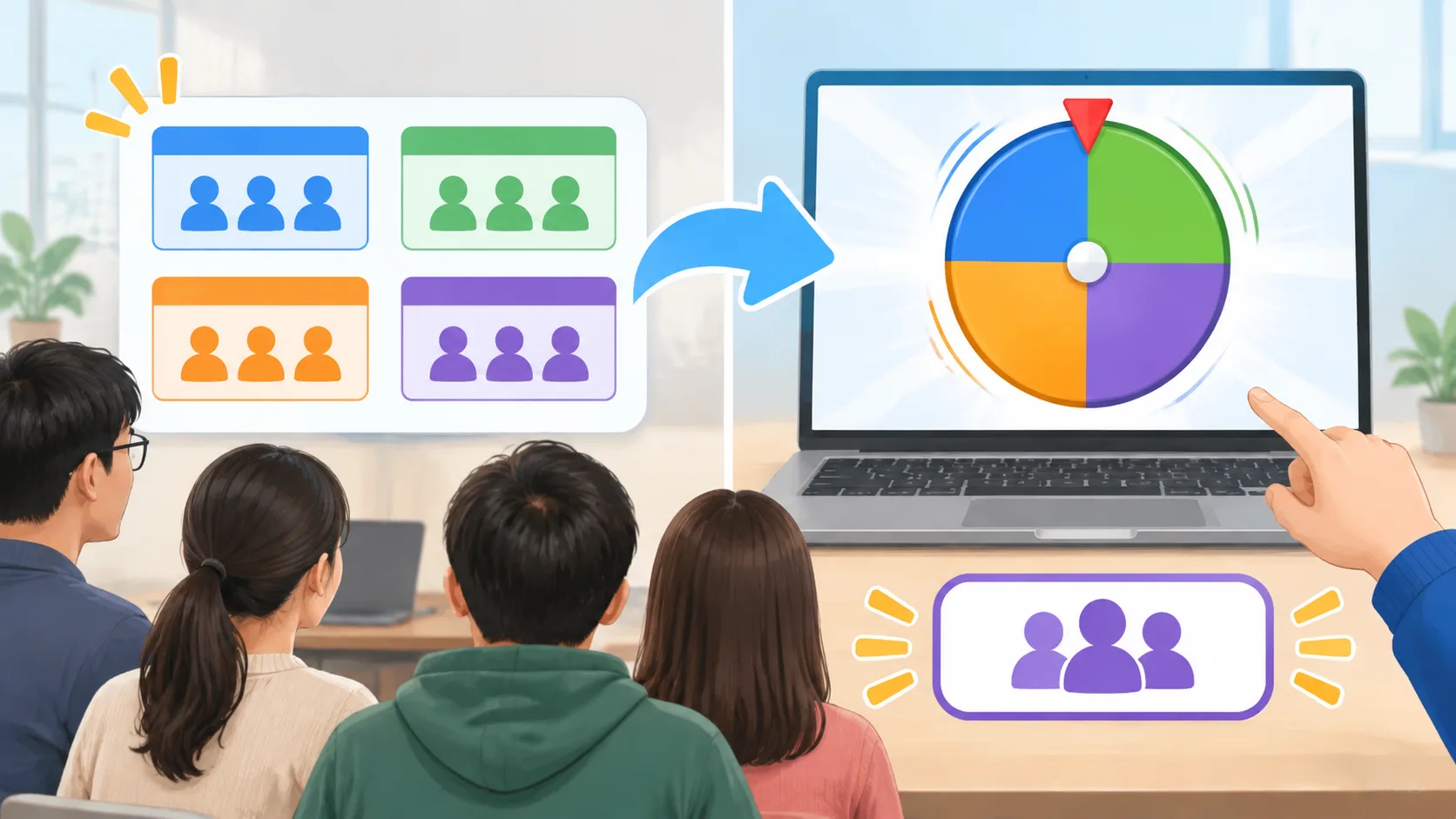
Although both methods use random selection, their workflows are different. A random group generator focuses on distributing participants across groups. A spin wheel focuses on selecting an individual outcome from available options. This difference affects how quickly each method can complete a task and how much attention participants give to the selection process.
Consider the following comparison when planning a classroom lesson or team activity:
| Comparison factor | Random group generator | Spin the wheel |
|---|---|---|
| Main purpose | Create multiple groups | Select one outcome at a time |
| Typical input | Participant names | Names, teams, or choices |
| Main output | Complete group assignments | One selected result per spin |
| Group creation | Designed for dividing participants | May require repeated selections |
| Visual engagement | Focuses on the generated results | Makes the selection process visible |
| Time efficiency | Convenient for creating several groups | Convenient for individual selections |
| Best classroom use | Project teams and discussion groups | Choosing students or activities |
| Facilitator control | Group size and assignment options depend on the tool | Wheel entries and available selection settings depend on the tool |
The distinction becomes clearer when the same group of participants is used for two different activities. If 24 employees need to form six project teams, a group generator can produce the complete arrangement in one workflow. If the facilitator needs to select one team to present its results, a wheel provides a more visible selection experience.
Neither approach guarantees that every resulting group will have identical skills, experience, or personalities. Randomization determines selection, not necessarily educational or professional balance. If participants need to be distributed according to ability, department, experience, or accessibility requirements, the facilitator should review the results and apply appropriate adjustments.
4. Pros and Cons of a Random Group Generator
A random group generator is especially useful when the main challenge is organizing many participants. It reduces the need for manual assignments and helps avoid repeatedly choosing the same familiar people for group activities. It also gives teachers and facilitators a consistent starting point for organizing collaborative work.
One practical benefit is preparation time. A teacher who creates new teams every week does not need to write names on paper, calculate group sizes, and distribute participants manually each time. The teacher can prepare a participant list, select the desired grouping arrangement, and use the generated results as a starting point.
Advantages of a random group generator:
- Efficient team creation: Generate multiple groups without selecting every participant individually.
- Reduced personal bias: Random assignment can reduce the influence of personal preferences when choosing teams.
- Flexible group organization: Many group-generation workflows allow facilitators to organize participants by group count or group size.
- Convenient classroom preparation: Teachers can prepare assignments before lessons or activities.
- Useful for recurring activities: The same participant list can support different collaborative exercises over time.
There are limitations, too. A random result does not automatically account for student support needs, language differences, workplace roles, or previous conflicts between participants. It may also produce combinations that are not appropriate for a particular learning objective. Facilitators remain responsible for checking whether the proposed groups make sense.
Another consideration is the participant experience. A simple list of generated teams is practical, but it may not create the same suspense as watching a wheel spin. If your main objective is to make one selection feel like a game, a conventional group generator may not provide the visual experience you want.
Example: A university instructor has 32 students and needs eight discussion groups. Using a random group generator allows the instructor to organize the class before the session. The instructor reviews the results, checks any necessary accommodations, and shares the team assignments. This approach is more direct than spinning a wheel repeatedly to select 32 individual names.
5. Pros and Cons of Spin-the-Wheel Selection
A spin wheel makes random selection visible. Rather than simply announcing a result, the facilitator can invite participants to watch the wheel and see which option is selected. This can make a short classroom activity or workshop transition feel more interactive.
For teachers, a wheel is useful for choosing who answers a question, which team presents first, or which activity the class completes next. In a corporate setting, it can help select a discussion topic, presentation order, or participant for a demonstration.
Advantages of spin-the-wheel selection:
- Visible selection: Participants can follow the selection process as it happens.
- Interactive experience: The spinning animation can add anticipation to a routine activity.
- Simple choices: A wheel works well when the available outcomes are easy to list.
- Flexible applications: Entries can represent people, teams, questions, tasks, or activities.
- Useful for presentations: The facilitator can display the selection process during an in-person or online session.
The main limitation is that selecting one result is not the same as distributing an entire class into groups. If you need multiple teams with similar sizes, you may have to spin repeatedly, track selected participants, and check the final distribution. This adds steps and creates more opportunities for manual errors.
Fairness also deserves attention. A wheel should be configured correctly, with entries representing the intended choices. Duplicate names, unequal entry representation, or inappropriate settings can affect the selection process. A visible animation alone does not prove that a selection method is statistically fair.
Example: A middle-school teacher has five teams presenting science projects. The teacher adds the five team names to a wheel and spins it to determine presentation order. This is a suitable use because only one outcome is needed at a time. The teacher does not need to divide the entire class again.

6. Which Method Is Better for Classroom Group Activities?
The best method depends on what students need to do next. If the objective is to create several teams, a random group generator is generally the more direct workflow. If the objective is to select one student, team, or classroom activity in front of everyone, a spin wheel may be more appropriate.
Teachers should also consider the educational purpose of the grouping process. Random assignments can introduce students to classmates they might not normally work with. However, not every activity benefits from completely random teams. Some projects require a deliberate mix of skills, while others need students to work with specific partners for accessibility or instructional reasons.
For example, consider a language teacher planning a speaking exercise for 24 students. The class needs six teams of four. A group generator can provide the initial assignments. The teacher then checks whether students have suitable opportunities to participate and adjusts the teams if the lesson requires particular language-support arrangements.
For a different lesson, the same teacher might want one student to choose the next discussion question. A wheel containing question topics would make more sense because the objective is to select one prompt, not create teams.
A practical decision rule is:
- Identify whether you need complete groups or a single selection.
- Estimate how many participants or options must be processed.
- Decide whether visual interaction is important to the activity.
- Check whether group size or participant characteristics require additional control.
- Choose the tool that minimizes unnecessary steps while supporting the learning objective.
Teachers can also use related tools for different classroom tasks. A Random Pair Generator is suitable when students need partners for interviews, peer reviews, or short discussions. A Random Student Picker serves a different purpose when the goal is to select an individual student.
7. Which Method Works Better for Corporate Teams and Workshops?
Corporate trainers and HR professionals face similar decisions, but the context may be different. A workshop might require breakout groups, rotating discussion partners, or a sequence of team presentations. The selection method should support the meeting format without taking attention away from the actual work.
For breakout sessions, a random group generator is useful when a facilitator needs to divide a large participant list into several teams. It can provide an initial arrangement that the facilitator reviews before participants move into their assigned discussions. This is particularly practical when employees from different departments should collaborate.
For instance, a trainer has 40 workshop participants and wants eight groups of five. The trainer generates the groups, checks whether any department-specific constraints need attention, and communicates the assignments before the breakout session begins. The participants can then focus on the discussion instead of waiting while the trainer manually assigns everyone.
A wheel has a different role in this environment. Imagine a facilitator has already created six project teams. At the end of a workshop, the facilitator uses a wheel to select which team presents first. This creates a shared moment of anticipation without requiring the facilitator to reorganize the participants.
Online meetings introduce another consideration. A tool's ability to generate assignments does not necessarily mean that it automatically creates breakout rooms in Zoom or Microsoft Teams. Facilitators should verify the available workflow and check whether assignments need to be transferred manually. The same principle applies to Google Classroom and Slack: do not assume that generating groups automatically sends invitations or changes platform membership.
8. How to Choose the Right Tool: A Practical Decision Process
Instead of asking which method is universally better, start with the task you need to complete. The difference between a random group generator and a spin wheel becomes straightforward when you define the required output.
Use this decision process before your next lesson or workshop:
Step 1: Define the result. Do you need several complete teams, or do you need to select one name or option? If you need complete teams, start with a group generator. If you need a single visible selection, consider a wheel.
Step 2: Check the participant list. Make sure names are entered correctly and that there are no unintended duplicates. For a classroom, use the current attendance list. For a workshop, confirm who is participating in the activity rather than including every person registered for the event.
Step 3: Consider group size. Decide whether you want a fixed number of groups or a fixed number of people in each group. Check the available settings and understand how any remaining participants will be handled.
Step 4: Identify special requirements. Consider accessibility, departmental representation, learning support, and other relevant constraints. If the activity requires carefully balanced teams, review the generated assignments rather than assuming random selection will satisfy every requirement.
Step 5: Choose the appropriate presentation style. A straightforward list is often sufficient for assigning teams. A visible wheel may be more engaging when the selection itself is part of the activity.
Step 6: Review and communicate the result. Check the assignments, explain the activity, and give participants clear instructions about where to go or what to do next.
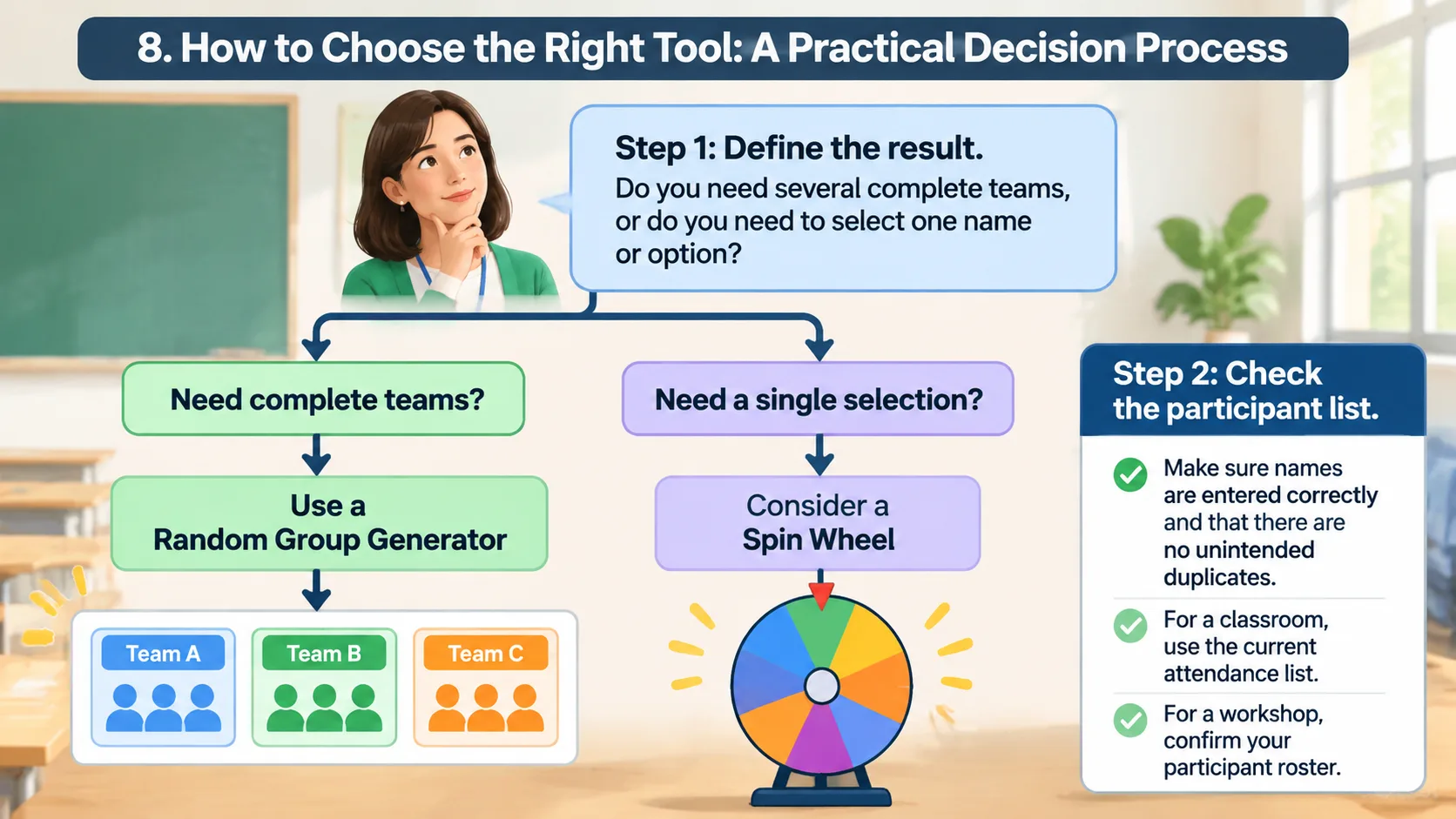
Here is a practical example. A training coordinator is organizing a 30-person workshop. The morning activity requires six teams of five, while the afternoon session needs one team selected to present its findings. The coordinator uses a random group generator for the morning assignment and a wheel containing the six team names for the afternoon presentation. Each tool serves a separate purpose, so the process remains simple and easy to explain.
9. Common Mistakes to Avoid
Even a convenient selection tool can produce a frustrating experience when it is used without preparation. One common mistake is choosing a wheel simply because it looks more entertaining, even when the actual task requires creating several complete groups. Repeatedly selecting individual names can add unnecessary work and make the process harder to manage.
Another mistake is assuming that random means balanced. Random selection can distribute participants without deliberate preference, but it does not guarantee an equal mix of experience, ability, personality, or departmental knowledge. If the activity depends on those characteristics, review the generated groups and make appropriate adjustments.
Facilitators should also avoid changing selection rules without explaining them. If a participant is absent, a group needs to be adjusted, or a particular team cannot participate, explain the reason for the change. Clear communication helps participants understand that the process supports the activity rather than creating arbitrary decisions.
Finally, prepare the participant list before the session. Check spelling, remove duplicate entries, confirm attendance, and decide what to do if the number of participants does not divide evenly. A few minutes of preparation can prevent interruptions once the activity begins.
Frequently Asked Questions
Is a random group generator fairer than a spin wheel?
Neither method is automatically fairer in every situation. Both can support random selection when configured correctly, but a group generator is designed to distribute participants across teams, while a wheel usually selects one outcome at a time. Fairness also depends on the input list, selection settings, and whether the method fits the activity.
Can I use a spin wheel to create classroom groups?
Yes, but creating several complete groups may require repeated spins and additional tracking. You will need to manage selected names, avoid unintended duplicate assignments, and check the final group sizes. A dedicated random group generator is generally more convenient when your main goal is to divide an entire class into teams.
Does a random group generator create balanced teams automatically?
A random group generator can distribute participants into groups according to the available grouping options, but random assignment does not guarantee balanced skills or experience. Teachers and facilitators should review the results when the activity requires specific participant characteristics, accessibility arrangements, or departmental representation.
Can teachers use both methods in the same lesson?
Yes. The tools can complement each other when they are used for different purposes. For example, a teacher can use a random group generator to create discussion teams and then use a spin wheel to choose which team shares its findings with the class.
Which tool should I use for a large class or workshop?
If you need to divide many participants into several teams, begin with a random group generator because it focuses on complete group assignments. If you only need to select one student, team, or activity, a wheel may be sufficient. Always review the final results before starting the activity.
Do random group generators automatically connect to Zoom or Microsoft Teams?
Not necessarily. Workflow integrations and automatic breakout-room creation depend on the specific tool and its supported features. Check the available integration instructions before relying on automatic transfers, and be prepared to copy or distribute assignments manually if needed.
Final Verdict: Match the Selection Method to Your Goal
The comparison between a random group generator vs. spin the wheel is ultimately about choosing the right workflow. A group generator is designed for creating complete teams efficiently, while a spin wheel makes individual selections more visible and interactive. Both approaches can support classroom activities, professional development, and team-building sessions when used for the right purpose.
For teachers, trainers, and organizers who regularly divide participants into teams, a dedicated group-generation tool provides a straightforward starting point. You can generate assignments, review the results, and focus on helping participants complete the activity. When the goal is to choose a presenter, select a question, or add a moment of anticipation, a wheel can provide the interaction you need.
Ready to organize your next classroom or workshop activity? Try the Random Group Generator to create randomized teams and spend less time managing assignments and more time facilitating meaningful collaboration.
Related Tools
Pick the right generator for the job — every tool runs free in your browser.