
random group generator scavenger hunt
Random Group Generator for Scavenger Hunts: Create Fair Teams
Learn how to use a random group generator for scavenger hunts to create balanced teams, assign roles, plan inclusive challenges, and make classroom or workplace activities easier to manage.

Planning a scavenger hunt sounds simple until you need to divide a classroom, workshop, or large event into teams. Some participants want to work with their friends, others feel left out, and manually assigning everyone can take valuable time away from the activity. A random group generator scavenger hunt strategy makes team formation quicker and more impartial, giving teachers and facilitators more time to prepare clues, explain rules, and support participants. With a little planning, random teams can turn an ordinary search activity into an organized opportunity for communication, cooperation, and problem-solving.
Why Team Formation Matters for a Scavenger Hunt
A scavenger hunt usually involves more than finding objects or answering clues. Participants need to communicate, share information, make decisions, and keep track of progress. When people work in teams, these responsibilities become shared tasks rather than individual challenges. However, the experience depends partly on how the teams are formed.
Allowing participants to choose their own teams can be convenient, but it may leave some people without a partner or create groups dominated by existing friendship circles. Teachers may also find that the same confident students repeatedly work together. Manually arranging every team can address some of these concerns, but it takes preparation and may lead to questions about why particular people were assigned together.
A random group generator provides another approach. Instead of spending several minutes negotiating team membership, an organizer can enter participant names and generate groups automatically. Everyone starts with a team, and the facilitator can concentrate on the actual scavenger hunt.
For example, imagine a teacher preparing a science scavenger hunt for 28 students. The class needs seven teams of four. Rather than asking students to find their own partners, the teacher uses a random grouping tool to distribute the class into seven teams. The activity can begin with fewer distractions and less time spent organizing participants.
Random selection does not guarantee that every team will have identical abilities, experience, or confidence. It is a practical starting point for fairer participation, not a replacement for thoughtful supervision. If an activity requires specific support arrangements, the teacher should review the generated groups before starting.
How to Use a Random Group Generator for Scavenger Hunts
The easiest way to organize a scavenger hunt is to decide how the teams should be structured before participants arrive. Think about the number of people, the available space, the difficulty of the clues, and the amount of time available. These details help determine whether smaller teams or larger groups will work better.
You can use the Random Group Generator to organize participants into randomly assigned teams. The basic process is straightforward and does not require you to negotiate every team assignment individually.
Follow these steps:
- Prepare your participant list. Write down the names of everyone taking part. Check spelling and remove duplicate entries so that each participant is included once.
- Decide the team structure. Choose the number of groups or the intended group size based on your activity and participant count.
- Enter the names. Add your participant list to the Random Group Generator.
- Generate the groups. Use the tool to create randomized teams from the submitted participants.
- Review the results. Check that everyone has been assigned and that the group sizes make sense for your activity.
- Share team assignments. Display the results, write team names on a board, or distribute the assignments before explaining the scavenger hunt.
- Introduce the rules. Explain boundaries, time limits, clue requirements, and expectations for respectful teamwork.
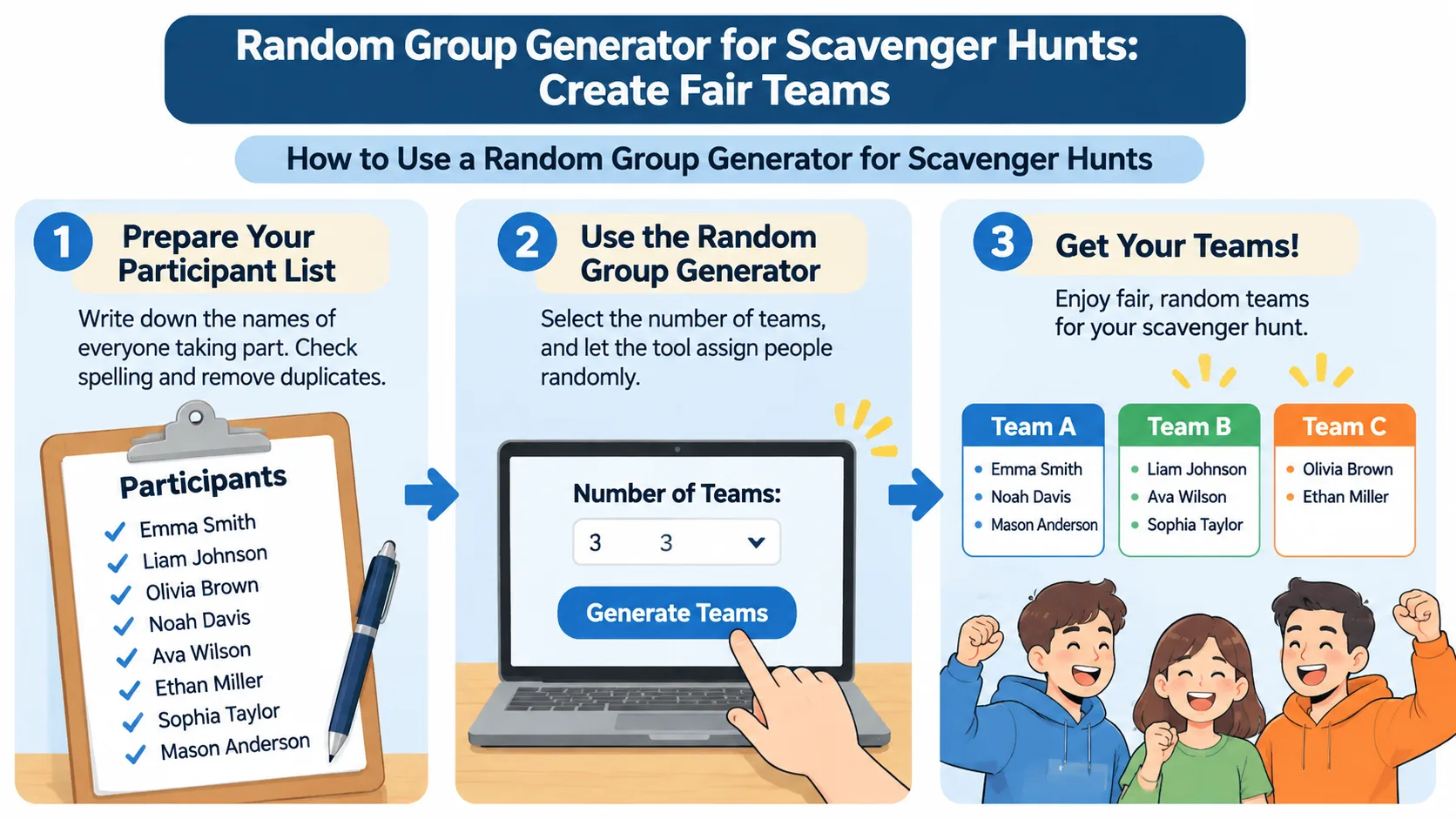
Consider a training session with 24 employees. The facilitator wants six teams of four for an office scavenger hunt. After entering the names and generating the groups, the facilitator can assign each team a starting clue and explain where participants are allowed to search. This removes the need for a lengthy team-selection discussion.
If your participant count does not divide evenly, expect some teams to contain one more person than others. For example, 23 participants divided into five teams cannot produce five identical group sizes. A distribution of three groups of five and two groups of four is a reasonable arrangement. The important point is to check that the resulting teams can complete the planned tasks comfortably.
Choose the Right Team Size for Your Activity
Team size affects how people communicate and divide responsibilities. A team that is too small may struggle with several simultaneous tasks, while a very large team can make it easier for quieter participants to become observers instead of contributors.
For many classroom and workshop scavenger hunts, teams of three or four provide a useful starting point. Smaller groups give each person more opportunities to contribute. Larger groups may be suitable when the activity requires different responsibilities, such as reading clues, recording answers, taking photographs, and navigating a larger area.
Consider these practical arrangements:
- Pairs: Useful for short activities, vocabulary searches, and simple classroom challenges.
- Teams of three: Suitable for activities where participants need to discuss clues and share responsibilities without managing a large group.
- Teams of four: Useful for classroom exploration, workplace challenges, and activities involving several different tasks.
- Teams of five or six: Helpful for larger outdoor events or activities with multiple stations, provided responsibilities are clearly distributed.
For example, a primary school teacher might organize 20 students into five teams of four. Each team receives a picture-based checklist and looks for objects that match different science concepts. A university instructor might instead create teams of three for a campus research hunt, where each participant records a different type of observation.
The right size depends on the work involved, not simply the number of participants. If every person must examine an object closely, smaller groups may be more practical. If the activity requires several stations and different responsibilities, a slightly larger group may work better.
Give Every Team Member a Clear Role
Randomly assigning people creates teams, but it does not automatically create good teamwork. Participants still need to understand how to contribute. Without clear responsibilities, one person may read every clue, make every decision, and record every answer while the rest of the team follows along.
A simple solution is to assign rotating roles. Each person receives a responsibility, and the team changes roles during the activity so that everyone has an opportunity to participate.
Here is a practical role structure for a four-person scavenger hunt:
| Role | Responsibility |
|---|---|
| Clue reader | Reads the instructions and explains what the team needs to find. |
| Navigator | Helps the group follow the approved route or locate activity stations. |
| Recorder | Writes down answers and keeps track of completed challenges. |
| Reporter | Shares discoveries and presents the team's final results. |
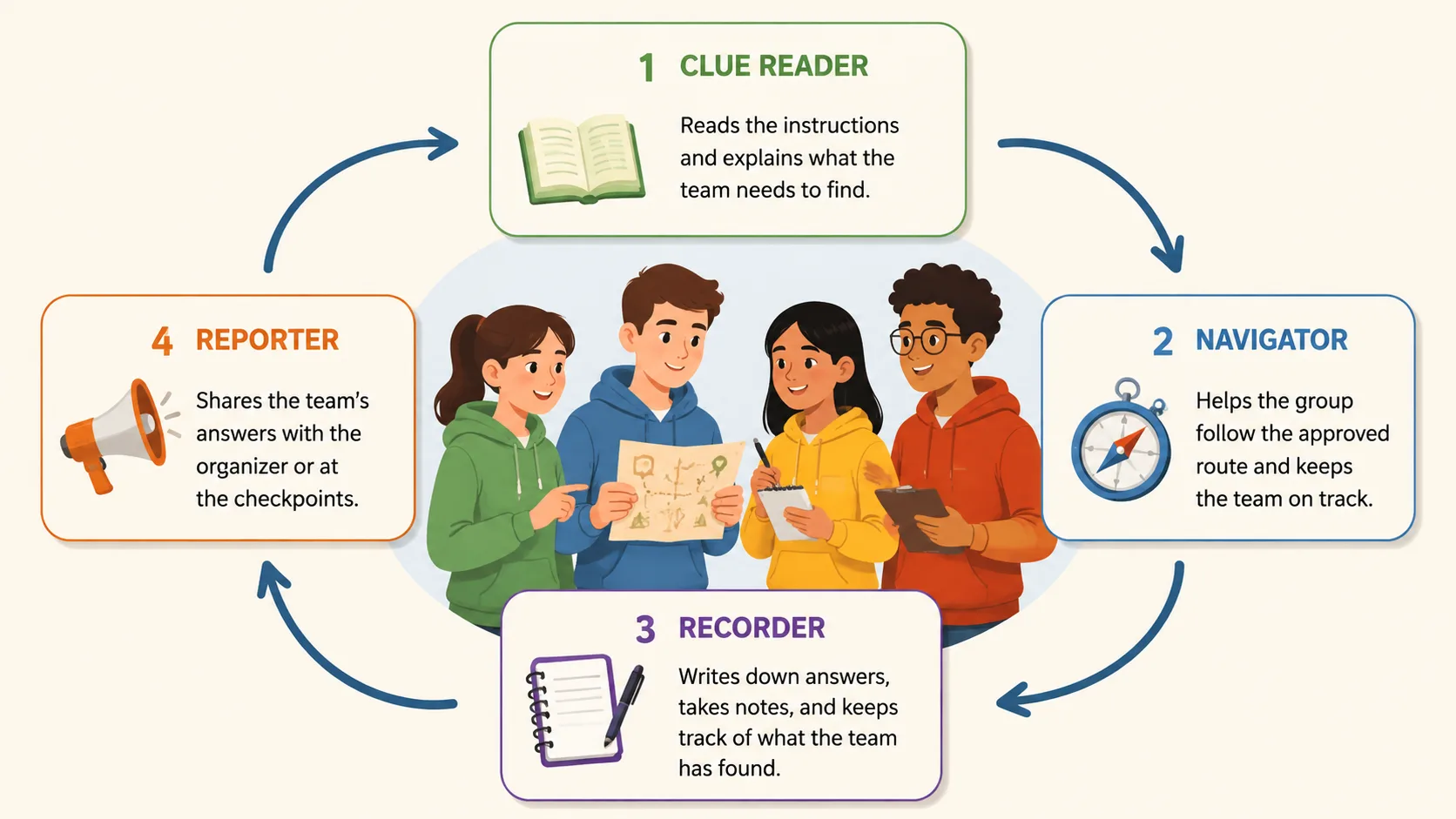
For example, during a history scavenger hunt, the clue reader might identify a historical reference, the navigator locates the relevant display, the recorder documents the answer, and the reporter explains the discovery. At the next station, participants switch responsibilities.
For younger children, use picture cards or simple labels rather than complicated role descriptions. For older students and workplace teams, responsibilities can involve evaluating evidence, documenting observations, or presenting a short explanation. The goal is to make participation visible and shared.
A useful recommendation is to include at least one task that requires discussion rather than simply dividing the checklist into separate individual assignments. When team members must compare observations and agree on an answer, they have a reason to communicate throughout the activity.
Scavenger Hunt Examples for Classrooms and Workplaces
A random group generator can support many different scavenger hunt formats. The same team-formation process works whether participants are searching for classroom objects, solving academic clues, exploring a workplace, or completing a team-building challenge.
1. Classroom learning scavenger hunt
A teacher prepares a list of objects connected to a current lesson. In a science activity, students might identify examples of different materials, locate classroom equipment, or match objects with scientific properties. The teacher randomly divides the class into teams of four and gives each team the same checklist.
Students record their findings and explain why each item meets the clue requirements. At the end, the teacher reviews the answers and asks teams to share an interesting discovery. This approach can connect observation with subject-specific discussion.
2. Vocabulary and language scavenger hunt
Language teachers can create clues that require students to find examples of specific words, signs, descriptions, or sentence structures. Teams might search for an object that is round, something that is made of wood, or an item whose name begins with a particular letter.
For example, a teacher could divide 24 English learners into six groups of four. Each team receives a vocabulary sheet and must record the objects they identify. Students can take turns reading clues, suggesting answers, and explaining their choices in the target language.
3. Workplace team-building scavenger hunt
Corporate trainers can organize an office-based challenge that encourages colleagues to discover shared resources and learn more about their working environment. Clues might ask participants to locate a meeting space, identify an internal resource, or find information about a company process.
A facilitator can randomly divide 32 employees into eight teams of four. Each group receives a different starting clue, helping reduce congestion around popular locations. Teams then complete the challenge within an agreed time limit and present their findings.
4. Outdoor nature scavenger hunt
Outdoor activities can encourage participants to observe their surroundings. Teams might look for different leaf shapes, identify natural patterns, record weather conditions, or photograph examples of different habitats.
For instance, a teacher could divide a class into teams of three and give each group a nature observation sheet. Students record what they discover without disturbing wildlife or removing objects from the environment. The class then compares observations and discusses similarities and differences.
These examples demonstrate why planning matters as much as random team formation. The generator organizes participants, while the facilitator determines the learning objectives, clues, rules, and level of challenge.
Make Random Scavenger Hunt Teams Inclusive and Safe
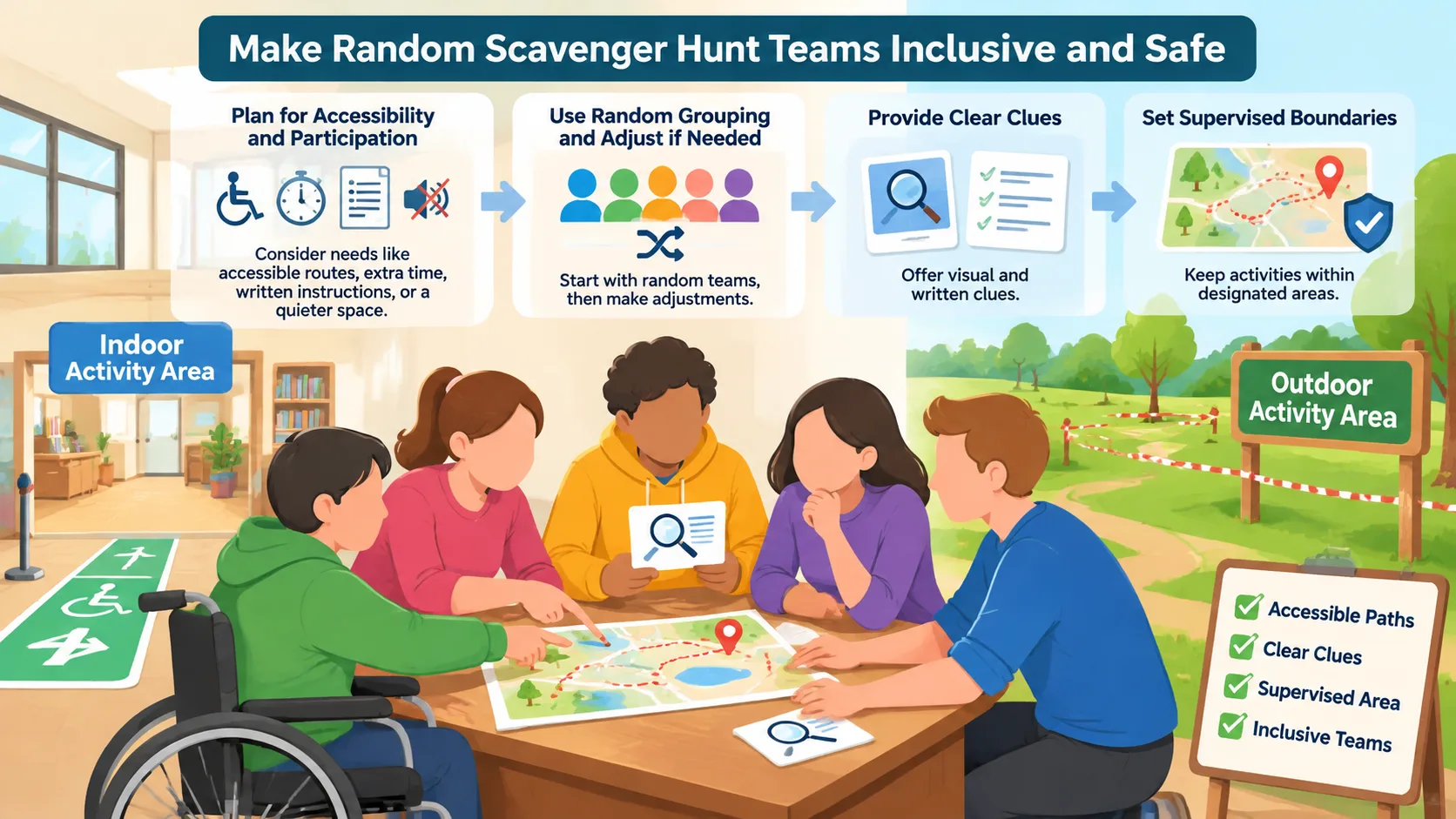
Random groups can introduce participants who do not normally work together. However, fairness involves more than distributing names evenly. An effective activity also considers accessibility, communication preferences, physical requirements, and opportunities for meaningful participation.
Before generating teams, identify any arrangements that need to be respected. For example, some participants may need an accessible route, additional time, written instructions, or a quieter activity space. You can use random grouping as the starting point and make appropriate adjustments afterward.
The Vermont Statewide Independent Living Council's accessibility scavenger hunt provides an example of using this activity format to help participants recognize accessibility features and barriers in schools and communities. Its guidance also emphasizes reflection and discussion after teams complete their observations.
Use these planning practices:
- Choose a location that participants can access safely.
- Provide instructions in clear language and more than one format when appropriate.
- Avoid clues that require unsafe movement, entering restricted areas, or handling unfamiliar objects.
- Make alternative ways of completing tasks available.
- Give participants opportunities to request assistance without being singled out.
- Review team assignments when particular support arrangements are necessary.
- Establish clear boundaries and supervision expectations before the activity begins.
For outdoor activities, check the venue, weather, permitted areas, and potential hazards. Establish meeting points and a clear procedure for participants who become separated from their teams. When children are involved, follow the organization's supervision and safeguarding requirements.
It is also important to avoid making the activity depend entirely on speed. A race can be exciting, but it may disadvantage participants who need more time or have different mobility and communication needs. Awarding recognition for careful observation, teamwork, creativity, and accurate answers gives participants different ways to contribute.
Random group generation is not always the right choice. If a scavenger hunt involves sensitive personal information, confidential workplace material, or tasks that require carefully matched specialist skills, a manually planned team structure may be more appropriate. The facilitator should make the final decision based on the activity's requirements.
Random Group Generator vs. Manual Team Assignment
Both random and manual grouping have a place in scavenger hunt planning. The best method depends on what the organizer needs to achieve and how much preparation time is available.
Manual assignment allows a teacher or facilitator to consider individual skills, experience, communication needs, and existing relationships. This can be useful when teams need a specific mix of abilities or when particular participants require additional support. However, manually assigning every person can become time-consuming, especially with larger classes or events.
A random group generator provides a quicker starting point. It reduces the number of individual decisions required during team formation and avoids asking participants to negotiate their own group membership. It is particularly practical for informal activities, recurring classroom challenges, and workshops where impartial assignment is more important than carefully matched team profiles.
| Consideration | Random grouping | Manual grouping |
|---|---|---|
| Setup time | Usually quicker | Requires more planning |
| Team selection | Randomly assigned | Organizer decides |
| Participant preferences | Not automatically considered | Can be considered |
| Skill balancing | Requires review and adjustment | Can be planned directly |
| Repeat activities | Easy to generate new teams | Requires new assignments |
| Accessibility arrangements | May require adjustments | Can be incorporated during planning |
For example, a teacher organizing a weekly classroom scavenger hunt might use random grouping to encourage students to work with different classmates. A specialist workshop requiring teams with particular technical skills might benefit from manual assignment instead.
You can also combine both methods. Generate random groups first, review the results, and make limited adjustments when a genuine participation or accessibility need exists. This approach preserves the convenience of random selection while giving the facilitator responsibility for the final arrangement.
Keep the Scavenger Hunt Organized from Start to Finish
Good team formation is only one part of a successful scavenger hunt. Participants also need clear instructions, an appropriate challenge level, and a predictable process for completing the activity. A little preparation can prevent confusion once everyone starts moving around.
Start by preparing a checklist that explains what participants need to find or accomplish. Keep instructions specific enough to avoid disagreements about acceptable answers. If the activity involves photographs, written observations, or completed worksheets, explain how teams should submit their work.
Next, establish a time limit that matches the number and difficulty of the challenges. A short classroom activity might use a small number of clues, while a campus exploration may need more time for movement between locations. Avoid setting a deadline so tight that participants must rush or ignore safety instructions.
A practical facilitator workflow looks like this:
- Prepare and test all clues before the event.
- Confirm that the venue and activity areas are available.
- Generate the teams and review the assignments.
- Explain the rules and distribute materials.
- Start the activity and monitor participation.
- Provide clarification when a clue causes confusion.
- Collect answers or observations when time expires.
- Invite teams to explain their discoveries.
- Reflect on how participants shared responsibilities and solved problems.
Consider a 30-minute classroom scavenger hunt. The teacher might spend five minutes explaining the activity, allow 15 minutes for searching, and reserve the remaining time for checking answers and discussing discoveries. The exact schedule should be adjusted for the age group and complexity of the task.
The final discussion is particularly valuable. Ask participants which clue required the most teamwork, how they handled disagreements, and whether everyone had an opportunity to contribute. These questions help turn a recreational activity into a more reflective learning experience.
Frequently Asked Questions
How do I divide students into teams for a scavenger hunt?
Prepare a list of student names and decide how many teams you need or how many students should be in each team. Enter the names into the Random Group Generator and generate the groups. Review the results before sharing the assignments, especially if students have specific accessibility or support requirements.
What is the best group size for a scavenger hunt?
Teams of three or four are a useful starting point for many classroom and workplace scavenger hunts. Smaller teams give participants more opportunities to contribute, while larger teams can accommodate activities with several different responsibilities. Choose a size that matches the difficulty of the clues and the number of tasks.
Can I use a random group generator for outdoor scavenger hunts?
Yes. A random group generator can organize participants before an outdoor activity just as it can for an indoor challenge. However, team formation does not replace venue planning, adult supervision, safety boundaries, weather checks, or accessibility arrangements.
Are random teams fairer than letting students choose their own groups?
Random assignment reduces the influence of friendship-based selection and gives participants a different way to form teams. It does not guarantee equal abilities, identical experience, or perfectly balanced groups. Teachers should review the results and make adjustments when necessary to support meaningful participation.
What should I do if the number of participants does not divide evenly?
Allow the generator to distribute participants into groups with slightly different sizes, then check whether the differences are practical for the activity. For example, 22 participants can be arranged into four groups of six and five, or another suitable combination depending on the available team structure. Avoid leaving someone without a group simply to achieve identical team sizes.
How can I make a scavenger hunt more engaging for every participant?
Give each team member a clear responsibility and rotate roles throughout the activity. Use clues that require discussion, observation, and shared decision-making rather than allowing one person to complete everything. Recognize different contributions, including creativity, careful observation, communication, and problem-solving.
Create Your Scavenger Hunt Teams in Minutes
A well-organized scavenger hunt starts with a simple, fair way to bring people together. Whether you are preparing a classroom learning activity, a campus exploration, or a workplace team-building challenge, random grouping can reduce administrative work and help participants focus on the experience.
Prepare your participant list, choose a practical team size, and give everyone a meaningful role. Review the results for accessibility and support needs, explain the rules, and finish with a short discussion about what the teams discovered.
Ready to organize your next activity? Use the free Random Group Generator to create random scavenger hunt teams and spend less time assigning participants and more time facilitating a great activity.
Related Tools
Pick the right generator for the job — every tool runs free in your browser.