
random group generator escape room
Random Group Generator for Escape Room Teams: Create Fair, Balanced Groups
Learn how to use a random group generator for escape room teams. Create fair teams, manage large groups, improve participation, and organize your next escape room activity.

You have prepared the puzzles, hidden the clues, and set the countdown timer. There is just one problem: deciding who should work with whom. Whether you are organizing a classroom escape room, a corporate team-building event, or a recreational puzzle challenge, creating teams can take longer than expected. A random group generator escape room strategy makes this process simpler by distributing participants into teams without relying on personal preferences or lengthy discussions. Instead of letting people choose their own partners, you can create groups quickly and give everyone a fair opportunity to participate.
Escape rooms depend on communication, problem-solving, observation, and cooperation. The way participants are grouped can influence how they approach these challenges. A well-organized team gives members room to contribute different ideas, share discoveries, and work toward a common goal. With a little preparation and a reliable grouping process, you can spend less time organizing people and more time creating an engaging experience.
Why Team Formation Matters in an Escape Room
Escape rooms are collaborative activities. Participants usually need to identify clues, connect information, solve puzzles, and make decisions before time runs out. These tasks become more interesting when people bring different perspectives and problem-solving approaches to the same challenge.
However, letting participants select their own teams does not always produce the best experience. Friends may naturally gather together, confident participants may dominate team selection, and quieter individuals may find themselves waiting for someone to invite them. In workplace settings, employees may also repeatedly choose colleagues they already know. This can limit opportunities to interact with new people.
A random group generator escape room approach removes much of this initial selection pressure. Instead of negotiating team membership, participants are assigned to groups through a neutral process. Everyone knows that the same method applies to the entire group, which can make the activity feel more transparent.
Research provides a useful reason to pay attention to team size. A systematic review of educational escape rooms found that teams of three to six participants were common in the studies examined. The review also discussed how smaller groups can encourage active participation and reduce situations where some members become spectators. This is a useful starting point, although the best size still depends on the room, puzzles, and activity objectives.
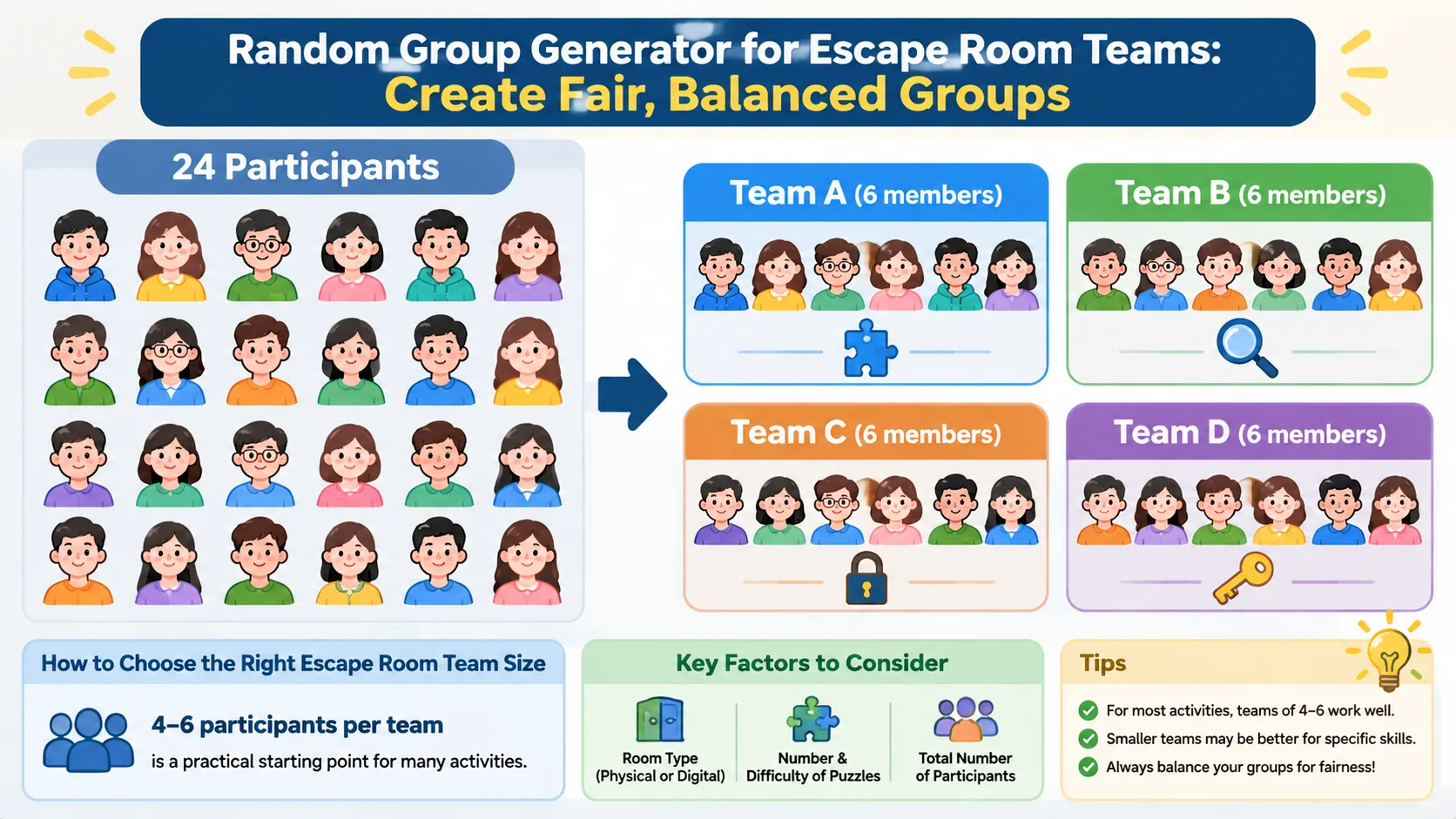
For example, imagine a teacher organizing a history-themed escape room for 24 students. Dividing the class into four teams of six creates manageable groups without requiring students to negotiate their membership. Each team can investigate historical clues, interpret documents, and work toward the final answer.
How to Choose the Right Escape Room Team Size
There is no universal team size that works for every escape room. A physical room with limited space has different requirements from a digital escape room where participants can solve several puzzles simultaneously. The number and difficulty of the challenges also matter.
For many educational activities, teams of four to six participants are a practical starting point. This range gives participants opportunities to exchange ideas while keeping the group small enough for individual contributions. For activities that require every participant to demonstrate a particular skill, smaller teams may be more suitable.
Consider these factors before creating your groups:
- Number of participants: Calculate how many teams you need and whether the final groups can be similar in size.
- Room capacity: Make sure each team has enough physical space to investigate clues without crowding.
- Puzzle structure: Several independent puzzles may support larger teams because members can work on different tasks simultaneously.
- Activity duration: Short challenges benefit from clear responsibilities and efficient communication.
- Learning objectives: If individual participation matters, smaller groups can make it easier to observe each person's contribution.
For example, a company with 30 employees might create six teams of five for a communication-focused escape room. If the activity takes place in a small training room, the facilitator can also provide separate puzzle stations or run multiple rounds rather than placing everyone in one crowded space.
Remember that random selection does not automatically create balanced groups in terms of experience, knowledge, or personality. If your activity requires particular skill combinations, you may need to review the generated teams and make reasonable adjustments.
How to Use a Random Group Generator for Escape Room Teams
A random group generator can turn a complicated team-selection process into a straightforward preparation task. Rather than writing names on paper, drawing slips, and repeating the process when the numbers do not work, you can enter participant names and generate groups in one place.
The Random Group Generator is designed to help teachers, facilitators, and event organizers distribute participants into groups. You can use it before an activity starts so that teams are ready when participants arrive.
Follow these steps to organize your escape room teams:
Step 1: Prepare Your Participant List
Collect the names of everyone who will participate. For a classroom activity, use your current class list. For a workplace event, prepare a list of employees who have registered for the session.
Check for duplicate names and spelling mistakes. If two participants share the same name, add an initial or another identifier so you can distinguish them easily.
For example, a facilitator preparing an escape room for 20 employees might enter all 20 names before the training session. This avoids spending the first few minutes asking participants to write their names on pieces of paper.
Step 2: Decide How Many Teams You Need
Think about the number of participants and the type of escape room you are running. If you have 24 students and want teams of approximately six, you can organize four teams.
You can also approach the task from the opposite direction. If your room supports five teams, enter the participant list and select the desired number of groups. The goal is to keep team sizes as similar as possible.
Step 3: Generate Your Groups
Open the Random Group Generator and enter the participant names. Choose the grouping arrangement that matches your activity, then generate the teams.
Review the displayed results before announcing them. Check that everyone appears in the correct activity and that no participant has been accidentally entered twice.
Step 4: Assign Each Team a Starting Point
Once the groups are ready, give each team a starting station, puzzle pack, or room assignment. If several teams are using identical materials, make sure each team knows which set belongs to them.
For example, Team A might begin with a locked-box puzzle, while Team B starts with a coded message. If teams are competing simultaneously, explain the rules for hints, time limits, and submitting final answers.
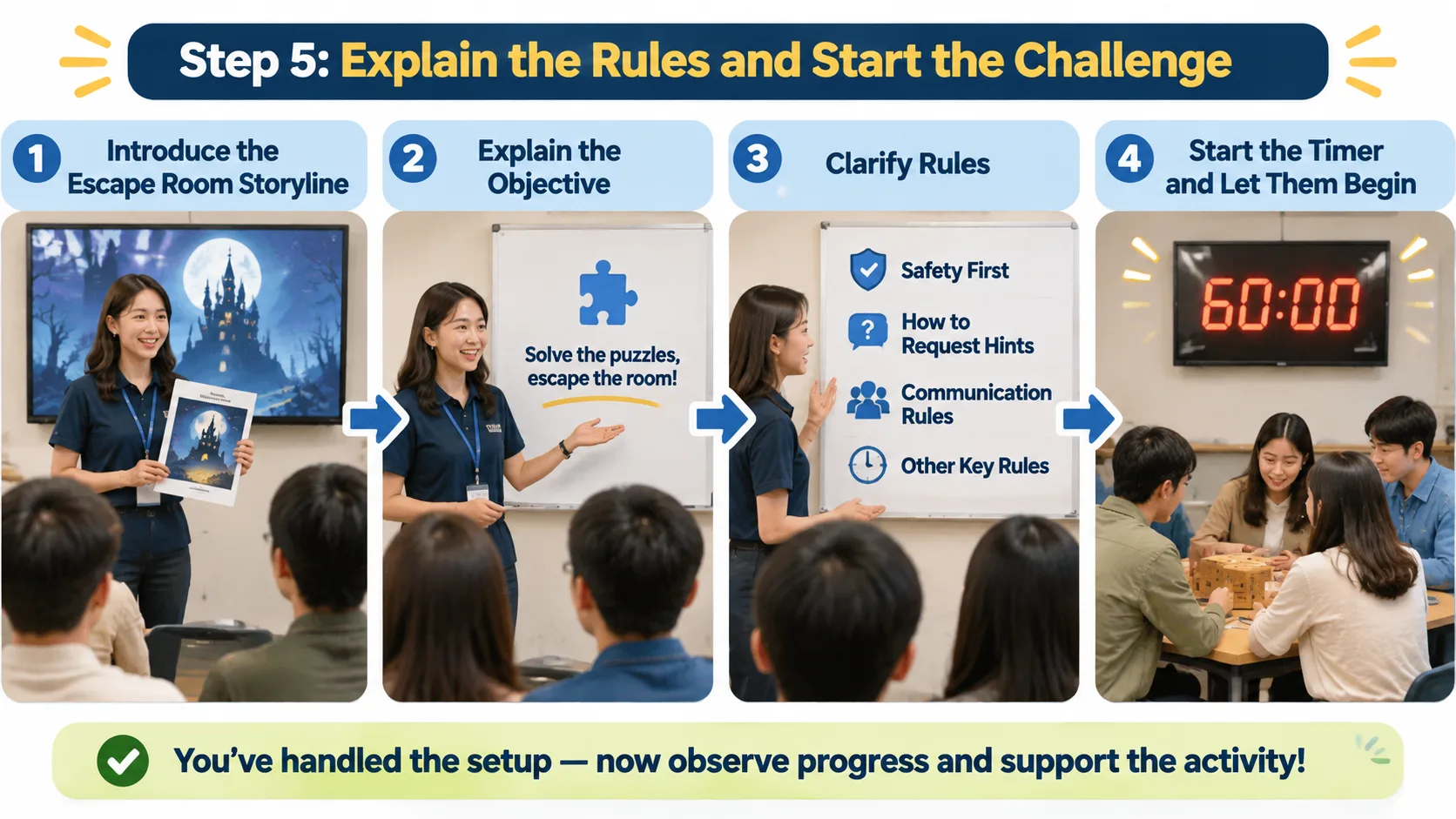
Step 5: Explain the Rules and Start the Challenge
Introduce the escape room storyline, explain the objective, and clarify any safety or participation rules. Make sure participants understand how to request hints and whether they can communicate with other teams.
After the briefing, start the timer and let participants begin. You have already handled the administrative work, so you can focus on observing progress and supporting the activity.
Practical Examples of Random Escape Room Team Formation
Different environments require different approaches to grouping. A random group generator escape room workflow can work for school lessons, university workshops, employee training, and community events, provided the grouping method matches the activity.
Classroom Escape Room for Students
Imagine a middle school teacher preparing a science escape room for 28 students. The activity includes questions about ecosystems, food chains, and environmental changes. The teacher wants students to collaborate with classmates outside their usual friendship groups.
The teacher enters all 28 names into the Random Group Generator and creates four teams of seven. Before the activity, each team receives a set of puzzles and a simple responsibility structure.
One student records discoveries, another organizes the clues, and another communicates progress to the teacher. These responsibilities can rotate during the activity so that everyone has a chance to participate.
The random selection helps avoid the usual situation in which students automatically choose the same friends. The teacher can then observe how different combinations approach the puzzles and discuss their teamwork during the lesson review.
Corporate Team-Building Escape Room
Consider a company organizing an escape room for 36 employees from different departments. The purpose is to encourage communication between colleagues who do not normally work together.
The organizer creates six teams of six using a random group generator. Instead of allowing departments to remain together, the resulting teams provide opportunities for cross-department interaction.
Each team receives the same fictional business crisis to solve. Participants must examine documents, interpret clues, and identify the correct sequence of actions. After the activity, the facilitator asks participants which communication approaches helped their teams make progress.
The grouping process supports the event's objective without requiring the organizer to manually arrange dozens of names.
University Orientation Escape Room
A university orientation coordinator wants new students to meet people outside their existing social circles. There are 40 participants, and the activity uses a series of campus-themed puzzles.
The coordinator creates eight teams of five. Each team receives clues related to university facilities, student services, and campus traditions.
Because participants are meeting for the first time, random grouping reduces the pressure of finding a team independently. The coordinator can also give each team a short introduction activity before starting the actual puzzle challenge.
These examples show that team generation is not only an administrative task. It is also an opportunity to shape the social experience of an escape room.
Tips for Making Random Escape Room Teams More Effective
Generating teams is only the beginning. The way you organize participation during the activity can make a significant difference to the experience. Even a well-distributed group can struggle if one person takes control of every puzzle or several participants do not know how to contribute.
Start by explaining that every team member should have an opportunity to investigate clues and suggest solutions. Avoid assigning all important decisions to the fastest or most confident participant. Instead, encourage members to share discoveries before the team settles on an answer.
A simple responsibility system can help. Consider assigning these roles:
- Clue investigator: Searches for information and identifies useful details.
- Puzzle solver: Connects clues and suggests possible answers.
- Progress recorder: Keeps track of discoveries and completed tasks.
- Timekeeper: Monitors the remaining time and reminds the team of its priorities.
- Team communicator: Shares questions or requests for hints with the facilitator.
For teams with more members, two participants can share a responsibility. Roles should also rotate when possible, particularly in educational activities where participation is part of the learning objective.
Another useful strategy is to provide a short team briefing. Explain the objective, the rules for using hints, and the expected behavior when disagreements arise. Remind participants that the goal is to solve the challenge together rather than simply finish first.
Finally, schedule a short debrief after the activity. Ask participants which clues were difficult, how they shared information, and whether everyone had an opportunity to contribute. An educational escape room systematic review emphasizes the importance of debriefing when facilitators want participants to reflect on teamwork and connect the activity to future situations.
Random Group Generator vs. Manual Team Selection
You can organize escape room teams in several ways. The best method depends on the size of your event, the amount of preparation time available, and whether participants need specific combinations of skills.
Manual selection gives teachers and facilitators more control. For example, a teacher may deliberately place students with different levels of subject knowledge together. However, manually assigning many participants takes time and can introduce unconscious preferences or repeated patterns.
Letting participants choose their own teams is another option. This can work well for informal recreational activities where social choice is part of the experience. However, it may be less appropriate when the objective is to encourage new interactions or ensure that everyone is included.
A random group generator offers a different approach. It provides a consistent selection process without requiring the facilitator to negotiate every team assignment.
| Team formation method | Main advantage | Potential limitation |
|---|---|---|
| Random group generator | Fast, neutral team assignment | Does not guarantee skill balance |
| Manual selection | Allows targeted combinations | Takes more preparation time |
| Participant choice | Gives participants control | Can create familiar social groups |
| Paper name drawing | Simple and low-tech | More difficult to manage for large lists |
For most general team-building activities, random selection is a useful starting point. For assessed educational tasks, accessibility requirements, or activities that depend on particular skills, a facilitator may need to review the results before the event.
You can also use a Random Pair Generator when an escape room includes partner-based clues or two-person puzzle stations. If you want to make team identities more memorable, the Group Name Generator can help participants choose names that match the escape room theme.
Common Mistakes to Avoid When Creating Escape Room Teams
Even a simple grouping process can create problems if the organizer overlooks practical details. The first common mistake is choosing team sizes without considering the room itself. Six participants might work well around a large puzzle table but feel crowded in a small physical room. Always consider available space and whether participants need to work on separate puzzles simultaneously.
Another mistake is assuming that random groups will automatically be fair in every respect. Random assignment distributes names without deliberately considering experience, accessibility, language needs, or individual learning requirements. If someone needs a specific accommodation, address it before generating the final teams.
Organizers should also avoid giving larger teams too many passive roles. If a team has eight members but only two puzzles to investigate, several people may have little to do. Add parallel tasks, divide the group into smaller working units, or choose a different team size when the activity design allows it.
Finally, do not forget to explain the rules before starting. Participants should know what counts as a completed puzzle, how hints work, and whether they are allowed to move between stations. Clear instructions reduce unnecessary interruptions and help everyone focus on the challenge.
For instance, a facilitator running a remote escape room should establish how participants will share clues through their meeting platform. A random assignment alone will not solve communication problems caused by unclear instructions or missing technical arrangements.
Frequently Asked Questions
What Is the Best Team Size for an Escape Room?
Teams of four to six participants are a useful starting point for many escape room activities. However, the ideal size depends on room capacity, puzzle complexity, available time, and the level of participation you expect. Smaller teams can be preferable when every individual needs to contribute directly.
How Can I Randomly Divide Students Into Escape Room Teams?
Prepare a complete list of student names and enter it into a random group generator. Choose the number of teams or grouping arrangement that fits your activity, generate the results, and check that every student is included. You can then assign each team a puzzle station and explain the rules before the challenge begins.
Are Randomly Assigned Escape Room Teams Fair?
Random assignment offers a neutral way to distribute participants without relying on friendship groups or personal preferences. However, it does not guarantee equal experience, knowledge, or problem-solving ability across teams. Review the results when your activity requires specific accommodations or carefully balanced skills.
Can I Use a Random Group Generator for Corporate Escape Room Events?
Yes. A random group generator can help HR teams and corporate facilitators divide employees into groups without spending time arranging every participant manually. It is particularly useful for activities intended to introduce colleagues from different departments or encourage new working relationships.
What Should I Do If the Number of Participants Does Not Divide Evenly?
Use the grouping option that produces teams with the smallest practical size differences. For example, 23 participants could be distributed into four groups with three teams of six and one team of five. A difference of one participant is usually manageable, but consider the puzzle workload before finalizing the arrangement.
Should I Change Randomly Generated Teams Before an Escape Room Starts?
You can make adjustments when there are clear practical reasons, such as accessibility needs, safety requirements, or a specific learning objective. Explain the grouping policy consistently so participants understand why changes may be necessary. Avoid making unnecessary changes simply because someone prefers to work with a particular friend.
Create Your Escape Room Teams in Minutes
A successful escape room starts with a clear plan. Before participants begin searching for hidden clues and solving puzzles, they need teams that are ready to work together. Spending too much time organizing names takes attention away from the activity itself.
A random group generator escape room workflow makes preparation easier by giving teachers, corporate trainers, and event organizers a straightforward way to distribute participants. Combine random assignment with sensible team sizes, clear responsibilities, and a short debrief to create a more organized experience.
Whether you are planning a classroom challenge, a university orientation activity, or a workplace team-building session, you can start creating your teams before the event begins. Enter your participant names, generate your groups, and get everyone ready to solve the mystery.
Ready to organize your next escape room? Try the free Random Group Generator and create your teams without the hassle of manual selection.
Related Tools
Pick the right generator for the job — every tool runs free in your browser.