
random group generator
Pembuat Kelompok: How to Use a Random Group Generator for Fair, Fast Teams
Learn how a pembuat kelompok (group maker) works, plus step-by-step instructions for fair random grouping in classrooms, workshops, and online breakout rooms.

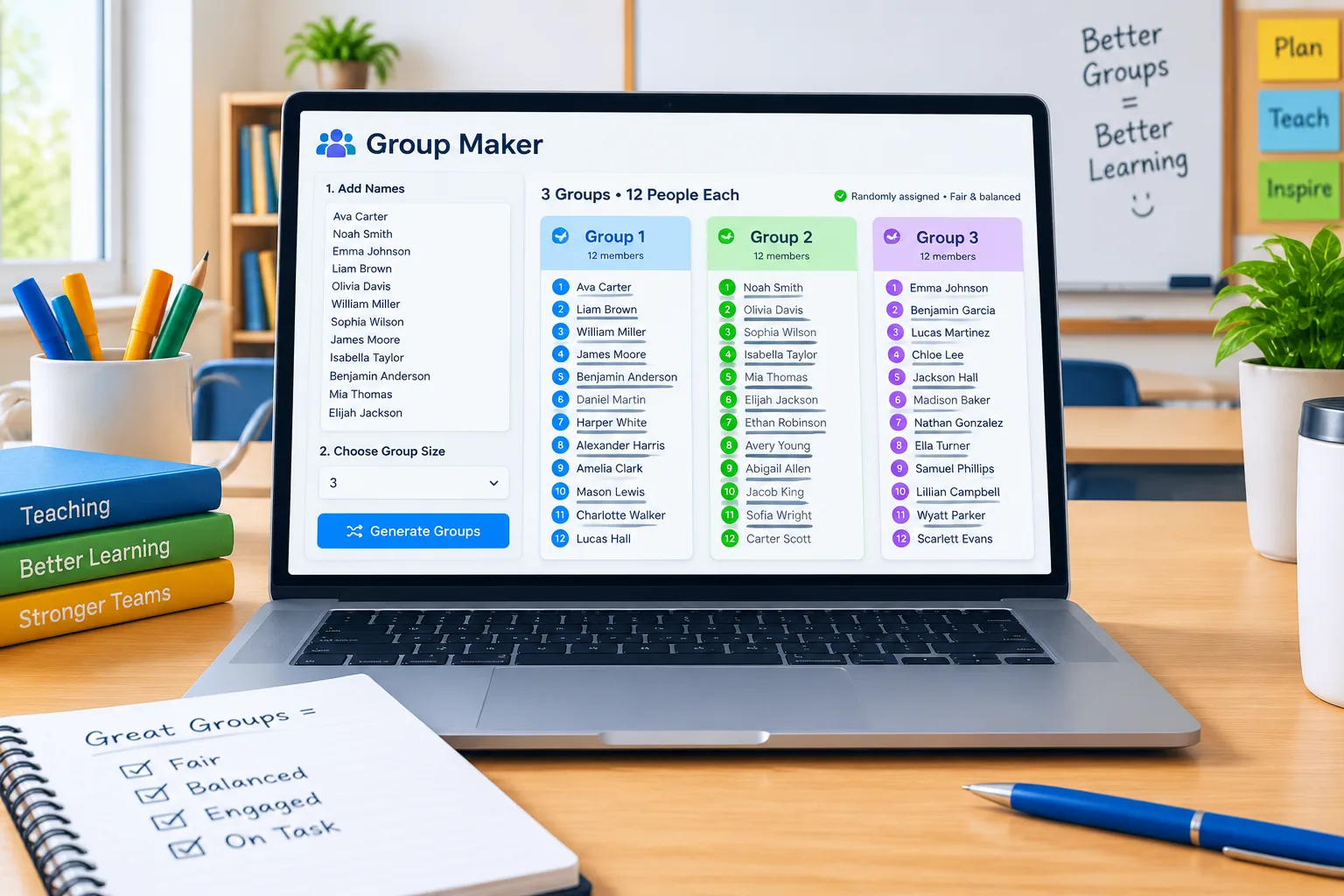
If you have ever split a room of 28 students or 18 workshop participants into teams on the spot, you know the friction: someone gets left out, the same four friends land together again, and you lose ten minutes you had planned for the actual activity. A pembuat kelompok — Indonesian for "group maker" — removes that friction. You paste a list of names, choose a group size, and a random group generator shuffles everyone into fair teams in seconds.
This guide is for K-12 teachers, university instructors, corporate trainers, and event organizers who need reliable grouping without a spreadsheet headache. It covers what a good group maker actually does, six steps to run one well, three real scenarios, and the cases where random is genuinely the wrong choice.
Why fair grouping is harder than it looks
The obvious method — "count off one, two, three" — feels fair, but it quietly fails in predictable ways. Students sitting together count off together, so the same friend clusters survive every reshuffle. Latecomers and absentees shift the count, so group sizes drift from four to three to five. And because it is done in the moment, you cannot easily show anyone the result if a student protests.
Manual balancing has the same issue from the other direction. When a teacher hand-picks groups to separate a disruptive pairing or spread strong readers evenly, the selection takes several minutes and invites the question every facilitator dreads: "Why am I always with him?" Hand-picked groups are often better pedagogically — but the process is slow, hard to repeat, and easy to unconsciously bias.
A group maker sits between those two extremes. It is fast like counting off, but it produces a visible, repeatable list you can adjust, save, and reuse. That combination — speed plus transparency — is the real reason teachers reach for one.
What a good group maker should do
At minimum, a group maker takes a list of names and returns groups of a size you choose. That sounds trivial, but the useful differences show up in the details.
First, it should let you set either a group size (four per team) or a number of groups (exactly six teams) and handle the remainder gracefully. With 26 students and groups of four, you will get six groups of four and one group of two — or the tool will redistribute into a cleaner mix. Either is fine, but you should know which behavior you are getting before you announce groups out loud.
Second, it should keep the result readable. You need something you can copy into a slide, a Google Doc, a Zoom breakout room list, or a printed handout. Tools that output plain, copy-friendly text save a step.
Third, it should support repeat and re-roll. If a group ends up with three students who were in the same team last week, one click should give you a fresh arrangement. This is also how you build in variety across a semester without tracking anything by hand.
Finally, it should be free and quick, with no account required for a single shuffle. A pembuat kelompok is a utility, not a project. If setting it up takes longer than counting off, nobody will use it twice.
How to create balanced groups in six steps
Here is a workflow that works for a 22-person seminar and a 60-person training day alike.
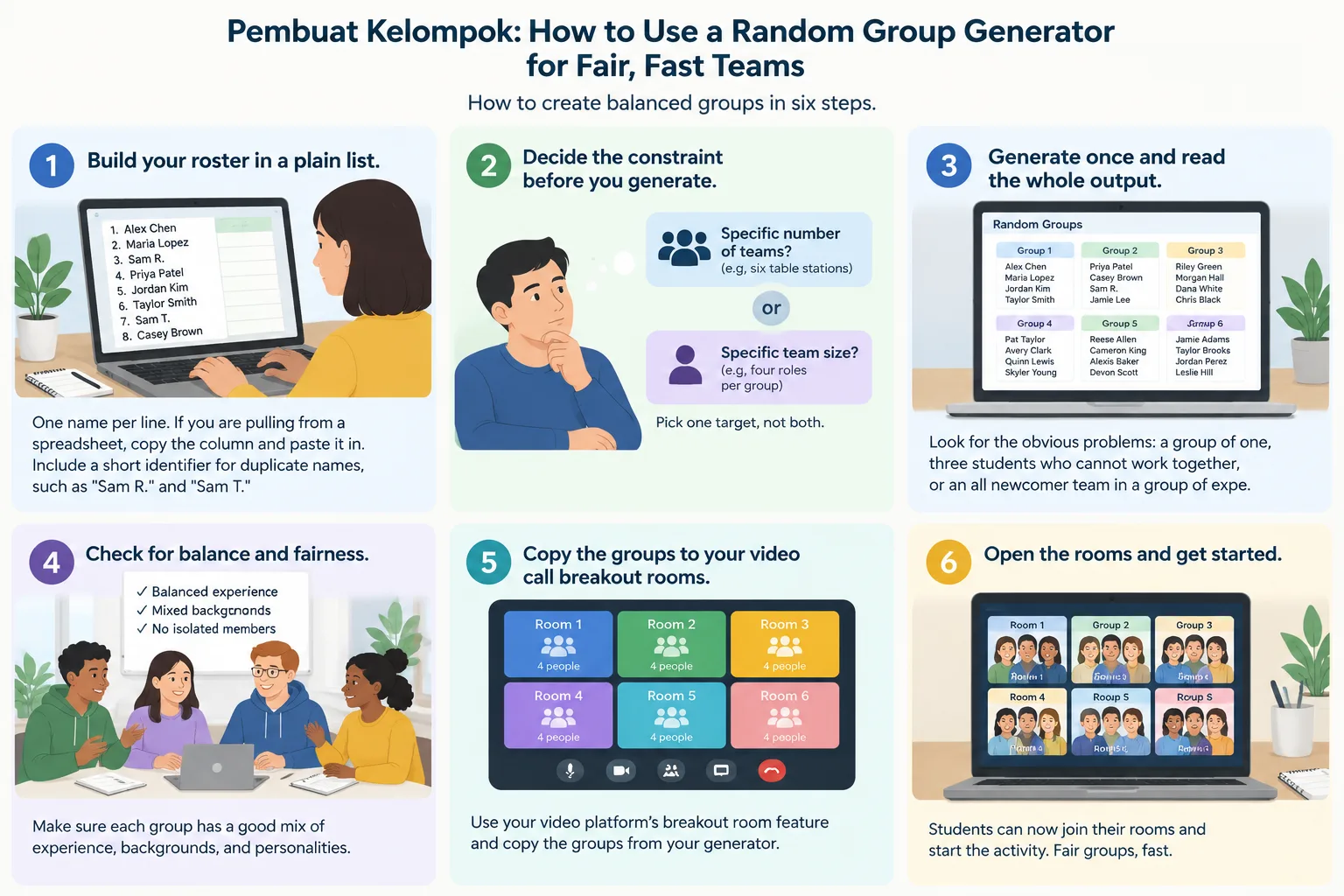
- Build your roster in a plain list. One name per line. If you are pulling from a spreadsheet, copy the column and paste it in. Include a short identifier for duplicate names, such as "Sam R." and "Sam T."
- Decide the constraint before you generate. Are you aiming for a specific number of teams because you have six table stations? Or a specific team size because the activity needs four roles per group? Pick one target, not both.
- Generate once and read the whole output. Look for the obvious problems: a group of one, three students who cannot work together, or an all-newcomer team in a group of experienced participants.
- Re-roll or manually swap for constraints only. Keep edits minimal. If you start rearranging everything, you have replaced random grouping with hand-picking — which is fine, but do it deliberately.
- Assign roles inside each team. Once groups are set, have each team pick a facilitator, a note-taker, a timekeeper, and a presenter. Role assignment solves most of the "quiet student disappears" problem without complicating the grouping step.
- Save or copy the result before you close the tab. You will want the same list next week, or a record of who worked with whom so you can re-roll for variety.
A quick example: a middle school teacher with 29 students uses groups of four, gets seven groups of four plus one group of one, and re-rolls until the leftover student lands in a group of five. The whole operation takes under a minute — and the teacher can show the class the generated list on the projector, which ends most fairness complaints before they start.
Three real scenarios
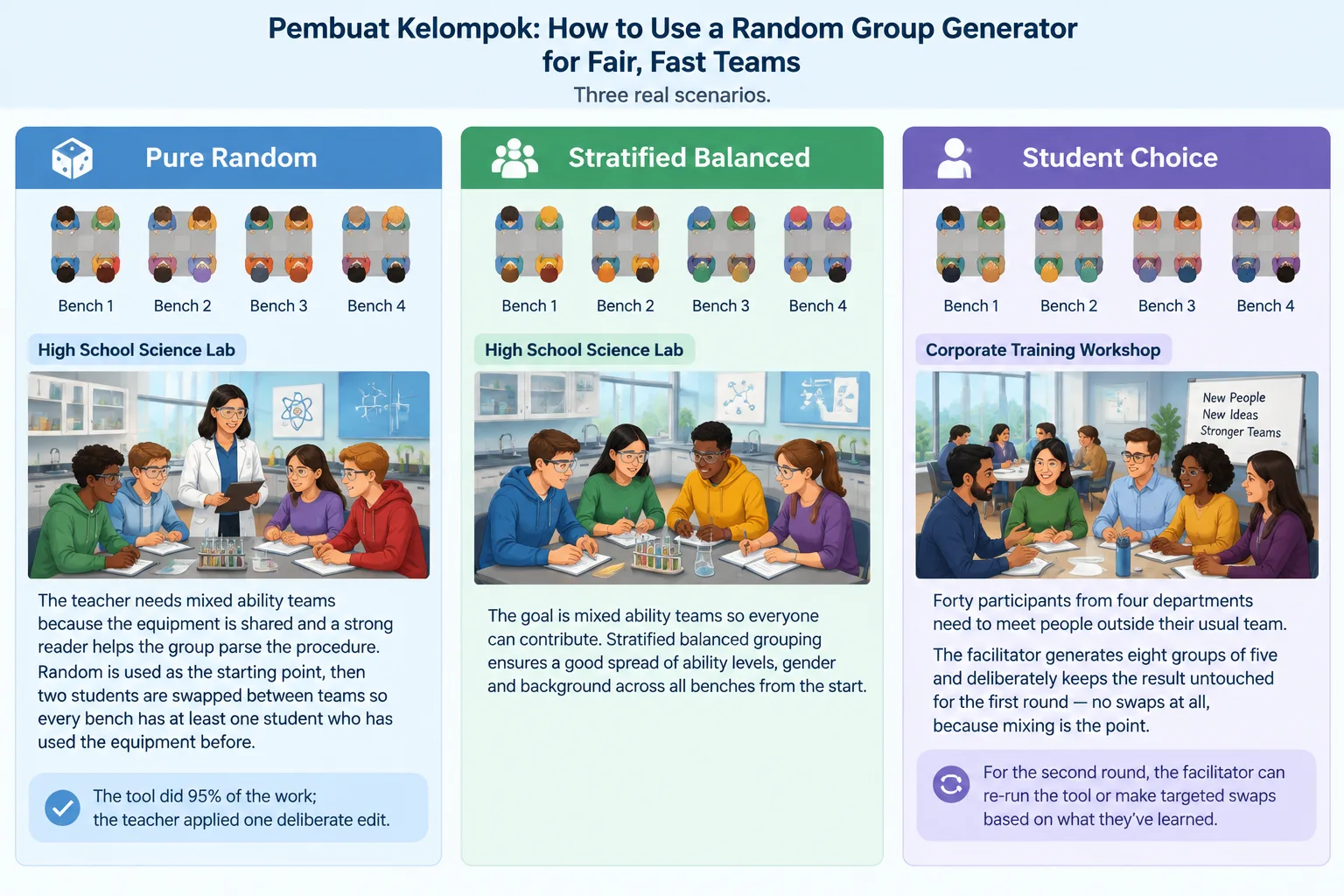
A high school science lab. Lab benches seat four. The teacher needs mixed-ability teams because the equipment is shared and a strong reader helps the group parse the procedure. Random is used as the starting point, then two students are swapped between teams so every bench has at least one student who has used the equipment before. The tool did 95% of the work; the teacher applied one deliberate edit.
A corporate training workshop. Forty participants from four departments need to meet people outside their usual team. The facilitator generates eight groups of five and deliberately keeps the result untouched for the first round — no swaps at all, because mixing is the point. For the second round, a re-roll with the same roster produces mostly new combinations.
An online class on a video platform. A 30-student seminar uses breakout rooms for a fifteen-minute discussion. The instructor generates six groups of five, pastes the lists into the breakout room interface, and posts the same list in the chat so anyone dropped from a room can self-correct. Posted lists also matter for accessibility: students who need to prepare in advance can see their group before the room opens.
When random grouping is the wrong tool
Randomness is a means, not a goal. There are situations where it actively works against you.
If your activity depends on specific expertise — a debate where each team needs one confident speaker, or a coding project where each team needs someone who can debug — pure random assignment will sometimes produce a team that cannot start. In those cases, use random as a first pass and then rebalance for the one or two skills that matter. Do not try to control for everything; you will spend longer rearranging than teaching.
If the social dynamics of your group are fragile, random can also backfire. For students in a new program or participants in a high-stakes workshop, self-selected or semi-structured groupings may build trust faster. Be honest about that trade-off: random grouping maximizes mixing and reduces favoritism, but it does not guarantee psychological safety on day one.
Finally, remember the practical limit of any list-based tool: if your roster is wrong, the groups are wrong. Names entered twice, absentees, and late arrivals all need fixing at the roster stage.
Random vs. stratified vs. student choice
It helps to know the three common approaches side by side.
- Pure random is fastest and most defensible. It eliminates teacher bias, spreads friend clusters, and requires no prior data. Best for short activities, workshops, and any setting where mixing is the goal.
- Stratified (balanced) random sorts students into tiers — for example, by prior assessment results or by language confidence — then draws one from each tier per group. It produces more even teams but needs data and takes longer to set up. Best for long-term project work.
- Student choice maximizes motivation and comfort, and minimizes complaints, but it reliably reproduces existing social cliques and can leave isolated students exposed.
A practical hybrid many instructors use: random generation for the first three weeks, then stratified grouping once they have enough information about their class, with occasional all-random days to keep friendship groups from hardening.
Pairs, names, and pickers: matching the tool to the task
Not every grouping job needs the full generator. When you only need partners for a two-minute think-pair-share, a random pair generator is faster than building teams. When you need to call on one student at random rather than group them, a random student picker does that job without creating teams at all. And if you want teams to feel like teams, a group name generator gives each one an identity in a few clicks — a small touch that noticeably improves buy-in with younger students.
The same list-based thinking applies to seasonal activities: a secret santa generator uses the identical mechanic of shuffling names without repeats, which is exactly why it works for gift exchanges at work. One method, several uses.
Frequently asked questions
What does "pembuat kelompok" mean?
Pembuat kelompok is Indonesian for "group maker" or "team maker" — a tool that splits a list of names into groups. In English-language classrooms and workplaces, the same function is usually called a random group generator or random team generator. The underlying job is identical: paste names, choose a group size, get fair teams.
Can I use a random group generator for video call breakout rooms?
Yes. Generate your groups first, then paste each group's names into your breakout room setup screen or share the list in the chat. Because the output is plain text, it transfers cleanly into video conferencing tools, shared documents, and slide decks without reformatting. Posting the list publicly also helps anyone who gets dropped into the wrong room.
How do I stop the same students from being grouped together every week?
Re-roll each time rather than reusing last week's list, and keep a saved copy of previous arrangements so you can spot repeats. If you are generating manually, a fresh shuffle already makes exact repeats unlikely for classes above 20 people, but small classes need a deliberate re-roll.
Is random grouping fair for students at different ability levels?
Random grouping is fair in the sense that it removes favoritism and gives everyone an equal chance of working with anyone. It does not guarantee even skill distribution, so for extended project work, consider stratified grouping where you balance one or two key traits per team. For short activities, pure random is usually the better trade-off.
How many groups should I create for a class of 30?
For collaborative tasks, groups of three to four work well, which means seven to ten groups. If the activity needs defined roles — facilitator, note-taker, timekeeper, presenter — groups of four are the practical minimum. Larger groups of six or more tend to leave quieter participants uninvolved unless roles are assigned explicitly.
Ready to make your next set of groups?
Paste your roster, choose a group size, and let the tool do the shuffling. It takes about twenty seconds, it is free, and you can re-roll instantly if a team needs adjusting. Start with the random group generator before your next class, workshop, or team meeting — and keep the list handy for next week.
FAQ
What does "pembuat kelompok" mean?
Pembuat kelompok is Indonesian for "group maker" or "team maker" — a tool that splits a list of names into groups. In English-language classrooms and workplaces, the same function is usually called a random group generator or random team generator. The underlying job is identical: paste names, choose a group size, get fair teams.
Can I use a random group generator for video call breakout rooms?
Yes. Generate your groups first, then paste each group's names into your breakout room setup screen or share the list in the chat. Because the output is plain text, it transfers cleanly into video conferencing tools, shared documents, and slide decks without reformatting. Posting the list publicly also helps anyone who gets dropped into the wrong room.
How do I stop the same students from being grouped together every week?
Re-roll each time rather than reusing last week's list, and keep a saved copy of previous arrangements so you can spot repeats. If you are generating manually, a fresh shuffle already makes exact repeats unlikely for classes above 20 people, but small classes need a deliberate re-roll.
Is random grouping fair for students at different ability levels?
Random grouping is fair in the sense that it removes favoritism and gives everyone an equal chance of working with anyone. It does not guarantee even skill distribution, so for extended project work, consider stratified grouping where you balance one or two key traits per team. For short activities, pure random is usually the better trade-off.
How many groups should I create for a class of 30?
For collaborative tasks, groups of three to four work well, which means seven to ten groups. If the activity needs defined roles — facilitator, note-taker, timekeeper, presenter — groups of four are the practical minimum. Larger groups of six or more tend to leave quieter participants uninvolved unless roles are assigned explicitly.
Related Tools
Pick the right generator for the job — every tool runs free in your browser.