
random groups
How to Use Random Groups for Collaborative Projects: A Practical Guide
Learn how to use random groups for collaborative projects, create balanced teams, assign roles, improve participation, and manage successful group work.

Collaborative projects can become difficult to manage when participants always work with the same people. Teachers may notice students choosing familiar friends, while corporate trainers may find that employees rarely interact outside their usual departments. Using random groups for collaborative projects offers a practical way to introduce new working relationships, distribute participation opportunities, and encourage people to approach shared challenges from different perspectives.
Random grouping is not simply about mixing names. Successful collaboration requires thoughtful project design, clear responsibilities, communication, and accountability. Whether you are organizing a classroom research assignment, a university presentation, or a workplace improvement project, a structured approach to random team formation can make the experience more productive.
Why Use Random Groups for Collaborative Projects?
People naturally develop familiar working relationships. Students often sit with friends, and employees may prefer colleagues from their own departments. Although familiarity can make communication comfortable, repeatedly working with the same people can limit opportunities to exchange ideas and develop new relationships.
Random groups introduce a different starting point. Instead of allowing participants to select only their preferred teammates, an instructor or facilitator distributes members through a neutral selection process. This can reduce the social pressure associated with choosing teams and give participants opportunities to work with people they might not otherwise approach.
The potential benefits extend beyond meeting new people. Carnegie Mellon University's Eberly Center identifies several benefits of group projects, including combining knowledge, sharing different perspectives, delegating responsibilities, and solving problems that individuals might struggle to address alone. However, these benefits depend on how the activity is designed and facilitated.
For example, imagine a high school environmental science class preparing presentations about local sustainability. If students always select their friends, some groups may have similar interests and approaches. Random assignment introduces different combinations of students, creating opportunities to compare research methods, discuss alternative solutions, and share individual strengths.
Random grouping can also help workplace facilitators create cross-functional conversations. An employee from marketing might approach a customer problem differently from someone in operations. Bringing these perspectives together can help a team examine a challenge more completely.
When Should You Use Random Group Assignments?
Random groups are particularly useful when the main objective is to encourage interaction, provide equal opportunities to participate, or introduce fresh perspectives. They work well for brainstorming sessions, short research projects, classroom discussions, collaborative presentations, workshops, and team-building activities.
They are also useful when participants have become accustomed to working with the same people. Changing team membership can introduce new communication patterns and encourage people to explain their ideas to different audiences.
However, random assignment is not appropriate for every situation. A project involving specialized technical knowledge, accessibility requirements, language support, or sensitive interpersonal dynamics may need intentional team composition. A facilitator should consider relevant needs before accepting an automatically generated result.
Consider these examples:
- Elementary classrooms: Create small teams for a science experiment so students practice sharing materials and discussing observations.
- Middle and high schools: Mix students for a research presentation so they encounter different approaches to organizing information.
- Universities: Form project teams for case studies, design challenges, or interdisciplinary assignments.
- Corporate training: Combine employees from different departments for a problem-solving exercise.
- Community workshops: Introduce participants to new collaborators during a planning or brainstorming activity.
The important distinction is between activities that benefit from varied interactions and projects that require specific qualifications or carefully managed relationships.
How to Create Random Groups for a Collaborative Project
Creating teams should be a straightforward process, but a little preparation helps prevent confusion. Start with the project requirements, determine the group size, and choose a method that makes the assignment process easy to understand.
Step 1: Define the Project Objective
Before creating teams, identify what participants need to accomplish together. A clear objective helps determine whether participants should brainstorm, research, solve a problem, develop a presentation, or produce a shared final product.
For example, a teacher might ask students to investigate renewable energy and present a practical recommendation. A corporate facilitator might ask employees to identify ways to improve communication between departments.
Write down the expected result and explain why collaboration is necessary. If participants can complete every part independently without exchanging ideas, the activity may need to be redesigned to encourage meaningful teamwork.
Step 2: Prepare Your Participant List
Collect the names of everyone who will participate. For a classroom activity, use the current attendance list. For a workshop, use the registration list or confirmed participant roster.
Check spelling and remove duplicate entries. Also account for anyone who will not participate in the activity. An accurate list helps avoid assigning absent participants or accidentally leaving someone out.
For example, a teacher preparing a geography project might have 24 students. Once the roster is confirmed, the teacher can use those names to create teams without asking students to negotiate membership in front of the class.
Step 3: Choose an Appropriate Group Size
Group size influences how easily participants communicate and share responsibilities. Small groups generally make it easier for everyone to contribute, while larger groups can provide more perspectives but require additional coordination.
Cornell University's Center for Teaching Innovation suggests groups of four to five members for many learning activities. Other teaching centers recommend smaller groups for tasks that require meaningful interaction. The appropriate number depends on the project's complexity, participants' experience, and available time.
As a practical starting point:
- Pairs: Useful for peer reviews, short discussions, and quick problem-solving activities.
- Three to four members: Suitable for research, brainstorming, and presentations.
- Four to five members: Useful for projects involving several responsibilities or different work stages.
- Larger teams: Appropriate when the assignment genuinely requires more people and clearly divided responsibilities.
For example, a class of 28 students could be organized into seven groups of four. Each group could investigate a different aspect of renewable energy and contribute to a shared class presentation.
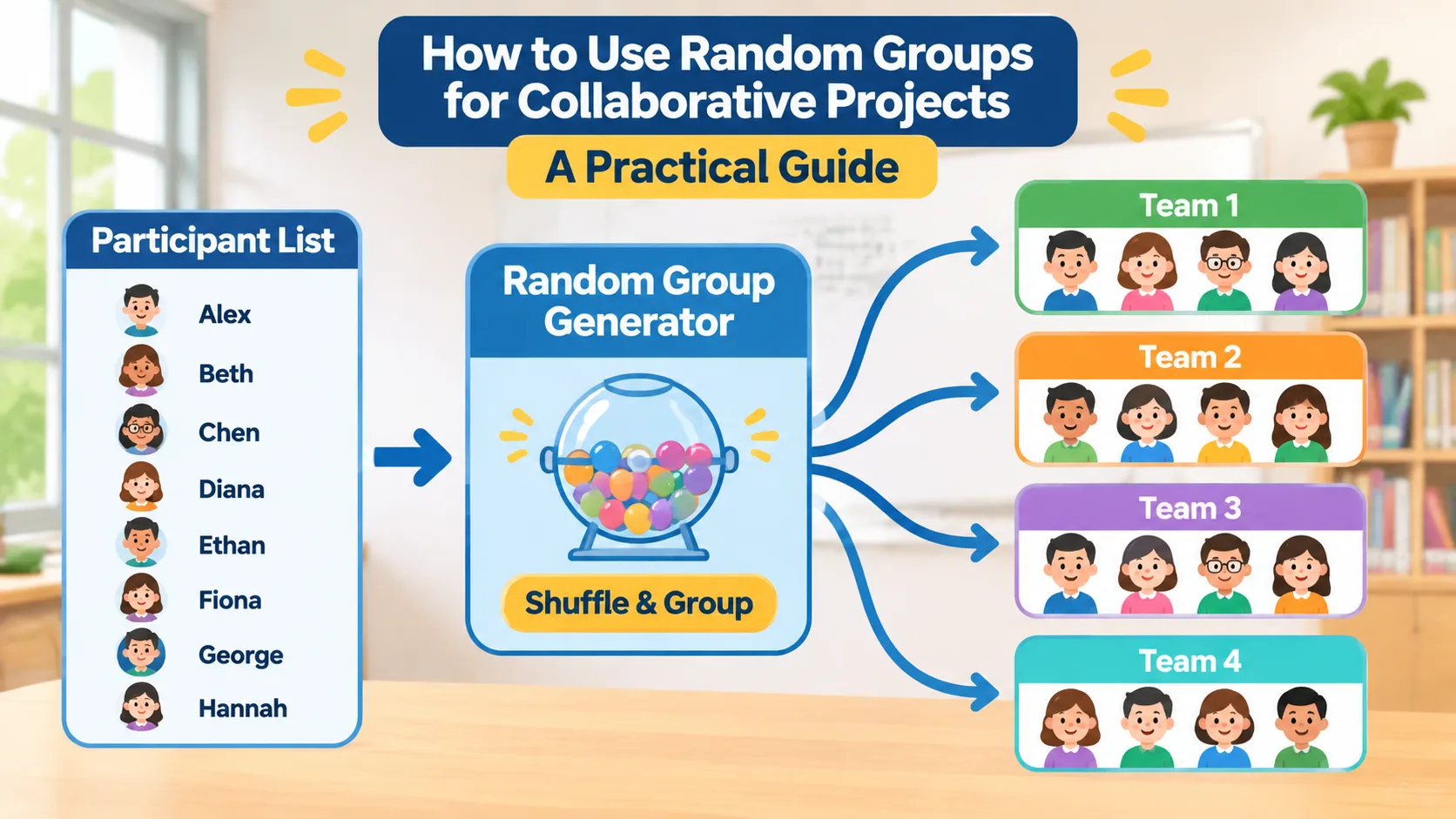
Step 4: Generate the Teams
An online random group generator can simplify the assignment process. Instead of writing names on paper, drawing them individually, and manually organizing the results, you can use a digital tool to create groups from a participant list.
To create teams with the Random Group Generator, follow these steps:
- Open the Random Group Generator.
- Enter or paste the names of your participants.
- Choose the number of groups or the group size according to your project requirements and the available options.
- Generate the groups.
- Review the assignments and check that everyone has been included.
- Share the resulting team lists with participants.
A digital assignment process is especially helpful when preparing several activities or managing larger participant lists. It also gives facilitators a consistent way to organize teams without spending class or meeting time drawing names manually.
Step 5: Explain the Assignment to Participants
Once teams have been generated, explain how the groups were created and what participants are expected to accomplish. This is important because random assignment can initially feel unfamiliar, particularly to students who prefer working with close friends.
Explain that the purpose is to encourage new interactions and give everyone an opportunity to contribute. Make it clear that participants are not being grouped according to their abilities, personalities, or previous performance unless you have separately applied those criteria.
For example, a facilitator could say: "Today, we are working with randomly assigned teams so everyone has a chance to exchange ideas with different colleagues. Each team will develop one solution, and every member will contribute to the final presentation."
Clear communication makes the process easier to accept and helps participants focus on the project rather than on how their teams were selected.
Give Every Group Member a Clear Responsibility
Creating random groups is only the beginning. Without clear responsibilities, some participants may take control while others remain passive. This can be especially frustrating during longer projects, when the workload is substantial and individual contributions are harder to track.
Assigning roles gives participants a practical starting point. The responsibilities should match the project rather than being added simply for the sake of organization.
Common roles include:
- Coordinator: Keeps the group organized and monitors deadlines.
- Researcher: Collects relevant information and checks supporting evidence.
- Recorder: Documents decisions, questions, and important ideas.
- Presenter: Organizes the group's explanation and communicates its results.
- Reviewer: Checks the final work for clarity, completeness, and accuracy.
In a four-person group, the coordinator might also serve as the presenter, while the other members handle research, documentation, and review. For a longer assignment, rotate responsibilities so participants have opportunities to practice different skills.
For example, a university business class could assign four students to analyze a fictional company's customer service problems. One student gathers customer feedback, another examines operational issues, a third organizes possible improvements, and the fourth prepares the presentation. All four discuss the recommendations before the final submission.
Roles should not become rigid job descriptions. Everyone should still participate in important decisions, challenge assumptions, and understand the final result. The purpose is to distribute work while preserving collective responsibility.
Design Projects That Require Real Collaboration
One common problem with group assignments is that participants divide the work into separate pieces and never meaningfully collaborate. Each person completes a section independently, and the group combines the results shortly before the deadline.
This arrangement may produce a shared document, but it does not necessarily develop collaboration skills. A better approach is to create tasks that require members to exchange information, compare ideas, and make decisions together.
For example, instead of asking four students to research four unrelated topics and combine their findings, ask them to investigate a shared question. Each student can collect different evidence, but the team must compare that evidence and agree on a final recommendation.
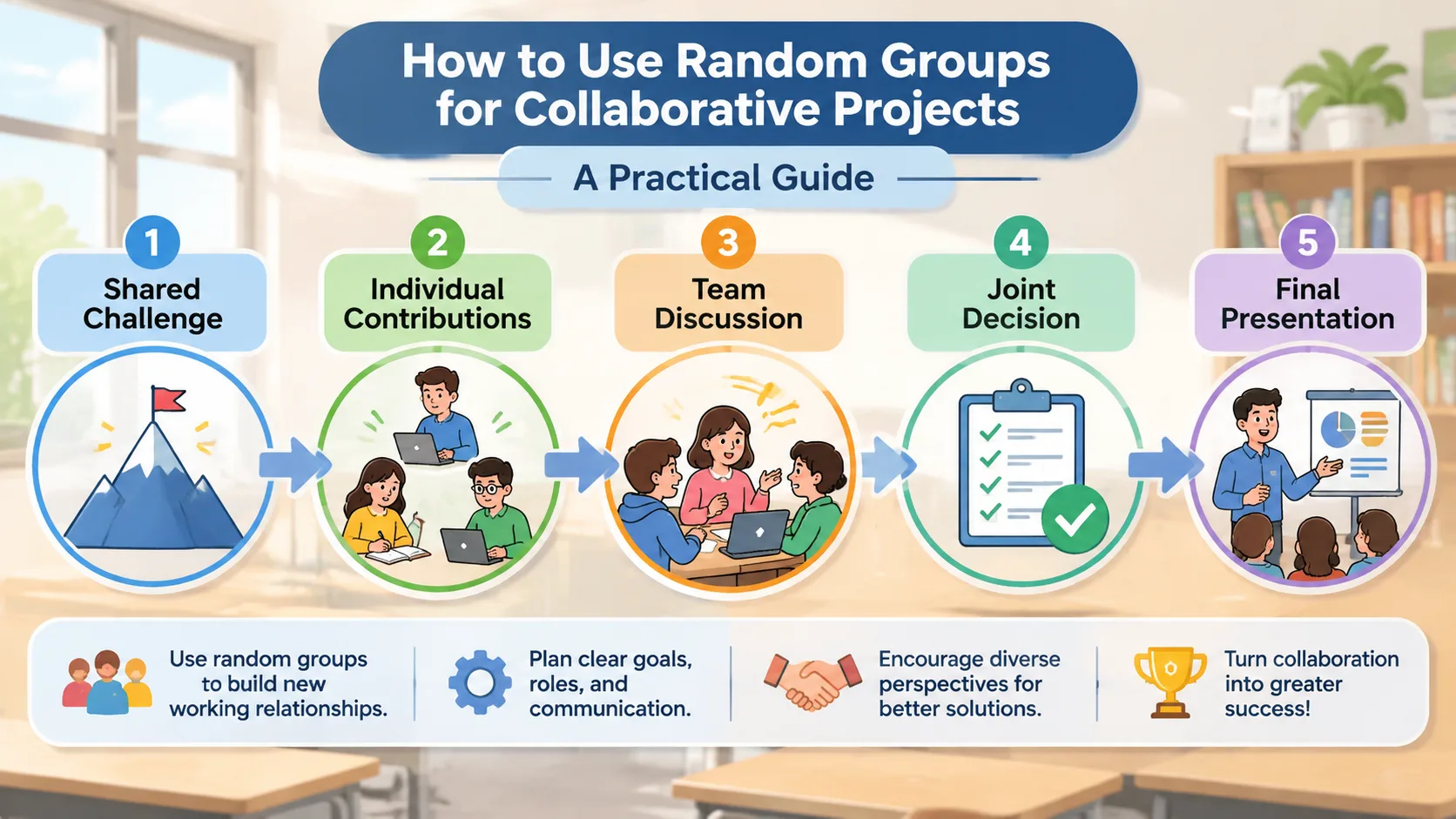
Use the following process to build interdependence into a project:
- Introduce a shared question or challenge that requires multiple perspectives.
- Give each participant a responsibility that contributes to the same outcome.
- Include at least one decision that the group must make together.
- Schedule a progress discussion before the final submission.
- Ask the team to explain how its individual contributions shaped the final result.
For a corporate training example, a facilitator could ask randomly formed teams to redesign an employee onboarding process. One person examines communication, another reviews training materials, and another considers administrative steps. The group then combines these findings into a single proposed process and explains why its recommendations address the main problem.
This approach makes teamwork part of the assignment itself rather than an optional activity surrounding individual work.
Keep Communication and Participation on Track
Even well-organized groups can experience difficulties. A participant might dominate discussions, another might hesitate to share ideas, or the team might disagree about deadlines and priorities. These situations are normal parts of collaborative work, but facilitators should establish expectations before problems become serious.
Start by agreeing on a few basic communication rules. Participants should listen without interrupting, explain their reasoning, respect different perspectives, and raise concerns early. For remote teams, establish where messages should be shared and when members are expected to respond.
Digital communication tools can support these workflows. Teams may use shared documents, video meetings, project boards, or their existing workplace communication channels. Random team assignment and ongoing project management are separate tasks, so generating groups does not automatically organize their communication or track their progress.
A practical check-in schedule might include:
- Project launch: Confirm the objective, responsibilities, and expected result.
- Early progress check: Ask whether everyone understands their tasks and has access to the necessary materials.
- Midpoint review: Discuss progress, disagreements, and any changes to responsibilities.
- Final review: Check the completed work and prepare the group presentation.
For example, a teacher supervising a two-week history project might spend five minutes with each team after the first research session. Students can explain what they have discovered, identify missing information, and agree on their next steps. This short intervention can help prevent confusion from continuing until the deadline.
Facilitators should observe participation rather than assume that a quiet group is necessarily a successful group. Ask open questions such as, "What different ideas have you considered?" or "How did the team decide on this approach?" These questions encourage reflection without taking over the work.
How to Handle Unequal Participation and Group Conflict
Random assignment does not guarantee that every team will have equal skills, availability, or motivation. Some participants may complete more work than others, while disagreements can develop around project direction or individual responsibilities.
Address these issues with clear expectations and observable evidence. At the beginning of a project, explain how contributions will be evaluated and what participants should do if a teammate cannot complete an assigned task.
A group agreement can be useful for longer assignments. It might cover meeting schedules, communication expectations, individual responsibilities, decision-making procedures, and how members will handle missed deadlines. Participants can review the agreement together before starting the project.
When a conflict occurs, try the following approach:
- Give each person an opportunity to explain the problem.
- Identify the specific task or decision causing the disagreement.
- Return to the project's shared objective.
- Agree on a practical next step and a responsible person.
- Check whether the solution has improved the situation.
Consider a workplace team in which two employees disagree about which customer problem should receive priority. Rather than immediately choosing a side, the facilitator can ask both employees to explain their evidence. The group can then compare the available information against the project's stated objectives.
If the issue involves bullying, discrimination, accessibility, or an established interpersonal concern, random assignment should not take priority over participant safety. Follow the relevant organizational or school procedures and adjust team membership when appropriate.
Evaluate Both the Final Project and Individual Contributions
A successful collaborative project should be evaluated on more than its final presentation or written submission. A polished result does not always mean that every participant contributed meaningfully.
Before the project begins, explain the assessment criteria. Participants should know whether they will be evaluated on the quality of the final work, research, communication, problem-solving, individual responsibilities, or a combination of these areas.
A useful assessment framework can include:
- Project quality: Does the final product address the original question?
- Research and reasoning: Are the conclusions supported by relevant information?
- Communication: Did members exchange ideas and explain their decisions?
- Participation: Did individuals complete their agreed responsibilities?
- Reflection: Can participants identify what worked and what they would improve?
For example, a teacher might assess a group presentation as a shared product while also asking each student to submit a short reflection describing their contribution. A workplace trainer might review the team's proposed solution and ask members to explain how their responsibilities supported the result.
Peer feedback can provide additional information, especially for extended assignments. However, it should be guided by clear questions and should not become an informal popularity contest. Ask participants to describe specific contributions and areas for improvement rather than simply rating whether they liked working with someone.
The University of Manitoba's guidance on assessing group work emphasizes the importance of communicating assessment expectations, including whether the process, the final product, and individual contributions will be evaluated. Making these expectations clear at the beginning helps participants understand what successful collaboration involves.
Random Groups vs. Self-Selected Teams: Which Approach Should You Choose?
Random assignment and self-selection serve different purposes. Neither method is automatically appropriate for every project, so the decision should depend on the activity's goals and participants' needs.
Self-selected teams allow participants to choose people they already know or trust. This can make it easier to begin working together, particularly when the assignment is short or requires established working relationships. However, self-selection can leave some participants without a group and may reinforce existing social or departmental boundaries.
Random groups provide a more neutral starting point. They can introduce new working relationships and reduce the need for participants to choose teammates publicly. On the other hand, random teams may need additional time to establish communication habits and agree on responsibilities.
| Team formation method | Useful when | Main consideration |
|---|---|---|
| Random assignment | Encouraging new interactions and distributing participation opportunities | Review accessibility and project requirements |
| Self-selection | Participants benefit from choosing familiar collaborators | Watch for exclusion and repeated team combinations |
| Instructor assignment | Specific skills or experience must be considered | Requires preparation and relevant information |
| Hybrid assignment | Some participant preferences or project requirements must be accommodated | Explain the selection criteria clearly |
For instance, a short classroom brainstorming exercise may work well with randomly assigned groups. A technical project requiring specific software expertise may benefit from instructor assignment instead. A hybrid approach could allow students to select a topic while the teacher organizes the teams.
The most useful approach is the one that supports the learning or business objective while providing a reasonable opportunity for everyone to participate.
Practical Example: Organizing a Collaborative Project from Start to Finish
Imagine a teacher planning a sustainability project for 24 students. The assignment requires each team to investigate an environmental issue, develop a recommendation, and present its findings to the class.
The teacher begins by checking the attendance list and confirming that all 24 students can participate. Using a random group generator, the teacher creates six teams of four. Each team receives the same overall assignment but investigates a different aspect of sustainability.
Next, students establish responsibilities. Each team chooses a coordinator, researcher, recorder, and presenter. They also agree on communication expectations and a short schedule for completing their work.
During the first session, students identify research questions and collect initial information. At the midpoint, the teacher checks whether every student has contributed and whether the groups have reached a shared understanding of their topics. Teams that need support receive guidance on dividing responsibilities or resolving disagreements.
Finally, each team presents its recommendation. Students submit individual reflections explaining their contributions, what they learned from their teammates, and what they would change in a future project.
This process combines random team formation with intentional project design. The random selection creates new working relationships, while roles, milestones, and individual reflection provide the structure needed to make collaboration meaningful.
For facilitators who need smaller working units, a Random Pair Generator can organize participants into pairs for peer reviews, interviews, or preliminary discussions. When teams need an identity for a longer assignment, the Group Name Generator can help participants choose a shared team name.
Frequently Asked Questions
Are random groups effective for collaborative projects?
Random groups can be effective when the goal is to introduce new interactions, encourage different perspectives, and give participants opportunities to work with unfamiliar teammates. However, random assignment alone does not guarantee productive collaboration. Clear objectives, defined responsibilities, and regular facilitator support are also important.
What is the ideal group size for a collaborative project?
The ideal size depends on the assignment and the participants. Groups of three to five members are a practical starting point for many classroom and workshop projects. Pairs work well for short discussions, while larger groups may be appropriate when a project requires several distinct responsibilities.
How do I make sure everyone participates in a random group?
Assign clear responsibilities and explain what each person is expected to contribute. Include regular progress checks, shared decision-making activities, and individual reflection. For assessed projects, make the expectations for individual contributions clear before the work begins.
Should teachers let students choose their own groups or use random assignment?
Both approaches have advantages. Self-selection can provide familiarity and comfort, while random assignment can introduce students to different classmates and reduce the pressure of choosing teammates. Teachers should select the method that best supports the assignment, classroom needs, and students' circumstances.
Can I use random groups for remote collaborative projects?
Yes. Random assignment can help organize participants before an online workshop, training session, or virtual classroom activity. Once teams are formed, use an agreed communication channel, shared project documents, clear deadlines, and scheduled check-ins to keep everyone connected.
What should I do if a randomly assigned group does not work well together?
Start by identifying the specific problem, whether it involves communication, scheduling, unequal participation, or disagreement about the project. Give members an opportunity to resolve ordinary working differences with clear expectations and facilitator guidance. If there are serious interpersonal, accessibility, or safety concerns, adjust the arrangement according to the relevant school or organizational procedures.
Start Creating Random Groups for Your Next Collaborative Project
Successful collaboration begins with a team structure that gives people a reason and an opportunity to work together. Random assignment can help teachers, trainers, and facilitators move beyond familiar team combinations, but the strongest results come from pairing thoughtful group formation with clear project goals, meaningful responsibilities, regular communication, and fair assessment.
Whether you are organizing a classroom research assignment, a university presentation, or a workplace improvement workshop, you can simplify the team formation process and spend more time supporting the actual project.
Try the Random Group Generator to organize your participants into teams and give your next collaborative project a clear starting point.
Related Tools
Pick the right generator for the job — every tool runs free in your browser.