
random groups of 3 4 5
How to Make Random Groups of 3, 4, or 5 People
Learn how to make random groups of 3, 4, or 5 people using simple methods and a free random group generator. Includes examples, balancing tips, and classroom activities.

You have a class of students, a workshop full of participants, or a team that needs to work together. The challenge is deciding who goes where without spending ten minutes negotiating group membership. Creating random groups of 3, 4, or 5 people is a simple way to get everyone organized quickly while giving participants opportunities to work with different people. Whether you are a teacher, corporate trainer, or event facilitator, you can use a few straightforward methods or an online random group generator to divide participants fairly.
The best method depends on your participant count, activity, and preferred group size. This guide explains how to create random groups, handle leftover people, choose between teams of three, four, and five, and make the process easier for your next classroom lesson or team activity.
Why Use Random Groups of 3, 4, or 5?
Random grouping removes much of the time and awkwardness involved in assigning people manually. Instead of asking participants to choose their own teammates, you give everyone an equal opportunity to work with different people. This can be especially useful in classrooms where students regularly work with the same friends or in workplaces where employees tend to collaborate within familiar departments.
Small groups also make it easier to organize discussions and distribute responsibilities. Cornell University's Center for Teaching Innovation recommends considering groups of four to five for many collaborative activities, while Yale's Poorvu Center discusses the benefits of groups of three to four. The appropriate size depends on the task, the participants, and how much discussion each person needs to contribute.
For example, a teacher preparing a 20-minute classroom discussion might choose groups of three so every student has time to speak. A corporate trainer running a project-planning exercise might prefer groups of five because participants can contribute different ideas and take on separate responsibilities.
Random grouping is particularly useful when you want to:
- Give participants a chance to collaborate with different people.
- Reduce the time spent organizing teams.
- Avoid repeatedly allowing the same people to work together.
- Create groups for discussions, games, workshops, and projects.
- Make team assignments more transparent.
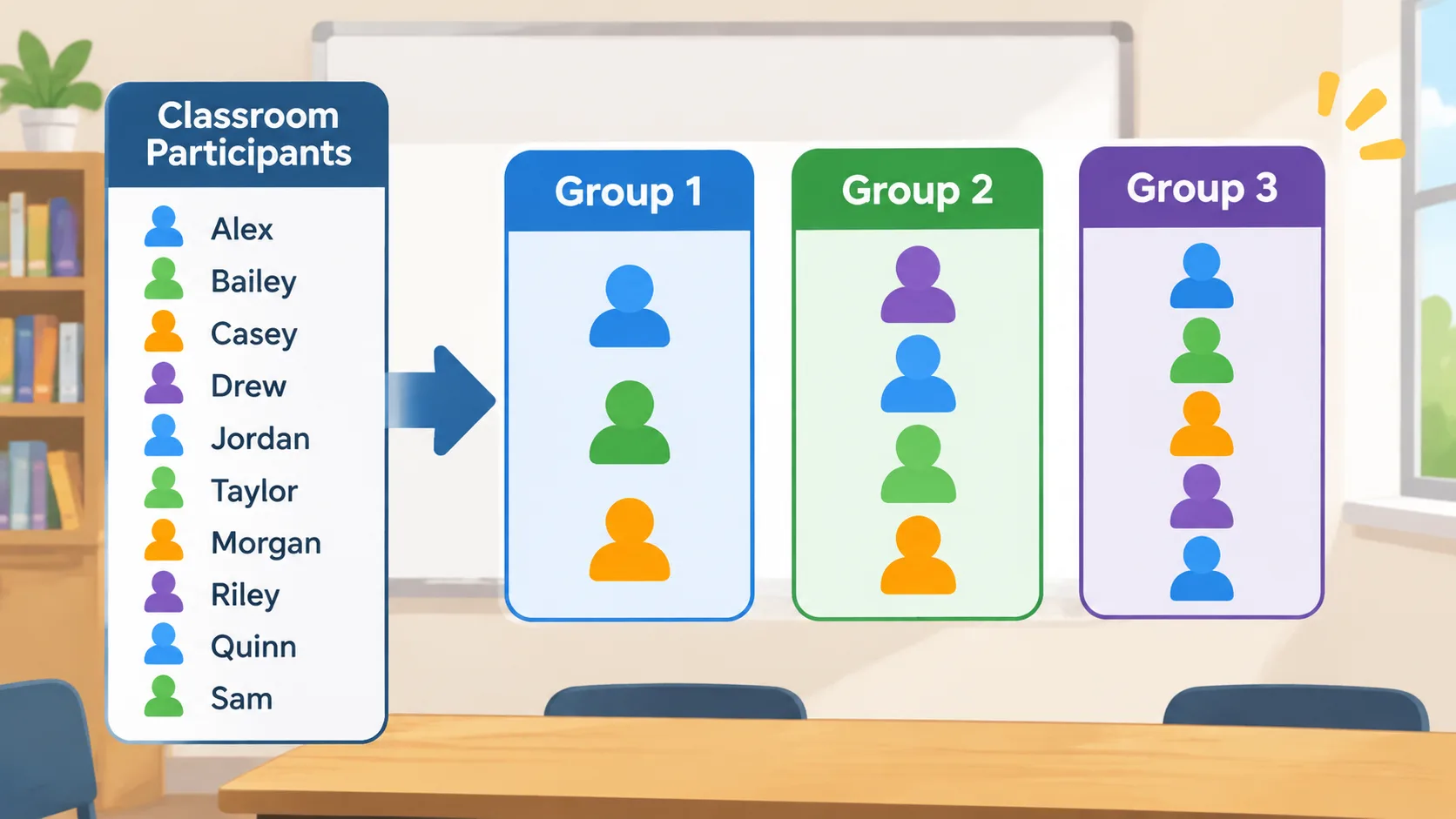
Remember that random assignment does not automatically guarantee balanced teams in terms of experience, ability, or specialist skills. If an activity requires particular expertise or accessibility arrangements, you may need to review the results before starting.
How to Make Random Groups of 3, 4, or 5 Online
Using an online generator is one of the easiest ways to organize a large participant list. Instead of writing names on paper, drawing numbers, or manually moving people between teams, you can enter the participants and select the group size.
The Random Group Generator provides a convenient starting point for dividing a list into random teams. It is suitable for teachers organizing classroom activities, facilitators preparing workshops, and managers arranging temporary project teams.
Follow these steps to create your groups:
- Prepare your participant list. Collect the names of everyone who needs to participate. Check spelling and remove duplicate entries.
- Open the generator. Visit the Random Group Generator tool and enter or paste your list of names.
- Choose the group size. Select three, four, or five members per group, depending on your activity.
- Generate the groups. Run the random assignment to divide your participants into teams.
- Review the result. Check the group sizes and make sure nobody has been accidentally omitted or entered twice.
- Share the assignments. Display the results, copy them into your lesson plan, or communicate the teams to participants.
For example, imagine you have 28 students and need groups of four. Enter all 28 names, select four people per group, and generate the assignments. You should receive seven groups of four, with no remainder.
If you have 26 students instead, the result requires a different arrangement. Depending on the generator's grouping settings, you might create six groups of four and one group of two, or distribute the participants into seven groups with sizes as evenly balanced as possible. Check the final result before announcing the assignments.
The main advantage of an online tool is consistency. You can use the same process for a small discussion group or a large training session without repeatedly counting names and moving paper slips around.
How to Make Random Groups Manually
You do not need an online tool every time you organize an activity. If you have a small class or a handful of workshop participants, manual methods can work just as well. The important thing is to use a method that distributes people without allowing participants to choose only their preferred teammates.
Here are three practical approaches.
Method 1: Count Off by Group Size
Counting off is one of the quickest classroom methods. Ask participants to count consecutively from one to the number of groups you need. Everyone with the same number becomes part of the same team.
For example, if you have 24 students and want groups of four, ask them to count from one to six. All students who say one form the first group, all students who say two form the second group, and so on.
The process is simple:
- Calculate the number of groups you need.
- Ask participants to count in sequence.
- Assign each participant a number.
- Bring together everyone with the same number.
- Check that the teams have the intended sizes.
This method is fast and works well in a physical classroom. However, it is not always genuinely random. Seating arrangements and the order in which people count can influence the results. If you want a more unpredictable assignment, shuffle the participant list first or use an online generator.
Method 2: Draw Names from a Container
For smaller groups, write each participant's name on an identical slip of paper. Fold the slips, place them in a container, and draw names one at a time.
Continue drawing until you have the required number of people for the first group. Repeat the process for the remaining teams.
For instance, a workshop with 15 participants can use this method to create three groups of five. Each participant has the same opportunity to be drawn, provided every name appears exactly once and the slips are mixed properly.
This approach can also make group formation more engaging for younger students. Participants can take turns drawing names, which turns an administrative task into a short classroom activity. Its main disadvantage is that it becomes slow when you have many participants or need to repeat the process several times.
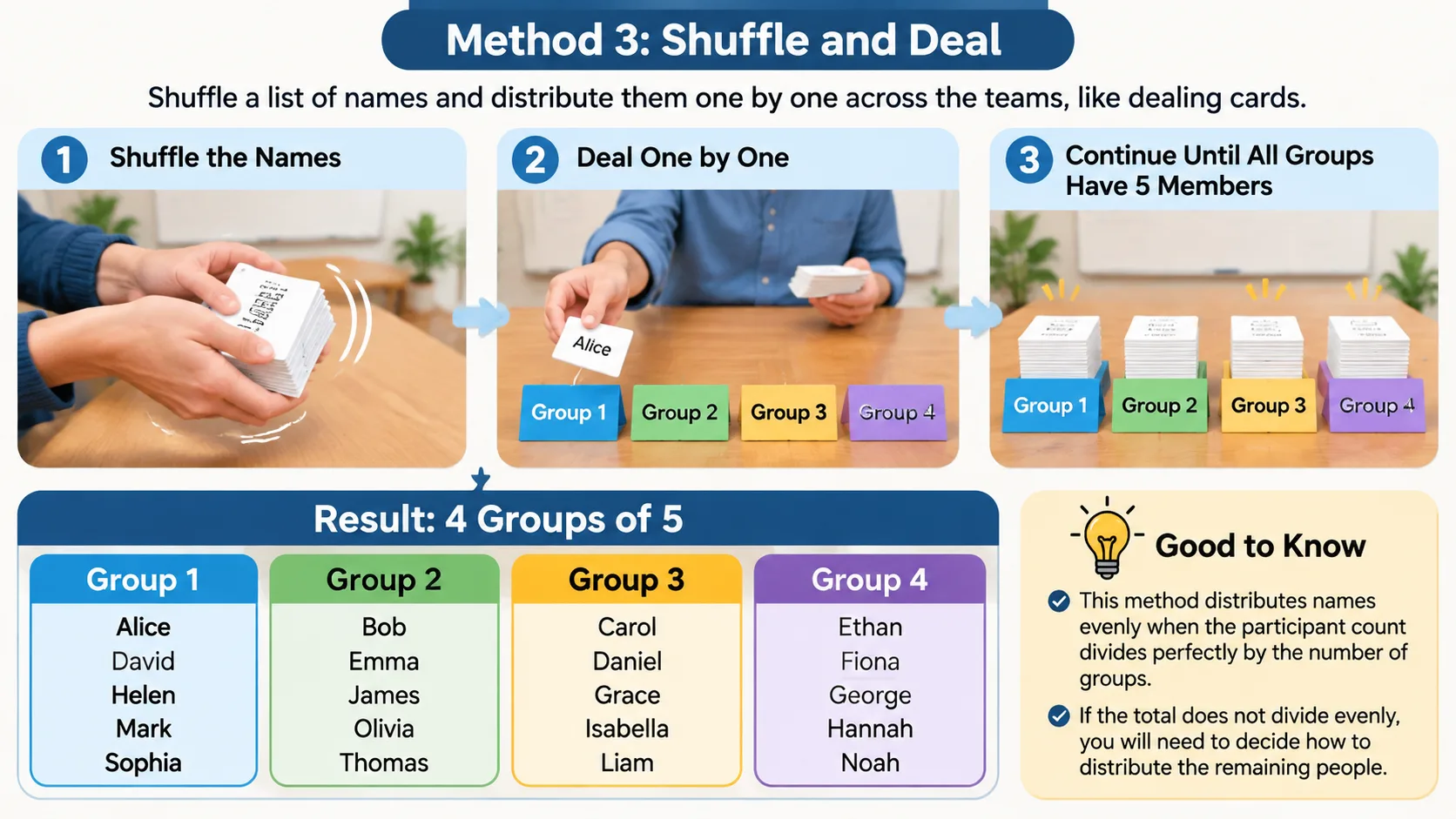
Method 3: Shuffle and Deal
Another option is to shuffle a list of names and distribute them one by one across the teams. Think of dealing cards around a table.
Suppose you have 20 participants and want four groups of five. Shuffle the list, then assign the first person to Group 1, the second to Group 2, and continue until every group has five members.
This approach distributes the names evenly when the participant count divides perfectly by the number of groups. If the total does not divide evenly, you will need to decide how to distribute the remaining people.
How to Handle Leftover People When Making Groups
One of the most common problems when creating random groups of 3, 4, or 5 is that the participant count does not divide evenly by the selected group size. For example, 23 participants cannot be divided into groups of exactly four without leaving three people over.
The solution is to distribute the remainder instead of automatically creating one very small team. In many classroom and workshop situations, groups with slightly different sizes are more practical than leaving participants without a team.
Consider these examples:
| Participants | Preferred size | Possible arrangement |
|---|---|---|
| 18 | 3 | 6 groups of 3 |
| 20 | 4 | 5 groups of 4 |
| 25 | 5 | 5 groups of 5 |
| 22 | 4 | 4 groups of 4 and 2 groups of 3 |
| 23 | 4 | 5 groups of 4 and 1 group of 3 |
| 26 | 5 | 4 groups of 5 and 2 groups of 3 |
| 29 | 5 | 4 groups of 5 and 1 group of 4 and 1 group of 5, or another balanced arrangement |
A useful rule is to keep the difference between the largest and smallest groups as small as possible. If a group of three can participate effectively alongside groups of four, that may be a better solution than creating a team of one or two people.
For example, imagine a teacher has 22 students and wants teams of four. Rather than creating five groups of four and leaving two students together, the teacher can make four groups of four and two groups of three. This gives everyone a team and keeps the size difference manageable.
Before finalizing the arrangement, consider the activity itself. A group of three may work perfectly well for a short discussion, while a five-person team might be better for a project requiring several different responsibilities. If the task requires exactly the same number of participants in every group, you may need to change the group size or adjust the participant count.
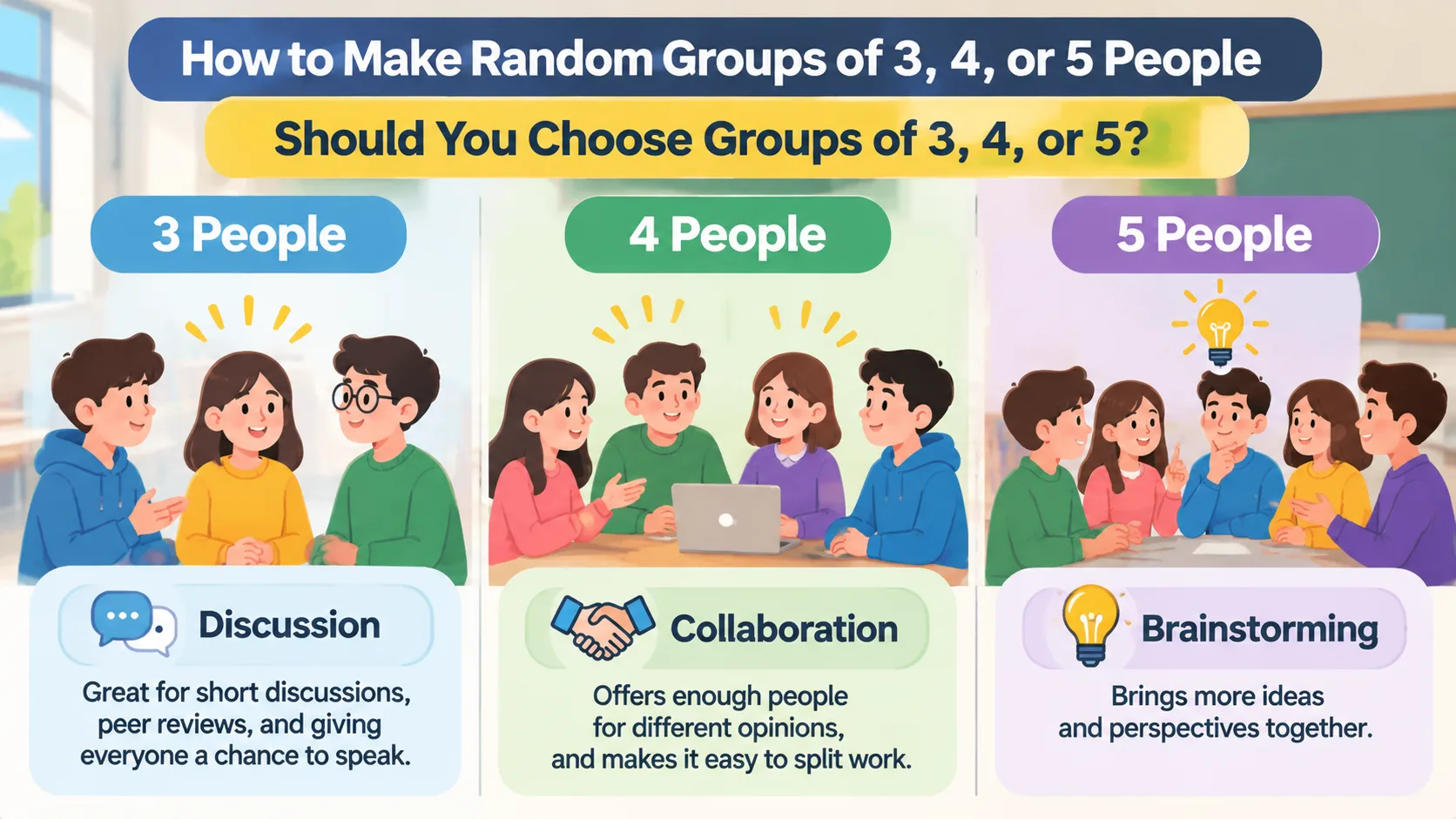
Should You Choose Groups of 3, 4, or 5?
There is no universally correct group size. The best choice depends on the purpose of the activity, the time available, and the number of people who need to contribute.
Groups of three are useful for short discussions, peer reviews, and activities where everyone should have a chance to speak. They are relatively easy to coordinate, and each participant has a visible role. A teacher might ask three students to solve a problem together, with one person explaining the answer afterward.
Groups of four provide a useful middle ground. They offer enough people for different opinions while keeping discussions manageable. They also make it easy to divide work into pairs. For example, two students can research one part of a question while the other two investigate another part, before everyone combines their findings.
Groups of five can be helpful for brainstorming, larger projects, and collaborative tasks with several responsibilities. A facilitator could assign a coordinator, researcher, note-taker, presenter, and timekeeper. However, larger teams need clear expectations to ensure that quieter participants are not overlooked.
| Group size | Best suited to | Potential limitation |
|---|---|---|
| 3 people | Discussions, peer feedback, quick problem-solving | Fewer perspectives and less flexibility if someone is absent |
| 4 people | Classroom projects, collaborative exercises, paired activities | Requires coordination when dividing responsibilities |
| 5 people | Brainstorming, workshops, multi-role projects | Some members may participate less without clear roles |
For most short classroom exercises, groups of three or four are a sensible starting point. For longer collaborative projects, groups of four or five may provide more flexibility. These are practical guidelines rather than fixed rules. Cornell and Yale teaching resources similarly emphasize choosing group size according to the task and participation requirements.
Practical Examples for Classrooms and Team Activities
Understanding how to make random groups is easier when you see how the process works in real situations. The same basic approach can support different activities, but the best group size and instructions will change depending on the setting.
Example 1: A Classroom with 30 Students
A teacher wants to organize a science discussion with six teams. Groups of five are a natural fit because 30 divides evenly by five.
The teacher enters the 30 student names into a random group generator, selects five participants per group, and generates six teams. Each group receives the same scientific question and has 15 minutes to prepare an explanation.
To make participation more balanced, the teacher assigns simple responsibilities: discussion leader, note-taker, evidence checker, timekeeper, and presenter. Students can rotate these responsibilities during future activities.
Example 2: A Corporate Training Session with 17 Employees
A facilitator wants employees to discuss ways to improve an internal process. Groups of four are preferred, but 17 does not divide evenly by four.
One practical arrangement is to create one group of five and three groups of four. The facilitator can distribute the assignments randomly and give every group the same discussion prompt.
The five-person group receives an additional responsibility, such as recording a second set of suggestions. This keeps the workload manageable without excluding anyone.
Example 3: A University Workshop with 21 Participants
A university instructor is organizing a peer-review exercise. The goal is to give each person enough time to explain their work and receive feedback.
Groups of three are a good choice because 21 divides evenly into seven teams. Participants can take turns presenting their work, asking questions, and offering suggestions.
The instructor randomly generates the teams, explains the review process, and gives each group a clear time limit. Every participant receives an opportunity to contribute.
These examples demonstrate why it helps to decide the activity requirements before choosing a group size. Random assignment organizes the teams, but clear instructions make the collaboration productive.
Tips for Making Random Groups Fair and Effective
Random assignment is a useful starting point, but it should not be confused with every aspect of fair team formation. A random process determines membership without deliberately selecting individuals for particular roles. It does not necessarily create equal skill levels, equal experience, or identical group dynamics.
Use these practical tips to improve the process:
- Check the participant list. Remove duplicate names and confirm that everyone who should participate is included.
- Choose the group size before generating teams. This reduces unnecessary rearranging and helps you plan the activity.
- Keep the distribution balanced. Avoid leaving one or two participants in a very small group when a more even arrangement is possible.
- Explain the purpose. Tell participants why teams are being assigned randomly and what they are expected to achieve.
- Give everyone a responsibility. Simple roles such as facilitator, recorder, presenter, and timekeeper can help distribute participation.
- Review special requirements. Consider accessibility, necessary skills, language support, and other relevant classroom or workplace needs.
- Change groups periodically. Repeating random assignments can give participants opportunities to collaborate with different colleagues or classmates.
For long-term projects, random assignment may not always be the best approach. A team that needs a particular mix of technical skills, experience, or specialist knowledge may benefit from deliberate instructor or manager selection. Random grouping is most useful when the main objective is to organize people quickly and give everyone an opportunity to work with different teammates.
If you only need two-person teams, the Random Pair Generator is a more suitable option. If you already have your teams and want to give them memorable identities, the Group Name Generator can help create team names.
Frequently Asked Questions
How do I make random groups of 3, 4, or 5 people?
Enter the participant names into a random group generator and select three, four, or five people per group. Generate the assignments and review the results to check that everyone is included. You can also use manual methods such as drawing names, counting off, or shuffling a list.
What if the number of people does not divide evenly into groups?
Distribute the remaining participants among the teams so the group sizes stay as similar as possible. For example, 22 people can be divided into four groups of four and two groups of three. This is usually more practical than leaving a very small group on its own.
Is it better to make groups of three, four, or five?
It depends on the activity. Groups of three work well for short discussions, groups of four provide a balance between participation and different perspectives, and groups of five can support brainstorming and projects with multiple responsibilities.
Are random groups fair for classroom activities?
Random assignment gives participants an opportunity to be placed into teams without relying on personal preferences or manual selection. However, random groups are not automatically balanced by academic ability, experience, or specialist skills. Teachers should review assignments when an activity has specific learning or accessibility requirements.
Can I make random groups without using students' names?
Yes. You can use participant numbers, anonymous labels, or unique identifiers instead of names. This can be useful for workshops, classroom games, and activities where participants do not need to know everyone's full name. Make sure each person receives one unique identifier so nobody is accidentally included twice.
Should I change random groups every time?
Changing groups regularly gives participants opportunities to collaborate with different people and hear new perspectives. However, long-term projects may benefit from stable teams that have time to develop working relationships. Choose the approach that best matches the length and goals of your activity.
Create Your Random Groups in Minutes
Organizing groups does not need to become a lengthy classroom or meeting task. Whether you need teams of three for a discussion, four for a collaborative exercise, or five for a brainstorming session, a clear group size and a fair assignment process make preparation easier.
Start by checking your participant count, choosing the size that suits your activity, and deciding how to handle any leftover people. Then use the free Random Group Generator to organize your participants into teams. Review the assignments, share the results, and get everyone started on the activity without spending valuable time arranging groups manually.
Related Tools
Pick the right generator for the job — every tool runs free in your browser.