
random group generator
Random Group Generator: Divide People into Fair Random Groups
Learn how to divide a class or team into fair random groups in under a minute. Step-by-step instructions, group size guidance, real classroom and workshop examples, and FAQs.

If you have ever stood at the front of a room holding a list of names with thirty seconds to decide who works with whom, you know the problem. Hand-picked groups take time, feel political, and quietly repeat the same cliques week after week. A random group generator solves that specific job: it takes a list of people and splits them into fair, balanced groups in seconds, in front of everyone. This guide explains how the shuffle actually works, how to divide a class into random groups step by step, and when a random tool helps — and when it does not.
Why Fair Random Grouping Matters More Than You Think
Hand-picking groups has two costs. The first is time: sorting 28 students into seven groups by eye takes several minutes of class time, and you usually do it while everyone waits. The second is bias. Even careful teachers tend to place strong students with quieter ones, keep friends together when the lesson feels risky, or accidentally create a group that always works together. Students notice these patterns, and the phrase "she always picks the same people" undermines the activity before it starts.
Teaching centers that support group work — such as the Eberly Center at Carnegie Mellon and the Center for Teaching Innovation at Cornell — recommend varying how groups are formed rather than leaving composition to habit. Random assignment is one of the few methods that visibly removes status effects: nobody was chosen because they were liked, disliked, strong, or weak. That visibility is the real benefit. When students watch names shuffle on a screen, they accept the outcome far more easily than when a teacher announces groups from memory.
Random grouping also spreads social exposure. Over a semester, a class that is randomly regrouped six or seven times gives most students a chance to work with most classmates, which is difficult to engineer deliberately. The point is not that random is always better than intentional grouping — it is that random is fast, transparent, and repeatable, and those three qualities cover most everyday grouping needs.
How a Random Group Generator Actually Works
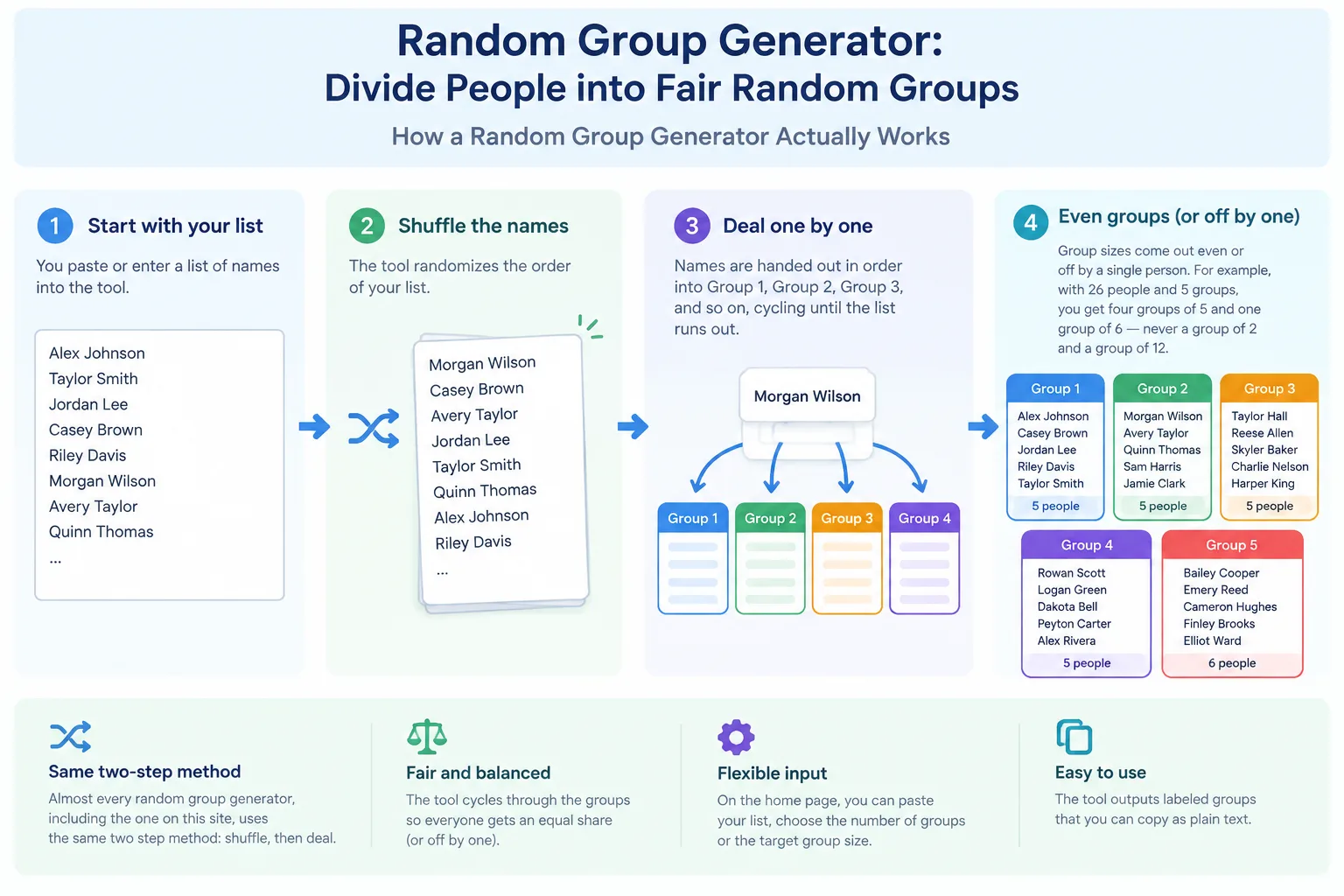
Almost every random group generator, including the one on this site, uses the same two-step method: shuffle, then deal. The tool takes your list of names, randomizes the order, and then hands out names one at a time into Group 1, Group 2, Group 3, and so on, cycling until the list runs out. This is why group sizes come out even or off by a single person — with 26 people and 5 groups, you get four groups of 5 and one group of 6, never a group of 2 and a group of 12.
This is verified site behavior: the Random Group Generator on the home page accepts a pasted list, lets you choose either the number of groups or the target group size, and outputs labeled groups you can copy as plain text. Because the output is plain text, it fits almost any workflow — paste it into Google Classroom, a Zoom chat, a Teams channel, a Slack message, or a slide before the session starts. No accounts, no student data stored, which matters for schools with privacy rules.
The honest limit: randomization controls placement, not chemistry. A random generator will not balance skill levels, separate two students who should not sit together, or guarantee that every group has a natural leader. Those needs require manual adjustment, and any good tool should let you swap one or two names after generating. Treat the random result as a strong first draft, not a final verdict.
Step-by-Step: Divide a Class into Random Groups in Under a Minute
Here is the workflow most teachers and facilitators settle into after a week or two:
- Prepare a plain list. One name per line, no numbering, no commas needed. First names or first name plus last initial are enough for classroom use.
- Decide the constraint, not the groups. Do you need six groups for six stations, or groups of four for a lab bench? Choose whichever constraint is fixed in your room.
- Paste and generate. Open the Random Group Generator and paste your list into the input box.
- Set the count. Enter the number of groups (or the group size) and run the shuffle once.
- Check group sizes. Confirm the sizes are within one person of each other. If one group looks unbalanced, regenerate — a new shuffle costs nothing.
- Make swaps only for hard constraints. Keep two students apart, or place a student who needs support with a patient peer. Change names, not the whole list.
- Project or paste the result. Show groups on screen so the fairness is visible, then copy the text into your LMS or chat tool.
A concrete example: a Grade 7 teacher with 27 students and five lab stations runs the generator, gets five groups of 5 and one group of 2 — wait, that is six groups. This is exactly the mistake the tool prevents when you set the constant correctly. With 27 students and five stations, the correct input is five groups, producing sizes of 6, 6, 5, 5, 5. Reading the sizes before class starts is a ten-second habit that avoids a scramble later.
Real Examples from Classrooms, Workshops, and Events
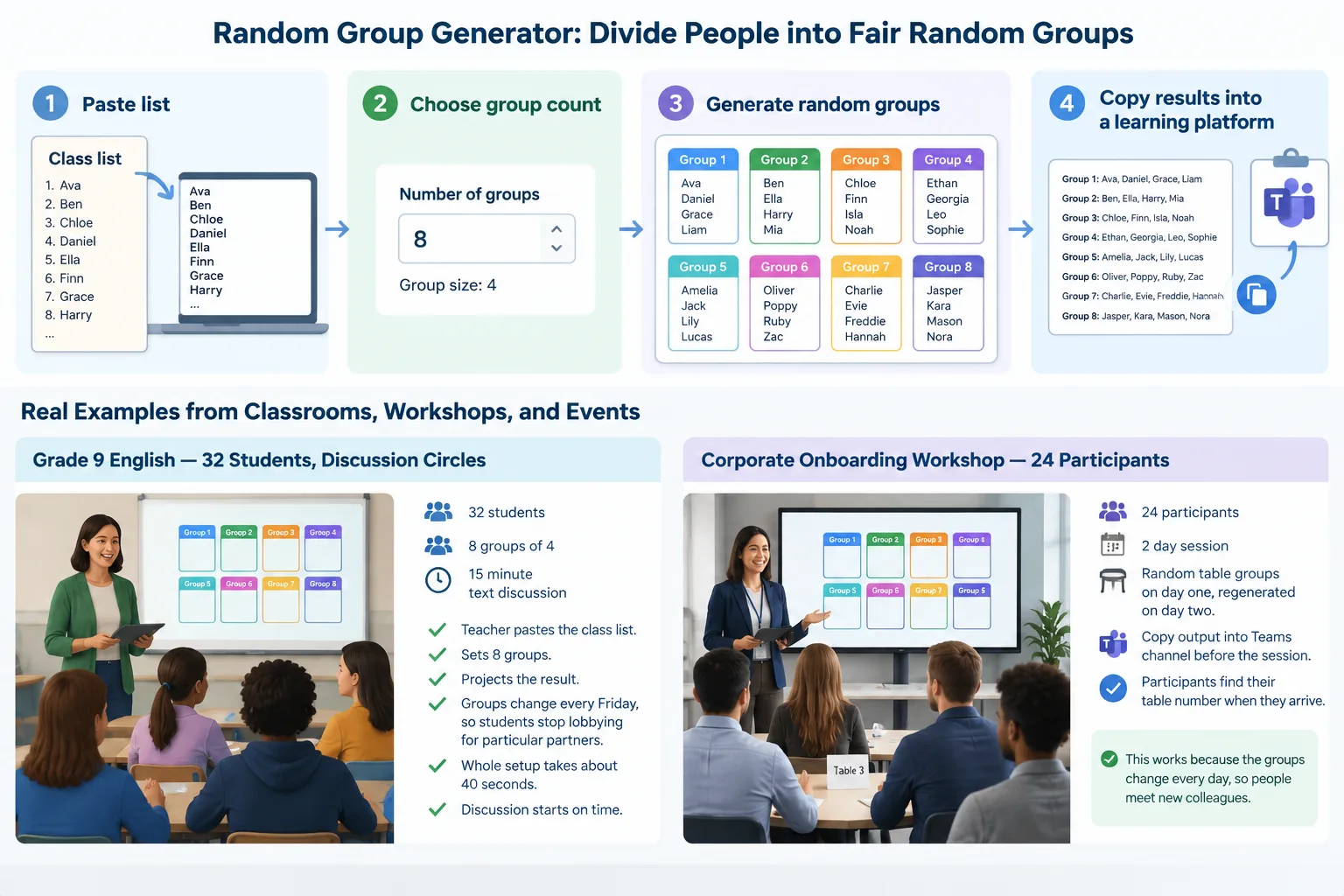
Grade 9 English, 32 students, discussion circles. The teacher needs eight groups of four for a 15-minute text discussion. She pastes the class list, sets eight groups, and projects the result. Because the groups change every Friday, students stop lobbying for particular partners. The whole setup takes about 40 seconds, and the discussion starts on time.
Corporate onboarding workshop, 24 participants. A trainer running a two-day session assigns random table groups on day one and
regenerates on day two, so people meet a second set of colleagues. She copies the output into the Teams channel before the session, and participants find their table number when they arrive. This works because the generator output is text, not a locked-in image.
Community event, 60 attendees, icebreaker rounds. The organizer needs groups of five for a rotation activity. Rather than counting people at the door, she runs the Random Pair Generator for the first round of introductions and the group generator for the rotation rounds afterward. Mixing tool types mid-event is fine as long as the list is the same.
Group identity as a small extra. Some facilitators let each random group pick a name to build quick ownership. A Group Name Generator can supply options in seconds, which is especially useful when groups need a label for a shared document or a scoreboard.
How Many Groups Should You Make?
Group size drives what the activity can actually achieve, so choose it before you open the tool. Small groups give every person speaking time; larger groups handle complex tasks with more roles but let quiet members disappear.
| Group size | Best for | Watch out for |
|---|---|---|
| 2 (pairs) | Peer review, quick checks, think-pair-share | No tie-breaker if partners disagree |
| 3–4 | Discussion, labs, problem sets | One person may be left out if roles are unclear |
| 5–6 | Projects with distinct roles, station rotations | Longer setup, some members idle |
| 7+ | Whole-room simulations, debates | Uneven participation, hard to assess |
For most K-12 and training rooms, three to four is the practical sweet spot: enough voices for discussion, few enough people that nobody can hide. If your only constraint is furniture — six lab benches, eight tables — let the room decide the count and accept groups of five or six.
Timing matters too. Regenerating groups every single session can feel chaotic, while regrouping once a unit gives students time to develop a working rhythm. A common compromise is to randomize for short activities and keep stable groups for multi-week projects.
Grouping vs Pairing vs Picking One Student
These three jobs look similar but produce different classroom dynamics. A random group generator splits everyone into balanced teams, which suits collaborative tasks, station work, and project kickoffs. A pair generator creates two-person partnerships, which suits peer editing, reading partners, and quick accountability checks. A random student picker selects one person at a time for answering, presenting, or taking a turn — useful for cold-calling without the awkwardness of choosing.
Matching the tool to the intent matters. If your activity needs every student to talk, groups of four beat a single picker; if you need one voice in front of the room, the Random Student Picker is the right call and a group generator is overkill. For seasonal or social activities with a different logic — one person gives to one other — a Secret Santa Generator handles assignments that grouping tools cannot. And when seating, not collaboration, is the actual problem, a Seating Chart is the closer match.
Pitfalls, Limits, and When Not to Use Random Grouping
Random grouping fails in three predictable ways. First, when the task requires specific skills or roles — a lab where one student must handle equipment safely, or a project needing an editor, a researcher, and a presenter — random placement can leave a group without the needed capability. Second, when relationships are fragile: two students in an active conflict should not be randomized into the same group, and no algorithm knows that unless you check the output. Third, when assessment depends on stable teams over many weeks, because constantly shifting membership prevents groups from developing trust and shared norms.
A generator also cannot verify who is actually present. If three students are absent, your carefully balanced six groups become five groups and one trio. Regenerate after attendance is final, or build in a manual swap step.
Use random grouping when the goal is exposure, fairness, speed, or breaking up cliques. Use deliberate grouping — with data, not habit — when the goal is differentiated instruction, skill balance, or sustained project work. Many experienced teachers combine both: random for the first two weeks to build class cohesion, then intentional for the long project once they know who needs what.
Frequently Asked Questions
How many students should be in each random group?
Three to four works for most discussion and problem-solving tasks, five to six for station rotations and role-based projects. Let a fixed constraint — number of tables, labs, or stations — decide when it exists, and set the group count in the tool accordingly.
Is a random group generator actually fair?
Yes, in the sense that matters most: every person has an equal chance of landing in any group, and the shuffle-then-deal method keeps group sizes within one person of each other. It does not balance skills or personalities, so treat the result as a fair starting point and adjust only for hard constraints.
Can I keep two students apart?
Not automatically. Generate the groups first, then swap one name between groups. Because sizes differ by at most one, a single swap rarely breaks the balance. Always review the output before displaying it if you know there is a conflict.
What is the difference between a random group generator and a random pair generator?
A group generator splits the whole list into teams of any size — usually groups of three or more. A Random Pair Generator creates two-person partnerships only, which suits peer review, reading partners, and turn-and-talk activities.
Do I need an account or a download to divide a class into random groups?
No. The Random Group Generator runs in the browser, needs no sign-up, and produces plain text you can copy straight into Google Classroom, Zoom, Teams, or Slack. Because nothing is stored, it is also simpler to use with student lists under school privacy policies.
Try It Before Your Next Session
Dividing a class into random groups should take seconds, not minutes, and it should look fair to the people being grouped. Paste your list, choose your group count, and run the shuffle once — then read the sizes, make any necessary swaps, and paste the result into the platform you already use. Start with the free Random Group Generator and see how much setup time it gives back to your lesson.
FAQ
How many students should be in each random group?
Three to four works for most discussion and problem-solving tasks, five to six for station rotations and role-based projects. Let a fixed constraint — number of tables, labs, or stations — decide when it exists, and set the group count in the tool accordingly.
Is a random group generator actually fair?
Yes, in the sense that matters most: every person has an equal chance of landing in any group, and the shuffle-then-deal method keeps group sizes within one person of each other. It does not balance skills or personalities, so treat the result as a fair starting point and adjust only for hard constraints.
Can I keep two students apart?
Not automatically. Generate the groups first, then swap one name between groups. Because sizes differ by at most one, a single swap rarely breaks the balance. Always review the output before displaying it if you know there is a conflict.
What is the difference between a random group generator and a random pair generator?
A group generator splits the whole list into teams of any size — usually groups of three or more. A [Random Pair Generator](/tools/random-pair-generator) creates two-person partnerships only, which suits peer review, reading partners, and turn-and-talk activities.
Do I need an account or a download to divide a class into random groups?
No. The [Random Group Generator](/) runs in the browser, needs no sign-up, and produces plain text you can copy straight into Google Classroom, Zoom, Teams, or Slack. Because nothing is stored, it is also simpler to use with student lists under school privacy policies.
SponsoredExplore more resources