
시크릿 산타 생성기 사용
자기 매칭 없이 선택적 제외가 가능한 단방향 선물 교환을 만듭니다.
시크릿 산타 배정 결과
이름을 3개 이상 추가한 후 추첨을 생성하세요.

참가자 명단을 붙여넣고 원치 않는 짝을 제외한 뒤, 이메일이나 로그인 없이 일대일 시크릿 산타 배정을 만드세요.
모두가 다른 사람을 뽑고, 받는 사람은 한 번만 배정됩니다.
커플, 가족, 팀원끼리 서로 뽑지 않도록 막습니다.
참가자마다 자신의 받는 사람만 보이는 링크를 전달하세요.
이 시크릿 산타 생성기의 작동 방식
참가자를 추가하고 필요에 따라 특정 짝을 제외한 뒤 일대일 추첨을 생성합니다. 매칭 알고리즘이 자기 매칭을 막고, 제외 규칙을 조용히 무시하지 않습니다.
추첨은 먼저 브라우저에서 실행됩니다. 결과를 나눌 때 개별 메시지를 복사하거나, 만료되는 비공개 확인 링크를 만들 수 있습니다.
연말 행사나 팀 활동을 준비할 때 가장 어려운 부분 중 하나는 누가 누구에게 선물을 줄지 정하는 일입니다. 시크릿 산타 생성기는 참가자 목록을 바탕으로 선물 상대를 무작위로 정하고, 각 참가자가 자신의 상대만 알 수 있도록 비공개 추첨을 돕는 도구입니다. 교실 활동, 회사 워크숍, 동호회 모임처럼 여러 사람이 참여하는 상황에서 공정한 선물 교환을 운영하는 데 활용할 수 있습니다.
이 글은 교사, 기업 교육 담당자, 팀 리더, 행사 운영자가 실제 모임에서 사용할 수 있도록 시크릿 산타 생성기의 활용 방법을 설명합니다. 이름을 종이에 적어 뽑는 전통적인 방식도 가능하지만, 참가자가 많거나 원격 참여자가 있는 경우에는 누락, 중복, 결과 공개 같은 문제가 생길 수 있습니다. 디지털 추첨 도구는 이런 운영 부담을 줄이고 참가자가 더 편하게 참여하도록 돕습니다.
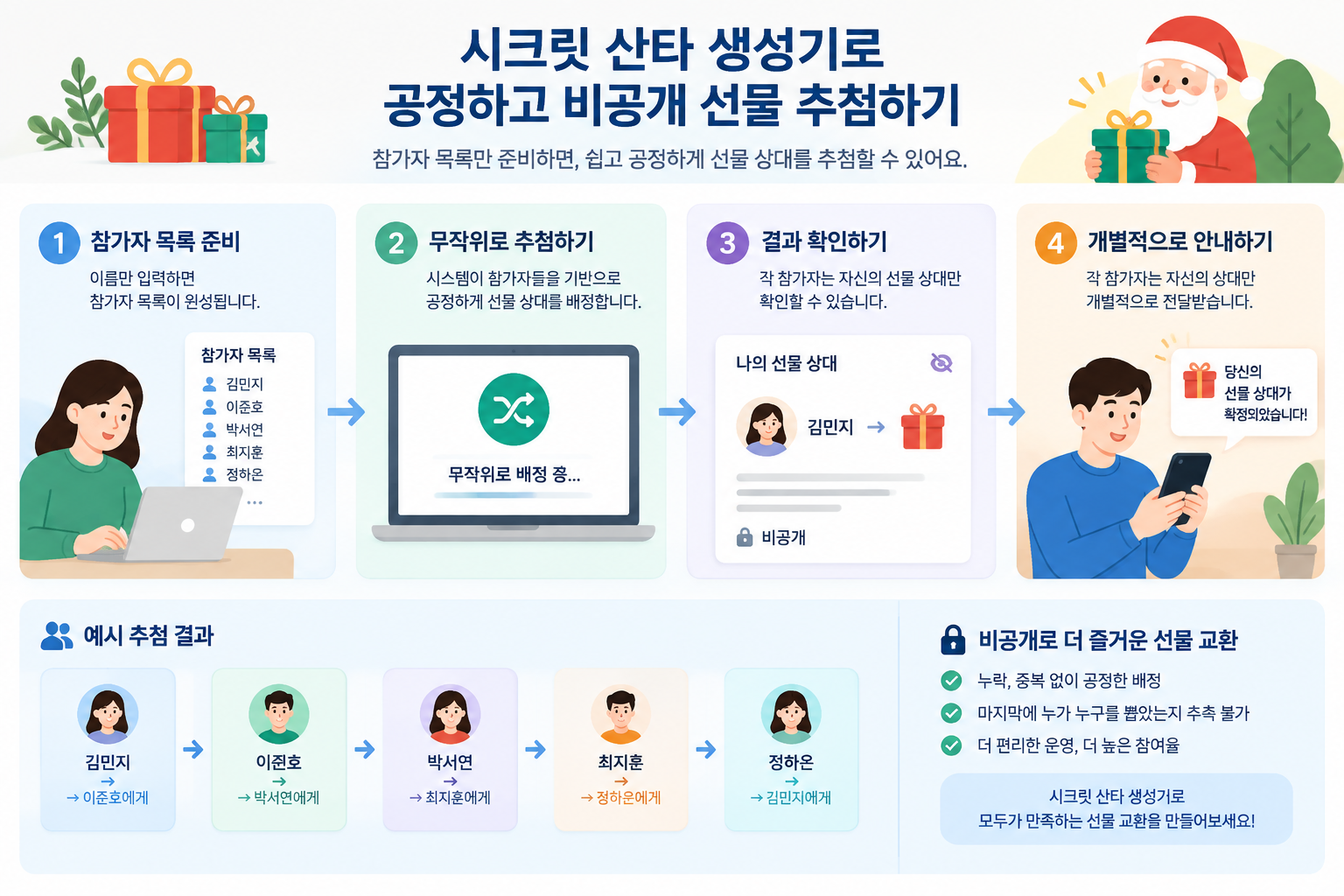
시크릿 산타 활동의 핵심은 재미와 비밀 유지입니다. 하지만 사람이 직접 추첨하면 작은 실수가 분위기를 망칠 수 있습니다. 예를 들어 25명의 직원이 참여하는 회사 행사에서 담당자가 종이를 준비하다가 한 사람의 이름을 빠뜨리면 다시 전체 추첨을 해야 할 수 있습니다. 또한 마지막에 남은 이름을 맞추는 과정에서 누가 누구를 뽑았는지 추측할 가능성도 있습니다.
시크릿 산타 생성기는 참가자 목록을 기반으로 무작위 배정을 진행해 이런 문제를 줄입니다. 추천하는 이유는 단순히 빠르기 때문만이 아니라, 모든 참가자에게 같은 기준을 적용하기 때문입니다. 교육 현장이나 조직 활동에서는 결과 자체보다 참여자가 과정이 공정하다고 느끼는 것이 중요합니다.
예를 들어 중학교 담임교사가 겨울 친목 활동을 준비한다고 가정해 보겠습니다. 학생 30명의 이름을 입력하고 추첨을 진행하면 교사는 일일이 짝을 정하지 않아도 됩니다. 학생들은 자신이 준비해야 할 친구만 확인하고, 다른 학생의 결과는 알 수 있어 활동의 재미를 유지할 수 있습니다.
다만 시크릿 산타 생성기가 모든 상황에 적합한 것은 아닙니다. 예산 차이가 큰 선물 교환, 특정 사람끼리 배정을 피해야 하는 복잡한 관계 조정, 선물 종류를 세밀하게 관리해야 하는 행사에서는 추가 운영 규칙이 필요할 수 있습니다. 도구는 공정한 무작위 배정을 돕지만 행사 목적과 참여자 상황을 함께 고려해야 합니다.
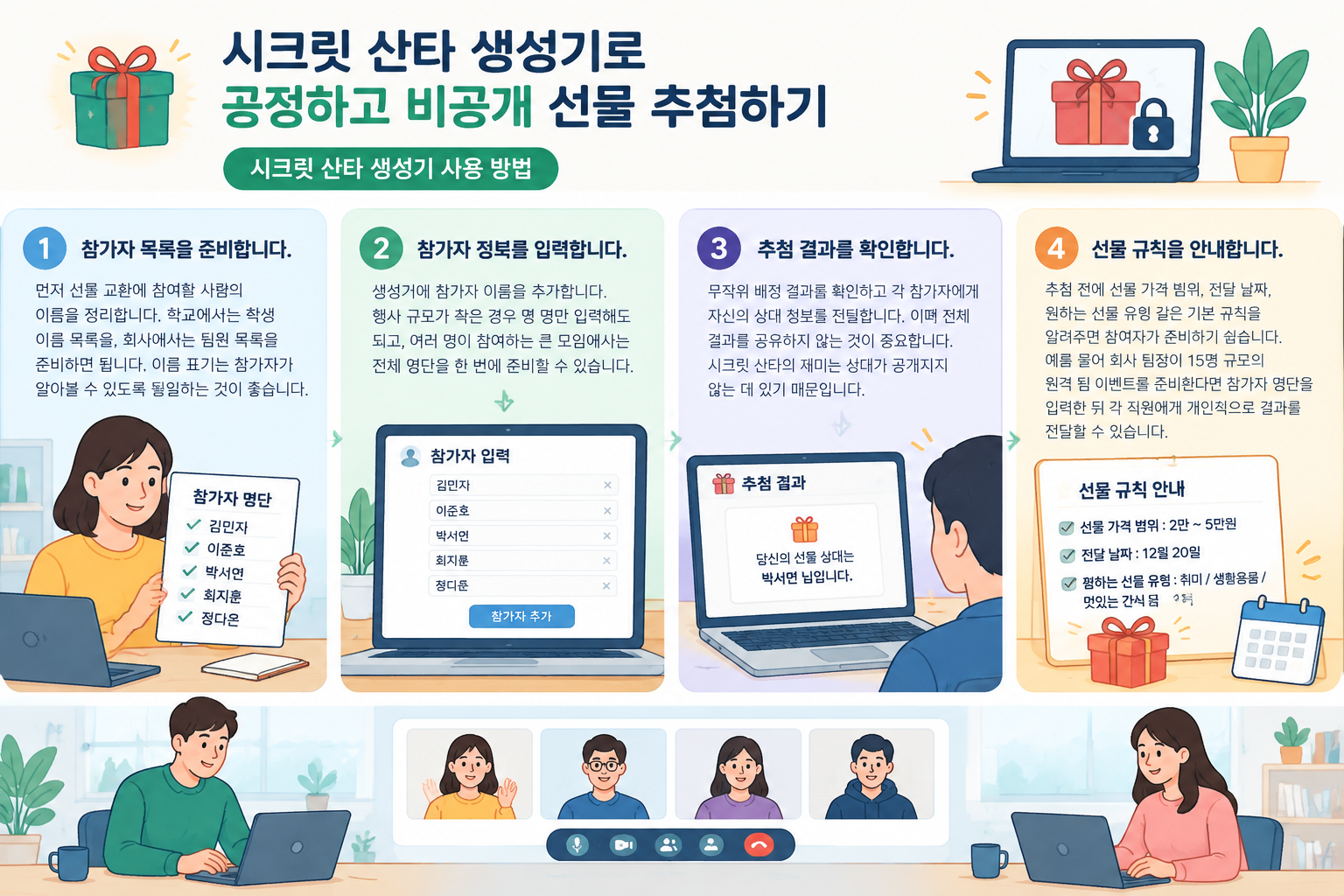
시크릿 산타 추첨을 준비할 때는 다음 순서로 진행하면 됩니다.
먼저 선물 교환에 참여할 사람의 이름을 정리합니다. 학교에서는 학생 이름 목록을, 회사에서는 팀원 목록을 준비하면 됩니다. 이름 표기는 참가자가 알아볼 수 있도록 통일하는 것이 좋습니다.
생성기에 참가자 이름을 추가합니다. 행사 규모가 작은 경우 몇 명만 입력해도 되고, 여러 명이 참여하는 큰 모임에서는 전체 명단을 한 번에 준비할 수 있습니다.
무작위 배정 결과를 확인하고 각 참가자에게 자신의 상대 정보를 전달합니다. 이때 전체 결과를 공유하지 않는 것이 중요합니다. 시크릿 산타의 재미는 상대가 공개되지 않는 데 있기 때문입니다.
추첨 전에 선물 가격 범위, 전달 날짜, 원하는 선물 유형 같은 기본 규칙을 알려주면 참여자가 준비하기 쉽습니다.
예를 들어 회사 팀장이 15명 규모의 원격 팀 이벤트를 준비한다면 참가자 명단을 입력한 뒤 각 직원에게 개인적으로 결과를 전달할 수 있습니다. 화상 회의 플랫폼을 이용하는 팀도 동일한 방식으로 운영할 수 있으며, 추첨 자체는 온라인으로 진행하고 선물 공개 이벤트는 별도로 진행할 수 있습니다.
교실에서는 시크릿 산타 활동을 통해 학생들이 서로를 배려하는 경험을 만들 수 있습니다. 교사는 단순한 선물 교환보다 감사 카드 작성, 칭찬 메시지 전달, 작은 응원 선물 같은 활동과 연결할 수 있습니다.
예를 들어 초등학교 학급에서 20명의 학생이 참여하는 경우, 교사는 미리 학생 목록을 준비하고 추첨 결과를 개별적으로 알려줄 수 있습니다. 학생들이 다른 친구의 상대를 알지 못하기 때문에 비밀 유지가 쉽고, 모든 학생이 같은 방식으로 참여하게 됩니다.
다만 어린 학생이 참여하는 경우에는 개인정보 관리와 보호자 안내를 고려해야 합니다. 이름 대신 별칭을 사용할 수 있고, 선물 가격이나 준비 방식도 학생 가정 상황을 고려해 부담 없는 수준으로 정하는 것이 좋습니다.
기업 환경에서는 시크릿 산타가 팀 관계 형성과 소통 활동으로 사용됩니다. 특히 다른 부서 구성원이 함께 참여하는 경우 평소 대화가 적던 동료와 자연스럽게 연결되는 기회가 될 수 있습니다.
예를 들어 인사팀이 연말 워크숍을 준비하면서 50명의 직원을 대상으로 선물 교환을 운영한다고 생각해 보겠습니다. 담당자는 명단을 관리하고 무작위 배정을 진행한 뒤 각 직원에게 개인 결과를 전달합니다. 참가자는 자신의 상대만 알고 준비할 수 있으므로 전체 운영 과정이 간단해집니다.
회사 행사에서는 참여하지 않는 사람, 휴직자, 퇴사 예정자처럼 예외 상황이 있을 수 있습니다. 따라서 추첨 전에 최종 참가 명단을 확정하고 변경 사항이 생기면 다시 배정할지 결정하는 운영 기준을 정하는 것이 좋습니다.
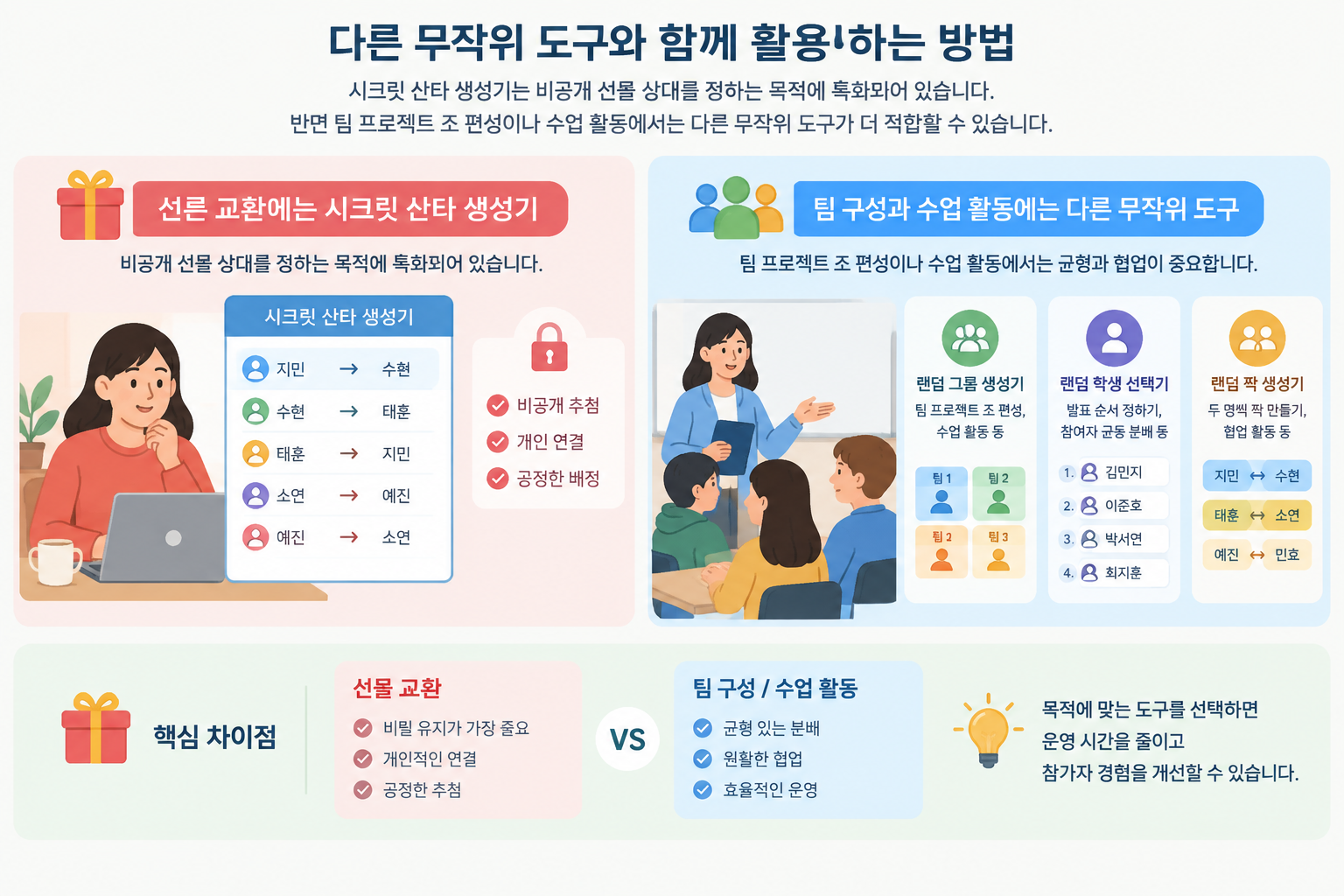
시크릿 산타 생성기는 비공개 선물 상대를 정하는 목적에 특화되어 있습니다. 반면 팀 프로젝트 조 편성이나 수업 활동에서는 다른 무작위 도구가 더 적합할 수 있습니다.
예를 들어 수업에서 학생을 여러 팀으로 나누려면 랜덤 그룹 생성기를 사용할 수 있습니다. 발표 순서를 정하거나 참여자를 균등하게 나누는 활동에는 랜덤 학생 선택기가 도움이 됩니다. 두 명씩 짝을 만드는 활동이라면 랜덤 짝 생성기를 활용할 수 있습니다.
이처럼 목적에 맞는 도구를 선택하면 운영 시간을 줄이고 참가자 경험을 개선할 수 있습니다. 선물 교환은 비밀과 개인 연결이 중요하고, 팀 구성은 균형과 협업이 중요하기 때문에 같은 무작위 방식이라도 필요한 기능은 다릅니다.
좋은 시크릿 산타 행사는 추첨만으로 완성되지 않습니다. 참가자가 규칙을 이해하고 편하게 참여할 수 있도록 사전 안내가 필요합니다.
첫째, 참가 인원을 정확히 확인하세요. 한 명이라도 빠지면 결과를 다시 조정해야 할 수 있습니다. 둘째, 선물 기준을 명확하게 정하세요. 가격 제한이 있으면 참가자의 부담을 줄일 수 있습니다. 셋째, 결과 전달 방식을 조심하세요. 전체 배정표를 공개하면 비밀이라는 핵심 요소가 사라집니다.
또한 원격 팀이나 여러 지역 참가자가 있는 경우 온라인 도구를 활용하는 것이 특히 유용합니다. 서로 다른 장소에 있는 참가자도 같은 방식으로 참여할 수 있고, 운영자가 직접 결과를 관리하는 부담을 줄일 수 있습니다.
시크릿 산타 생성기는 완벽한 이벤트 관리 시스템을 대신하는 도구라기보다, 공정한 추첨과 비공개 전달이라는 핵심 과정을 단순하게 만드는 도구입니다. 참가자 수, 관계, 행사 목적에 맞게 규칙을 함께 설계하면 더 좋은 경험을 만들 수 있습니다.
시크릿 산타 생성기는 학교 행사, 회사 팀 활동, 친구 모임, 온라인 커뮤니티 이벤트처럼 여러 사람이 선물 상대를 정해야 하는 상황에서 사용할 수 있습니다. 참가자가 많거나 원격 참여자가 있을 때 특히 편리합니다.
아니요. 시크릿 산타의 목적은 상대를 비밀로 유지하는 것입니다. 각 참가자가 자신의 선물 상대만 확인하는 방식이 일반적이며, 전체 결과를 공유하면 활동의 재미가 줄어들 수 있습니다.
네. 팀 규모가 작은 회사부터 여러 명이 참여하는 워크숍까지 활용할 수 있습니다. 다만 회사에서는 참여 여부, 예산, 선물 기준 같은 운영 규칙을 먼저 정하는 것이 좋습니다.
같은 무작위 기능을 사용하지만 목적은 다릅니다. 시크릿 산타 생성기는 비공개 선물 상대 선택에 적합하고, 팀 프로젝트나 수업 조 편성은 랜덤 그룹 생성기 같은 팀 배정 도구가 더 적합합니다.
네. 참가자가 같은 장소에 있지 않아도 온라인 방식으로 명단을 관리하고 결과를 전달할 수 있습니다. 원격 근무 팀이나 온라인 수업에서도 활용할 수 있습니다.
참가자 목록만 준비하면 시크릿 산타 이벤트를 간단하게 시작할 수 있습니다. 공정한 무작위 배정과 비공개 결과 전달로 학교 활동, 팀 행사, 친목 모임을 더 원활하게 운영해 보세요.
지금 시크릿 산타 생성기를 사용해 다음 선물 교환을 준비해 보세요.
결과가 비공개 선물 배정이라면 시크릿 산타 생성기를 사용하세요.
자기 매칭 없이 선택적 제외가 가능한 단방향 선물 교환을 만듭니다.
두 사람이 함께 작업만 하면 되는 경우 일반 랜덤 페어를 사용하세요.
선물 배정이 아니라 팀 나누기가 필요하다면 홈 도구를 사용하세요.
명단에서 비공개 배정까지 4단계로 끝냅니다.
한 줄에 한 명씩 붙여넣거나 CSV·텍스트 파일을 가져오세요. 이름은 중복되면 안 됩니다.
필요할 때 파트너, 가족, 직장 동료가 서로 뽑지 않도록 합니다.
도구가 완전한 일대일 추첨을 찾거나 규칙에 해가 없는 이유를 설명합니다.
비공개 메시지를 복사하거나, 배정 목록을 내보내거나, 사람마다 만료되는 확인 링크를 만드세요.
결과는 단방향 배정이지 일반 페어 목록이 아닙니다.
아무도 자신에게 줄 선물로 배정되지 않습니다.
참가자는 한 번 주고 한 번 받습니다.
결과를 보여주기 전에 제외 규칙을 확인합니다.
행사는 가볍게 유지하고, 각자 알아야 할 것만 전달합니다.
각 링크는 전체 배정표가 아니라 한 사람의 받는 사람만 보여줍니다.
참가자별로 바로 보낼 수 있는 메시지를 복사하세요.
총무 메모용으로 CSV·텍스트·Markdown을 다운로드하세요.
스프레드시트 작업 없이 깜짝 이벤트를 즐기고 싶은 모임을 위한 간단한 추첨입니다.
상사, 파트너, 친한 팀원을 제외하고 동료마다 비공개 결과를 하나씩 공유하세요.
다른 사람의 배정을 보여주지 않으면서 규모가 큰 선물 교환을 정리합니다.
계정 만들기를 요구하지 않고 채팅이나 메신저로 확인 링크를 보내세요.
특정 짝을 떨어뜨려야 할 때는 제외 규칙을 사용하세요.
행사 전체를 관리한다고 가장하는 것보다 명확한 교환 흐름이 낫습니다.
이 도구는 이메일 전송, 위시리스트 관리, 선물 예산 수집, 메시지 열람 확인을 하지 않습니다. 비공개 링크는 베어러 링크이며, 링크를 받은 사람은 만료되거나 취소될 때까지 해당 결과를 열 수 있습니다.
제외 규칙 때문에 받을 사람이 없는 참가자가 생기면 도구가 멈추고 규칙 조정을 요청합니다. 불완전한 추첨을 반환하지 않습니다.
직접 비공개 확인 링크를 만들기 전까지 이름은 로컬에 보관됩니다.
“명확한 추첨과 비공개 링크 하나면 작은 교환에는 충분합니다.”
직접 교환을 진행하기 전에 매칭 결과가 어떻게 보이는지 미리 확인하세요.


관련 도구
화이트 엘리펀트(White Elephant) 선물 교환 순서를 몇 초 만에 무작위로 정하고, 파티 전원이 쓸 수 있는 훔치기 규칙 치트 시트까지 받아보세요.
4~64개 팀을 붙여넣으면 무작위 시드와 자동 부전승이 적용된 싱글 엘리미네이션 대진표가 완성 — 첫 대결부터 결승까지 모든 라운드가 정리됩니다.
공정한 이벤트 예산을 몇 초 만에 산출하세요. 참석자, 1인당 예산, 예비비 비율을 입력하면 계획 범위가 포함된 총액이 나옵니다.
활동과 이벤트에서 사람들을 조직하는 다른 방법을 살펴보세요.
온라인 수업에서 Random Student Picker를 사용해 모든 학생에게 공정하게 발표 기회를 주는 방법을 알아보세요. 단계별 가이드와 실제 사례, FAQ를 제공합니다.
가이드 읽기교사가 무의식적으로 특정 학생만 자주 호명하는 수업 지목 편향을 없애고, Random Student Picker를 통해 공정하고 투명한 발표 기회를 제공하는 구체적인 방법을 안내합니다.
가이드 읽기무작위 학생 추첨 도구로 수업 참여를 높이고 공정하게 학생을 선택하는 방법을 소개합니다. 초중고 교사 및 대학 강사를 위한 실용 가이드.
가이드 읽기추첨, 개인정보, 제외 규칙에 대한 일반적인 답변.
아니요. 매칭 알고리즘이 결과를 반환하기 전에 자기 매칭을 차단합니다.
네. 두 사람에 제외 규칙을 추가하면 기본값으로 양방향에 적용됩니다.
아니요. 개별 메시지를 복사하거나 비공개 확인 링크를 만들어 기존 채팅 채널로 보내면 됩니다.
추첨은 브라우저에서 만들어집니다. 확인 링크를 만들면 각 링크는 한 사람의 배정만 보여주고 자동으로 만료됩니다.
도구가 오류로 멈추고 제외를 삭제하거나 변경하라고 안내합니다. 규칙을 조용히 완화하지 않습니다.
네. 추첨을 생성한 뒤 CSV, 일반 텍스트, Markdown을 다운로드할 수 있습니다.
네. 팀 명단을 추가하고 원치 않는 짝을 제외한 뒤 추첨을 생성하고, 각 비공개 결과를 해당 동료에게 전달하세요.
명단을 붙여넣고 제외 규칙을 추가해 깜짝 이벤트를 비공개로 유지하세요.