
무작위 학생 선택 휠 사용
수업 지명, 정답 확인, 발표 순서, 현장 질문에 적합합니다.

명단을 붙여 넣거나 가져온 뒤 휠을 돌리고 결과를 전체 화면으로 보여 주세요. Remember picked를 켜면 선택된 이름은 초기화 전까지 다음 휠에서 제외됩니다.
휠 방식은 선택 과정을 교실 화면에서 보여 주고 설명하기 쉽습니다.
선택된 이름을 다음 회전에서 제외해 더 많은 학생에게 기회를 줄 수 있습니다.
교실, 온라인 수업, 회의, 워크숍에서 보기 좋게 표시할 수 있습니다.
빠른 답변
Random Student Picker Wheel은 한 명 또는 여러 명의 학생을 공정하게 고르는 전체 화면용 이름 선택 휠입니다.
CSV/TXT 명단을 가져오고, 보이는 휠을 돌리고, 초기화 전 중복을 피하며, 선택 결과나 기록을 복사할 수 있습니다.
수업 중에 발표할 학생이나 퀴즈에 답변할 사람을 고를 때 고민해 보셨나요? 특정 학생만 계속 지목되거나, 교사의 선호가 반영되는 것은 공정하지 않습니다. 이 랜덤 학생 뽑기 튜토리얼에서는 무료 도구 Random Student Picker를 사용해 누구나 쉽게 완전히 무작위로 학생을 선정하는 방법을 단계별로 알려드립니다. 이 도구는 수업 참여를 높이고, 모든 학생에게 동등한 기회를 제공하여 교실 분위기를 한층 밝게 만들어 줍니다.
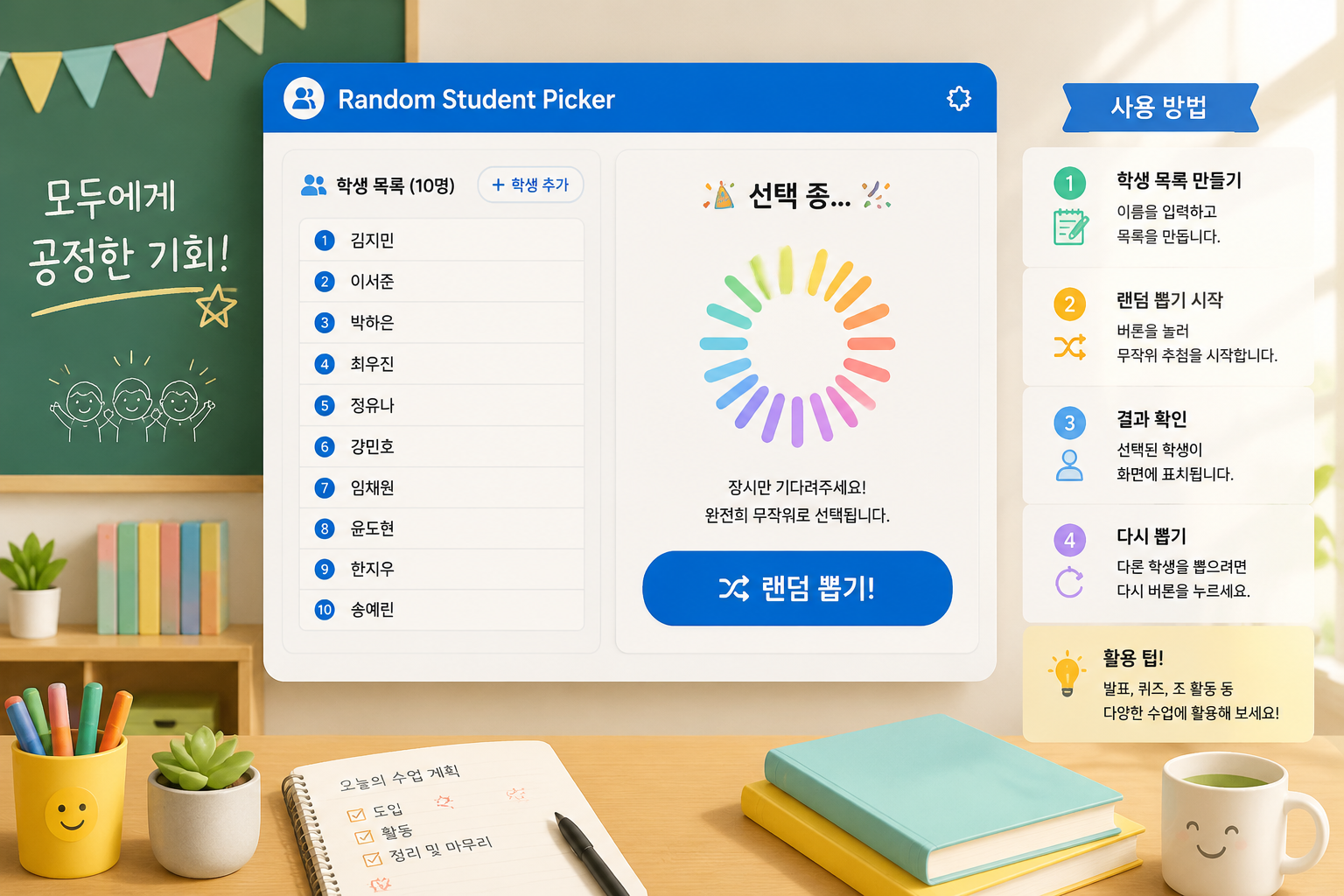
선생님들은 수업 중 학생을 지목할 때 다양한 방법을 사용합니다. 출석부 순서, 랜덤 카드, 막대 뽑기 등이 있지만, 이들은 종종 예측 가능해지거나 조작 가능해집니다. 학생들은 “또 나야?”라는 불만을 가지기 쉽고, 오히려 집중력을 떨어뜨릴 수 있습니다.
Random Student Picker는 진정한 무작위 알고리즘을 기반으로 하여, 어떤 학생이든 완전히 공정하게 선택됩니다. 수업의 긴장감과 재미를 살리면서도, 학습 참여를 유도하는 강력한 동기부여 도구가 됩니다. 또한, 도구 자체가 무료이며 복잡한 설치 없이 웹 브라우저에서 바로 실행할 수 있어, 디지털 환경이 낯선 교사도 부담 없이 활용할 수 있습니다.
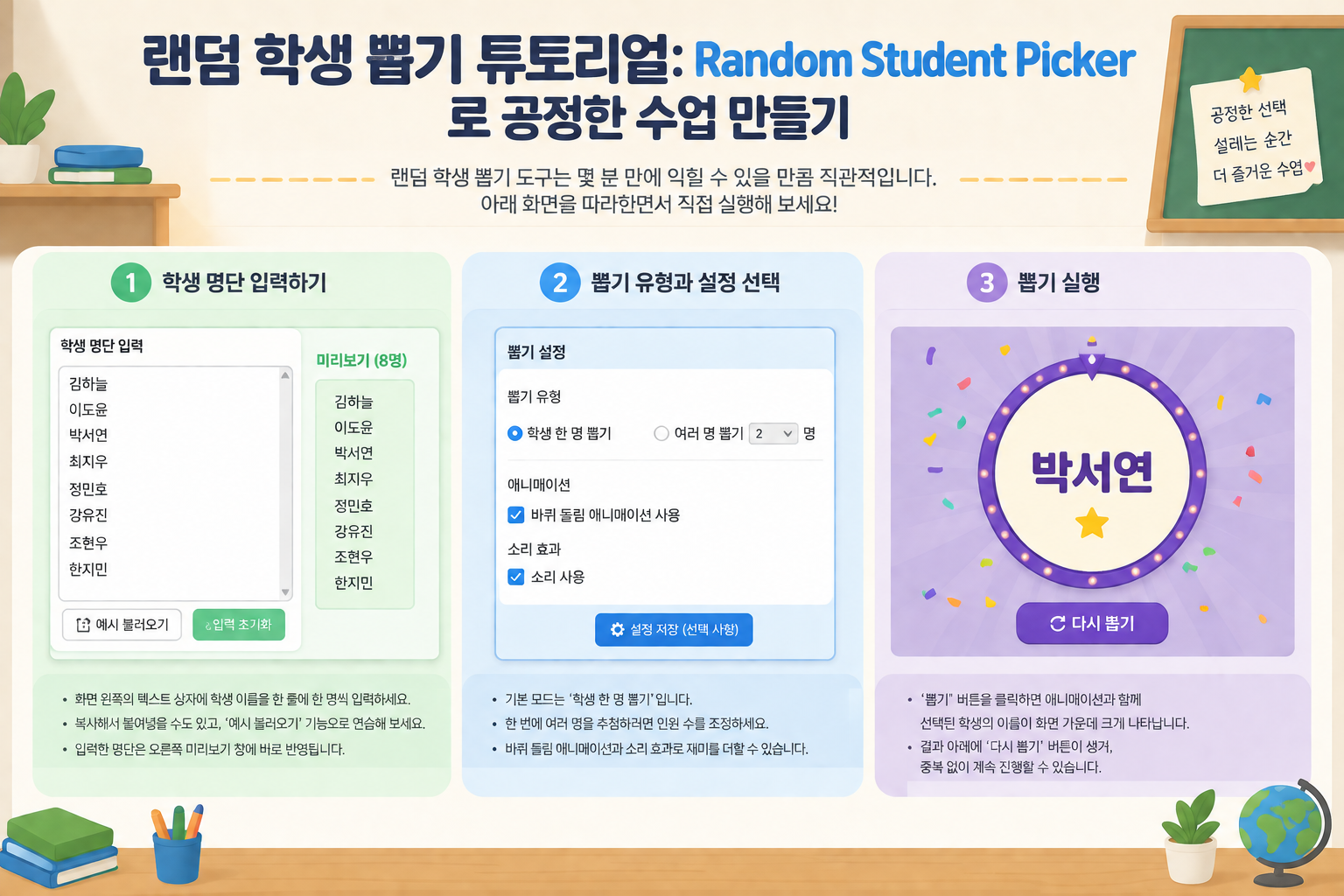
랜덤 학생 뽑기 도구는 몇 분 만에 익힐 수 있을 만큼 직관적입니다. 아래 화면을 따라하면서 직접 실행해 보세요.
먼저 랜덤 학생 뽑기 도구로 이동합니다. 화면 왼쪽의 텍스트 상자에 학생 이름을 한 줄에 한 명씩 입력하세요. 복사해서 붙여넣을 수도 있고, ‘예시 불러오기’ 기능으로 연습해 볼 수 있습니다. 입력한 명단은 오른쪽 미리보기 창에 바로 반영됩니다.
기본 모드는 ‘학생 한 명 뽑기’입니다. 한 번에 여러 명을 추첨하려면 상단 옵션에서 인원 수를 조정할 수 있습니다. 또한, 시각적 재미를 더하기 위해 바퀴 돌림 애니메이션을 활성화하거나, 소리 효과를 추가할 수도 있습니다.
‘뽑기’ 버튼을 클릭하면 애니메이션과 함께 선택된 학생의 이름이 화면 가운데 크게 나타납니다. 학생들은 이름이 나타날 때까지 긴장감을 느끼며 집중하게 됩니다. 추첨 후에는 결과 아래에 ‘다시 뽑기’ 버튼이 생겨, 중복 없이 계속 진행할 수 있습니다.
이 도구의 진가는 실제 수업 상황에서 드러납니다. 예를 들어 한 중학교 영어 교사는 발표 순서를 정할 때 기존에는 이름표를 통에 넣어 뽑았지만, 준비 시간이 오래 걸리고 공정함에 대한 의심이 생겼습니다. Random Student Picker를 도입한 후, 수업 시작 전 명단을 한 번 입력해 두고 매번 클릭 한 번으로 발표자를 뽑았습니다. 학생들은 화면에 이름이 나타나는 순간을 즐기며 적극적으로 참여했고, “선생님이 일부러 그랬다”는 불만이 사라졌습니다.
또한, 온라인 수업에서도 유용합니다. 화면 공유를 통해 학생들이 직접 지켜보는 가운데 무작위 추첨을 실행하면, 비대면 환경에서도 긴장감과 참여도를 높일 수 있습니다. 이는 무작위 그룹 생성기나 무작위 짝 생성기와 결합하여, 조별 활동의 구성원 배정까지 자동화할 수 있습니다.
Random Group Generator 사이트는 여러 공정한 선정 도구를 제공합니다. 상황에 맞는 도구를 선택하는 것이 중요합니다.
학생 한 명을 뽑아야 한다면 Random Student Picker가 가장 빠르고 집중도가 높습니다. 여러 명을 한 번에 뽑을 수도 있지만, 그룹핑 목적이 아니라 추첨 연속 실행에 가깝습니다. 모둠 구성이 필요할 때는 무작위 그룹 생성기를 함께 활용하면 환상의 호흡을 자랑합니다.
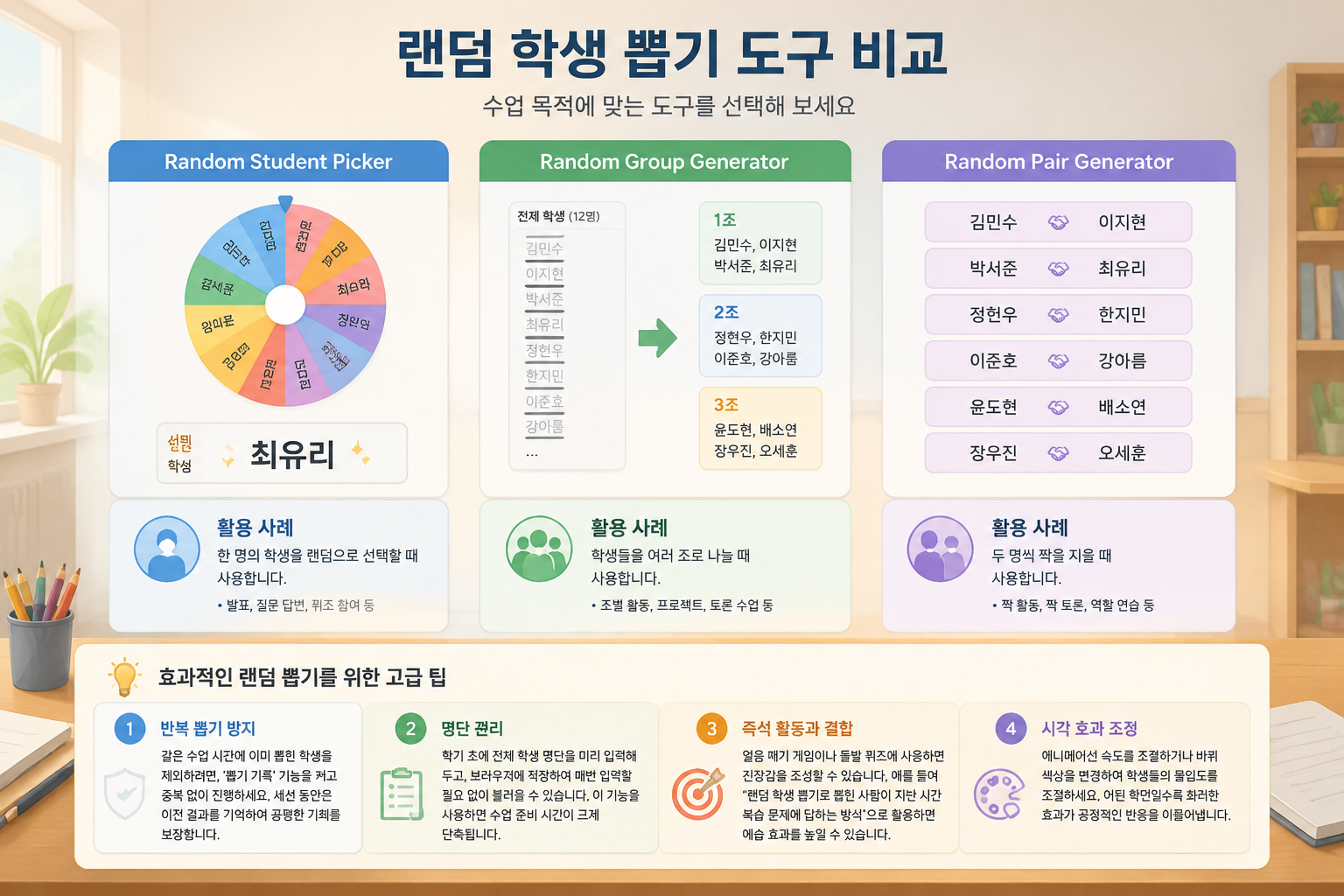
네, 한 번에 여러 명을 추첨할 수 있습니다. 설정에서 원하는 인원으로 숫자를 조절하고 ‘뽑기’를 누르면, 그 수만큼 순차적으로 결과가 표시됩니다. 단, 이것은 개별 학생을 여러 번 뽑는 것과 유사하며, 그룹을 생성하는 무작위 그룹 생성기와는 목적이 다릅니다.
브라우저 저장 기능을 통해 명단이 자동으로 유지됩니다. 같은 기기, 같은 브라우저로 재접속하면 이전에 입력한 이름 목록이 그대로 남아 있습니다. 단, 다른 기기나 시크릿 모드에서는 저장되지 않으므로, 텍스트 파일로 백업해 두는 것을 권장합니다.
Random Student Picker는 편향을 배제한 공정한 알고리즘을 사용합니다. 컴퓨터가 생성한 난수를 기반으로 하기 때문에, 특정 패턴이나 선호도가 개입되지 않습니다. 교실 환경에서 실제로 시연해 보면 학생들도 납득할 만큼 투명한 결과를 보여줍니다.
네, 줌(Zoom), 구글 미트, 팀즈 등 모든 화면 공유 플랫폼과 완벽하게 호환됩니다. 별도의 설치나 복잡한 통합 없이 브라우저 하나만 띄우면 되므로, 원격 수업에서도 손쉽게 활용할 수 있습니다.
Random Group Generator 사이트의 모든 도구는 무료이며, 계정 생성 없이 사용할 수 있습니다. 광고가 표시될 수 있지만, 핵심 기능에 영향을 주지 않습니다.
이제 교실에서 공정함과 재미를 동시에 잡을 준비가 되셨나요? 오늘 당장 Random Student Picker에 접속해 학생 명단을 입력하고, 첫 추첨을 실행해 보세요. 단 한 번의 클릭으로 모든 학생의 참여를 높일 수 있습니다. 수업의 긴장감을 바꾸는 작은 도구가 큰 변화를 만듭니다.
누가 답할지, 다음 순서가 누구인지 정해야 할 때 가장 적합한 페이지입니다.
수업 지명, 정답 확인, 발표 순서, 현장 질문에 적합합니다.
명단 전체를 프로젝트나 토론 그룹으로 나눠야 한다면 홈 도구로 돌아가세요.
발표자 뽑기가 아니라 모두에게 짝이 필요하다면 짝 도구가 더 적합합니다.
명단과 중복 규칙이 분명할수록 휠 추첨을 더 자연스럽게 사용할 수 있습니다.
쉼표나 줄바꿈으로 이름을 추가하거나 CSV/TXT 명단을 브라우저에서 로컬로 가져옵니다.
답변, 예시, 발표, 발언 순서에 맞게 한 명 또는 여러 명을 선택합니다.
Remember picked를 켜면 선택된 이름이 초기화 전까지 제외됩니다.
페이지에서 바로 돌리거나 전체 화면 모드로 교실과 화상 수업에 표시합니다.
학생과 참여자가 볼 수 있는 휠 기반 무작위 단계를 사용합니다.
명단을 보이는 휠로 바꿔 지명, 답변, 발표 순서에 활용할 수 있습니다.
입력 폼을 숨기고 휠, 결과, 남은 인원, 초기화 컨트롤만 표시합니다.
FileReader로 CSV/TXT를 가져와 이름이 브라우저 안에서만 처리되게 합니다.
라운드 컨트롤로 더 많은 이름에 참여 기회를 나눌 수 있습니다.
선택된 이름은 라운드를 초기화할 때까지 다음 회전에서 제외됩니다.
한 명을 고르거나 같은 엔진 결과에서 여러 명을 순서대로 보여 줄 수 있습니다.
현재 결과나 선택 기록을 수업 메모, 회의록, 후속 작업에 복사할 수 있습니다.
발언자를 고르는 일과 전체 팀을 나누는 일은 서로 다른 작업입니다.
이 페이지는 지명과 참여에 집중하며 전체 그룹 만들기와 섞지 않습니다.
초기화 전까지 명단을 반복 없이 진행할 수 있습니다.
다음 단계가 팀 구성이라면 Random Group Generator로 돌아가면 됩니다.
진짜 질문이 '다음에는 누가 답해야 하나?'일 때 이 도구를 사용하세요.
공정한 지명, 낭독 순서, 정답 확인, 발표 순서는 물론 좌석표를 다시 짤 때 좌석 번호 뽑기에도 활용하세요.
채팅이 늘 같은 몇 명의 목소리에 지배되는 원격 수업에서 활용하세요.
더 투명한 참여 방식을 만들어 편향 인식을 줄일 수 있습니다.
다음 작업이 팀 구성이라면 메인 그룹 도구로 돌아가세요.
30분 토론에서 손들기 독점을 줄이기
고등 교사가 매번 지명 때 같은 여섯 명이 답한다는 것을 봅니다. 토론 블록에서 학급 명단을 붙여 넣고 그 시간의 단순 비반복 패스를 켠 뒤, 휠이나 이름 강조를 투사해 선택이 공개되게 합니다.
세 번 추첨 후 조용한 학생도 한 번 말했고 ‘교사가 노리는 내성적인 아이’로 찍히지 않습니다. 분명히 준비가 안 된 학생은 건너뛰고 교사 예외로 기록합니다. 조작처럼 보이는 조용한 재추첨은 하지 않습니다.
가짜 무작위 없는 공정한 지명
선택기는 빈 항목을 정리한 활성 명단에서 샘플링합니다. 비반복 또는 ‘이미 호명’ 모드가 있으면 뽑힌 이름은 풀이 빌 때까지 빠지고, 이후 주기를 리셋할 수 있습니다. 단기 공정성은 기억만 쓰는 것보다 낫습니다.
휠·강조 같은 시각 모드는 제시 보조이며 아래 무작위 선택은 바꾸지 않습니다. 공정성 주장은 ‘이번 추첨에서 자격 있는 이름이 같은 확률’이지 ‘학기 내내 발언량이 같다’가 아닙니다.
무작위 선택이 잘못된 개입일 때
무작위 지명은 일부 학습자의 불안을 키울 수 있습니다. 옵트아웃 규범 없는 트라우마 민감 교실, 발화 편의 제공이 있는 학생, 자발적 전문성이 정말 필요한 질문에는 맞지 않습니다.
한 번의 추첨이 준비 불균형이나 자리 권력 역학을 고치지 않습니다. 선호 이름이 나올 때까지 다시 돌리는 것도 막지 못하며, 그 행동은 학생에게 보여 도구를 약화시킵니다.
기억, 습관, 매번 같은 손든 학생에게 의존하는 것보다 투명합니다.
“뽑기 전에 모두에게 짧은 준비 시간을 주니 학생들이 훨씬 편하게 받아들였습니다.”
교실과 온라인 참여를 위한 예시 흐름입니다.










관련 도구
화이트 엘리펀트(White Elephant) 선물 교환 순서를 몇 초 만에 무작위로 정하고, 파티 전원이 쓸 수 있는 훔치기 규칙 치트 시트까지 받아보세요.
4~64개 팀을 붙여넣으면 무작위 시드와 자동 부전승이 적용된 싱글 엘리미네이션 대진표가 완성 — 첫 대결부터 결승까지 모든 라운드가 정리됩니다.
공정한 이벤트 예산을 몇 초 만에 산출하세요. 참석자, 1인당 예산, 예비비 비율을 입력하면 계획 범위가 포함된 총액이 나옵니다.
이 글들은 랜덤 지목을 단순한 재미 기능이 아니라 실제 참여 루틴으로 활용하는 방법을 설명합니다.
무작위 학생 추첨 도구로 수업 참여를 높이고 공정하게 학생을 선택하는 방법을 소개합니다. 초중고 교사 및 대학 강사를 위한 실용 가이드.
기사 읽기교사가 무의식적으로 특정 학생만 자주 호명하는 수업 지목 편향을 없애고, Random Student Picker를 통해 공정하고 투명한 발표 기회를 제공하는 구체적인 방법을 안내합니다.
기사 읽기온라인 수업에서 Random Student Picker를 사용해 모든 학생에게 공정하게 발표 기회를 주는 방법을 알아보세요. 단계별 가이드와 실제 사례, FAQ를 제공합니다.
기사 읽기무작위 선택 휠을 수업에서 쓰기 전 자주 묻는 질문입니다.
네. 명단을 보이는 휠로 바꾸고, 최종 결과는 기존 무작위 선택 엔진이 결정합니다.
네. 선택 인원을 설정하면 같은 엔진 결과에서 여러 명이 순서대로 표시됩니다.
네. Remember picked를 켜면 선택된 이름이 초기화 전까지 휠에서 제외됩니다.
네. 휠, 선택 버튼, 결과, 남은 인원, 초기화, 나가기 컨트롤만 표시됩니다.
아니요. 붙여 넣은 이름과 CSV/TXT 가져오기는 브라우저에서 로컬로 처리됩니다.
이 페이지는 “다음에 누가 답할까?”를 정합니다. 메인 도구는 “전체 명단을 어떻게 팀으로 나눌까?”를 정합니다.
아니요. 공정성이 중요할 때 보이는 기본 규칙을 제공할 뿐입니다.
네. 이름을 한 명씩 뽑아 교실 좌석 순서대로 배치하면 됩니다. 행과 좌석 번호가 있고 인쇄할 수 있는 완성형 좌석표가 필요하다면 무작위 좌석표 생성기를 사용하세요.
다음 단계가 팀 구성이면 메인 그룹 도구로 다시 전환하세요.