
random student picker
Random student picker para clases online: guía práctica para docentes
Aprende a usar un random student picker en clases online: pasos concretos, ejemplo real con 28 estudiantes, cómo mantenerlo justo en Zoom o Teams y errores que debes evitar.

En una clase online es fácil que respondan siempre los mismos cuatro estudiantes. El resto queda en silencio, con la cámara apagada y el micrófono en mute, y tú no tienes una forma rápida de saber si siguen la explicación. Un random student picker (selector aleatorio de estudiantes) resuelve justo eso: toma tu lista de nombres, elige uno al azar y lo muestra en pantalla en segundos. Esta guía explica cómo usarlo en Zoom, Teams o Google Meet, cómo mantener la selección justa y en qué casos conviene otra herramienta distinta.
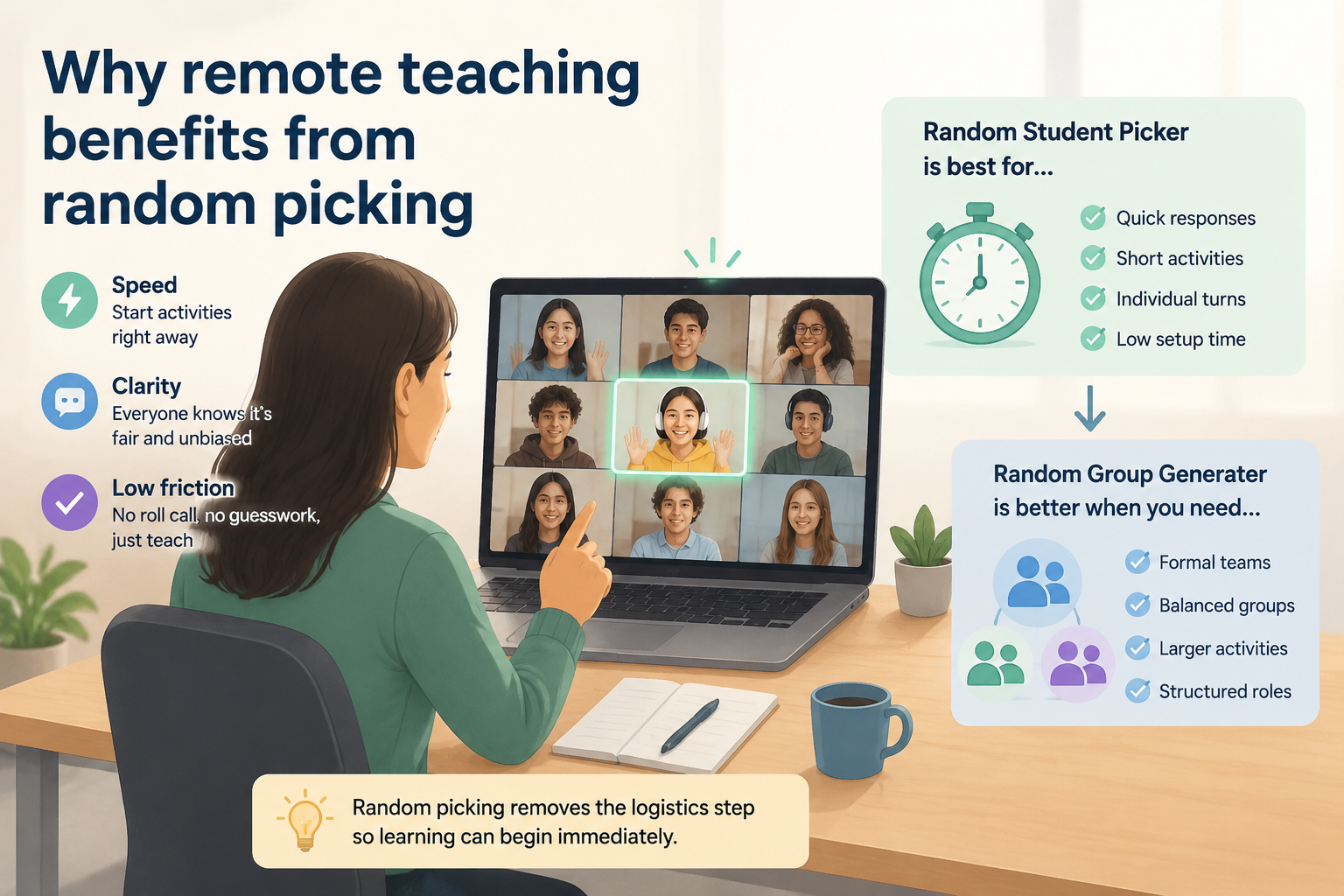
Por qué funciona elegir al azar en una clase online
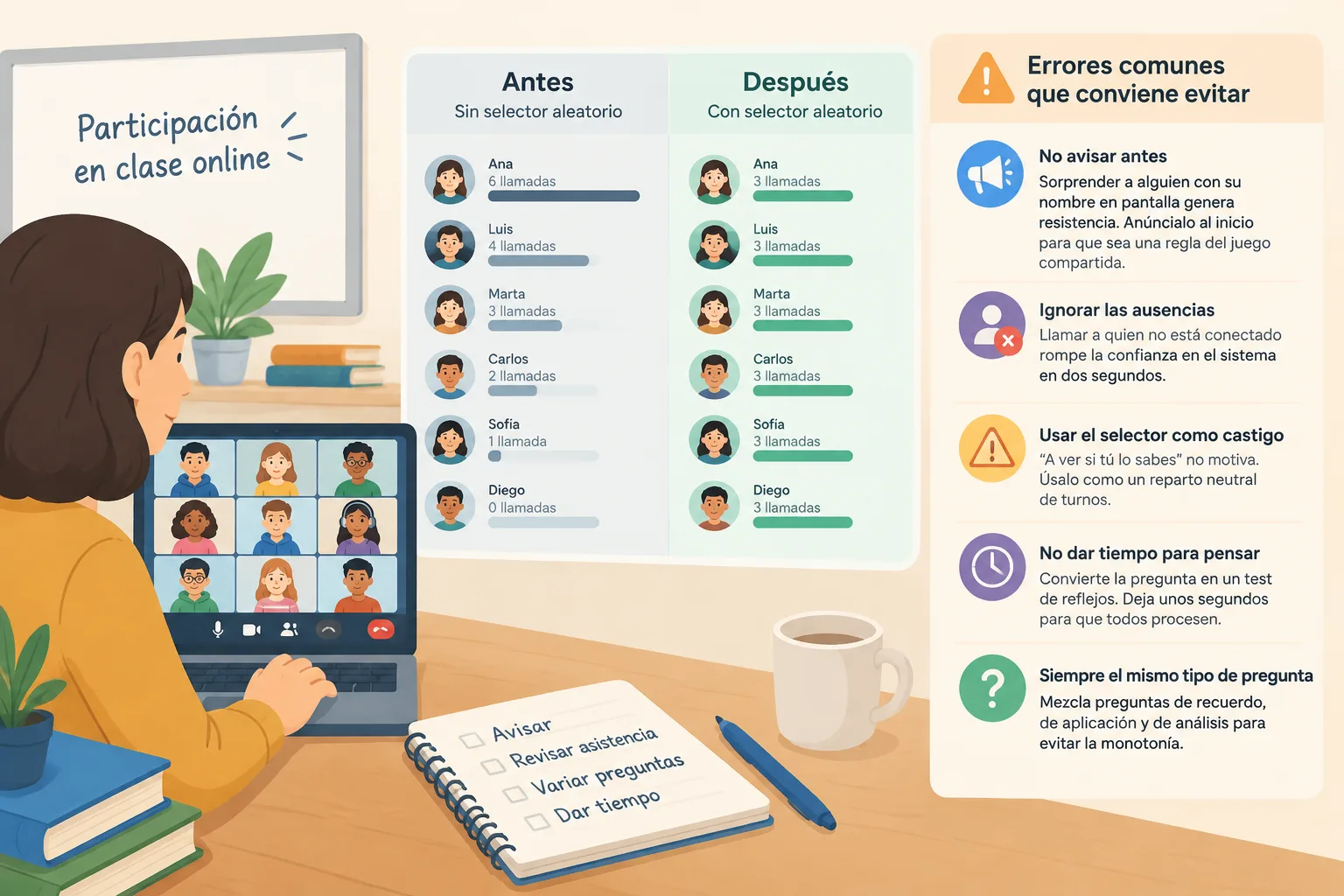
La dinámica de "manos levantadas" premia a quien habla primero y a quien se siente más seguro. En un aula virtual esa desigualdad se acentúa: activar el micrófono, quitarse el mute y hablar delante de treinta cuadros negros requiere más esfuerzo que levantar la mano en un aula física. El resultado es que la conversación se concentra en un grupo pequeño y el resto se convierte en audiencia pasiva. Un selector aleatorio cambia la lógica: la responsabilidad de responder no la elige el voluntario más rápido, sino el azar, y eso reparte las intervenciones de forma mucho más equilibrada a lo largo de la sesión.
Hay un segundo efecto, menos obvio y bastante útil: la atención. Cuando los estudiantes saben que su nombre puede aparecer en cualquier momento, escuchan de otra manera. No hace falta anunciar castigos ni premios; basta con que el proceso sea visible y predecible en su mecánica (aunque no en su resultado). En clases de 45 a 60 minutos, ese pequeño cambio de expectativa suele notarse en la cantidad de preguntas de repaso que se resuelven sin repetir el mismo discurso tres veces.
Dicho esto, conviene ser honesto sobre el riesgo. La llamada en frío (cold calling) puede aumentar la ansiedad de algunos estudiantes, sobre todo en secundaria y en grupos donde el idioma de instrucción no es el idioma materno de todos. La solución no es abandonar la técnica, sino aplicarla con cuidado: avisar al inicio de la clase que se va a usar, dar entre 10 y 15 segundos de silencio para pensar antes de pedir la respuesta, permitir un "hoy prefiero pasar" por sesión y empezar siempre con preguntas de bajo riesgo. Así la aleatoriedad se percibe como juego, no como examen sorpresa.
Qué hace y qué no hace un selector de estudiantes aleatorio
En su forma básica, la herramienta toma una lista de nombres y muestra uno al azar en pantalla. Muchos selectores, incluido el de este sitio, ofrecen una opción para no repetir un nombre hasta que toda la lista haya salido al menos una vez. Esa función es la que marca la diferencia entre "aleatorio" y "equitativo": con la rotación activada, en una clase de 25 estudiantes y 15 preguntas ningún nombre aparece dos veces antes de que otros hayan participado. Conviene activarla y comprobar en tu propia sesión cómo se comporta exactamente tu herramienta.
Lo que la herramienta no hace también importa. No evalúa, no registra calificaciones y no corrige respuestas: es una ayuda logística que elimina una decisión repetitiva de tu cabeza (¿a quién le toca?) y hace visible el proceso para el grupo. Si esperas que resuelva la participación por sí sola, te vas a decepcionar; lo que hace es quitar la fricción para que tú puedas dedicar tu atención a la dinámica de la clase.
Sus límites prácticos son fáciles de anticipar. Necesita una lista fiable: si un estudiante está ausente y no lo quitas, el selector llamará a alguien que no está conectado y perderás el momento. Con nombres duplicados (dos "María", por ejemplo) conviene añadir un apellido o una inicial, porque el estudiante elegido puede no saber que le toca a él. Y en grupos muy grandes, por encima de 60 personas, la pantalla puede volverse difícil de leer en una videollamada; en ese caso amplía la vista o limita la lista al subgrupo que está trabajando contigo en ese bloque.
Cómo usarlo paso a paso en tu próxima clase online
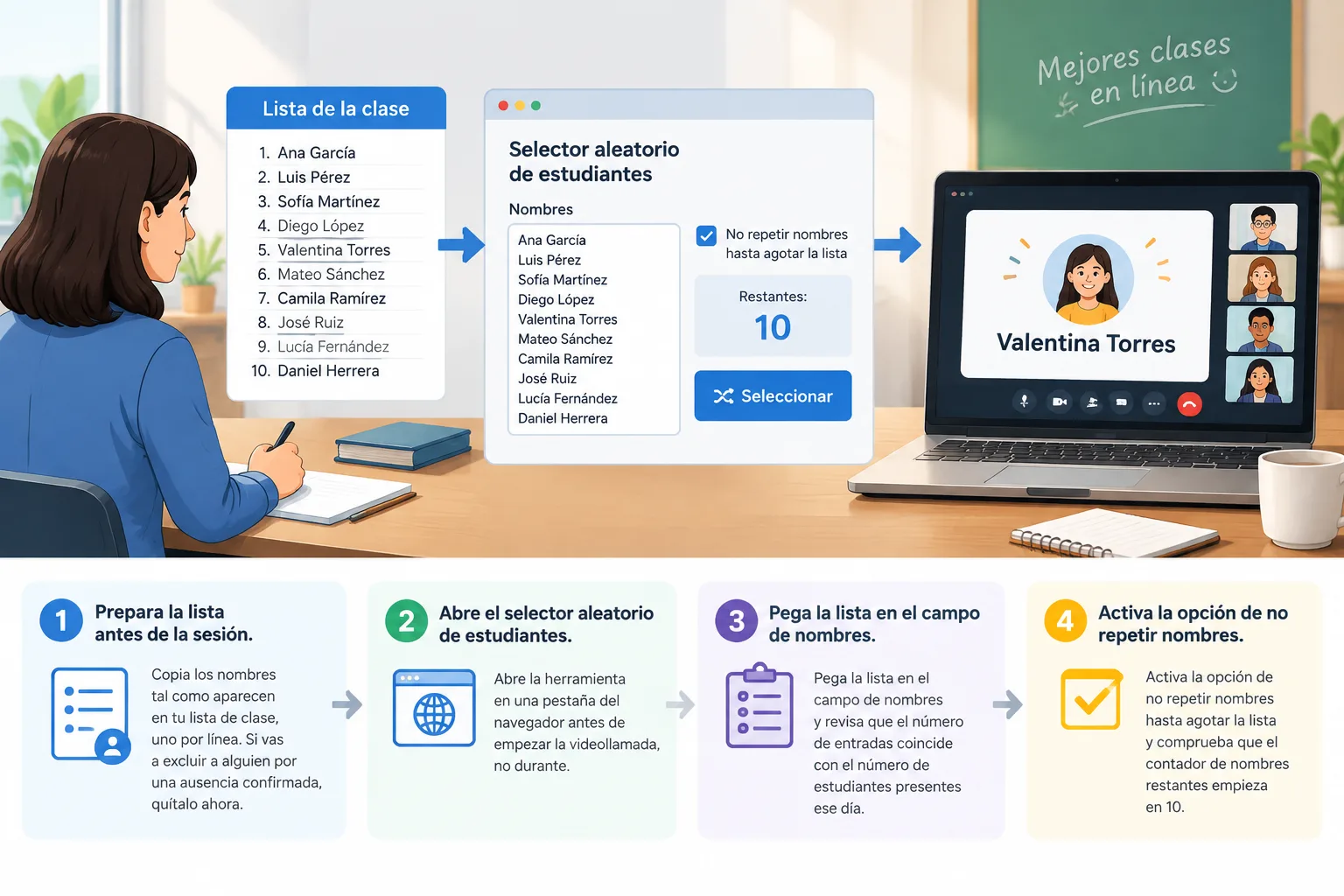
El proceso completo no debería llevarte más de dos minutos de preparación. Este es el flujo que mejor funciona en sesiones sincrónicas:
- Prepara la lista antes de la sesión. Copia los nombres tal como aparecen en tu lista de clase, uno por línea. Si vas a excluir a alguien por una ausencia confirmada, quítalo ahora.
- Abre el selector aleatorio de estudiantes en una pestaña del navegador antes de empezar la videollamada, no durante.
- Pega la lista en el campo de nombres y revisa que el número de entradas coincide con el número de estudiantes presentes ese día.
- Activa la opción de no repetir nombres hasta agotar la lista y comprueba que el contador de nombres restantes empieza en el total.
- Comparte pantalla solo de esa pestaña, no de todo el escritorio, para evitar notificaciones y ventanas personales.
- Al comenzar la clase, anuncia la regla: "voy a usar el selector para las preguntas de repaso; si necesitas tiempo, tienes 15 segundos y puedes pasar una vez".
- Después de cada selección, deja el nombre visible en pantalla mientras el estudiante responde y unos segundos más. Ver el nombre refuerza la sensación de transparencia.
Un detalle que muchos docentes pasan por alto: el momento de mostrar el nombre. Si lo enseñas y preguntas inmediatamente, los estudiantes con más ansiedad se bloquean. Si lo enseñas, das diez segundos y luego preguntas, la respuesta mejora notablemente. Ese pequeño silencio también te da tiempo a ti para formular la pregunta con precisión en lugar de improvisarla.
Ejemplo real: 28 estudiantes en una clase de Zoom
Imagina una clase de biología de 50 minutos con 28 estudiantes conectados. La profesora quiere repasar el tema anterior con 12 preguntas cortas antes de introducir material nuevo. Sin ninguna ayuda, en la primera sesión solo seis personas responden a todas las preguntas: los mismos nombres, en el mismo orden, mientras el resto observa.
En la segunda sesión, la profesora abre el selector, pega la lista de 28 nombres y activa la rotación sin repeticiones. En los primeros 15 minutos formula 12 preguntas y obtiene 12 nombres distintos, incluidos cinco estudiantes que no habían hablado en toda la semana. Cuando alguien no sabe la respuesta, la profesora no pasa al siguiente nombre de inmediato: pide una pista a un compañero y vuelve al mismo estudiante para que complete la idea. Ese detalle convierte la selección aleatoria en una herramienta de aprendizaje y no en un filtro de aciertos.
En el bloque final, la profesora quiere una actividad de tres minutos por parejas y cambia de herramienta: usa el generador de parejas aleatorias para formar 14 pares rápidos, sin que nadie tenga que elegir compañero. Al terminar, cada pareja comparte su conclusión en el chat y la clase cierra con la sensación de que todo el mundo participó al menos una vez. La diferencia entre las dos sesiones no fue el contenido ni el tiempo: fue haber quitado la decisión logística de la ecuación.
Justicia, ausencias y repeticiones: cómo mantenerlo creíble
La aleatoriedad solo funciona si el grupo la percibe como justa. Por eso el primer paso no es técnico, sino de transparencia: comparte la lista en pantalla antes de empezar, aunque sea unos segundos, para que todos vean que están sus nombres y que no hay una lista oculta. Si alguien pregunta por qué a otra persona le tocó ya dos veces, puedes mostrar el contador de rotación y explicar cómo funciona la opción de no repetir.
Las ausencias son el problema más habitual. La solución es simple: actualiza la lista justo antes de empezar la sesión, no la noche anterior. Si el selector integra tu roster de Google Classroom o si puedes exportar la lista, el proceso es cuestión de segundos; si lo haces a mano, reserva un minuto antes de la clase para marcar quién falta. Llamar a un estudiante ausente rompe la confianza en el sistema más rápido que cualquier otro error.
Sobre la rotación a lo largo de la semana, depende de cuántas sesiones tengas con el mismo grupo. Si te ves dos veces por semana, no necesitas guardar el estado entre clases: el azar ya redistribuye. Si das una sola sesión semanal y quieres garantizar que todos participen a lo largo del mes, lleva una libreta o una hoja simple con los nombres que ya salieron. Es un registro de treinta segundos que evita la sensación de "siempre le toca a los mismos".
Hay casos en los que esta herramienta no es la adecuada. En evaluaciones orales con nota, la aleatoriedad puede percibirse como injusta porque no todos se enfrentan a la misma pregunta en las mismas condiciones; allí es mejor una rúbrica y un orden acordado. Y en grupos donde varios estudiantes presentan ansiedad alta al hablar en público, forzar la intervención individual puede ser contraproducente: es mejor empezar por respuestas escritas en el chat o por parejas.
Cómo encajarlo en Zoom, Teams y Google Classroom
A nivel técnico, un selector funciona igual en cualquier plataforma porque vive en el navegador, no dentro de la aplicación de videollamada. Lo único que necesitas es la opción de compartir pantalla de Zoom, Microsoft Teams o Google Meet. La recomendación práctica es compartir una pestaña, no la pantalla completa, y silenciar las notificaciones del sistema antes de abrir la herramienta.
Según la descripción de la plataforma, estas herramientas están pensadas para encajar en flujos de trabajo con Zoom, Microsoft Teams, Google Classroom y Slack, y ofrecen interfaz en 9 idiomas, lo que resulta útil en programas bilingües o en formación corporativa con equipos internacionales. Si trabajas en formación de empresa, el mismo flujo sirve para repartir turnos de palabra en una sesión de retrospectiva o para elegir a quien presenta un bloque en un taller remoto.
Un truco que ahorra tiempo: abre el selector de estudiantes en una ventana distinta de la videollamada y fíjala encima de la ventana de la reunión. Así ves el nombre elegido sin compartir toda tu pantalla y sin cortar el vídeo. Esta configuración es especialmente útil cuando quieres que el estudiante vea el nombre pero no quieres sacrificar la vista de las caras durante el resto de la clase.
Alternativas: cuándo conviene otra herramienta
El selector individual no es la única opción y no siempre es la mejor. Si el objetivo de la actividad es que todos hablen, el trabajo en parejas genera más tiempo de habla por estudiante en menos minutos; en ese caso, el generador de parejas aleatorias es más eficiente que llamar a personas una por una.
Si lo que necesitas es formar equipos para un proyecto de varias semanas, un selector de individuos se queda corto: ahí tiene más sentido el generador de grupos aleatorios para crear equipos equilibrados, y después el generador de nombres de grupo si quieres que cada equipo se identifique con un nombre propio. Para dinámicas de repaso rápido donde la parte visual importa (por ejemplo, con estudiantes de primaria), la ruleta de grupos mantiene la atención porque el giro es parte del juego.
Y si tu preocupación es el aula física o la disposición de los puestos, el generador de plan de asientos resuelve un problema distinto que la selección de turnos de palabra. La regla general es sencilla: elige la herramienta según lo que quieras producir (una respuesta oral, una pareja, un equipo, un puesto), no según la que tengas más a mano.
Errores comunes que conviene evitar
El error más frecuente es no avisar de que se va a usar el azar. Sorprender a alguien con su nombre en pantalla genera resistencia; anunciarlo al inicio convierte la mecánica en una regla del juego compartida. El segundo es ignorar las ausencias y llamar a quien no está conectado, algo que rompe la confianza en el sistema en dos segundos.
Otros tropiezos habituales: usar el selector como castigo ("a ver si tú lo sabes") en lugar de como reparto neutral de turnos; no dar tiempo para pensar, lo que convierte la pregunta en un test de reflejos; y formular siempre el mismo tipo de pregunta de memoria, que hace que el ejercicio se vuelva monótono. Mezclar preguntas de recuerdo, de aplicación y de opinión mantiene la actividad viva y da oportunidades a perfiles distintos.
Por último, no reflejes la rotación. Si un estudiante tiene la impresión de que le toca siempre a él, la herramienta pierde credibilidad por muy aleatoria que sea en realidad. Mostrar la lista, explicar la opción de no repetir y llevar un registro simple cuando haga falta son medidas de treinta segundos que sostienen todo el sistema.
Preguntas frecuentes
¿Qué es un random student picker en una clase online?
Es una herramienta que toma una lista de nombres y muestra uno al azar en pantalla. En una clase online se comparte esa pantalla durante la videollamada para que todos vean el nombre elegido. Su función es repartir los turnos de palabra sin que el docente tenga que decidir a quién llamar en cada momento, y sin que el turno dependa de quién levanta la mano primero.
¿Cómo evito que siempre salga el mismo estudiante?
Activa la opción de no repetir un nombre hasta que toda la lista haya salido al menos una vez. Si tu herramienta no la tiene, lleva un registro simple de los nombres que ya salieron y quítalos de la lista temporalmente. También ayuda actualizar la lista justo antes de la sesión, porque una lista desactualizada con nombres ausentes distorsiona la rotación real.
¿Es justo usar la selección aleatoria para poner una nota?
No es lo más recomendable. La aleatoriedad reparte turnos de participación, pero no garantiza condiciones equivalentes: dos estudiantes pueden recibir preguntas de dificultad muy distinta. Para evaluaciones orales con nota conviene una rúbrica clara y un orden acordado. El selector funciona mejor para práctica, repaso y comprobación rápida de comprensión.
¿Funciona en Zoom, Microsoft Teams y Google Meet?
Sí, porque la herramienta se ejecuta en el navegador y solo necesitas compartir la pestaña donde está abierta. No requiere instalar nada dentro de la aplicación de videollamada. El único requisito es que puedas compartir pantalla o una pestaña concreta, algo que las tres plataformas permiten.
¿Qué hago si un estudiante se pone muy nervioso al ser elegido?
Avisa al inicio de la clase de que se va a usar el selector, da entre 10 y 15 segundos de tiempo para pensar y permite pasar una vez por sesión sin penalización. Si aun así el estudiante se bloquea, acepta una respuesta breve o pide una pista a un compañero y vuelve a él para completar la idea. La aleatoriedad debe sentirse como apoyo, no como exposición.
Empieza con una sola clase
No necesitas rediseñar tu curso entero para notar la diferencia. Elige una sesión de esta semana, prepara la lista cinco minutos antes, abre el selector aleatorio de estudiantes, comparte la pestaña y usa la rotación sin repeticiones durante quince minutos. Al terminar, anota cuántos estudiantes distintos hablaron: casi siempre el número sube de forma evidente respecto a tu clase habitual. Si la experiencia funciona, el siguiente paso natural es combinarla con el generador de parejas aleatorias para las actividades cortas en grupo y reservar el selector individual para las preguntas de comprensión. Es un cambio pequeño, se prepara en dos minutos y responde a un problema muy concreto: que la voz de la clase no sea siempre la de las mismas cuatro personas.
PatrocinadoExplorar más recursos