
ランダム学生ピッカーホイールを使う
授業での指名、答え合わせ、発表順、その場での問いかけに向いています。

名簿を貼り付けるかインポートして、ホイールを回し、結果を全画面で表示できます。Remember picked を使うと、選ばれた名前はリセットまで次の抽選から外れます。
ホイール形式なので、選ばれる流れを教室で見せやすく説明しやすくなります。
選ばれた名前を次のスピンから外し、リセットするまで重複を避けられます。
教室、オンライン授業、会議、ワークショップで表示しやすいモードです。
クイック回答
Random Student Picker Wheel は、1 人または複数の学生を公平に選ぶための全画面対応の名前ルーレットです。
CSV/TXT 名簿をインポートし、見えるホイールを回し、リセットまで重複を避け、選択結果や履歴をコピーできます。
教室で「誰か答えてくれる人?」と問いかけた時、いつも同じ数名の生徒だけが手を挙げる経験はありませんか?無意識のうちに同じ生徒ばかりを指名してしまったり、指名に時間がかかって授業のテンポが悪くなったりすることは、多くの教師が抱える共通の悩みです。このガイドでは、公平かつ効率的に学生を選ぶための無料Webツール「ランダム学生ピッカー」の使い方を、実践的な例とともにステップバイステップで解説します。
ランダム学生ピッカーは、あらかじめ登録した学生の名前リストから、完全なランダム性をもって一人を選び出すオンラインツールです。Random Group Generatorが提供する教育ツール群のひとつで、ブラウザさえあれば追加のアプリやアカウント登録不要で利用できます。画面に表示された大きなボタンをクリックするだけで、瞬時に一名の学生が選ばれ、誰もが納得できる公平な結果を即座に得られます。
このツールは、単なる抽選アプリではありません。一度選ばれた学生を一時的に除外する「重複なしモード」や、過去の選出履歴を確認できる機能などを備えており、授業運営をスムーズにするために設計されています。また、9言語に対応しているため、日本語環境でも直感的に操作できます。
教育現場において、学生をランダムに選ぶことには多くのメリットがあります。ひとつめは公平性の確保です。教師の無意識の偏りや、声の大きい生徒・積極的な生徒に依存してしまう傾向を排除し、全員に平等に発言や参加の機会を与えることができます。これにより、内向的な生徒や学習に遅れがちな生徒も含め、クラス全体のエンゲージメントが高まります。
ふたつめは時間の節約です。伝統的な方法では、出席番号カードを引いたり、ランダムな数字を考えたりする手間がかかります。ランダム学生ピッカーを使えば、ボタンひとつで候補者が即座に表示されるため、授業の流れを止めずにテンポよく進行できます。
みっつめは心理的なハードルの軽減です。教師が直接指名するのではなく「ツールが選んだ」という事実があることで、選ばれた生徒も受け入れやすく、不公平感を感じさせません。また、生徒自身が「次は自分かもしれない」と適度な緊張感を持って授業に集中する効果も期待できます。
ここからは、実際にランダム学生ピッカーを操作する手順を詳しく紹介します。初めての方でもすぐに使いこなせるよう、画面イメージを交えながら説明します。
まず、ツールページにアクセスします。画面上部のテキストエリアに、クラスの学生の名前を1行ずつ入力してください。手入力のほか、スプレッドシートやテキストファイルからコピー&ペーストすることも可能です。漢字やひらがな、アルファベットにも対応しており、最大で数百名の名前を登録できます。
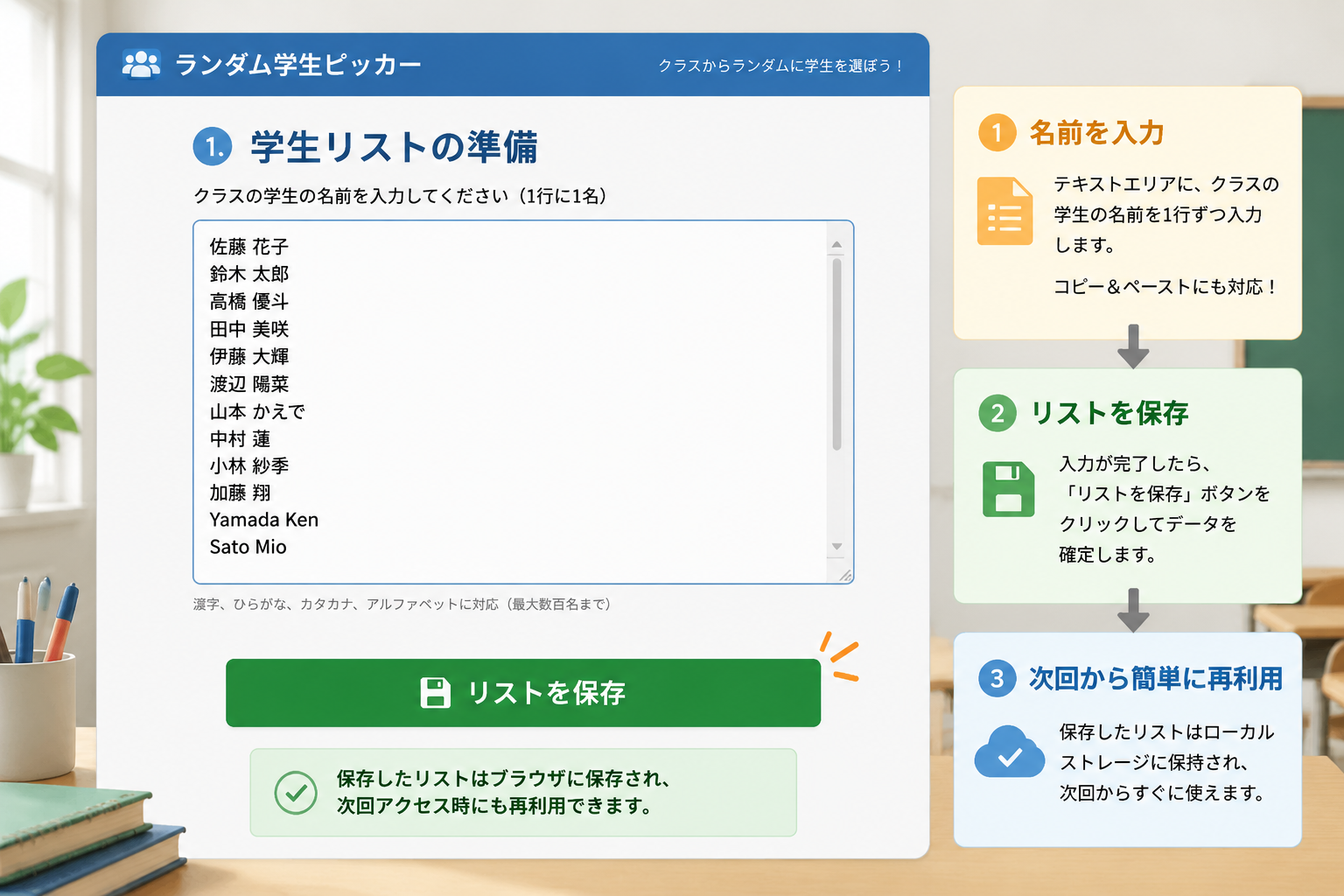
名前を入力し終えたら、「リストを保存」ボタンをクリックしてデータを確定します。保存したリストはブラウザのローカルストレージに保持され、次回アクセス時にも再利用できるため、毎回入力し直す手間が省けます。
リストが準備できたら、画面中央にある「学生を選ぶ」ボタンをクリックします。すると、短いアニメーションの後、ランダムに選ばれた学生の名前が大きく表示されます。
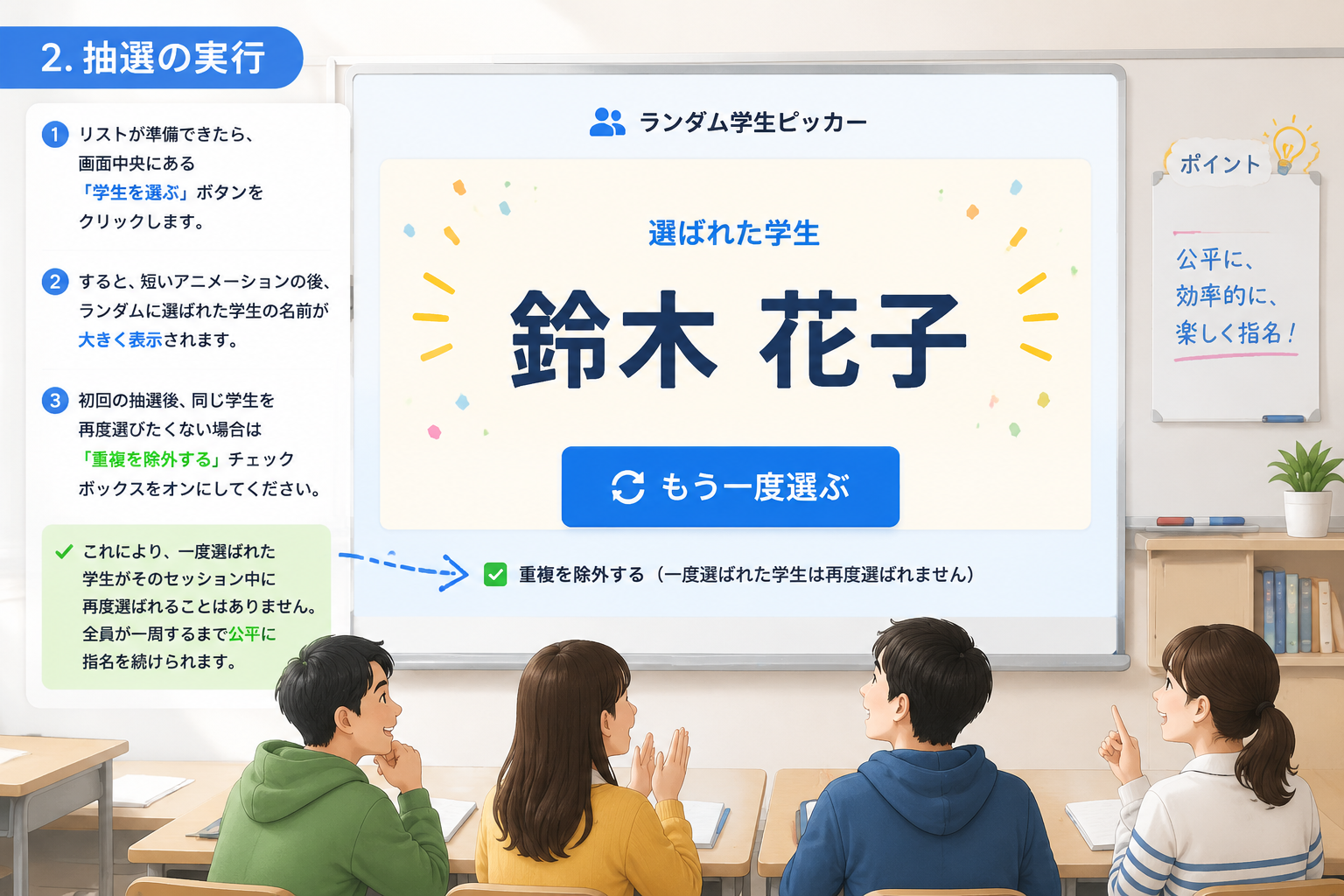
初回の抽選後、同じ学生を再度選びたくない場合は「重複を除外する」チェックボックスをオンにしてください。これにより、一度選ばれた学生がそのセッション中に再度選ばれることはありません。全員が一周するまで公平に指名を続けられます。
抽選結果はその場でクラス全体に見せることが大切です。プロジェクターや大型ディスプレイに画面を映せば、選ばれた学生もそうでない学生も納得しやすくなります。また、ツール下部にはこれまでの選出履歴が表示されるため、誰が何回当てられたかを確認することも可能です。
一日の授業が終わったり、別のクラスで使う際には「リセット」ボタンで履歴と除外設定をクリアしてください。新たなリストをアップロードすれば、すぐに別のクラスに対応できます。
グループワークの後の発表順を決める際、誰から始めるかで揉めることがあります。そんなときはランダム学生ピッカーで各グループの代表者を選び、さらにその中から発表順を抽選で決めれば、一切の不公平感なくスムーズに進行できます。実際の高校の授業で、7つのグループの発表順をツールで決定したところ、「文句が出ず、すぐに発表に入れた」という声が寄せられています。
グループ活動をする際、リーダーを決めるのに時間がかかることはありませんか。ランダム学生ピッカーをプロジェクターに映し、各グループから1名ずつリーダーを選出することで、客観的かつ迅速に役割を割り振れます。リーダーに選ばれた生徒も、偶然性によって責任感を持って取り組みやすくなります。
毎日の掃除当番や日直を順番に決めるのは面倒な作業です。あらかじめクラス全員の名前を登録しておき、「重複除外」モードをオンにした状態で毎日ピッカーを回せば、自動的に誰がまだ当番をしていないかが可視化され、割り当て漏れや集中を防げます。
ランダム学生ピッカーは単体でも強力ですが、Random Group Generatorシリーズの他のツールと組み合わせることで、教室活動の幅が大きく広がります。
これらのツールはすべて共通のインターフェースで動作し、同じ学生リストを流用することもできるため、授業準備の手間を大幅に削減できます。
A. 現在のバージョンでは、数百名程度の名前であれば問題なく登録・抽選が可能です。非常に大規模な講義(500名以上)の場合は、ブラウザのパフォーマンスに応じて動作が遅くなることがありますが、通常の学級規模では全く問題ありません。
A. 抽選ボタンの近くにある「重複を除外する」オプションを有効にしてください。これにより、セッション中に同じ生徒が二度選ばれなくなります。全員が一周した後は自動的にリセットされ、再び全員が候補になります。
A. はい、ランダム学生ピッカーはレスポンシブデザインを採用しているため、スマートフォンやタブレットのブラウザからでも快適に操作できます。教室のWi-Fiに接続したタブレットをプロジェクターに映して使うことも可能です。
A. ツール内でセッション履歴を確認できますが、恒久的な記録として残すには、スクリーンショットを撮るか、履歴をコピーしてメモ帳などに貼り付けてください。今後のアップデートでエクスポート機能が追加される可能性もあります。
A. 同じブラウザ上で、ランダムグループジェネレーターやランダムペアジェネレーターを使う場合、入力した名前リストが自動的に引き継がれるため、改めて入力する必要はありません。
ランダム学生ピッカーは、授業の公平性とテンポを向上させ、教師と生徒双方のストレスを軽減するシンプルかつパワフルなツールです。設定はほとんど不要で、今日からすぐに使い始められます。ぜひ以下のリンクからアクセスし、次の授業で試してみてください。
誰が答えるか、次に誰が進むかを決めるときに最適なページです。
授業での指名、答え合わせ、発表順、その場での問いかけに向いています。
名簿全体をプロジェクトや話し合いのグループに分ける必要があるときは、ホームのツールに戻ってください。
発表者の選択ではなく全員にパートナーが必要な場合は、ペアツールの方が適しています。
名簿と重複ルールが明確だと、ホイール抽選はよりスムーズに使えます。
カンマや改行で名前を追加するか、CSV/TXT のクラス名簿をブラウザ内で読み込みます。
回答、発表、発言順に合わせて 1 人または複数名を選べます。
Remember picked をオンにすると、選ばれた名前はリセットまで外れます。
ページ上でスピンするか、全画面モードで教室やオンライン授業に表示します。
学生や参加者が見て理解できるホイール型のランダム手順です。
名簿を見える抽選ホイールに変換し、指名、回答、発表順に使えます。
入力フォームを隠し、ホイール、結果、残り人数、リセット操作だけを表示します。
FileReader による CSV/TXT インポートで、名前はブラウザ内にとどまります。
ラウンド操作で、より多くの名前に参加機会を広げます。
選ばれた名前は、リセットするまで次のスピンから外されます。
1 人を選ぶことも、同じエンジン結果から複数名を順に表示することもできます。
現在の結果や履歴を授業メモ、会議記録、フォローアップにコピーできます。
発言者を選ぶことと、全員をチームに分けることは別の作業です。
このページは指名と参加に集中し、グループ作成には広げません。
リセットまで名前を繰り返さずに名簿を進められます。
次の作業がチーム分けなら Random Group Generator に戻れます。
本当に知りたいことが「次に誰が答えるべきか」であれば、このツールを使ってください。
公平な指名、音読の順番、答え合わせ、発表順に加えて、座席表を組み替える際の座席番号抽選にも使えます。
同じ数名の声がチャットを占めてしまいがちなオンライン授業で活用できます。
より透明な参加の仕組みを作り、えこひいきの印象を減らせます。
次の作業がチーム編成なら、メインのグループ分けツールに戻ってください。
30分の議論で挙手独占を減らす
高校の教員が、毎回の指名で同じ6人が答えることに気づきます。議論ブロックでクラス名簿を貼り、その時間の単純な非再出モードを有効にし、ホイールや名前ハイライトを投影して抽選を公開します。
3回の抽選後、静かめの生徒も一度発言でき、「教員が狙っている内気な子」として目立たずに済みます。明らかに準備不足の生徒はスキップし、それを教員オーバーライドとして記録します。不正に見える無言の再抽選にはしません。
偽のランダムではない公正な指名
ピッカーは空エントリを清掃したアクティブ名簿から抽出します。非再出や「既に指名済み」モードがある場合、出た名前はプールが尽きるまで外れ、その後サイクルをリセットできます。短期の公平性は記憶だけより良く近似します。
ホイールやハイライトは提示補助であり、下層のランダム選択は変えません。公平性の主張は「この抽選では対象名が等確率」であり、「学期を通じて発言量が同じ」ではありません。
ランダム指名が不適切な介入になるとき
ランダムな指名は、一部の学習者の不安を高めることがあります。オプトアウト規範のないトラウマ配慮教室、発話の合理的配慮がある生徒、自発的専門性が本当に必要な問いには向きません。
1回の抽選では準備の偏りや座席の力関係は直りません。好みの名前が出るまで再抽選する行為も防げません。それは生徒に見え、ツールの信頼を損ないます。
記憶や習慣、毎回同じ挙手者に頼るよりも透明です。
“抽選の前に短い準備時間を全員に与えることで、生徒はずっと納得して取り組めるようになりました。”
教室とオンラインでの参加のための使用例です。










関連ツール
ホワイトエレファント(White Elephant)のプレゼント交換の順番を数秒でランダム化。パーティーみんなで使える「盗みルール」の早見表付き。
4〜64チームを貼り付けるだけで、不戦勝を自動補填したランダムドロー方式のシングルエリミネーショントーナメント表が完成 — 最初の対戦から決勝まで全ラウンドを一覧化。
公平なイベント予算を数秒で見積もり。参加者・1人あたり予算・予備費の割合を入れるだけで、プランニングレンジ付きの合計額がわかります。
これらの記事では、ランダム指名を単なるおもしろ機能ではなく、実際の参加ルーティンとして使う方法を解説しています。
ランダム学生ピッカーを使って、教師が公平で参加意欲を引き出す授業を実現する方法を徹底解説。セットアップから実際の授業シーン別活用法まで、すぐに使える実例とともに紹介します。
記事を読む教師がランダム学生ピッカーを使って公平な指名を行い、教室の参加を促進する方法を詳しく解説。準備から応用まで、誰でもすぐに始められます。
記事を読むオンライン授業で生徒を公平に指名したい教師・研修担当者向けに、Random Student Picker の使い方、Zoom・Teams・Google Classroom での運用、つまずきの対処法とFAQをまとめて解説します。
記事を読むランダムピッカーホイールを使う前に多い質問です。
はい。名簿を見えるホイールに変換し、最終結果は既存のランダム選択エンジンで決まります。
はい。必要な人数を設定すると、同じエンジン結果から複数名が順に表示されます。
はい。Remember picked をオンにすると、選ばれた名前はリセットまでホイールから外れます。
はい。ホイール、スピン、結果、残り人数、リセット、終了だけが表示されます。
いいえ。貼り付けた名前や CSV/TXT インポートはブラウザ内で処理されます。
このページは「次に誰が答えるか」を決めます。メインツールは「全員をどうチーム分けするか」を決めます。
いいえ。公平さが必要な場面で、見える標準ルールを提供するためのものです。
使えます。名前を1人ずつ抽選して、教室の席順に入れていくだけです。行・列と座席番号付きで印刷もできる完成版が必要なら、ランダム座席表ジェネレーターを使ってください。
次のステップがチーム編成なら、メインのグループ分けツールに戻ってください。