
comparación
Random Student Picker vs Random Group Generator: Diferencias y cuándo usar cada uno
Comparación detallada entre el Random Student Picker y el Random Group Generator. Descubre cuál es mejor para elegir alumnos al azar o formar equipos equilibrados en clase.
Random Student Picker vs Random Group Generator: Diferencias y cuándo usar cada uno
Todos los docentes hemos pasado por ese momento: necesitas la participación de un estudiante para una pregunta rápida o tienes que armar equipos de trabajo para un proyecto. La solución parece simple, pero elegir entre un selector de estudiantes aleatorio (Random Student Picker) y un generador de grupos aleatorios (Random Group Generator) puede marcar la diferencia entre una clase fluida y un caos organizativo. En este artículo comparamos ambas herramientas gratuitas de random-group-generator.com para que sepas exactamente cuál encaja con tu objetivo pedagógico.
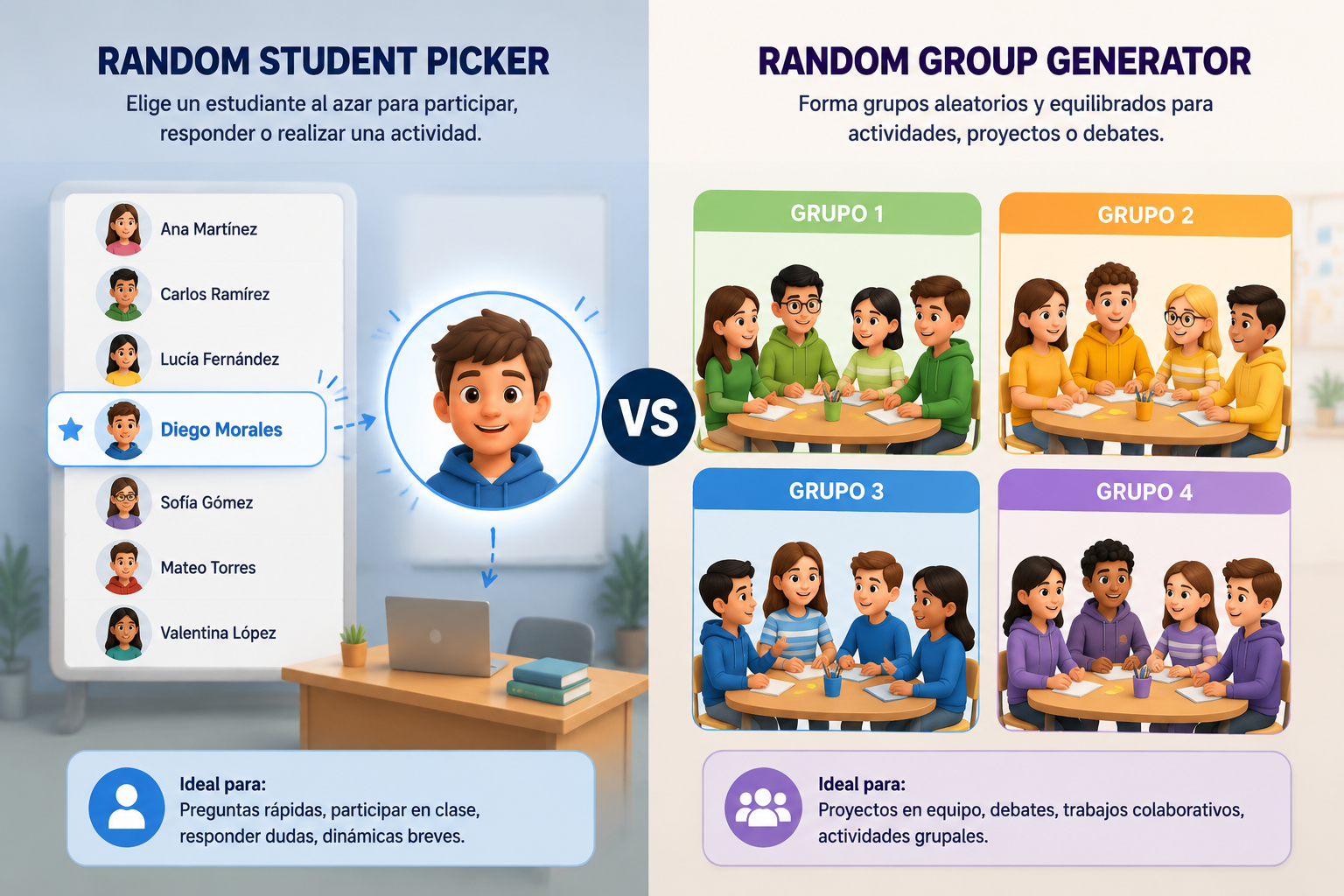
¿Qué es el Random Student Picker y para qué sirve?
El selector de estudiantes aleatorio, disponible en Random Student Picker, es una herramienta digital que extrae uno o varios nombres al azar de una lista. Su propósito es eliminar cualquier sesgo (consciente o inconsciente) a la hora de pedir la participación de un alumno. Con un solo clic, toda la clase ve quién es el elegido, lo que reduce la ansiedad y aumenta la equidad.
Ideal para preguntas relámpago, revisar tareas, exposiciones cortas o cualquier dinámica donde necesites una intervención individual. El profesor carga la lista de alumnos, configura el número de selecciones (por ejemplo, 1) y el sistema devuelve el nombre. Así evitas recurrir al clásico “a ver, ¿quién no ha salido todavía?”. La transparencia del proceso genera confianza en el aula y acelera el ritmo de la clase.
Cómo usar el Random Student Picker paso a paso
- Accede a la herramienta Random Student Picker.
- Introduce los nombres de tus estudiantes manualmente o pega una lista desde un documento.
- Indica cuántos alumnos quieres seleccionar (por ejemplo, 1, 3, 5).
- Haz clic en “Pick” y el sistema destacará los nombres elegidos al azar.
- Si solo necesitas un nombre, la interfaz lo muestra en grande, ideal para proyectar en pantalla.
Ejemplo real: El profesor de matemáticas quiere que un alumno resuelva un ejercicio en la pizarra sin presiones. Carga la lista de 28 estudiantes, pulsa “Pick” y sale “María”. Todos ven que ha sido aleatorio y María participa con naturalidad. Si más adelante necesita dos voluntarios para repartir material, simplemente cambia el número a 2 y repite el proceso.
¿Qué es el Random Group Generator y cuándo conviene usarlo?
El Random Group Generator crea equipos al azar a partir de una lista de participantes. Puedes definir el número de grupos o el tamaño de cada grupo, e incluso equilibrar la composición según criterios como género, nivel o cualquier atributo que añadas. Esto lo convierte en un aliado imprescindible para trabajos colaborativos, proyectos por estaciones, debates en equipos o juegos educativos.
A diferencia del selector de estudiantes, aquí no buscas un nombre, sino una estructura grupal completa. Por ejemplo, 28 alumnos repartidos en 7 grupos de 4. El generador distribuye automáticamente a todos, garantizando que nadie se quede fuera. Si marcas opciones de balanceo, la herramienta se esfuerza por crear grupos heterogéneos, muy útiles para aprendizaje cooperativo.
Cómo formar grupos en segundos con el Random Group Generator
- Ve al generador de grupos.
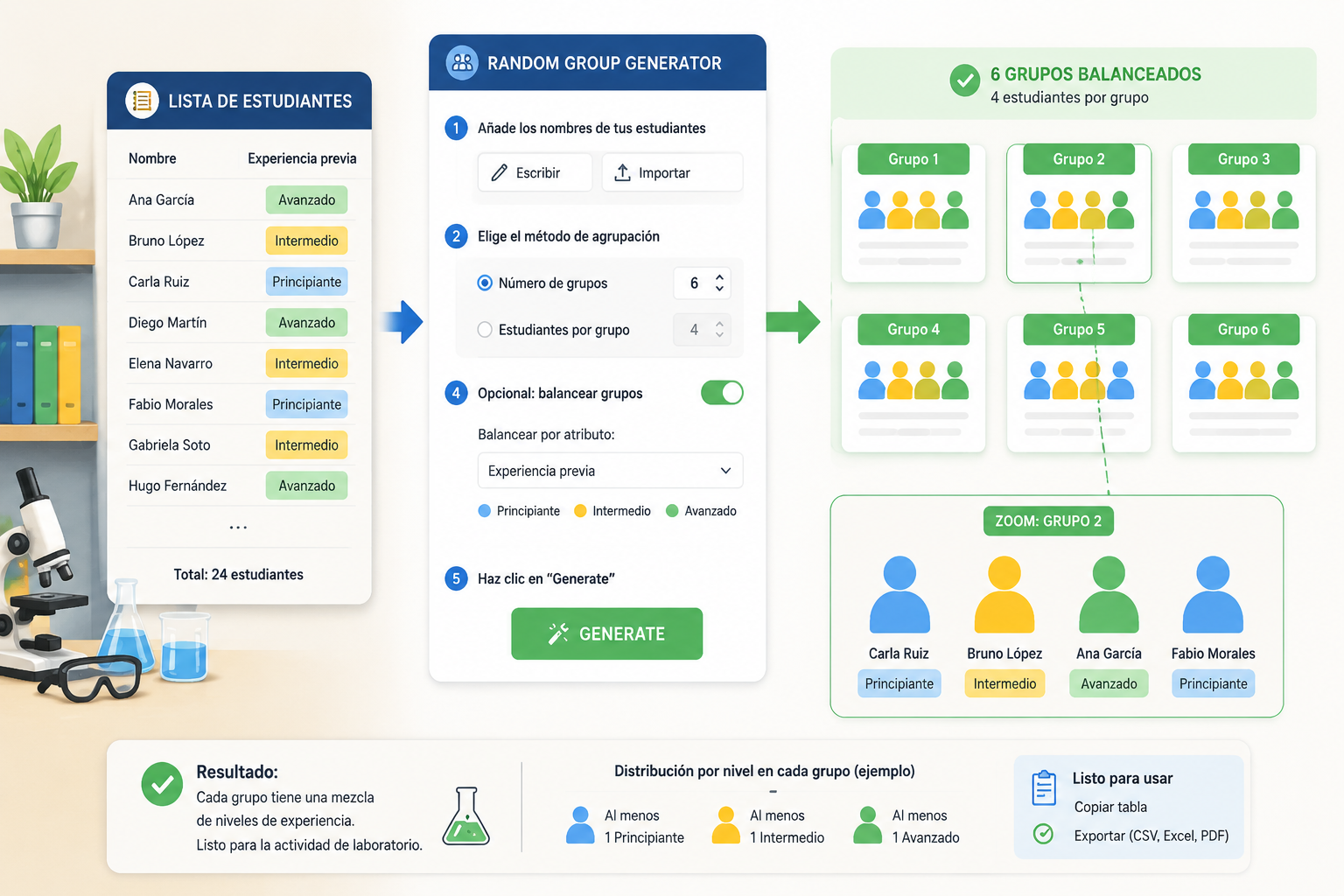
- Añade los nombres de tus estudiantes (escribe o importa).
- Elige el método de agrupación: “Número de grupos” o “Estudiantes por grupo”.
- Opcionalmente activa “Balancear grupos” y añade una columna con un atributo (ej. nivel de lectura).
- Haz clic en “Generate” y obtendrás los equipos listos para usar. Puedes copiar la tabla o exportarla.
Ejemplo real: La profesora de ciencias necesita montar 6 equipos para un experimento de laboratorio. Introduce 24 nombres, selecciona 6 grupos y activa el balanceo por la columna “experiencia previa”. La herramienta distribuye a los estudiantes de modo que cada equipo cuente con al menos un alumno con experiencia, evitando que todos los novatos queden juntos. El resultado se proyecta en la pizarra digital y los estudiantes se reúnen con su grupo.
Diferencias clave entre Random Student Picker y Random Group Generator
Aunque a primera vista parezcan herramientas similares, responden a necesidades didácticas completamente distintas. Conocer estas diferencias te ayudará a evitar frustraciones y a elegir la correcta desde el principio.
1. Objetivo de la selección
- Random Student Picker: selecciona individuos para una tarea puntual y visible.
- Random Group Generator: organiza a toda la clase en subconjuntos para trabajos colaborativos o actividades simultáneas.
2. Resultado obtenido
- El picker devuelve uno o varios nombres sueltos, pero nunca una estructura de equipos.
- El generador devuelve una tabla con todos los estudiantes asignados a un grupo, vacía la lista original por completo.
3. Equilibrio de perfiles
- El selector puro no balancea: cada alumno tiene la misma probabilidad de salir.
- El generador ofrece un modo de balanceo que respeta atributos opcionales, ideal para formar equipos heterogéneos y evitar desequilibrios.
4. Contexto pedagógico frecuente
- Preguntas en gran grupo, control de asistencia, elección de delegado, microexposiciones.
- Proyectos de investigación, estaciones de aprendizaje, gamificación por equipos, tutorías entre iguales.
5. Nivel de preparación previa
- El student picker apenas requiere configuración: lista y número de selecciones.
- El team generator puede requerir añadir atributos si se desea balancear, y decidir cuántos grupos o el tamaño deseado.
¿Cuándo elegir cada herramienta? Escenarios prácticos
Entender la diferencia teórica está bien, pero lo que realmente importa es el momento en el aula. Aquí tienes situaciones cotidianas con la recomendación justificada.
Usa el Random Student Picker cuando necesites...
- Sacar a un alumno a la pizarra o pantalla sin que parezca favoritismo. La aleatoriedad elimina las quejas de “siempre sale el mismo”.
- Formar parejas momentáneas para un ejercicio de speaking en idiomas. Aunque también existe un generador de parejas, la opción más rápida es pedir al picker que seleccione dos nombres consecutivos.
- Revisar deberes de forma aleatoria. Eliges varios números al principio de la semana y esos estudiantes saben que pueden ser preguntados, aumentando la preparación general.
- Romper el hielo con preguntas personales. Seleccionas al azar quién responde “¿Cuál es tu libro favorito?” y la actividad gana dinamismo.
Ejemplo concreto: Una profesora de inglés quiere practicar “show and tell”. Carga 20 nombres en el Random Student Picker, elige “Pick 1” y deja que el azar decida quién enseña su objeto hoy. Mañana repetirá sin que nadie sepa de antemano.
Utiliza el Random Group Generator cuando el objetivo sea...
- Proyectos colaborativos largos. Vas a dedicar tres semanas a un proyecto de ciencias. Equilibras los grupos por nota media o habilidad investigadora. El generador de grupos asegura que cada equipo tenga perfiles complementarios.
- Estaciones de aprendizaje rotativas. Divides la clase en 5 estaciones y necesitas que los grupos sean homogéneos en tamaño pero heterogéneos en competencias. La herramienta los crea en un instante y los rotas cuando quieras.
- Torneos o competiciones en el aula. Ya sea un quiz de historia o una olimpiada matemática, formar equipos equilibrados mantiene la emoción. Puedes incluso asignar un nombre divertido usando el generador de nombres para grupos y proyectarlo junto a los equipos.
- Tutorías entre iguales. Crea grupos de 3 o 4 donde combines estudiantes avanzados con quienes necesitan refuerzo. Si añades una columna con nivel, el balanceo se encarga de la mezcla óptima.
Ejemplo concreto: En una clase de 32 estudiantes, el profesor de historia quiere hacer un debate sobre las causas de la Revolución Francesa. Necesita 8 grupos de 4, y desea que en cada grupo haya al menos un alumno con alta capacidad de argumentación. Introduce los nombres, añade una columna “argumentación” con valores Alto/Medio/Básico, selecciona 8 grupos y activa el balanceo. En un clic, los equipos quedan configurados.
Errores comunes al elegir entre Random Student Picker y Random Group Generator
Incluso docentes con experiencia pueden confundir ambas funciones. Estos son los fallos más frecuentes y cómo evitarlos:
- Intentar formar equipos con el selector: Marcar “Pick 4” esperando que la herramienta agrupe a esos cuatro estudiantes. No funcionará; los nombres salen sueltos y el resto queda sin asignar. Para eso está el generador de grupos.
- Usar el generador para elegir un alumno: Pretender obtener un solo nombre configurando “1 grupo de 1 persona”. Aunque técnicamente arroja un resultado, la interfaz no está pensada para exposición en pantalla ni para la rapidez de una pregunta. El student picker es mucho más ágil y visual.
- Olvidar el balanceo al formar equipos: Simplemente generar grupos al azar sin atributos puede crear equipos muy desequilibrados. Si la tarea requiere habilidades concretas, invierte un minuto en añadir la columna correspondiente. La guía de balanceo de grupos lo explica en detalle.
- No guardar la configuración: Ambas herramientas permiten copiar la lista o los resultados. Si la sesión se interrumpe, podrías perder el trabajo. Acostúmbrate a pegarlos en un documento de notas o en tu planificación digital.
Preguntas frecuentes (FAQ)
¿Puedo usar ambas herramientas en la misma sesión de clase?
Por supuesto. De hecho, es una combinación muy productiva. Por ejemplo, empiezas con el Random Student Picker para elegir quién presenta el repaso del día, y luego usas el Random Group Generator para organizar los equipos de trabajo de la práctica guiada. Ambas conviven perfectamente y comparten el mismo ecosistema, por lo que hasta puedes copiar la lista de una a otra.
¿Cuál es más rápida de usar?
El selector de estudiantes suele ser más inmediato porque no requiere configurar distribución ni balanceo. Subes la lista, pones 1 y haces clic. El generador de grupos pide un pequeño ajuste previo (número de grupos o integrantes por grupo) que puede llevar unos segundos extra. Sin embargo, ambas herramientas son muy ágiles, y una vez dominas sus opciones, la diferencia es mínima.
¿Existe alguna alternativa si necesito solo parejas aleatorias?
El Random Group Generator puede crear parejas si configuras grupos de 2, pero para una experiencia optimizada te conviene el Random Pair Generator. Esta herramienta hermana genera automáticamente parejas de toda la lista sin necesidad de ajustar parámetros adicionales. Es la opción más directa cuando la actividad requiere trabajos en dúo.
¿Puedo balancear la selección con el Random Student Picker?
No, el student picker no ofrece balanceo. Tampoco lo necesita, ya que su función no es distribuir a la clase entera. Si tu intención es que ciertos estudiantes aparezcan con más o menos frecuencia, puedes manipular la lista (por ejemplo, incluir más copias de un nombre) pero se pierde la aleatoriedad. En casos donde la equidad en la selección sea crítica, te recomendamos complementar con un registro externo de quién ha participado.
¿Funcionan ambas herramientas en videollamadas como Zoom o Meet?
Sí. Puedes compartir tu pantalla y usar cualquiera de las dos en vivo. Los estudiantes ven el resultado al instante, lo que refuerza la transparencia. Además, la interfaz limpia y sin distracciones las hace ideales para proyección. Para actividades híbridas, algunos docentes lanzan el generador de grupos y luego crean salas de videoconferencia con los equipos ya formados.
Conclusión
La decisión entre Random Student Picker y Random Group Generator no es cuestión de cuál es mejor, sino de qué necesita tu clase en ese momento. Si buscas participación individual, ágil y transparente, el selector de alumnos es tu mejor aliado. Si el objetivo es organizar el trabajo colaborativo en equipos equilibrados, el generador de grupos te ahorrará tiempo y garantizará equidad. Ambas herramientas gratuitas están listas para usarse sin registro y en múltiples idiomas, así que no hay excusa para no probarlas. Visita el Random Student Picker o el Random Group Generator ahora y empieza a transformar la dinámica de tu aula.